🛒 Best Price Today on Amazon
Prime members get fast, free shipping on everything above, plus member-only deals. New members get a 30-day free trial — cancel anytime.
- Best VR Ready Graphics Cards at a Glance
- What Headsets Demand From a VR Graphics Card
- Best VRAM Graphics Cards for VR
- Budget Tier: Entry PC VR
- Mid-Range Tier: Mainstream VR
- Premium Tier: High-End PC VR
- How VR Headsets Connect: Quest Link, Air Link and SteamVR
- Best AMD Graphics Cards for VR vs NVIDIA
- Older Cards: RTX 2080, 4 GB Cards and Used VR Options
- Decision Table: Pick X If…
- Tips to Get More From Any VR Graphics Card
- Compatibility and Power Notes
- Frequently Asked Questions
Updated November 2026 – The best graphics cards for VR are the GeForce RTX 5070 Ti and Radeon RX 9070 XT for most PC VR players on a Quest 3 or similar headset, the RTX 5060 Ti 16 GB and RX 9060 XT 16 GB for tighter budgets, and the RTX 5090 for the highest-resolution headsets.
If you want the best graphics cards for VR, three things decide the answer: the resolution and refresh rate your headset renders, how much video memory (VRAM) the card has, and how the headset connects to the PC. VR renders two images at once at a high refresh rate, so a card that feels fine on a flat monitor can struggle in a headset. This guide groups current cards by budget, explains VRAM needs, covers Quest Link, Air Link and SteamVR connections, and answers the most common VR GPU questions. Specs come from the card makers’ reference listings, and outlet reports are attributed.
Best VR Ready Graphics Cards at a Glance
| Card | Best for | Key stated specs | Limits |
|---|---|---|---|
| GeForce RTX 5060 | Entry PC VR on Quest 3 or 3S | 8 GB GDDR7 · 128-bit | Memory is tight at high render scale |
| Radeon RX 9060 XT 16 GB | Budget VR with lots of VRAM | 16 GB GDDR6 · 128-bit | An 8 GB version also exists; check which you buy |
| GeForce RTX 5060 Ti 16 GB | Budget to mid-range with DLSS | 16 GB GDDR7 · 128-bit | An 8 GB version also exists |
| GeForce RTX 5070 | Mainstream VR | 12 GB GDDR7 · 192-bit | 12 GB is described as borderline by some reviewers |
| Radeon RX 9070 | Mid-range VR on AMD | 16 GB GDDR6 · 256-bit | VR support varies by title |
| Radeon RX 9070 XT | Best-value high-end VR | 16 GB GDDR6 · 256-bit | Fewer VR-specific features than NVIDIA |
| GeForce RTX 5070 Ti | High-end VR for most people | 16 GB GDDR7 · 256-bit | Premium tier |
| GeForce RTX 5080 | High refresh and supersampling | 16 GB GDDR7 · 256-bit | Same memory size as the RTX 5070 Ti |
| GeForce RTX 5090 | Highest-resolution headsets | 32 GB GDDR7 · 512-bit | Highest power and size demands |
What Headsets Demand From a VR Graphics Card
A headset needs two views rendered at once, each at a resolution close to a small monitor, at a refresh rate that is usually 72 Hz to 120 Hz. One roundup lists the Meta Quest 3 at 2,064 by 2,208 pixels per eye and the Valve Steam Frame at 2,160 by 2,160 per eye. Games also render above the panel resolution to compensate for lens distortion, which is why the real load is higher than the panel numbers suggest. Meta publishes its own minimum requirement for Link, which roundups describe as roughly an RTX 2060 or RX 5700 XT class card, but that is a floor for acceptable use, not a comfortable target.
Frame consistency matters more than the average. A dropped frame in VR can cause discomfort, so a card with headroom is more important than in flat-screen gaming. If you are prone to motion sickness, choose a stronger tier than the bare minimum.
Best VRAM Graphics Cards for VR
If you are comparing the best VRAM graphics cards, a useful way to think about VR is by memory tier. Build guides describe about 8 GB as entry-level VR, 10 GB to 12 GB as comfortable, and 16 GB as the high-end target for supersampling and large modded games. One roundup calls 16 GB the comfortable floor for Quest 3 and Steam Frame at higher render scale, and another describes 12 GB on the RTX 5070 as borderline. VR also loads textures for two views, and many VR titles keep growing in size, so extra VRAM extends the card’s useful life.
| VRAM | Typical fit | Cards in this guide |
|---|---|---|
| 8 GB | Entry VR, lower render scale | RTX 5060 |
| 12 GB | Comfortable mainstream VR | RTX 5070 |
| 16 GB | High-end VR and supersampling | RX 9060 XT 16 GB, RTX 5060 Ti 16 GB, RX 9070, RX 9070 XT, RTX 5070 Ti, RTX 5080 |
| 32 GB | Highest-resolution headsets and heavy mods | RTX 5090 |
Budget Tier: Entry PC VR
GeForce RTX 5060 – Best for entry PC VR on Quest 3 or 3S
Specs: 8 GB GDDR7 · 128-bit bus · Blackwell architecture · DLSS 4 support · reference board power as listed by the maker.
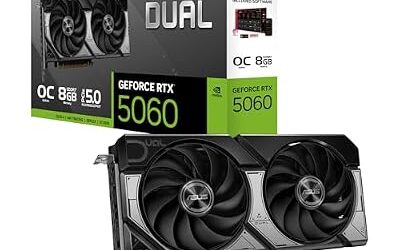
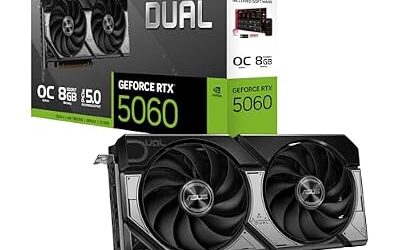
The RTX 5060 is the cheapest current NVIDIA card that roundups name for a Quest 3 or 3S at sensible render resolutions. It handles lighter VR titles and moderate settings in heavier ones. Eight gigabytes is the limit to watch: high render scale and texture mods can fill it. Check the card maker’s stated power connector and PSU requirement before purchase.

ASUS Dual NVIDIA GeForce RTX 5060 8GB GDDR7 OC Edition (PCIe 5.0, 8GB GDDR7, DLSS 4, HDMI 2.1b, DisplayPort 2.1b, 2.5-Slot Design, Axial-tech Fan Design, 0dB Technology), 3 Year Warranty
Included for 'Best Graphics Cards for VR in 2026 (Quest Link, SteamVR and PCVR)' as a representative home product in this roundup; selection reflects the product set returned for this topic.
View on AmazonRadeon RX 9060 XT 16 GB – Best for budget VR with plenty of VRAM
Specs: 16 GB GDDR6 · 128-bit bus · RDNA 4 architecture · hardware AV1 encode.
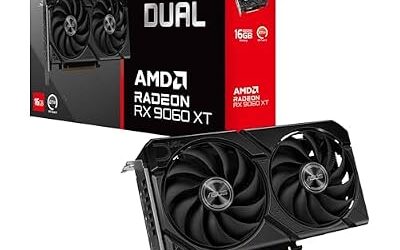
AMD lists the RX 9060 XT in 8 GB and 16 GB versions, so confirm the memory on the box. The 16 GB version is the one most relevant for VR because of the extra headroom for textures. It also supports AV1 encoding, which helps with wireless streaming. VR support is broad on AMD but specific features vary by title, so check the games you play.

ASUS Dual Radeon RX 9060 XT 16GB GDDR6 Gaming Graphics Card | PCIe 5.0, HDMI 2.1b, DisplayPort 2.1a, 2.5-slot design, Axial-tech Fans, 0dB Technology
Included for 'Best Graphics Cards for VR in 2026 (Quest Link, SteamVR and PCVR)' as a representative home product in this roundup; selection reflects the product set returned for this topic.
View on AmazonGeForce RTX 5060 Ti 16 GB – Best for budget to mid-range VR with DLSS
Specs: 16 GB GDDR7 · 128-bit bus · DLSS 4 support · hardware AV1 encode.
NVIDIA lists the RTX 5060 Ti in 8 GB and 16 GB versions. The 16 GB version gives a mid-range VR card plenty of memory, although the 128-bit bus limits bandwidth compared with higher cards. It is a sensible upgrade from a card like the RTX 2080 or similar older mid-range models.

ASUS Dual GeForce RTX 5060 Ti 16GB GDDR7 OC Edition Gaming Graphics Card | PCIe 5.0, HDMI 2.1b, DisplayPort 2.1b, 2.5-slot, Axial-tech Fans, 0dB Technology, Dual BIOS
Included for 'Best Graphics Cards for VR in 2026 (Quest Link, SteamVR and PCVR)' as a representative home product in this roundup; selection reflects the product set returned for this topic.
View on AmazonMid-Range Tier: Mainstream VR
GeForce RTX 5070 – Best for mainstream Quest 3 and SteamVR play
Specs: 12 GB GDDR7 · 192-bit bus · DLSS 4 support · hardware AV1 encode.
The RTX 5070 is the card a UK PC builder reportedly calls the minimum recommended for comfortable PC VR, and another review says it runs VR excellently. The counterpoint is its 12 GB of memory, which one reviewer calls borderline for heavily supersampled sessions. It suits a Quest 3 or 3S user who wants consistent frames in most titles.

msi Gaming RTX 5070 12G Shadow 2X OC Graphics Card (12GB GDDR7, 192-bit, Extreme Performance: 2557 MHz, DisplayPort x3 2.1a, HDMI 2.1b, NVIDIA Blackwell Architecture)
Included for 'Best Graphics Cards for VR in 2026 (Quest Link, SteamVR and PCVR)' as a representative home product in this roundup; selection reflects the product set returned for this topic.
View on AmazonRadeon RX 9070 – Best for mid-range VR on AMD
Specs: 16 GB GDDR6 · 256-bit bus · RDNA 4 architecture · hardware AV1 encode.
For the best AMD graphics cards for VR, the RX 9070 and RX 9070 XT are the current names, and the RX 9070 offers 16 GB at a mid-range tier. Roundups pair it with the RTX 5070 for the average VR player. AMD’s drivers handle most major VR headsets, but a few VR titles and tools are written first for NVIDIA, so check your key games.
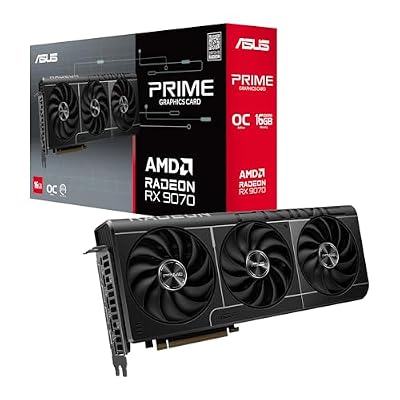
ASUS Prime Radeon RX 9070 16GB GDDR6 OC Edition Gaming Graphics Card | PCIe 5.0, HDMI/DP 2.1, 2.5-Slot, Axial-tech Fans, Dual-Ball Fan Bearings, Dual BIOS, GPU Guard
Included for 'Best Graphics Cards for VR in 2026 (Quest Link, SteamVR and PCVR)' as a representative home product in this roundup; selection reflects the product set returned for this topic.
View on AmazonPremium Tier: High-End PC VR
Radeon RX 9070 XT – Best for value in high-end VR
Specs: 16 GB GDDR6 · 256-bit bus · RDNA 4 · hardware AV1 encode · board power as listed by the board maker.
One recent roundup names the RX 9070 XT as the best-value pick for Quest 3 and Steam Frame, and another recommends it to almost everyone. It has the memory and bandwidth to suit supersampled VR, and AV1 encoding supports wireless streaming. It is a good choice for buyers who prefer AMD and do not need NVIDIA-only features.

GIGABYTE Radeon RX 9070 XT Gaming OC 16G Graphics Card, PCIe 5.0, 16GB GDDR6, GV-R9070XTGAMING OC-16GD Video Card
Included for 'Best Graphics Cards for VR in 2026 (Quest Link, SteamVR and PCVR)' as a representative home product in this roundup; selection reflects the product set returned for this topic.
View on AmazonGeForce RTX 5070 Ti – Best for high-end VR for most buyers
Specs: 16 GB GDDR7 · 256-bit bus · DLSS 4 support · hardware AV1 encode.
The same roundup that picks the RX 9070 XT for value names the RTX 5070 Ti as its best pick overall for 2026 VR. Its 16 GB of GDDR7 and wide bus give room for high render scale and demanding simulators. It is a premium tier card, so check the maker’s stated PSU requirement and case clearance.

MSI GeForce RTX 5070 Ti 16G Shadow 3X OC Gaming Graphics Card | 16GB GDDR7 (28Gbps/256-bit), PCIe 5, Boost: 2482 MHz, HDMI 2.1b, DisplayPort 2.1b DLSS 4.5
Included for 'Best Graphics Cards for VR in 2026 (Quest Link, SteamVR and PCVR)' as a representative home product in this roundup; selection reflects the product set returned for this topic.
View on AmazonGeForce RTX 5080 – Best for high refresh rates and supersampling
Specs: 16 GB GDDR7 · 256-bit bus · DLSS 4 support · hardware AV1 encode.
The RTX 5080 carries the same memory size as the RTX 5070 Ti, but with more processing power on top. It suits players who want headroom for high refresh rates, high render scale or demanding titles such as flight and racing simulators. If you mostly play lighter VR games, the RTX 5070 Ti is the more economical step.

ASUS Prime GeForce RTX 5080 16GB GDDR7 Gaming Graphics Card | SFF-Ready, PCIe 5.0, HDMI/DP 2.1, 2.5-slot, Axial-tech Fans, Vapor Chamber, Dual BIOS
Included for 'Best Graphics Cards for VR in 2026 (Quest Link, SteamVR and PCVR)' as a representative home product in this roundup; selection reflects the product set returned for this topic.
View on AmazonGeForce RTX 5090 – Best for the highest-resolution headsets
Specs: 32 GB GDDR7 · 512-bit bus · DLSS 4 support · high board power as listed by the maker.
One roundup names the RTX 5090 as the best card for the highest-resolution headsets. It is the only consumer card with this much memory, which helps modded games and very high render targets. It also has the highest power and cooling demands, and its connector needs careful installation: follow the card and PSU maker’s guidance for the 12V-2×6 cable and stop using it if you see heat damage.

ASUS TUF Gaming GeForce RTX 5090 32GB GDDR7 OC Edition Gaming Graphics Card | PCIe 5.0, HDMI/DP 2.1, 3.6-slot, Military-grade Components, Protective PCB Coating, Axial-tech Fans
Included for 'Best Graphics Cards for VR in 2026 (Quest Link, SteamVR and PCVR)' as a representative home product in this roundup; selection reflects the product set returned for this topic.
View on AmazonHow VR Headsets Connect: Quest Link, Air Link and SteamVR
VirtualLink, the single-cable USB-C standard that once appeared on some RTX 20 cards, is no longer relevant. Today’s connections are simpler.
- Quest Link (wired): a USB cable from the headset to a USB port on the PC, and the PC then encodes video to the headset. Use a cable rated for Link and a good USB port.
- Air Link and Virtual Desktop (wireless): the PC streams video over a Wi-Fi network. Roundups note that hardware AV1 or HEVC encoding on the GPU matters here, and both RTX 50 and recent Radeon cards support AV1.
- SteamVR with a PC headset: a headset such as a Valve or other PC headset connects with its own cable, normally through DisplayPort and USB. Check the headset maker’s manual for the port needs.
- Steam Frame: reported by outlets as a Valve headset that can stream from a PC. Specifications vary by source, so read the maker’s own page.
Best AMD Graphics Cards for VR vs NVIDIA
For the best AMD graphics cards for VR, the Radeon RX 9070 XT and RX 9060 XT 16 GB give plenty of memory per unit of cost. NVIDIA tends to lead in VR tooling, DLSS support in VR titles and some wireless encoding options, while AMD leads in memory per tier. Choose based on the games you play and whether they support your preferred upscaling.
Older Cards: RTX 2080, 4 GB Cards and Used VR Options
The GeForce RTX 2080 is a previous-generation card with 8 GB, and it can still run many VR games at modest settings, so it can be a stopgap if you already own one. Cards with 4 GB of VRAM, such as a GTX 1650 or RX 6400, are below what roundups consider workable for current VR, and they are not recommended for a new VR build. If you buy used, inspect the card for dust, fan wear and signs of heavy continuous use, ask for a warranty or return window, and avoid assuming a specific listing is in good shape without photos and terms.
Decision Table: Pick X If…
| Pick | If… |
|---|---|
| RTX 5060 | You have a Quest 3 or 3S and want entry-level PC VR. |
| RX 9060 XT 16 GB or RTX 5060 Ti 16 GB | You want a budget card with 16 GB of memory. |
| RTX 5070 or RX 9070 | You want the mainstream answer for a Quest 3 on Link or Air Link. |
| RX 9070 XT | You want strong value and are happy with AMD. |
| RTX 5070 Ti | You want a high-end NVIDIA card without paying for the flagship. |
| RTX 5080 | You want high refresh rates and heavy supersampling. |
| RTX 5090 | You use the highest-resolution headsets or modded titles. |
Tips to Get More From Any VR Graphics Card
Settings often matter as much as the card. Lower the render scale a step before lowering texture quality, because render scale has the largest effect on GPU load. Use the headset’s lower refresh rate if frames drop, since a steady 72 Hz feels better than an unstable 120 Hz. Keep GPU drivers current, close background programs that use the GPU, and for wireless play use a dedicated Wi-Fi router close to the headset. Reviewers also note that CPU and memory can limit VR, so a strong GPU paired with a weak processor will not reach its potential.
Compatibility and Power Notes
- Check the card maker’s stated PSU requirement and the connector type before purchase.
- For the 12V-2×6 or 12VHPWR connector, push it fully into place and follow the maker’s guidance. Stop using the card and contact the maker if you see heat damage.
- Measure case length and thickness, as high-end cards are large.
- Check your headset’s port needs: USB for Link and a free USB port, or DisplayPort for a PC headset.
- Use a modern PCIe 4.0 or 5.0 slot where possible, though most VR use is not limited by an older slot.
Frequently Asked Questions
What is the best graphics card for VR gaming?
For most players, the RTX 5070 Ti and the RX 9070 XT are the usual top picks in 2026 roundups. Choose the RTX 5090 only for the highest-resolution headsets or heavy mods.
How much VRAM do I need for VR?
Build guides describe about 8 GB as entry-level, 10 GB to 12 GB as comfortable and 16 GB as the high-end target. If you plan to supersample or use mods, 16 GB or more is safer.
What are the best graphics cards for Steam VR?
The same cards suit SteamVR as other PCVR routes, from the RTX 5060 at entry level up to the RTX 5070 Ti, RX 9070 XT and above. Check your headset maker’s requirements, since some PC headsets need specific ports and a DisplayPort connection.
Is an RTX 2080 still good enough for VR?
An RTX 2080 can run many VR games at modest settings and may suit a first headset. It is previous-generation, lacks the newest features, and is limited by its 8 GB of memory in demanding titles.
Can I use a card with 4 GB of VRAM for VR?
It is not a good fit. Four gigabytes is below what current guides describe as workable, and many VR titles would run poorly or need very low settings.
Do I need a cable for a Quest headset on PC?
No, since Air Link and Virtual Desktop can stream wirelessly over a good Wi-Fi connection. A wired Quest Link cable gives a more stable connection when wireless is unreliable, and either route works with a card that has hardware AV1 or HEVC encoding.