
The thousand-dollar range is arguably the sweet spot for prebuilt gaming PCs. It is the point where you get modern RTX graphics, a capable multi-core CPU, and enough RAM and fast storage to play current games at high settings, all without stepping into premium-price territory. For most gamers, this budget delivers the best balance of performance and value on the market.
- Watch: Best $1000 Dollar Gaming PC Prebuilt — Video Review
- How to Choose a $1000 Prebuilt Gaming PC
- The Best $1000 Prebuilt Gaming PCs Reviewed
- What to Look For in a Prebuilt at This Budget
- Which One Should You Buy?
- Common Mistakes When Buying a Prebuilt
- Checklist Before You Order
- Related Guides
- Frequently Asked Questions
- Final Thoughts
- Related Articles
Because so many builders target this price, the competition is fierce and the configurations vary widely. Below are our favorite prebuilt gaming PCs around the thousand-dollar mark, followed by a buying guide to help you spot the machines that deliver genuine value rather than cut corners you cannot see.

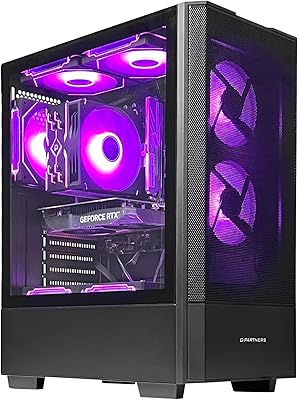


As an Amazon Associate we earn from qualifying purchases at no extra cost to you.


🎮 Get More From Your Setup — Free
Prime Gaming gives you free PC games every month, in-game loot, and a free Twitch channel sub — plus fast free shipping on all the gear above. New members get a 30-day free trial.
Watch: Best $1000 Dollar Gaming PC Prebuilt — Video Review
How to Choose a $1000 Prebuilt Gaming PC
- Prioritize the GPU: An RTX 5060 Ti or RTX 5070 in this range signals a build focused on real gaming performance rather than flashy extras.
- Balanced CPU pairing: A Ryzen 7 or Core i7 keeps the graphics card fed and prevents bottlenecks in demanding titles.
- Memory and storage: Look for 32GB of DDR5 and a 1TB NVMe SSD, which have become achievable and worthwhile at this price.
- Power supply quality: A reputable 80+ Gold PSU with headroom protects your components and enables future GPU upgrades.
- Cooling and airflow: Liquid cooling or strong fan configurations keep performance stable during long sessions.
The Best $1000 Prebuilt Gaming PCs Reviewed
KOTIN RTX 5070 / Ryzen 7 9700X
Our top pick, this build combines an RTX 5070, Ryzen 7 9700X, 32GB DDR5, and a 1TB SSD. It punches above its price with genuine 1440p performance and a modern component stack.
KOTIN RTX 5060 Ti / Ryzen 7 9700X
A close alternative, this configuration pairs the same strong Ryzen 7 with an RTX 5060 Ti and 16GB DDR5, delivering excellent high-settings 1080p and entry 1440p gaming.
Evounic 12-Core / RTX 4060 Liquid Cooled
With a liquid-cooled 12-core CPU, RTX 4060, 64GB of RAM, and generous storage, this build is ideal for gamers who also multitask or create heavily.
YAWYORE Ryzen 7 5700X / RTX 5060
A dependable value option, this Ryzen 7 and RTX 5060 pairing handles modern games at high settings and represents solid, no-nonsense performance for the money.
Prebuilt Core i7 Business Tower
A versatile Intel Core i7 tower, this build suits gamers who also want a capable machine for office and productivity work in one affordable package.
What to Look For in a Prebuilt at This Budget
Graphics Card Tier Matters More Than Core Count
At this budget the graphics card does most of the work in games, so compare GPUs first and CPUs second. NVIDIA lists the GeForce RTX 5060 at 145W and the RTX 5060 Ti at 180W, both with 8GB of GDDR7 on a 128-bit bus (a 16GB Ti variant also exists, so confirm which one is in the box). The RTX 5070 steps up to 12GB on a wider 192-bit bus and a 250W rating. The older RTX 4060 uses 8GB of GDDR6 and draws less power, but it lacks the multi-frame generation feature that is limited to the RTX 50 series. The RTX 3050 6GB is the weakest card in this group, with a 96-bit bus and a power rating low enough that many cards need no extra connector.
Platform and Upgrade Path
Ryzen 5 9600X and Ryzen 7 9700X systems use the AM5 socket and DDR5 memory, which keeps a future CPU swap possible. Ryzen 5 5500 and Ryzen 7 5700X builds sit on the older AM4 platform with DDR4. That is fine for gaming today, but the platform has no new CPU generations ahead of it. The Ryzen 5 5500 is also limited to PCIe 3.0, which matters little for a mid-range card but does limit fast NVMe drives. One more caution: a Core i9-14900HX is a laptop-class processor. In a desktop chassis it is usually soldered to a compact board, so expect little room to swap the CPU later.
Memory, Storage and Power Supply
Look for 16GB as the floor and make sure it is two sticks, since a single DDR5 stick runs in single-channel mode and can cost frame rate in CPU-limited games. A 1TB NVMe drive fills quickly with a handful of large titles, so a free M.2 slot is a real plus. NVIDIA’s published system guidance is around 550W for the RTX 5060, 600W for the 5060 Ti and 650W for the 5070. A listing that names a 80 Plus rated unit from a known brand is a better sign than one that only states wattage.
Cooling and Case Airflow
A liquid-cooled CPU, as on the Evounic, looks impressive but adds a pump that can fail. For 65W chips like the Ryzen 5 9600X and Ryzen 7 9700X, a good air cooler is usually enough. Prioritize a mesh front panel and at least one rear exhaust fan.
Which One Should You Buy?
| If you… | Choose… |
|---|---|
| Want the strongest graphics in this group for 1440p | KOTIN RTX 5070 / Ryzen 7 9700X |
| Want modern AM5 and DDR5 with a mid-range RTX 50 card | KOTIN Ryzen 5 9600X with RTX 5060 Ti, or KOTIN RTX 5060 Ti / Ryzen 7 9700X |
| Want to spend a little less and still get an RTX 50 card | KOTIN Ryzen 5 9600X with RTX 5060, or YAWYORE Ryzen 7 5700X / RTX 5060 |
| Care about the most CPU cores | WIWB Core i9-14900HX, or the Evounic 12-Core, accepting limited upgrades |
| Prefer an eight-core Ryzen with an RTX 5060 Ti | MLOONG Ryzen 7 8700F |
| Play only esports and older titles at 1080p | The Ryzen 5 5500 / RTX 3050 6GB system |
| Want a cooler-running RTX 40 card with liquid cooling | Evounic RTX 4060 Liquid Cooled |
Common Mistakes When Buying a Prebuilt
- Judging by the CPU name. A high-core-count processor paired with a weak GPU will not play games better than a balanced build.
- Ignoring VRAM. 8GB cards can run into limits at high texture settings in recent releases, so plan on medium textures or upscaling for the newest games.
- Skipping the memory configuration. Confirm dual-channel kits and the DDR generation on the listing.
- Assuming every part can be upgraded. Proprietary power supplies, mobile CPUs and compact boards can limit later changes.
- Overlooking warranty terms. Confirm who services the system and how long coverage lasts, because small brands vary widely.
- Forgetting the monitor. A 60Hz screen hides most of what a mid-range RTX card can deliver.
Checklist Before You Order
- Confirm the exact GPU name and its memory size, since the same family can ship in 8GB and 16GB versions.
- Look for the CPU model, socket type and DDR generation, and note whether the memory is two sticks.
- Find the power supply wattage and efficiency rating, and compare it with NVIDIA’s guidance for the card.
- Check for a free M.2 slot and a spare RAM slot, which show how much room you have to grow.
- Read the warranty length and the support process before the purchase, not after.
After setup, install current graphics drivers, enable the XMP or EXPO memory profile in the BIOS so the RAM runs at its rated speed, and set your monitor’s refresh rate in Windows. These small steps are often skipped and can leave performance on the table.
Related Guides
- Adjustable Laptop Stand (2026)
- Best Wireless Xbox Controller in 2026: Complete Buyer's Guide
- Best Steelseries Arctis Nova Pro Wireless Gaming Headset 202
- Hewlett Packard Docking Station For Laptop (2026)
Frequently Asked Questions
What can a $1000 gaming PC run?
A well-specced build in this range comfortably plays modern AAA games at high settings in 1080p and handles many titles at 1440p, especially with an RTX 5060 Ti or 5070.
Is 16GB or 32GB of RAM better?
16GB is sufficient for pure gaming, but 32GB, now common at this price, adds valuable headroom for streaming, multitasking, and future-proofing.
Can I upgrade a prebuilt in this range?
Yes. These builds use standard components, so upgrading the GPU, RAM, or storage later is straightforward, provided the power supply has adequate headroom.
Should I get liquid or air cooling?
Both work well. Liquid cooling handles higher heat loads quietly, while quality air cooling is reliable and simpler. Choose based on your CPU and preferences.
Final Thoughts
The KOTIN RTX 5070 build is our top pick for the strongest gaming performance in this range, while the KOTIN RTX 5060 Ti is a slightly more affordable alternative. Gamers who multitask heavily should consider the Evounic liquid-cooled build with its generous memory.
Top picks from this guide
 YAWYOREYAWYORE Gaming PC, AMD Ryzen 7 5700X, GeForce RTX 5060…$1,360 \xc2\xb7 99/100
 MLOONGMLOONG Gaming PC Desktop,AMD Ryzen 7 8700F (8-Core up to…$1,550 \xc2\xb7 99/100
 ZYNEEXZYNEEX Prebuilt Gaming Desktop PC, AMD Ryzen 5 5500, GeForce…$960 \xc2\xb7 98/100
 GPVHOSOGPVHOSO Prebuilt Gaming PC Desktop, AMD Ryzen 3 3200G, 8GB…$360 \xc2\xb7 95/100








