🛒 Best Price Today on Amazon
Prime members get fast, free shipping on everything above, plus member-only deals. New members get a 30-day free trial — cancel anytime.
Almost every laptop made in the last two decades uses a lithium battery, and the great majority of laptops sold today use a lithium-ion or lithium-polymer cell. The answer is almost certainly yes if your laptop was made in the last ten years, but it is still worth checking, because the exact type decides how you charge it, store it, and dispose of it. A quick check of the battery label or the system settings gives you the answer in a minute.
This guide is for laptop owners who want to know what kind of battery sits inside their machine, including anyone buying a replacement and anyone preparing to recycle an old laptop. It explains how to check the battery type, why lithium became the standard, and what that means for everyday care. It gives general guidance about how laptop batteries work, not a specification for any single model, so check your own machine for the final word.
As an Amazon Associate we earn from qualifying purchases
How to Choose
Check the label on the battery itself
The most direct way to find out is to read the battery, because the label states the chemistry plainly. On a laptop with a removable battery, slide the battery out and look for words like lithium-ion, Li-ion, lithium-polymer, or Li-poly printed on the label, along with a voltage and a capacity figure. The label may also carry a model number that you can search for to confirm the type. If the battery is sealed inside the case, do not open the laptop yourself; use the software checks described below instead, since opening a sealed case can damage the machine and void the warranty.
Check the system settings and the maker page
Your operating system can usually tell you about the battery without opening the case. On Windows, the battery report lists the chemistry among its details, and on macOS the system information shows the battery type and condition. The maker’s support page for your exact model also lists the battery type in its specifications, so searching for your model number plus the word battery will usually give you the answer. Cross-check the two sources when you can, because the settings report and the maker page should agree.
Know why lithium became the standard
Lithium batteries took over laptops because they store more energy for their weight than the older nickel-based batteries did, and they lose little charge while sitting unused. A lithium-ion cell also has no memory effect, which means you can top it up at any level without harming its capacity, unlike older batteries that needed full discharges. Lithium-polymer cells are a thinner, lighter variant of the same chemistry, which is why they appear in slim laptops and tablets. These advantages explain why the industry moved to lithium and never moved back.
Understand what the answer means for daily care
A lithium battery prefers partial charges and moderate temperatures, and it ages fastest when kept fully charged in a hot place or left fully flat for weeks. Keeping the charge roughly between a fifth and four-fifths full suits everyday use, and storing a laptop for months is best done at about half charge in a cool place. Avoiding heat matters more than any charging ritual, so keep the laptop out of a hot car and off soft surfaces that block its vents. These habits slow the gradual fading that every lithium battery experiences over time. A laptop left plugged in at full charge for weeks will age its battery faster than one that is used on battery now and then.
How to Tell What Battery You Have
The label, the system report, and the model page
Three checks together give a certain answer. The battery label, where you can see it, states the chemistry directly. The system battery report gives the same information from software, and it also shows the design capacity against the current capacity, which tells you how much the battery has faded. The maker page for your model lists the battery type in its specifications, which confirms what the label and the report say. If all three agree, you can be confident about the type, and you can use the model number from any of them to find a matching replacement when the time comes.
What the voltage and capacity figures mean
The battery label carries two figures that matter when you buy a replacement: voltage, measured in volts, and capacity, measured in milliamp-hours or watt-hours. The voltage must match the original exactly, because a battery with the wrong voltage can damage the laptop. The capacity can be equal to or a little higher than the original, which gives the same or slightly longer use, but a much larger figure on a cheap replacement is often a sign of a false label. Match the model number first, then check that the voltage and capacity agree with the original.
What to do if the checks disagree or give no answer
If the label is worn, the system report is blank, or the maker page does not list the type, the safest assumption for a laptop made in the last twenty years is lithium-ion, because that is what nearly every maker used in that period. A laptop older than that may use a nickel-based battery, in which case the label or the maker page is the only reliable source. When in doubt, ask the maker’s support with your model number, or take the laptop to a repair shop that can identify the battery safely. Never guess when ordering a replacement, because the wrong chemistry will not fit or work correctly.
Which One Fits Your Situation
Your laptop is less than ten years old
It almost certainly uses a lithium-ion or lithium-polymer battery, and the label or system report will confirm which one. Charge it in partial top-ups rather than full cycles, keep it cool, and do not worry about the memory effect that older batteries suffered from. When the battery fades, order a replacement by model number. The battery will fade gradually over the years, so expect shorter sessions long before it needs replacing.
Your laptop is older and you are not sure
Check the battery label or the maker page for your exact model, because laptops from the early 2000s onwards are usually lithium, while much older machines may not be. If the label is unreadable, the system report or the maker’s support can confirm the type. Do not open a sealed case yourself to look.
You are buying a replacement battery
Match the replacement by the model number on the old battery or on the maker page, not by the laptop brand alone, because the same brand uses different batteries across models. Check that the replacement states the same chemistry and voltage as the original, and buy from a seller that names the model number clearly. A battery that looks right but has the wrong voltage can damage the laptop.
You are recycling or disposing of an old laptop
Treat the battery as a lithium battery unless you have proof otherwise, and take it to a proper battery recycling point rather than putting it in household waste. Lithium batteries need specialist handling, and many electronics shops and recycling centres accept them free of charge. If the battery is swollen or damaged, handle it carefully and follow local guidance for damaged batteries.
Common Mistakes
- Assuming every laptop battery is the same and ordering a replacement by brand alone.
- Opening a sealed laptop case to read the battery label, risking damage and voiding the warranty.
- Treating a lithium battery like an old nickel battery and running full discharge cycles.
- Leaving a laptop fully charged in a hot car, which ages a lithium battery faster than anything else.
- Throwing a worn lithium battery in household waste instead of taking it to a recycling point.
Gear for Safe Lithium Battery Handling and Backup Power
Knowing your laptop has a lithium cell is the first step. These items help with the practical side: containing a worn battery, opening a case carefully, and keeping a spare power source ready.
Zeee Fireproof LiPo Battery Safe Bag
A flame-resistant pouch designed for charging or storing lithium batteries. It adds a layer of caution when a battery needs to sit somewhere until it is recycled or replaced.

Zeee Fireproof Explosionproof Lipo Bag Battery Storage(8.46 x 6.5 x 5.71in) | Large Capacity Guard Pouch for Lipo Charge & Storage
Included for 'Does My Laptop Use a Lithium Battery? (November 2026)' as a representative home product in this roundup; selection reflects the product set returned for this topic.
View on AmazonOVONIC Fireproof Explosionproof LiPo Safe Bag
A large-capacity safe bag with a zip closure. It is big enough for a laptop-sized pack or several smaller ones.

OVONIC Lipo Safe Bag Fireproof Explosionproof Bag Large Capacity Lipo Battery Storage Guard Safe Pouch for Charge & Storage(260X130X180mm 251g)
Included for 'Does My Laptop Use a Lithium Battery? (November 2026)' as a representative home product in this roundup; selection reflects the product set returned for this topic.
View on AmazonJOREST 59-Piece Precision Screwdriver Set
A magnetic set with small Phillips, Torx and other bits for laptop and phone screws. Choose the exact bit your model uses and keep the screws sorted as you go.
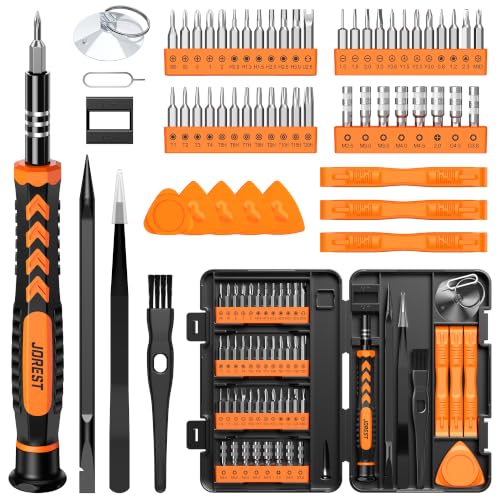
JOREST 59Pcs Small Precision Screwdriver Set with Torx T5 T6, Mini Tool Kit | Magnetic Electronic Repair Tool Kit for Macbook, Computer, Laptop, Phone, PS5, Xbox, Switch, Eyeglasses, Watch, Ring Doorbell
Included for 'Does My Laptop Use a Lithium Battery? (November 2026)' as a representative home product in this roundup; selection reflects the product set returned for this topic.
View on AmazonAnker Laptop Power Bank, 25,000mAh with 165W Total Output
A high-capacity pack with three USB-C ports that can each deliver up to 100W. It can top up a laptop and a phone at once, which makes it a practical backup for travel days away from a wall socket.

Anker Laptop Power Bank, 25,000mAh Travel Essential with 165W Total Output | 3 USB-C Ports with 100W Max Each, Built-In Retractable Cables, Flight-Ready, for iPhone 17 Series ,MacBook, and More
Included for 'Does My Laptop Use a Lithium Battery? (November 2026)' as a representative home product in this roundup; selection reflects the product set returned for this topic.
View on AmazonFrequently Asked Questions
Does my laptop use a lithium battery?
Almost certainly yes, if it was made in the last twenty years, because lithium-ion and lithium-polymer cells are the standard in modern laptops. Check the battery label, the system battery report, or the maker page for your exact model to confirm. A laptop older than that may use a different chemistry, so check the label in that case.
What is the difference between lithium-ion and lithium-polymer?
Both use lithium chemistry, but lithium-polymer cells use a gel-like electrolyte that lets makers shape them thinner and lighter, which suits slim laptops. Lithium-ion cells use a liquid electrolyte in a rigid case and are common in larger laptops. In everyday use they behave the same way and need the same care.
How long does a lithium laptop battery last?
A lithium laptop battery usually keeps most of its capacity for several hundred charge cycles, which for most people means a few years of daily use. Capacity fades gradually rather than stopping at once, so you will notice shorter sessions long before the battery fails. Heat and long periods at full charge speed up the fading.
How should I dispose of a lithium laptop battery?
Take it to a battery recycling point, an electronics shop that accepts old batteries, or a local recycling centre, and never put it in household waste. If the battery is swollen, hot, or damaged, handle it carefully and follow local guidance for damaged batteries. Many shops accept old laptop batteries free of charge.