🛒 Best Price Today on Amazon
Prime members get fast, free shipping on everything above, plus member-only deals. New members get a 30-day free trial — cancel anytime.
A hybrid grip sits between palm and claw: the palm rests lightly on the rear of the shell while the fingers stay arched over the buttons, ready to lift and flick. Most mice are shaped for one extreme or the other, so a shell that is too flat leaves the palm unsupported and a shell that is too tall forces the fingers into a full palm grip. The real decision is finding a shape whose hump lands under the middle of the hand, with side buttons that fall under the thumb without shifting the grip.
This guide is for players who switch between palm and claw during a session, for medium to large hands that never settled on one style, and for anyone whose current mouse cramps the hand after an hour. The five mice below were picked from their Amazon product listings, and each section shows the shape, weight, sensor and switch details listed there, so you can check the fit before you buy one in November 2026.
Quick Picks
As an Amazon Associate we earn from qualifying purchases
| Product | Best for | Key spec from title |
|---|---|---|
| Razer DeathAdder V3 Pro | A light ergonomic shell for palm-claw players | 63 g, Focus Pro 30K sensor |
| Logitech G502 X LIGHTSPEED | A button-heavy mouse with a thumb rest | 102 g, HERO 25K sensor |
| Razer Basilisk V3 Pro | A full-featured ergonomic mouse with a tilt wheel | Focus Pro 30K sensor, 11 buttons |
| Logitech G PRO X Superlight 2 | A featherweight symmetrical shape for fast flicks | 60 g, HERO 2 sensor |
| SteelSeries Rival 5 | A wired ergonomic mouse with side-button rows | 85 g, TrueMove Air sensor |
How to Choose
Match the hump to where your palm lands
The hump is the raised rear section of the shell, and its position decides whether a hybrid grip feels natural. In a true hybrid grip the palm touches the rear third of the mouse while the fingertips stay arched, so a hump placed toward the middle of the shell supports the hand without pushing the fingers flat. The DeathAdder V3 Pro and the Rival 5 both carry a centered hump that suits this position, while a very tall rear hump can force a full palm grip instead. Before buying, compare the shell length and hump placement on the product page with your own hand; a mouse near 120 to 130 mm long fits most medium to large hands.
Let weight set how the mouse lifts and resets
Hybrid grip players lift the mouse often, because the arched fingers reset the aim between flicks, so weight matters more than it does for a pure palm grip. A 60 g mouse like the Superlight 2 lifts with almost no effort and suits low-sensitivity players who swipe across a wide pad, while a 102 g mouse like the G502 X LIGHTSPEED feels planted and steadies slow, deliberate aim. The middle ground sits near 85 g, where the Rival 5 lands, and that weight gives enough presence to feel the shell without tiring the wrist. Choose the lighter end if you lift constantly, and the heavier end if your aim relies on smooth tracking rather than fast resets.
Check the sensor figures that matter for flicks
A hybrid grip mixes long tracking swipes with sudden flicks, so the sensor has to hold tracking through both. Look for the maximum tracking speed in inches per second and the acceleration figure in G on the product page, because those two numbers describe whether the sensor keeps up when the hand moves fast. A sensor listed at 750 IPS with 70G, like the Focus Pro 30K in the DeathAdder V3 Pro, will not spin out on the long swipes that low-sensitivity players make. The headline DPI number matters far less, since most players settle between 400 and 1600 DPI, and a high DPI ceiling never rescues a sensor with a modest IPS figure.
Count the buttons your thumb can actually reach
Extra buttons only help if the thumb reaches them without the grip shifting, and that is where many hybrid grip players go wrong. A mouse with two well-placed side buttons beats a mouse with a full side keypad when the thumb has to stretch to the far buttons. The G502 X LIGHTSPEED offers 13 programmable controls, but its thumb rest and the reversible DPI-shift button keep the main controls close, while the Rival 5 lines up five quick-action side buttons in a row that a thumb can walk across. Test the layout by checking the button positions in the listing images, and skip any mouse whose rear side button sits so far back that pressing it rolls the whole shell.
The 5 Best Options
Razer DeathAdder V3 Pro

The DeathAdder V3 Pro is the lightest ergonomic mouse in this guide, and that combination is exactly what a hybrid grip needs. Its right-handed shell carries a centered hump that fills the palm without pushing the fingers flat, so the hand can rest during tracking and arch up for flicks. At 63 g it lifts easily during low-sensitivity resets, and the Focus Pro 30K sensor tracks cleanly across cloth and glass, which matters when the grip shifts mid-swipe. The five-button layout keeps the thumb free of clutter, and the 90-hour battery means long sessions end before the mouse does.
Specs
- Focus Pro 30K optical sensor, up to 30,000 DPI
- 750 IPS tracking speed and 70G acceleration
- 63 g right-handed ergonomic shell
- Gen-3 optical switches
- HyperSpeed wireless with USB-C charging
- Up to 90 hours of battery life
- 5 programmable buttons
Best for: Palm-claw players with medium to large hands who want a light ergonomic shell.
Watch out for: There is no tilt wheel and no Bluetooth, so check that the five-button layout covers every command you need before buying.
Logitech G502 X LIGHTSPEED

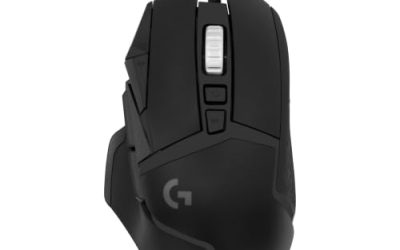
The G502 X LIGHTSPEED suits hybrid grip players who want controls under the thumb without giving up a full palm rest. Its sculpted right-handed shell gives the thumb a dedicated rest, and the reversible and removable DPI-shift button sits where the thumb naturally lands, so sensitivity changes never disturb the grip. The LIGHTFORCE hybrid optical-mechanical switches give the main clicks a crisp feel, and the dual-mode scroll wheel switches between ratcheted steps and free spin. At 102 g it is the heaviest mouse here, and that weight steadies the shell during slow tracking.
Specs
- HERO 25K sensor, 100 to 25,600 DPI
- LIGHTFORCE hybrid optical-mechanical switches
- 102 g, 131.4 x 41.1 x 79.2 mm
- 13 programmable controls
- Dual-mode scroll wheel with hyper-fast and ratchet modes
- Up to 140 hours of battery life
- PTFE feet and 5 onboard memory profiles
- USB-C charging port
Best for: Players who want many programmable controls and a thumb rest in a hybrid grip.
Watch out for: The 102 g weight and the wide shell can feel bulky for smaller hands, so compare the dimensions with your hand length first.
Razer Basilisk V3 Pro
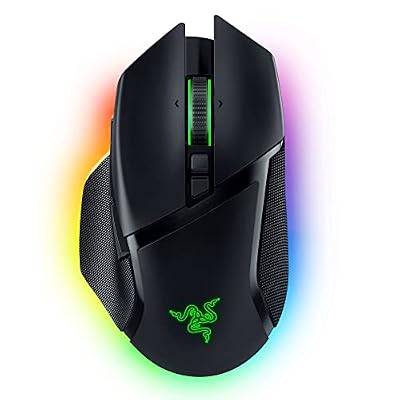
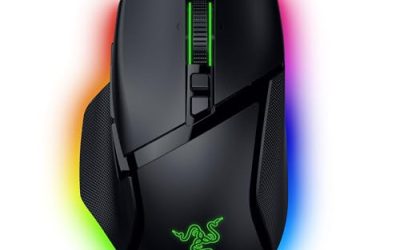
The Basilisk V3 Pro is the most feature-dense mouse in this guide, and its ergonomic shell was built for hands that rest on the mouse rather than hovering above it. The thumb rest and the HyperScroll Tilt wheel give the thumb two jobs it can do without lifting, which suits a hybrid grip that keeps the palm planted while the fingers work. The Focus Pro 30K sensor matches the DeathAdder V3 Pro on tracking, and the 11 programmable buttons cover weapon swaps, push-to-talk and ability binds. Three connection modes cover wireless, Bluetooth and wired play, so the mouse adapts to a desk that changes between sessions.
Specs
- Focus Pro 30K optical sensor, up to 30,000 DPI
- Gen-3 optical switches
- HyperScroll Tilt wheel
- 11 programmable buttons
- 13-zone Chroma RGB lighting
- HyperSpeed wireless, Bluetooth and wired modes
- Up to 90 hours of battery life
Best for: Players who want a tilt wheel, many buttons and three connection modes in one ergonomic shell.
Watch out for: The shell is wide and the feature set adds weight, so players with smaller hands should check the width against their grip before buying.
Logitech G PRO X Superlight 2

The Superlight 2 takes the opposite approach to the ergonomic mice above: a symmetrical 60 g shell that disappears under the hand. That lightness is what makes it work for a hybrid grip, because the arched fingers can lift and reposition the mouse with almost no effort, and the HERO 2 sensor holds tracking through fast flicks at over 888 IPS. The shape suits right-handed players who switch between claw and palm during a match, and the 8 kHz polling keeps input latency low. There are only five programmable buttons, so this pick trades control density for speed and simplicity.
Specs
- HERO 2 sensor, 100 to 44,000 DPI
- Over 888 IPS tracking speed and over 88G acceleration
- 60 g, 125.0 x 63.5 x 40.0 mm
- LIGHTFORCE hybrid optical-mechanical switches
- Up to 8 kHz polling rate
- Up to 95 hours of battery life
- 5 programmable buttons
- Zero-additive PTFE feet and USB-C charging
Best for: Fast flick aimers who want the lightest shell possible for a hybrid grip.
Watch out for: There is no DPI button on the shell and no Bluetooth, so confirm the five-button layout is enough for your binds.
SteelSeries Rival 5

The Rival 5 is the only wired mouse here, and its ergonomic shape was made for players whose grip drifts between palm and claw across genres. The 85 g shell sits in the middle of this group, heavy enough to feel planted and light enough to lift, and the five quick-action side buttons line up where the thumb rests, so binds stay reachable without shifting the hand. The TrueMove Air sensor tracks at 18,000 CPI with true one-to-one tracking, and the Golden Micro IP54 switches carry an 80-million-click lifespan figure. Ten zones of PrismSync lighting round out a mouse that covers FPS, MOBA and MMO play on one shell.
Specs
- TrueMove Air optical sensor, up to 18,000 CPI
- 400 IPS tracking speed and 40G acceleration
- 85 g ergonomic shell
- Golden Micro IP54 mechanical switches, 80-million-click lifespan
- 9 programmable buttons including 5 quick-action side buttons
- 10-zone PrismSync RGB lighting
- Wired USB connection, 1000 Hz polling rate
Best for: Multi-genre players who want a wired ergonomic mouse with a row of reachable side buttons.
Watch out for: The cable adds drag unless it is routed through a bungee or kept clear of the pad edge, so plan the cable path before buying.
Which One Fits Your Situation
You switch between palm and claw all session
Pick the Razer DeathAdder V3 Pro. Its centered hump supports the palm during tracking while the arched fingers stay free for flicks, and at 63 g it lifts without effort. The Focus Pro 30K sensor keeps tracking stable when the grip shifts mid-swipe, which is the exact moment a weaker sensor loses the plot.
You want the most buttons without losing the grip
Pick the Logitech G502 X LIGHTSPEED. The thumb rest and the reversible DPI-shift button keep 13 programmable controls within reach, and the dual-mode scroll wheel adds another layer of control. The 102 g weight steadies the shell, so the extra buttons never make the mouse feel twitchy during long sessions.
You want one mouse for gaming and everything else
Pick the Razer Basilisk V3 Pro. Its HyperScroll Tilt wheel, 11 programmable buttons and three connection modes cover gaming, browsing and work without swapping hardware. The ergonomic shell keeps the palm comfortable through long days, and the 90-hour battery means charging rarely interrupts a session. It is the simplest pick when one mouse has to do every job on the desk.
You play fast flick shooters and lift constantly
Pick the Logitech G PRO X Superlight 2. At 60 g with a HERO 2 sensor and 8 kHz polling, it resets faster than any other mouse here, and the symmetrical shape suits a hybrid grip that never fully commits to palm. Just be sure five buttons cover your binds before committing.
Common Mistakes
- Buying a mouse shaped for pure palm grip and expecting the fingers to stay arched all session.
- Choosing by the DPI headline instead of checking the IPS and acceleration figures on the product page.
- Picking a side keypad whose rear buttons sit too far back for the thumb to reach without shifting the grip.
- Ignoring shell length and hump position, then wondering why the hand cramps after an hour.
- Forgetting to check whether the configuration software runs on your operating system before buying a mouse that needs it for DPI and polling changes.
Frequently Asked Questions
What is a hybrid grip?
A hybrid grip blends palm and claw: the palm rests lightly on the rear of the shell while the fingers stay arched over the main buttons. It suits players who want palm support during tracking but need the fingers free for fast flicks, and it works best on a shell with a centered hump and a length near 120 to 130 mm.
How heavy should a mouse be for a hybrid grip?
Most hybrid grip players settle between 60 and 100 g. Lighter mice near 60 g lift easily during low-sensitivity resets, while mice near 85 to 100 g feel more planted during slow tracking. Try the middle of that range first if you lift often but still want the shell to feel solid.
Does a hybrid grip need extra side buttons?
Not always, but the buttons you have must fall under the thumb without shifting the grip. Two well-placed side buttons beat a full keypad when the rear buttons sit out of reach. Check the button positions in the listing images and count only the buttons your thumb can press while the palm stays put.
Can a symmetrical mouse work for a hybrid grip?
Yes, if the shell is light and the hump is low. A symmetrical mouse like the Superlight 2 lets the hand sit in a relaxed arch, and the low weight makes lifting easy. The trade-off is fewer buttons and less palm support, so it suits flick-heavy play more than long sessions with many binds.