🛒 Best Price Today on Amazon
Prime members get fast, free shipping on everything above, plus member-only deals. New members get a 30-day free trial — cancel anytime.
Introduction
The best wireless gaming mouse for palm grip is a large, tall mouse that lets your whole hand rest on the shell instead of hovering above it. Palm grip players keep the palm in contact with the mouse, the fingers extended along the buttons, and the wrist in a relaxed position. That style only works when the shell is long enough to support the palm and tall enough to fill the hand. A small, flat, or narrow mouse forces the fingers to curl and the palm to drag, which gets uncomfortable during long sessions.
This guide focuses on wireless gaming mice with large ergonomic shells built for palm grip. Every pick below connects without a cable, uses a high-resolution optical sensor, and offers programmable buttons for games. We compare shell shape, weight, sensor, buttons, connection modes, and battery life so you can match a mouse to your hand size and the games you play most.
If your hand measures about 18 centimeters or longer from wrist to middle fingertip, start with the larger options in this guide. If your hand is closer to 17 centimeters, a mid-large shell may fit better. Hand length matters more than any single specification, because a sensor cannot fix a shell that is too small for your grip.
How to Choose
1. Shell length and hump height
A palm grip mouse needs a long shell and a tall, centered hump. The hump should sit under the middle of your palm, not under your fingers. Look for a length of about 120 millimeters or more and a height that fills the cup of your hand. A tall hump supports the palm and keeps the wrist straighter. A low hump leaves the palm unsupported and pushes the work onto the fingers.
2. Shell width and thumb rest
Width matters as much as length. A narrow shell forces the thumb and ring finger to pinch inward, which adds tension over time. A wide shell with a flared thumb rest gives the thumb a place to sit without gripping the side. Check the shape from above: a palm grip shell usually widens toward the rear, where the palm sits, and narrows gently toward the front.
3. Weight and balance
Palm grip players move the mouse with the arm as much as the wrist, so a very light mouse is not always the best choice. A mouse in the 90 to 115 gram range often feels planted and steady for palm grip, while a mouse under 70 grams can feel twitchy when the whole palm rests on it. Balance matters too. A mouse that is heavy at the rear can feel sluggish, while a mouse that is heavy at the front can make the cursor drift. Look for a design where the weight sits near the center of the shell.
4. Sensor and polling rate
A modern optical sensor should track cleanly at high speeds without acceleration or angle snapping. For most players, a sensor rated at 25,000 DPI or higher is more than enough, because few players use the top of that range. Polling rate is the number of times per second the mouse reports its position to the computer. A rate of 1,000 Hz is the standard for smooth play. Higher rates can feel slightly more responsive, but they also use more battery. Choose a mouse whose wireless link stays stable at the polling rate you plan to use.
5. Wireless connection and battery life
Wireless gaming mice usually connect through a 2.4 GHz receiver, Bluetooth, or a wired cable for charging and play. The 2.4 GHz link is the best choice for gaming, because it offers the lowest latency. Bluetooth is useful for laptops and travel, but it is not the best choice for fast competitive games. Battery life varies widely, from about 80 hours to about 140 hours on a single charge, depending on lighting and polling rate. A mouse that charges over USB-C is easier to keep topped up than one that needs a special dock or a disposable battery.
6. Buttons and scroll wheel
Palm grip players rest the index and middle fingers on the main buttons, so the click feel matters. Optical switches give a crisp, consistent click and avoid the double-click faults that can affect mechanical switches over time. Side buttons should sit within easy thumb reach without forcing the thumb to stretch. A scroll wheel with a defined step is better for weapon switching, while a free-spinning wheel is better for scrolling long pages. Some mice in this guide offer a wheel that switches between stepped and free-spinning modes.
7. Software and onboard memory
Companion software lets you remap buttons, adjust DPI steps, and set lighting. That is useful, but it should not be required for basic play. A mouse with onboard memory can store at least one profile on the device, so your button mapping and DPI settings travel with the mouse to another computer. Check whether the software is available for your operating system before you buy, because some features are limited on Mac or Linux systems.
Top Picks
Logitech G502 X LIGHTSPEED Wireless Gaming Mouse

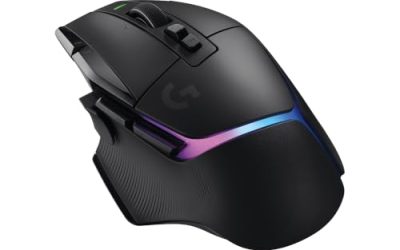
The Logitech G502 X LIGHTSPEED is a large, right-handed wireless gaming mouse with a tall shell that suits palm grip players with medium to large hands. It uses the HERO 25K optical sensor, which tracks up to 25,600 DPI, and LIGHTFORCE hybrid optical-mechanical switches for the main buttons. The shell carries 13 programmable buttons, including two DPI shift buttons near the index finger and a set of thumb buttons on the left side.
Battery life runs up to 140 hours on a single charge when lighting is off, according to the listing, and the mouse charges over USB-C. It also supports PowerPlay wireless charging, so it can charge on a compatible PowerPlay mat while you play. The scroll wheel offers both a notched mode for precise steps and a free-spinning mode for fast scrolling, and you can switch between them with a button below the wheel.
This mouse is a strong fit for players who want many buttons for MMO, MOBA, or strategy games without giving up a large palm-friendly shell. The thumb rest is wide, the rear of the shell flares to support the palm, and the overall shape is familiar to anyone who has used an earlier G502 model. One thing to note is the size: players with small hands may find the shell long and the thumb buttons a stretch. The mouse is also heavier than the ultralight options in this guide, which is a plus for palm grip stability but a drawback if you prefer a featherweight feel.
Razer Basilisk V3 Pro Wireless Gaming Mouse
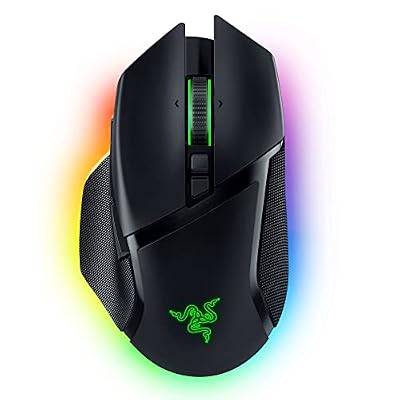
The Razer Basilisk V3 Pro is a large, right-handed wireless gaming mouse built around a tall ergonomic shell. It uses the Focus Pro 30K optical sensor, which tracks up to 30,000 DPI, and Gen-3 optical switches for the main buttons. The mouse offers 13 programmable controls, including a thumb paddle, side buttons, and a HyperScroll Tilt Wheel that can switch between tactile cycling and free spin, and can tilt left and right for horizontal scrolling.
Connection options include HyperSpeed Wireless through a 2.4 GHz receiver, Bluetooth for use with laptops and tablets, and a wired USB-C connection for charging and play. The shell uses 13-zone Chroma RGB lighting along the base and logo, which you can adjust or turn off in the companion software. The shape is wide at the rear, with a textured thumb rest and a raised hump that fills the palm.
This mouse is a strong fit for palm grip players who want a full-featured wireless mouse for a mix of competitive shooters and longer story-driven games. The thumb paddle is useful for push-to-talk, melee, or ability binds, and the tilt wheel adds a control that many mice lack. One thing to note is the weight: at over 100 grams, this is a substantial mouse, and players who favor fast flicks with a claw grip may prefer a lighter model. The software is also needed to unlock the full set of lighting and remapping options.
Razer DeathAdder V3 Pro Wireless Gaming Mouse

The Razer DeathAdder V3 Pro is a large, right-handed wireless gaming mouse with one of the most palm-friendly shapes in this guide. It weighs 63 grams, which is light for a mouse of this size, and uses the Focus Pro 30K optical sensor with Gen-3 optical switches. The shell has 5 programmable buttons, a clean layout with no extra thumb grid, and a smooth, split-button design that keeps the main clicks consistent across the whole button surface.
Battery life runs up to 90 hours on a single charge, according to the listing, and the mouse charges over USB-C. It connects through HyperSpeed Wireless for low-latency gaming and can also connect over Bluetooth or a wired cable. The shape is long and gently curved, with a high rear hump that supports the palm and a flared thumb area that keeps the thumb clear of the desk surface.
This mouse is a strong fit for palm grip players who want a light mouse without giving up a large shell. The low weight makes long sessions less tiring, and the simple button layout keeps the focus on aim rather than on extra binds. One thing to note is the button count: with only 5 programmable buttons, this mouse is less suited to games that need many thumb binds. Players who rely on a side button grid for MMO abilities should look at the G502 X LIGHTSPEED or the Basilisk V3 Pro instead.
Corsair DARKSTAR RGB Wireless Gaming Mouse

The Corsair DARKSTAR RGB Wireless Gaming Mouse is a large, right-handed wireless mouse aimed at MMO and MOBA players who use a palm grip. It uses the CORSAIR MARKSMAN optical sensor, rated at 26,000 DPI, and offers 15 programmable buttons, including a six-button side cluster that you can reach with the thumb. The shell is broad at the rear, with a textured thumb grip and a tall hump that fills the palm.
Battery life runs up to 80 hours over Bluetooth and up to 65 hours over the Slipstream 2.4 GHz wireless link, according to the listing, and the mouse charges over USB-C. It also connects over Bluetooth for use with more than one device. The RGB light strip across the middle of the shell and the illuminated logo are adjustable in the companion software, which also handles button remapping and DPI steps.
This mouse is a strong fit for palm grip players who play MMO or MOBA games and want a large set of thumb buttons within easy reach. The side cluster is the main attraction here, and the wide shell gives the palm a stable platform during long raids or matches. One thing to note is the weight and size: this is a large, full-featured mouse, and players with smaller hands may find the side cluster a stretch. The mouse is also best suited to games that benefit from many binds, so shooter-only players may prefer a simpler layout.
Comparison Table
| Mouse | Sensor | Buttons | Connection | Battery Life | Best For |
|---|---|---|---|---|---|
| Logitech G502 X LIGHTSPEED | HERO 25K, up to 25,600 DPI | 13 programmable | 2.4 GHz wireless, USB-C | Up to 140 hours | Many-button games, large hands |
| Razer Basilisk V3 Pro | Focus Pro 30K, up to 30,000 DPI | 13 programmable controls | HyperSpeed wireless, Bluetooth, USB-C | Long wireless use, varies with lighting | Mixed gaming, tilt wheel |
| Razer DeathAdder V3 Pro | Focus Pro 30K, up to 30,000 DPI | 5 programmable | HyperSpeed wireless, Bluetooth, USB-C | Up to 90 hours | Light palm grip, aim-focused play |
| Corsair DARKSTAR RGB Wireless | MARKSMAN, up to 26,000 DPI | 15 programmable | Slipstream wireless, Bluetooth, USB-C | Up to 80 hours over Bluetooth | MMO and MOBA thumb binds |
Which One Is Right for You?
Choose the Logitech G502 X LIGHTSPEED if you want a large palm grip mouse with a proven shape, a dual-mode scroll wheel, and a long battery life. It is the most balanced pick in this guide for players who split time between shooters and games that need extra buttons.
Choose the Razer Basilisk V3 Pro if you want a full-featured mouse with a tilt wheel, a thumb paddle, and lighting you can tune. It suits players who want every control within reach and who do not mind a heavier shell.
Choose the Razer DeathAdder V3 Pro if you want the lightest large-shell mouse in this guide and you play aim-focused games. Its simple layout and low weight make it easy to move, while the tall hump still supports a full palm grip.
Choose the Corsair DARKSTAR RGB Wireless if you play MMO or MOBA games and want a six-button thumb cluster on a wide palm grip shell. It is the best pick here for players who bind many abilities to the thumb.
If you are still unsure, measure your hand and compare it with the shell size. A hand longer than 19 centimeters will feel most at home on the G502 X LIGHTSPEED, the Basilisk V3 Pro, or the DARKSTAR. A hand between 17 and 19 centimeters can use any pick in this guide, with the DeathAdder V3 Pro as the lightest option. A hand shorter than 17 centimeters should look at the DeathAdder V3 Pro first, because its shape is long but its narrow front keeps the main buttons within reach.
FAQ
What makes a wireless gaming mouse good for palm grip?
A good palm grip mouse has a long shell, a tall centered hump, and a wide rear that supports the whole palm. The fingers should rest extended on the main buttons without curling, and the thumb should sit on a rest rather than dragging on the desk. Wireless play adds freedom of movement, which helps palm grip players who move the mouse with the arm.
Is a heavier mouse better for palm grip?
Many palm grip players prefer a mouse between 90 and 115 grams, because the extra weight feels steady under a full palm. A very light mouse can feel skittish when the whole hand rests on it. That said, the DeathAdder V3 Pro shows that a light mouse can still work well for palm grip when the shell is large and the balance is centered. Try both weights if you can, and pick the one that feels controlled rather than the one with the lowest number.
Do I need a high polling rate for palm grip gaming?
A polling rate of 1,000 Hz is enough for most players, including palm grip players. Higher rates can feel slightly smoother, but they drain the battery faster and the difference is small in normal play. Use the 2.4 GHz receiver for gaming rather than Bluetooth, because the receiver link offers lower latency and a more stable connection at high polling rates.
Can I use these mice for work as well as gaming?
Yes. All four mice in this guide work as everyday mice, with programmable buttons you can bind to copy, paste, browser navigation, or app shortcuts. The G502 X LIGHTSPEED and the Basilisk V3 Pro are the most flexible for mixed use, because their extra buttons and dual-mode wheels help with documents and web browsing. The DeathAdder V3 Pro is the simplest option if you want a clean layout for both work and play.
Disclosure: As an Amazon Associate, we may earn from qualifying purchases.