🛒 Best Price Today on Amazon
Prime members get fast, free shipping on everything above, plus member-only deals. New members get a 30-day free trial — cancel anytime.
Introduction
The best ergonomic gaming mouse for carpal tunnel is a mouse that lets your wrist rest in a more neutral position while you play. A standard flat mouse twists the forearm so the palm faces down, which can add strain during long sessions. A vertical mouse turns the hand into a handshake position, while a contoured mouse uses a sculpted shape and a thumb rest to support the hand without forcing it flat. Both designs aim to reduce the twisting and pressure that can make long gaming sessions uncomfortable.
This guide compares three ergonomic mice that fit that goal. Two are vertical mice with a 57-degree angle, and one is a contoured mouse with a sculpted body and a thumb rest. All three are wireless, all three work for gaming as well as everyday computer use, and all three are sold on Amazon US. None of them is a medical device, and none of them can promise to fix wrist pain. What they can do is change the angle of your wrist, spread the load across the hand, and give you a shape that is easier to hold for hours at a time.
If you have ongoing wrist pain, numbness, or tingling, talk to a clinician before you change your setup. A mouse is only one part of the picture. Desk height, chair height, arm support, break habits, and the way you hold the mouse all matter. Use this guide to pick a shape that feels comfortable, then pay attention to how your wrist feels over the first few weeks.
How to Choose
1. Vertical angle and wrist position
A vertical mouse holds the hand at an angle, usually around 57 degrees, so the palm faces sideways rather than down. That handshake position reduces forearm twisting compared with a flat mouse. The Logitech MX Vertical and the Logitech Lift both use a 57-degree angle. If you have never used a vertical mouse, expect a short adjustment period while your aim and button habits adapt to the new angle. Give yourself several days of regular use before you judge the shape.
2. Hand size and shell fit
Vertical mice are sized more strictly than flat mice, because the hand wraps around a tall shell. The MX Vertical is sized for medium to large right hands, while the Lift is sized for small to medium right hands. Measure your hand from the wrist crease to the tip of the middle finger. A hand longer than about 18 centimeters will usually fit the MX Vertical better, while a hand shorter than about 18 centimeters will usually fit the Lift better. A shell that is too large forces the fingers to stretch, and a shell that is too small leaves the palm unsupported.
3. Sensor and tracking for gaming
An ergonomic mouse does not need the highest sensor numbers to play well, but it should track cleanly at the sensitivity you use. The MX Vertical uses a 4000 DPI optical sensor with a cursor speed switch, which is enough for most games at moderate sensitivity. The MX Master 3S uses an 8000 DPI sensor that tracks on glass as well as on a desk surface. For fast competitive shooters, a vertical mouse will feel different from a flat gaming mouse, because the grip changes how you aim. For slower games, strategy games, and everyday use, the difference is smaller.
4. Buttons and click effort
Click effort matters when your wrist is sore. A mouse with light, quiet clicks needs less force from the fingers, which can help during long sessions. The Lift uses quiet clicks, and the MX Master 3S uses quiet clicks that the maker describes as much quieter than a standard click. Count the buttons you actually use. A vertical mouse usually has four buttons, which is enough for most games, while a contoured mouse such as the MX Master 3S has more buttons and a second scroll wheel for horizontal scrolling.
5. Wireless connection and battery
All three mice in this guide connect over a USB receiver and Bluetooth, so you can switch between computers without unplugging a cable. The MX Vertical has a rechargeable battery that lasts up to four months on a full charge, with a one-minute quick charge giving about three hours of use. The Lift runs on a single AA battery for up to 24 months. The MX Master 3S has a rechargeable battery and charges over USB-C. Pick the power style that fits your habits: a rechargeable mouse needs a cable now and then, while a battery mouse needs a fresh cell once in a long while.
6. Weight and grip texture
A vertical mouse is taller than a flat mouse, so its weight sits higher in the hand. That can feel strange at first, and a heavy vertical mouse can tire the hand faster than a light one. Look for a textured surface that keeps the grip secure without forcing you to squeeze. The MX Vertical uses a textured rubber surface, and the Lift uses a soft-touch finish with a textured grip area. A secure grip lets you move the mouse with the arm and shoulder rather than pinching it with the fingers.
7. Software and extra features
Companion software lets you remap buttons, adjust pointer speed, and set up gestures or app-specific controls. The MX Vertical and the Lift both work with the same software, and the MX Master 3S adds a thumb wheel and gesture controls that are useful for browsing and media. You do not need the software to use the mouse, but it helps if you want to bind a side button to a game action or a work shortcut. Check that the software supports your operating system, because some features vary between Windows and Mac systems.
Top Picks
Logitech MX Vertical Wireless Mouse

The Logitech MX Vertical is a vertical wireless mouse with a 57-degree angle that holds the hand in a natural handshake position. The maker describes the design as reducing muscular activity by 10 percent compared with a standard mouse, based on a Logitech study, and as reducing pressure on the wrist while the thumb rests on a thumb rest. It is sized for medium to large right hands, and it uses a textured rubber surface that keeps the grip secure without a tight squeeze.
The sensor is a 4000 DPI high-precision optical sensor, and a cursor speed switch on top lets you change sensitivity with a touch. The listing describes the sensor as giving 4x less hand movement than a traditional 1000 DPI sensor, which can help when you need to cross a wide screen without moving the hand far. The mouse has 4 customizable buttons, connects over a USB receiver or Bluetooth, and works with up to 3 computers. Battery life runs up to four months on a full charge, and a one-minute quick charge gives about three hours of use.
This mouse is a strong fit for players with medium to large hands who want the most upright shape in this guide. The tall shell and the thumb rest support the hand through long sessions, and the rechargeable battery means you will rarely need to think about power. One thing to note is the adjustment period: aiming in fast games feels different with a vertical grip, and precision work takes a few days to feel natural. Players with small hands should look at the Lift instead, because the MX Vertical can feel bulky when the hand cannot wrap around the shell.
Logitech Lift Vertical Ergonomic Mouse
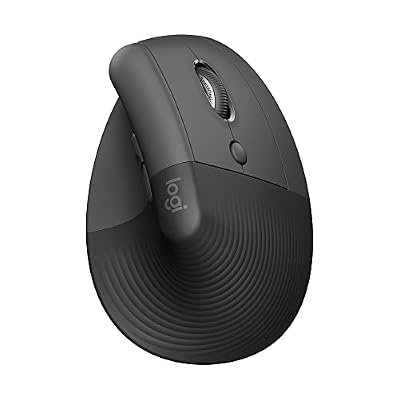
The Logitech Lift Vertical Ergonomic Mouse is a vertical wireless mouse with the same 57-degree angle as the MX Vertical, sized for small to medium right hands. It uses a soft-touch finish with a textured grip area, a sculpted thumb rest, and quiet clicks that need less force than a standard click. The shape is shorter and narrower than the MX Vertical, so a smaller hand can wrap around it without stretching.
The mouse has 4 buttons, connects over Bluetooth or a Logi Bolt USB receiver, and works with up to 3 devices. It uses a SmartWheel that can switch between a precise notched mode and a fast free-spinning mode, which is useful for scrolling long documents or web pages. Battery life runs up to 24 months on a single AA battery, according to the listing, so you will not need to charge it often. The mouse works with Windows, Mac, and iPad systems, and you can remap the buttons in the companion software.
This mouse is a strong fit for players with small to medium hands who want a vertical shape without the bulk of the MX Vertical. The quiet clicks and the lighter feel make it easy to use for hours, and the long battery life is a practical plus. One thing to note is the sensor: it is an advanced optical sensor suited to everyday play and slower games, but it is not aimed at fast competitive shooters in the way a dedicated gaming mouse is. If you play fast shooters most of the time, treat the Lift as a comfort-first option for long sessions and keep your expectations about aim feel realistic.
Logitech MX Master 3S Wireless Mouse

The Logitech MX Master 3S is a contoured wireless mouse with a sculpted body, a thumb rest, and a thumb wheel for horizontal scrolling. It is not a vertical mouse, but its shape supports the hand in a more relaxed position than a flat mouse, and it is the best pick in this guide for players who want an ergonomic shape without switching to a vertical grip. The shell is sized for medium to large right hands, and the thumb rest gives the thumb a place to sit instead of dragging on the desk.
The sensor is an 8000 DPI sensor that tracks on glass as well as on a desk surface, and the MagSpeed electromagnetic scroll wheel can switch between a precise ratchet mode and a free-spinning mode. The mouse uses quiet clicks, connects over Bluetooth or a Logi Bolt USB receiver, and works with up to 3 computers. It has a USB-C charging port, and a one-minute charge gives about three hours of use, according to the listing. You can remap the buttons and set up gestures in the companion software.
This mouse is a strong fit for players who want a comfort-first mouse for a mix of gaming and work, and who do not want to relearn aiming with a vertical shape. The extra buttons and the thumb wheel are useful for strategy games, browsing, and media control, and the high-resolution sensor handles fast cursor movement well. One thing to note is the shape: because it is contoured rather than vertical, it does not change the wrist angle as much as the MX Vertical or the Lift. If your wrist feels better with a fully upright handshake position, start with one of the vertical picks instead.
Comparison Table
| Mouse | Shape | Angle | Sensor | Buttons | Battery | Best For |
|---|---|---|---|---|---|---|
| Logitech MX Vertical | Vertical | 57 degrees | 4000 DPI optical | 4 customizable | Up to 4 months, rechargeable | Medium to large hands, upright grip |
| Logitech Lift Vertical | Vertical | 57 degrees | Advanced optical | 4, quiet clicks | Up to 24 months, 1 AA battery | Small to medium hands, quiet clicks |
| Logitech MX Master 3S | Contoured | Sculpted, not vertical | 8000 DPI, tracks on glass | 7, quiet clicks, thumb wheel | Rechargeable, USB-C | Mixed gaming and work, no vertical learning curve |
Which One Is Right for You?
Choose the Logitech MX Vertical if your hand is medium to large and you want the most upright shape in this guide. Its tall shell, thumb rest, and rechargeable battery make it a solid choice for long sessions, and the cursor speed switch helps you adjust sensitivity without opening software.
Choose the Logitech Lift Vertical if your hand is small to medium and you want the same 57-degree angle in a smaller shell. Its quiet clicks, soft-touch finish, and long battery life make it easy to live with, and it is the most comfortable vertical pick here for smaller hands.
Choose the Logitech MX Master 3S if you want an ergonomic shape without switching to a vertical grip. Its contoured body, thumb wheel, and high-resolution sensor make it the most versatile pick in this guide for players who split time between games and work.
If you are unsure between the two vertical mice, measure your hand. A hand longer than about 18 centimeters from wrist to middle fingertip will usually fit the MX Vertical better. A hand shorter than about 18 centimeters will usually fit the Lift better. If you have never used a vertical mouse, give the shape at least a week of regular use before you decide, because the first day always feels strange. And if wrist pain, numbness, or tingling continues, talk to a clinician rather than relying on a mouse alone to solve it.
FAQ
Can an ergonomic mouse help with carpal tunnel symptoms?
An ergonomic mouse can change the angle of your wrist and reduce the twisting that a flat mouse causes, which some people find more comfortable during long sessions. It is not a medical device and it cannot promise to fix wrist pain, numbness, or tingling. If symptoms continue or get worse, talk to a clinician, and look at the rest of your setup too, including desk height, chair height, arm support, and how often you take breaks.
How long does it take to get used to a vertical mouse?
Most people need a few days to a week of regular use before a vertical mouse feels natural. Aiming in games and precise cursor work feel different at first, because the hand moves from a new angle. Start with slower games and everyday tasks, then move to faster games once the grip feels automatic. If the shape still feels awkward after two weeks, the shell may be the wrong size for your hand.
Is a vertical mouse good for gaming?
A vertical mouse works well for slower games, strategy games, and everyday play, and many people use one for gaming without trouble. For fast competitive shooters, a vertical grip can feel less precise at first, because most gaming mice are flat and the aim habits are different. The MX Master 3S is the safer pick in this guide if fast shooters are your main game and you still want a more comfortable shape.
What else can I change besides the mouse?
Desk and chair height matter as much as the mouse. Your forearm should rest roughly level with the desk, with the wrist straight rather than bent up or down. A wrist rest can help if it supports the forearm rather than pressing on the wrist itself. Take short breaks, stretch your hands and forearms, and vary your posture during long sessions. Small changes in setup and habits often help more than any single piece of hardware.
Disclosure: As an Amazon Associate, we may earn from qualifying purchases.