🛒 Best Price Today on Amazon
Prime members get fast, free shipping on everything above, plus member-only deals. New members get a 30-day free trial — cancel anytime.
As an Amazon Associate, we earn from qualifying purchases made through links on this page.
Xbox consoles accept standard USB keyboards and mice, which makes keyboard-and-mouse play possible on a Series X, Series S or Xbox One without any adapter tricks. But there is a catch that shapes every recommendation in this article: the console supports the hardware, while each game decides whether to accept it. Microsoft leaves keyboard and mouse support to developers, so a combo that works beautifully in one title may do nothing in another.
Well-known supported games include Fortnite, Call of Duty: Warzone, Minecraft, Halo Infinite, Gears 5 and Microsoft Flight Simulator, and the list grows over time. Many other games — including most sports titles and plenty of single-player releases — are controller-only. Some competitive games also place keyboard-and-mouse console players into PC lobbies for fairness. None of that makes a combo a bad buy; it just means you should buy for the games you actually play, and check a title’s input support before assuming it works.
The four combos below are all sold as keyboard-and-mouse sets, and each one states Xbox compatibility from its manufacturer or listing. They range from Razer’s officially designed Turret for Xbox to straightforward wired and wireless sets from Redragon and CHONCHOW.
One reassurance before the details: there is no separate Series X|S versus Xbox One divide to worry about. Both console generations accept standard USB keyboard and mouse input in the same way, so a combo that works on one works on the other, and the per-game support rules are identical across the two. If you upgrade consoles later, the combo comes with you. What changes between setups is not the console generation but your room — a desk rewards a normal keyboard, while a couch rewards a lapboard or a wireless set and a stable surface for the mouse.
What to look for in a keyboard and mouse combo for Xbox
A single USB connection is simplest. Xbox consoles have limited USB ports, and a combo that shares one wired connection or one 2.4 GHz dongle leaves ports free for headsets and storage. Avoid Bluetooth-only sets: Xbox does not pair Bluetooth keyboards and mice, so Bluetooth modes on these combos are for PC use only.
Wired always works. A wired combo needs no charging and no dongle, and it is recognised the moment it is plugged in. The trade-off is a cable across the living room, which is why wireless sets exist — just expect to manage battery life.
Know what the mouse can and cannot do. On Xbox, the mouse works inside supported games and in the Edge browser, but dashboard navigation is primarily keyboard-driven; the mouse is not a universal pointer for the whole interface. The keyboard doubles as a fast text-entry tool for search, chat and codes in every case.
Game support is the real specification. Before buying, confirm your main games support keyboard and mouse on Xbox. Fortnite, Warzone, Minecraft and Halo Infinite do; if your library is mostly controller-only titles, a combo will spend its life as a very nice text-input device.
Couch play needs a surface. A mouse needs a flat, stable surface. Lapboard designs like the Razer Turret solve this properly; with a standard combo, plan on a lap desk or side table.
The best gaming keyboard and mouse combos for Xbox
1. Razer Turret for Xbox One — designed with Xbox, built for the couch

ASIN: B07QXLC24V — View on Amazon
The Turret is the only combo here developed with Xbox itself, and it shows. The mechanical keyboard and mouse connect through a single 2.4 GHz dongle, a dedicated Xbox button opens the guide, and the keyboard has a retractable magnetic mouse mat built in, so the mouse stays planted on your lap. The mouse uses Razer’s 16,000 DPI 5G optical sensor, the keyboard uses Razer Green mechanical switches with Chroma RGB, and Xbox Dynamic Lighting is supported in compatible games. Razer rates the keyboard for up to 43 hours and the mouse up to 50 hours per charge with lighting disabled (11 and 30 hours with lighting on).
- Keyboard: mechanical, Razer Green switches, Chroma RGB
- Mouse: 16,000 DPI 5G optical sensor
- Connection: single 2.4 GHz USB dongle for both devices
- Battery life: up to 43 hours (keyboard) / 50 hours (mouse), lighting off
- Extras: retractable magnetic mouse mat, dedicated Xbox button
- Compatibility: Xbox Series X|S, Xbox One, PC
Who it’s for: Couch players who want the one combo designed specifically for Xbox, with a proper lap solution and an official Xbox button.
Limitations: It is a lapboard form factor, so desk players may prefer a separate full keyboard. As with every pick here, it only plays in games that support keyboard and mouse on Xbox.
2. Redragon S101-3 Pro — the wired value combo

ASIN: B00NLZUM36 — View on Amazon
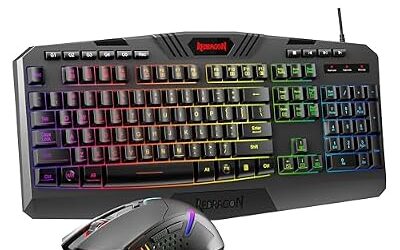
The S101-3 Pro is a long-running wired combo: an RGB-backlit membrane keyboard with independent macro record keys, paired with a programmable gaming mouse with adjustable DPI. On Xbox, wired USB is the most foolproof connection there is — plug the keyboard and mouse into the console’s USB ports and supported games recognise them immediately, with no batteries or dongles to manage. The keyboard’s multimedia keys and the mouse’s software-free DPI switching both carry over as standard USB input.
- Keyboard: RGB backlit membrane, macro record keys
- Mouse: programmable, adjustable DPI (800–7200)
- Connection: wired USB
- Compatibility: Xbox (supported games), PS4, PC
- Extras: software support on PC for programming
Who it’s for: Players who want a dependable plug-and-play combo for supported Xbox titles and PC, and who prefer wired reliability over wireless freedom.
Limitations: Two cables to run to the console, a membrane rather than mechanical keyboard, and the usual rule applies — controller-only games will ignore it entirely.
3. Redragon S155-PRO — wireless combo with a compact keyboard

ASIN: B0FDG55BPG — View on Amazon
The S155-PRO pairs a compact 75% keyboard with a lightweight mouse in one wireless set, and Redragon’s listing names Xbox among its compatible devices. The set offers Bluetooth, 2.4 GHz and USB-C wired modes; on Xbox you will use the 2.4 GHz dongle or the cable, since Xbox does not accept Bluetooth peripherals. The mouse is rated up to 12,800 DPI with software support on PC, the keyboard is a quiet membrane design with RGB backlighting, and the small footprint suits entertainment units and desks where a full-size board does not fit.
- Keyboard: 75% layout, RGB backlit membrane
- Mouse: up to 12,800 DPI, programmable on PC
- Connection: 2.4 GHz dongle, Bluetooth, USB-C wired
- Compatibility: Xbox (via dongle or wired, supported games), PC, Mac
- Extras: rechargeable, single set for console and computer
Who it’s for: Players who want one tidy wireless combo shared between an Xbox and a PC, and who prefer a space-saving keyboard.
Limitations: Bluetooth mode does not work on Xbox despite being part of the set, and the 75% layout drops the number pad that some PC players rely on.
4. CHONCHOW G220 — budget wireless combo for supported games

ASIN: B0D99WMLQV — View on Amazon
The G220 is a 2.4 GHz wireless combo where the keyboard and mouse share a single USB receiver — exactly the arrangement that suits an Xbox, since it uses one port and needs no pairing. CHONCHOW states the set works with Xbox consoles, and the plug-and-play receiver means setup is simply plugging it in. The keyboard is a mechanical-feel membrane board with LED backlighting and a 2500 mAh rechargeable battery; the mouse offers adjustable DPI up to 3600 across seven buttons.
- Keyboard: full-size, LED backlit, mechanical-feel membrane
- Mouse: 7 buttons, adjustable DPI up to 3600
- Connection: shared 2.4 GHz USB receiver
- Battery: rechargeable, 2500 mAh keyboard battery
- Compatibility: Xbox (supported games), PS5, PS4, PC, Mac
Who it’s for: Players who want the simplest possible wireless setup for supported Xbox games and fast text entry, in one box with one receiver.
Limitations: The mouse sensor and keyboard switches are entry-level compared with the Razer and Redragon sets, and Xbox compatibility covers supported games only, as with every combo here.
Comparison table
| Combo | Keyboard type | Mouse | Connection | Xbox route | Battery |
|---|---|---|---|---|---|
| Razer Turret for Xbox One | Mechanical (Razer Green) | 16,000 DPI optical | Single 2.4 GHz dongle | Designed for Xbox | Up to 43 h / 50 h |
| Redragon S101-3 Pro | Membrane, macro keys | Adjustable 800–7200 DPI | Wired USB | Plug into console USB | None (wired) |
| Redragon S155-PRO | 75% membrane | Up to 12,800 DPI | 2.4 GHz / BT / wired | Dongle or wired | Rechargeable |
| CHONCHOW G220 | Mechanical-feel membrane | Up to 3600 DPI | Shared 2.4 GHz receiver | Plug in receiver | Rechargeable |
FAQ
Do all Xbox games support keyboard and mouse?
No. Support is decided per game by its developer. Popular supported titles include Fortnite, Call of Duty: Warzone, Minecraft, Halo Infinite, Gears 5 and Microsoft Flight Simulator, but many games remain controller-only. Check your specific game before buying a combo for it.
Can I use a Bluetooth keyboard and mouse with Xbox?
No. Xbox consoles do not pair Bluetooth keyboards or mice. Wireless combos work on Xbox through their 2.4 GHz USB dongle, or in wired mode if they offer one — which is why every combo in this article connects that way.
Will keyboard and mouse put me against PC players?
In some games, yes. Several competitive titles match console keyboard-and-mouse players into PC lobbies to keep controller and mouse players separate. The exact policy varies by game, so check the title you play most.
Can I navigate the Xbox dashboard with the mouse?
Only partially. The keyboard works for moving around menus and is excellent for text entry, search and entering codes, and the mouse works in supported games and the Edge browser. Day-to-day dashboard use is still designed around a controller or the keyboard.
Can I use the same combo on my PC as well?
Yes — all four combos are standard USB devices, so the same set moves between an Xbox and a Windows PC without any conversion. Programming features such as macros and lighting profiles are usually configured in PC software and, where the device has onboard memory, may carry across; the basic typing and mouse input always carry across.
Do I need an adapter to use these combos?
No. All four combos connect directly by USB cable or USB dongle, which is the officially supported route. Adapter devices that emulate a controller are a different product category and can conflict with game rules, so they are not included here.
Conclusion
If keyboard and mouse on Xbox is your main way to play, the Razer Turret is the purpose-built answer: one dongle, an official Xbox button and a lapboard design that works from the couch. For desk setups, the Redragon S101-3 Pro is the dependable wired option, the S155-PRO adds wireless flexibility and a compact board for shared Xbox-and-PC use, and the CHONCHOW G220 is the simplest one-receiver wireless set. Whichever you choose, check your favourite games for keyboard and mouse support first — the combo can only play where the game allows it.