🛒 Best Price Today on Amazon
Prime members get fast, free shipping on everything above, plus member-only deals. New members get a 30-day free trial — cancel anytime.
A desktop bought for multitasking rarely feels slow because of its graphics card. It bogs down when a browser full of tabs, a video call, two office suites and a background export all compete for processor threads and memory. The real decision is how much parallel work the machine has to absorb before it starts swapping, stuttering or making you close things you still need. That means weighing core counts, installed RAM and SSD room ahead of gaming extras, in a tower with headroom to grow.
This guide is for remote workers who live in tabs and calls, creators who export while they keep editing, students with research stacks open, and players who want the same tower to game after hours. The five prebuilt desktops below were chosen from the names and spec tables on their Amazon pages. Every one ships with 32 GB of DDR5 memory, a many-core processor and NVMe storage, so the comparison turns on cores, memory ceilings, drive size and the Windows edition in the box.
Quick Picks
As an Amazon Associate we earn from qualifying purchases.
| Product | Best for | Key spec from title |
|---|---|---|
| HP OMEN 45L GT22-3080 | Workstation-style multitasking on Windows 11 Pro | Intel Core Ultra 7 265K, 32GB DDR5, 2TB SSD |
| CyberPowerPC Gamer Xtreme GXiVR8080A41 | Heavy background work running next to games | AMD Ryzen 9 9900X, 32GB DDR5, 1TB SSD |
| iBUYPOWER Y40 Pro Y40BA9N57T01 | Big storage and a high core count in one tower | AMD Ryzen 9 7900X, 32GB DDR5, 2TB NVMe SSD |
| Skytech Azure ST-AZURE3-1563-W-AM | Roomy 2TB storage in a white tempered-glass case | AMD Ryzen 7 9700X, 32GB DDR5, 2TB SSD |
| Lenovo Legion Tower 5 90YJ00A9US | Gaming first, with multitasking muscle behind it | AMD Ryzen 7 9800X3D, 32GB DDR5, 1TB SSD |
How to Choose
Count cores and threads before clock speed
Multitasking loads a processor differently from gaming. A single game leans on a few fast cores, while a workday spreads dozens of apps across every thread the chip offers. That is why the 20-core Intel Core Ultra 7 265K and the 12-core Ryzen 9 chips in this guide suit parallel work better than a higher-clocked part with fewer cores. When you compare listings, read the exact processor model in the title, count its cores, and treat boost clock as a tiebreaker rather than the headline number.
Treat 32 GB of memory as the starting point
Memory is where heavy multitasking succeeds or fails. Sixteen gigabytes can hold a browser and a few documents, but add a call app, a spreadsheet suite, a photo editor and an export queue and the system starts paging to disk. All five towers here ship with 32 GB of DDR5, which is the sensible floor for this job. Also check the listing for the number of memory slots and the maker’s maximum supported capacity, because a tower that accepts 128 GB leaves a far longer upgrade path than one capped at 64 GB.
Size the SSD for work files and games together
A multitasking tower usually stores two libraries at once: project files, exports and backups on the work side, and large game installs on the other. One terabyte disappears quickly once both move in, which is why three of these picks ship with 2 TB NVMe drives. If you choose a 1 TB model, confirm the motherboard offers a second M.2 slot so another SSD can go in later without replacing the boot drive. Prefer NVMe storage over a spinning hard drive for the system disk, since app launches and file searches stay responsive under load.
Check ports, wireless and the Windows edition
The daily friction of a work tower shows up at its edges. Look for a front or top USB-C port for fast drives and docks, enough USB-A ports for peripherals, and the Wi-Fi generation named in the listing if the desk sits far from the router. The Windows edition matters too: four of these towers ship with Windows 11 Home, while the HP OMEN 45L configuration below includes Windows 11 Pro, which adds features such as BitLocker drive encryption and Remote Desktop hosting that some home-office and small-business users specifically need.
The 5 Best Options
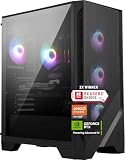
HP OMEN 45L GT22-3080
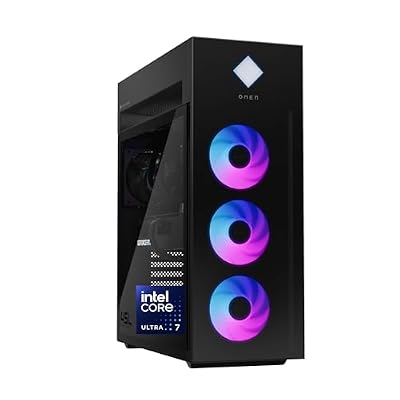
This is the most work-leaning configuration in the group. The Intel Core Ultra 7 265K brings 20 cores and 20 threads to parallel workloads, the 32 GB of Kingston FURY DDR5-5600 runs as two 16 GB sticks across four DIMM slots, and HP rates the platform for up to 128 GB of memory. A 2 TB PCIe Gen4 NVMe SSD gives work files and games separate room to grow, the RTX 5080 covers GPU-accelerated editing and gaming, and Windows 11 Pro suits buyers who need its business features. It fits professionals whose tower earns its keep during the day.
Specs
- Processor: Intel Core Ultra 7 265K, up to 5.5 GHz, 20 cores, 20 threads
- Memory: 32 GB DDR5-5600 (2 x 16 GB), 4 DIMM slots, supports up to 128 GB
- Storage: 2 TB PCIe Gen4 NVMe M.2 SSD
- Graphics: NVIDIA GeForce RTX 5080, 16 GB GDDR7
- Operating system: Windows 11 Pro
- Model: OMEN by HP 45L Gaming Desktop GT22-3080
Best for: Professionals who want a workstation-style tower with Windows 11 Pro and the largest memory ceiling here.
Watch out for: The OMEN 45L name covers many configurations, so confirm the GT22-3080 model number and the Core Ultra 7 265K, RTX 5080 configuration on the listing before ordering.
CyberPowerPC Gamer Xtreme GXiVR8080A41
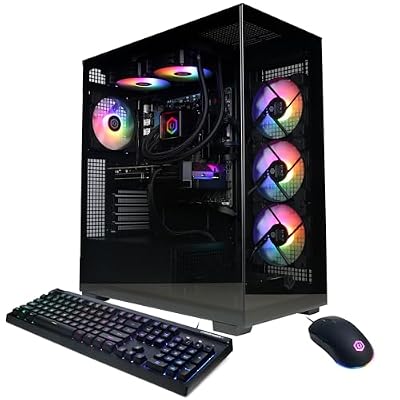
CyberPowerPC builds this Gamer Xtreme around the AMD Ryzen 9 9900X, a 12-core, 24-thread processor running at 4.4 GHz in the listing, which gives exports, compiles and virtual machines plenty of threads while the RTX 5070 handles gaming and GPU-accelerated apps. The 32 GB of DDR5 memory matches the rest of this guide, and the desktop, keyboard, mouse and power cord are all listed in the box, so the setup is complete once a monitor is connected. It suits buyers who split the day between demanding background work and play, and who are comfortable adding storage later.
Specs
- Processor: AMD Ryzen 9 9900X, 4.4 GHz
- Graphics: GeForce RTX 5070, 12 GB
- Memory: 32 GB DDR5
- Storage: 1 TB PCIe 4.0 SSD
- Connectivity: Wi-Fi ready
- Operating system: Windows 11 Home
- Included: Desktop, keyboard, mouse, power cord
Best for: Users who run renders, compiles or virtual machines in the background while the machine stays their daily driver.
Watch out for: The 1 TB SSD is the joint-smallest here, and the listing title does not name the power supply, so check the full product details and confirm this exact GXiVR8080A41 configuration before ordering.
iBUYPOWER Y40 Pro Y40BA9N57T01

The Y40 Pro pairs a 12-core AMD Ryzen 9 7900X with the joint-largest storage in this guide, a 2 TB NVMe SSD, so large project folders and a full game library can live on one fast drive. Its 32 GB of DDR5 RGB memory runs at 5200 MHz across four slots, and iBUYPOWER lists support for up to 128 GB, matching the HP for long-term headroom. An AW4 240mm liquid cooler sits on the processor, the HYTE Y40 case shows the build through glass, and a keyboard and mouse are included. It fits multitaskers who want storage and cores without giving up a gaming-ready graphics card.
Specs
- Processor: AMD Ryzen 9 7900X
- Graphics: NVIDIA GeForce RTX 5070 Ti, 16 GB
- Memory: 32 GB DDR5 RGB, 5200 MHz, 4 slots, supports up to 128 GB
- Storage: 2 TB NVMe SSD
- Cooling: iBUYPOWER AW4 240mm liquid CPU cooler
- Operating system: Windows 11 Home
- Included: Keyboard and mouse
- Dimensions: 17.28 x 9.44 x 18.58 inches, 36 pounds
Best for: Multitaskers who want a 12-core processor and 2 TB of storage in a single tower.
Watch out for: It is a large, heavy tower, so measure the desk or floor space first, and confirm the Y40BA9N57T01 model number since the Y40 family spans many configurations.
Skytech Azure ST-AZURE3-1563-W-AM

Skytech’s Azure takes a different balance: an 8-core Ryzen 7 9700X with a 5.5 GHz turbo boost, fast DDR5 6000 memory and a 2 TB NVMe SSD, wrapped in a white tempered-glass case with a 360mm ARGB liquid cooler. The RTX 4060 is the lightest graphics card in this guide, which matters less for the multitasking brief than the memory and storage, and it still covers 1080p gaming and GPU-accelerated office and creative apps. Four memory slots leave room to grow. It fits buyers whose parallel work is app-heavy rather than render-heavy, and who prefer a lighter-looking setup.
Specs
- Processor: AMD Ryzen 7 9700X, 3.8 GHz (5.5 GHz Turbo Boost)
- Graphics: NVIDIA GeForce RTX 4060, 8 GB GDDR6
- Memory: 32 GB DDR5 6000 RGB, 4 slots listed
- Storage: 2 TB NVMe M.2 SSD
- Power supply: 650W Gold
- Cooling: 360mm ARGB liquid cooler
- Operating system: Windows 11 Home
- Case: Skytech Azure tempered glass, white
Best for: App-heavy multitaskers who want 2 TB of storage and a white tower, with gaming as a secondary use.
Watch out for: The listing notes the graphics card brand may vary, and the RTX 4060 is the entry point of this group, so confirm the exact configuration on the product page before ordering.
Lenovo Legion Tower 5 90YJ00A9US

Lenovo’s Legion Tower 5 is the gaming-first pick that still multitasks well. Its Ryzen 7 9800X3D is an 8-core chip built around gaming workloads, the RTX 5070 Ti carries 16 GB of GDDR7 memory, and the 32 GB of DDR5 keeps a browser, call apps and documents open alongside a game without complaint. The Eclipse Black tower keeps a restrained look for a home office, and the listing includes three months of PC Game Pass. It suits players who work on the same machine all day and want the strongest gaming processor here, accepting fewer cores than the Ryzen 9 towers for parallel exports.
Specs
- Processor: AMD Ryzen 7 9800X3D
- Graphics: NVIDIA GeForce RTX 5070 Ti, 16 GB GDDR7
- Memory: 32 GB DDR5, supports up to 64 GB
- Storage: 1 TB SSD
- Operating system: Windows 11 Home
- Color: Eclipse Black
- Model: Legion Tower 5, 90YJ00A9US
- Included in listing title: 3 months of PC Game Pass
Best for: Gamers who also run a full workday of apps on the same tower.
Watch out for: Lenovo sells sibling Legion Tower 5 configurations under the same model family, so confirm the 9800X3D and RTX 5070 Ti configuration on the listing, and note the 64 GB memory ceiling is the lowest here.
Which One Fits Your Situation
Your workday is forty tabs, two calls and a wall of documents
Choose the HP OMEN 45L GT22-3080. Its 20-core Core Ultra 7 265K spreads browser windows, call apps, office suites and sync tools across more threads than any other pick here, the 2 TB SSD keeps big document libraries local, and Windows 11 Pro fits managed work setups. The 128 GB memory ceiling also gives this tower the longest upgrade runway in the guide.
You render, export or compile while everything else stays open
Choose the CyberPowerPC Gamer Xtreme GXiVR8080A41. The 12-core, 24-thread Ryzen 9 9900X is built for exactly this pattern: an export or compile chewing through threads in the background while documents, tabs and calls stay responsive in front of you. Budget a second SSD later if the 1 TB drive fills, and confirm the power supply details on the listing before you order.
You want one tower for the office by day and games at night
Choose the Lenovo Legion Tower 5 90YJ00A9US. The Ryzen 7 9800X3D is the gaming specialist of this group and the RTX 5070 Ti backs it up, while 32 GB of DDR5 still covers a full slate of work apps during the day. It is the natural pick when gaming performance decides the purchase and multitasking has to be comfortably good rather than maximal.
Your project files and game library keep outgrowing the drive
Choose between the iBUYPOWER Y40 Pro and the Skytech Azure, the two 2 TB picks. Take the iBUYPOWER if your parallel work is processor-heavy, since its Ryzen 9 7900X brings 12 cores and a 128 GB memory ceiling. Take the Skytech if your load is mostly many apps open at once and you prefer the white case and the faster DDR5 6000 memory kit.
Common Mistakes
- Shopping by graphics card first, when multitasking performance is decided mainly by processor cores and installed memory.
- Settling for 16 GB of RAM to save money, then losing time to slowdowns once calls, tabs and documents pile up.
- Assuming every listing under a model name is the same configuration, instead of matching the exact model number in the title.
- Ignoring the memory slot count and the maker’s maximum supported RAM, which decide whether the tower can grow with your workload.
- Forgetting to measure the tower and check what is in the box, since some listings include a keyboard and mouse and others do not.
Frequently Asked Questions
How much RAM does a desktop need for heavy multitasking?
Thirty-two gigabytes is the practical target for a multitasking desktop in this class. It leaves room for a browser with dozens of tabs, office suites, call apps and a creative program to stay open together without paging to disk. Sixteen gigabytes works for lighter loads, while 64 GB suits users who run virtual machines or very large projects, which is why slot headroom matters.
Does the graphics card matter if I mostly work in documents and browsers?
For documents, browsers and calls, the graphics card does very little, and the processor and memory decide how the machine feels. A dedicated card earns its place when you game, edit video, work in 3D tools or drive several high-resolution monitors. Every pick here includes one, so the choice comes down to how much gaming or GPU-accelerated work you expect alongside the multitasking.
Can I add more memory or storage to these towers later?
Generally yes, within the limits printed in each listing. The HP OMEN 45L and iBUYPOWER Y40 Pro list support for up to 128 GB of memory, while the Lenovo Legion Tower 5 listing caps memory at 64 GB. Storage upgrades depend on free M.2 slots or drive bays, so check the product details for the exact model before counting on a second SSD.
Is Windows 11 Pro worth choosing over Home for office work?
It depends on the features you actually use. Windows 11 Pro adds BitLocker drive encryption, Remote Desktop hosting and group policy tools, which matter to some home-office and small-business setups. For general multitasking there is no performance difference, so most buyers can choose on hardware first. In this guide only the HP OMEN 45L configuration includes Pro; the other four ship with Windows 11 Home.