🛒 Best Price Today on Amazon
Prime members get fast, free shipping on everything above, plus member-only deals. New members get a 30-day free trial — cancel anytime.
Your microphone is only as good as where it sits, and a desk stand that wobbles or sits between you and the keyboard is the quickest way to ruin a stream. A boom arm lifts the mic off the desk, shortens the distance to your mouth, and clears room for a mouse pad. This roundup keeps every pick under 150 dollars, a cap that comfortably covers every arm that is worth buying.
The nine arms below suit streamers, podcasters, and gamers on a cramped desk in 2026. The real decisions are clamp style, weight capacity, and how well each arm hides its cable, so the sections ahead translate listing details into choices you can check before you commit. Each entry notes who it suits and who should look elsewhere, so you can eliminate arms quickly.
Quick Picks

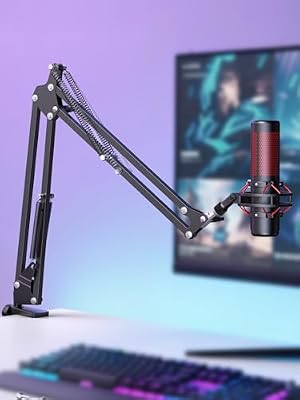
InnoGear Boom Arm Microphone Mic Stand for Blue Yeti Fifine HyperX, Black | Desk Mount, Desktop Stands, Adjustable Reach, Rotate Fully, Folds Away Compactly, for Gaming, Streaming or Recording




As an Amazon Associate we earn from qualifying purchases. Product prices and availability are accurate as of the date/time indicated.

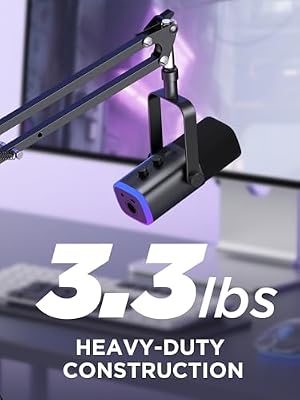
InnoGear Mic Arm Low Profile Microphone Boom Arm Mic Stand 360° Flex, Black | Vibration Resistant, 3.3 lbs Weight Capacity, Extendable up to 25.6", Multiple Adapters, for Desk Thickness Within 2.75"

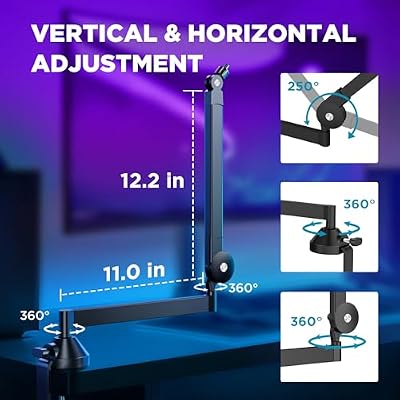


As an Amazon Associate we earn from qualifying purchases. Product prices and availability are accurate as of the date/time indicated.

FIFINE AmpliGame AM8T XLR/USB Gaming Microphone Set, Dynamic PC Mic | Streaming RGB Mic Kit with Boom Arm Stand, Mute Button, Headphones Jack, for Podcasting Recording Vocal Voice-Over


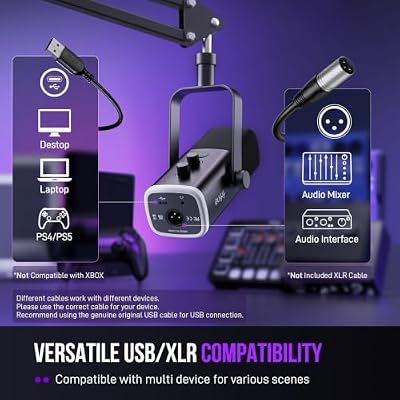


As an Amazon Associate we earn from qualifying purchases. Product prices and availability are accurate as of the date/time indicated.

InnoGear Low Profile Mic Arm Boom Arm Microphone Stand Desk Mount, Black | for Fifine AM8 K669B Elgato Blue Yeti Shure SM58 SM7B, 3.3lb Weight Capacity, Vibration Resistant, Adjustable Angle


As an Amazon Associate we earn from qualifying purchases. Product prices and availability are accurate as of the date/time indicated.
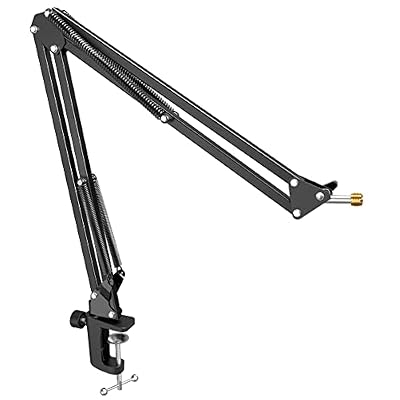
FIFINE CS1 Scissor Microphone Boom Arm Stand for Gaming Recording | Podcast Mic Arm Stand,Heavy Duty clamp,3/8" to 5/8" Adapter, for Voice-over Home Office


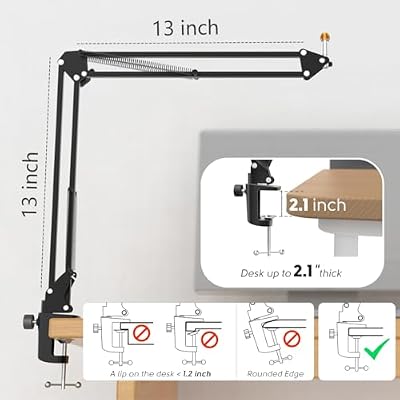


As an Amazon Associate we earn from qualifying purchases. Product prices and availability are accurate as of the date/time indicated.

InnoGear Mic Arm Microphone Boom Arm Cable Management for Blue Yeti, Black | Desk Mount, for Shure Fifine, Professional Appearance, Extendable, Horizontal Reach 32.3", 3.5 lb Weight Capacity, Heavy-Duty


As an Amazon Associate we earn from qualifying purchases. Product prices and availability are accurate as of the date/time indicated.

QuadCast Boom Arm, Mic Arm for Blue Yeti HyperX QuadCast SoloCast Fifine AM8 and Most Microphone, Mic Stand Desk with 3/8" to 5/8" Adapter by SUNMON


As an Amazon Associate we earn from qualifying purchases. Product prices and availability are accurate as of the date/time indicated.

InnoGear Microphone Stand Mic Boom Arm for Blue Yeti HyperX QuadCast S SoloCast Snowball Fifine K669B and other Mic, with Shock Mount Windscreen Pop Filter Mic Clip Holder Cable Ties, Medium


As an Amazon Associate we earn from qualifying purchases. Product prices and availability are accurate as of the date/time indicated.
| Product | Best for | Key spec from the title |
|---|---|---|
| InnoGear Boom Arm (Blue Yeti) | Fold-away desks | Desk mount, adjustable reach, folds compactly |
| FIFINE BM88 | Low desk clearance | Low profile, cable management, screw adapter |
| InnoGear Low Profile 360 | Vibration-sensitive setups | 3.3 lb capacity, extends to 25.6 inches |
| InnoGear Low Profile (SM7B-listed) | Larger named mics | 3.3 lb capacity, desk mount |
| FIFINE CS1 Scissor Arm | Heavy-duty clamping | Scissor design, 3/8 to 5/8 inch adapter |
| InnoGear Arm with Cable Management | Neat cable routing | Extendable, desk mount |
| SUNMON Boom Arm | QuadCast-style mics | 3/8 to 5/8 inch adapter |
| InnoGear Stand with Shock Mount | Extras in the box | Shock mount, windscreen, pop filter |
| Basics 14-Inch Boom Arm | Simple standard setup | 14 inch, adjustable tension, pop filter |
How to Choose
Weight capacity and your mic
Arms list a weight limit, and several here state 3.3 pounds. Large condenser mics and heavier dynamic models can exceed that once you add a shock mount. Check your microphone weight, plus any accessories, before picking an arm whose limit sits close to that number.
Reach and arm style
Standard booms extend horizontally, with listings noting lengths such as 25.6 inches. Low profile designs sit closer to the desk and suit tight setups under monitors. Scissor arms use springs and a different motion, which some people find smoother to position.
Thread adapters and mounting
Mics attach with either a 3/8 or 5/8 inch thread, and many arms include a screw adapter to cover both. A desk clamp should open wide enough for your desktop thickness. Skip any arm whose listing does not mention adapters if your mic uses an unusual mount.
Cable routing and noise
Built-in cable channels keep the XLR or USB cord tidy and prevent it from tapping the arm. Vibration-resistant designs reduce the thump of a desk bump reaching the mic. Budget arms may skimp on spring tension, which causes the boom to droop under load.
The 9 Best Options
InnoGear Boom Arm (Blue Yeti)
Listed for Blue Yeti, Fifine, and HyperX mics, this black desk-mount boom arm has adjustable reach, full rotation, and a fold-away design. It targets players who want an arm that tucks out of the way when the session is done. The compatibility list suggests it is aimed at popular USB mics, which makes matching easy. A fold-away design is a real advantage in a shared room or a dorm, where the desk doubles as a study space and the mic should not hover over a laptop all day. Test the swing range by positioning the arm before you tighten the clamp fully.
- Strength: folds compactly when not in use.
- Strength: adjustable reach with full rotation.
- Trade-off: the listing offers no weight limit in the visible title.
Skip it if you use a heavy broadcast microphone and need a stated capacity.
FIFINE BM88
The BM88 is a low profile boom arm for gaming and streaming with an adjustable stick design, a desk clamp, cable management, and a screw adapter. It fits desks where a tall arm would crowd a monitor. It is a natural pairing for owners of other Fifine microphones, though it is not limited to them. The low frame also keeps the mic out of your webcam view, which matters if you stream with a face cam. Streamers who adjust position often will appreciate the screw adapter, since swapping mics later will not require a new arm.
- Strength: low profile suits tight desk setups.
- Strength: cable management and a screw adapter included.
- Trade-off: lower arm height limits vertical positioning.
Skip it if you want a tall arm that lifts the mic far above the desk.
InnoGear Low Profile 360
This low profile arm flexes 360 degrees, resists vibration, supports 3.3 pounds, and extends up to 25.6 inches, with a multi-mount design. The vibration-resistant claim is relevant for desks that shake when you type or slam a mouse. It balances reach and a compact frame for typical USB mics. Buyers who type loudly or game on a mechanical keyboard will notice the difference, because less desk rumble reaches the capsule. Pair it with a lightweight mic so the arm does not droop over time.
- Strength: 25.6 inch extension with 360 degree movement.
- Strength: vibration-resistant design noted in the title.
- Trade-off: a 3.3 pound limit excludes heavy microphones.
Skip it if your mic plus shock mount weighs more than the limit.
InnoGear Low Profile (SM7B-listed)
The listing names compatibility with the Fifine AM8, K669B, Elgato, Blue Yeti, Shure SM58, and SM7B, with a 3.3 pound capacity. That broad list signals flexibility across popular mics. Be careful with heavier models, since the stated capacity is the actual limit regardless of the names in the compatibility list. Weigh the mic and its shock mount on a kitchen scale first, which takes a minute and prevents a sagging boom.
- Strength: a wide compatibility list.
- Strength: low profile desk mount.
- Trade-off: a 3.3 pound limit may not suit every named mic setup.
Skip it if your mic is heavy once the shock mount is attached.
FIFINE CS1 Scissor Arm
A scissor-style boom arm with a heavy-duty clamp and a 3/8 to 5/8 inch adapter, listed for gaming, recording, and podcasts. The scissor motion uses a different mechanism from a straight boom, which many buyers find smoother when adjusting position. It is a good fit for voiceover and home office use. Spring tension in scissor arms can feel stiff at first, so give it a few days of adjustments before judging. The heavy clamp suits thicker desktops better than a light clip would.
- Strength: heavy-duty clamp and thread adapter.
- Strength: scissor design for smooth positioning.
- Trade-off: scissor arms can take more desk depth.
Skip it if you want a low profile arm for a shallow desk.
InnoGear Arm with Cable Management
This extendable desk-mount arm lists cable management, a professional look, and compatibility with Blue Yeti and Shure mics. It is for buyers who care about a tidy setup on camera. The cable channel hides the cord along the arm so the shot stays clean. That detail adds up for creators who record video as well as audio, since a dangling cable breaks the look of an otherwise tidy desk. Route the cord before you tighten each joint so nothing pinches.
- Strength: cable management for neat routing.
- Strength: extendable with a professional appearance.
- Trade-off: the visible title does not state weight capacity.
Skip it if you need exact load numbers before buying.
SUNMON Boom Arm
Marketed for Blue Yeti, HyperX QuadCast, SoloCast, and Fifine AM8 mics, this arm comes with a 3/8 to 5/8 inch adapter. The compatibility list is aimed at gaming streamers using popular USB mics. It is a straightforward desk arm without a long list of extras. Fewer extras also keep the setup simple for gamers who just want voice chat to sound closer and clearer. Because dimension details are thin, confirm that the reach is enough for your desk depth before committing.
- Strength: thread adapter included for flexible mounting.
- Strength: aimed at common gaming mics.
- Trade-off: the listing is light on dimension details.
Skip it if you want a documented extension length or capacity. Skip it too if you dislike compatibility lists that name specific brands only.
InnoGear Stand with Shock Mount
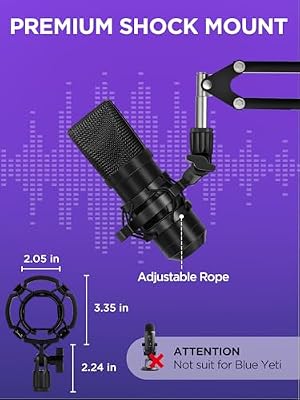
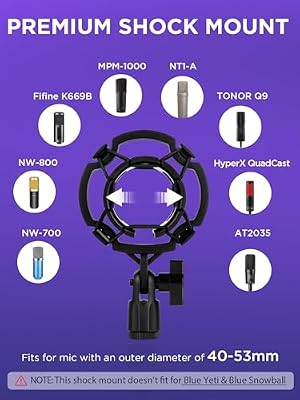
This boom arm stands out for including a shock mount, a windscreen, and a pop filter, per the listing. It names Blue Yeti, HyperX QuadCast S, SoloCast, Snowball, and Fifine K669B compatibility. It is the pick if you want accessories in one box rather than buying them separately. Beginners who have not bought a pop filter yet save time and shipping hassle with a bundle like this. Experienced users may already own better accessories and would pay for duplicates.
- Strength: shock mount, windscreen, and pop filter included.
- Strength: broad compatibility list.
- Trade-off: bundled extras may not suit every mic design.
Skip it if you already own a shock mount and pop filter. It also pays to confirm the shock mount fits the diameter of your particular mic body.
Basics 14-Inch Boom Arm
A 14 inch adjustable boom arm for standard microphones with adjustable tension, a pop filter, and a windscreen. It is meant for everyday desks and simple voice chat. The shorter length keeps it compact, and the tension control helps hold lighter mics in place. It is a sensible starter for voice chat, school calls, or a modest home setup, while serious streamers will outgrow the reach sooner. Tighten the tension knob gradually so the arm stays put without strain.
- Strength: adjustable tension and a bundled pop filter.
- Strength: simple design for standard mics.
- Trade-off: a 14 inch length gives limited reach.
Skip it if your desk is deep and you want a longer arm.
Which One Fits Your Situation
A tight desk under a monitor
The FIFINE BM88 or the InnoGear Low Profile 360 keeps the mic close to the desk surface and out of the line of sight.
A streamer with a camera on
The InnoGear Arm with Cable Management hides the cord, which keeps the shot clean.
A beginner who needs accessories
The InnoGear Stand with Shock Mount includes a pop filter and windscreen, so there are fewer separate purchases.
A small desk with a simple USB mic
The Basics 14-Inch Boom Arm is compact and uncomplicated.
Common Mistakes
- Ignoring the weight limit when adding a shock mount.
- Choosing an arm with the wrong thread size and no adapter.
- Clamping to a thin or glass desk without checking clamp range.
- Leaving the cable loose so it knocks against the arm.
- Placing the mic too far from your mouth and raising the gain.
Related guides
- Logitech G Pro X 2 Vs Steelseries Arctis Nova Pro Wireless
- Travel Controller Case For 8Bitdo Ultimate Series
- Gaming Pc Under 600 For Roblox And Minecraft
Frequently Asked Questions
Does a boom arm improve audio quality?
It lets you place the mic closer to your mouth and away from keyboard noise, which usually improves clarity. Distance matters more than most settings, since a mic a few inches from your mouth needs less gain and picks up less room echo.
What thread size does my mic use?
Many mics use 3/8 or 5/8 inch threads. Most arms here include an adapter for that reason.
Can I use one with a heavy XLR microphone?
Only if the arm states a capacity above the combined weight of the mic and mount.
Are scissor arms better than boom arms?
Neither is universally better. Scissor arms move smoothly, while straight booms often fit tighter spaces.