🛒 Best Price Today on Amazon
Prime members get fast, free shipping on everything above, plus member-only deals. New members get a 30-day free trial — cancel anytime.
- Best Cherry MX Keyboards at a Glance
- Cherry MX Switch Colors Explained
- Cherry MX vs Clone Switches
- Budget Picks
- Mid-Range Picks
- Premium Picks
- Best MX Red Keyboards
- Best MX Brown Keyboards
- Best MX Blue Keyboards (and Best Keyboards for Blues)
- Pick X If… Decision Table
- Fit, Size and Compatibility Notes
- Alternatives to Consider
- How to Choose Between Red, Brown and Blue
- Frequently Asked Questions
Updated November 2026 – The best Cherry MX keyboards for most gamers are the Corsair K70 RGB Pro (MX Speed Silver) for competitive play, the Ducky One 3 for typing and tinkering, the Leopold FC660M for a quiet compact board, and the Das Keyboard Model S Professional for office desks that favor Blue or Brown switches.
If you are searching for the best Cherry MX keyboards, the real question is which switch color and which layout fit how you play and type. Cherry MX is a switch family made by Cherry, and several brands buy it for their boards. Because many makers also sell versions with their own or third-party switches, always read the exact switch line on the product page before buying. This guide covers current boards that the makers list with genuine Cherry MX options, explains Red, Brown, Blue, Silent and Speed switches, and answers the long-tail questions buyers ask, such as the best MX Red, MX Brown and MX Blue keyboards.
Best Cherry MX Keyboards at a Glance
| Keyboard | Best for | Layout | Cherry MX options (maker lists) | Limits |
|---|---|---|---|---|
| Corsair K70 RGB Pro | Competitive FPS | Full size | MX Speed Silver (1.2 mm actuation per reviewers) | Wired only; software-driven lighting |
| Corsair K95 RGB Platinum XT (previous generation) | Macro-heavy gaming and MMOs | Full size plus macro column | MX Speed, Blue or Brown variants (varies by region) | Large footprint; older design |
| Ducky One 3 | Typing and customizing | Full, TKL, SF 65%, Mini 60% | Several MX colors (varies by sku) | Wired; no wireless on the One 3 line per reviewers |
| Das Keyboard Model S Professional | Office and writing | Full size | Blue or Brown per reviewers | Plain looks; premium tier |
| Leopold FC660M | Quiet compact desk | 65% | Cherry MX, PBT keycaps (maker and reviewers) | Limited extras; no per-key lighting |
| Leopold FC900R | Classic TKL | Tenkeyless | Cherry MX options | Basic features; model variants differ |
| Varmilo (Minilo or VA series) | Looks and keycap art | Compact and TKL | Cherry MX on selected skus | Many skus use other switches; read the listing |
| Cherry MX Board 3.0 S | Straightforward all-round | Full size | The maker’s own MX switches | Few bells and whistles |
| Cherry Xtrfy K5V2 Compact | Small gaming board | Compact 65% | Cherry MX Red or similar per maker | Fewer media keys |
Cherry MX Switch Colors Explained
Cherry MX colors describe how a key feels and sounds. The maker’s own switch guide lists these as the common families, and most keyboard makers use the same color language.
- MX Red: linear, no bump, no click. Popular for gaming because presses feel smooth and repeat quickly. The maker lists a light actuation force of around 45 cN.
- MX Brown: tactile, with a small bump you feel but do not hear as a click. A common compromise between typing and gaming.
- MX Blue: tactile and clicky, with an audible click. Typists often like it, but it is loud for shared rooms and noisy on voice chat.
- MX Silent Red and Silent Black: linear with internal dampening, so the bottom-out and return sound is reduced.
- MX Speed Silver: a linear switch with a shorter actuation point, 1.2 mm according to Cherry and reviewers, aimed at fast reaction games.
- MX Black and MX Clear: heavier switches. Black is linear; Clear is tactile with a firmer bump.
Exact force and travel numbers differ by switch revision, so use the figures on the keyboard’s own spec sheet when comparing.
Cherry MX vs Clone Switches
A genuine Cherry MX switch carries the Cherry name and is sold as such by the keyboard maker. Clones from other manufacturers, including Gateron, Kailh and Outemu, use a compatible stem and often a similar color scheme, so a “red” clone looks the same on paper. Reviewers report that the differences are mostly in smoothness, sound and consistency, and that clones can be excellent or poor depending on the batch. Cherry’s own patent on the cross-shaped stem expired years ago, which is why compatible keycaps and clone switches are so common.
The practical rule is simple. If the product page says “Cherry MX”, the maker is stating that the board uses genuine switches. If it says “mechanical switches” or lists a house brand, you have no stated Cherry switch. Some makers sell the same keyboard in both versions, so read the exact variant name.
Budget Picks
Cherry Xtrfy K5V2 Compact – Best for a small gaming board
Specs: 65% compact layout · Cherry MX switch options as the maker lists · wired USB · per-key RGB as listed by the maker. The Xtrfy brand is owned by Cherry, so this is a Cherry-branded gaming line. Reviewers who cover small boards point to the compact layout as the main reason to choose it, since it frees mouse space for low-sensitivity play. Check which switch the specific listing includes, because the line has had several variants.

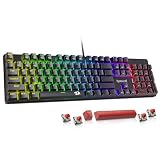
Cherry K5V2 RGB Compact 65 Wired Gaming Mechanical Keyboard - White
Included for 'Best Cherry MX Keyboards in 2026 (Red, Brown, Blue, Silent and Speed Switches)' as a representative home product in this roundup; selection reflects the product set returned for this topic.
View on AmazonCherry MX Board 3.0 S – Best for a no-fuss full-size board
Specs: full size · Cherry MX switches · wired USB · basic backlight. A Keyblink roundup names it the best all-round Cherry board, and the appeal is the lack of extras: no companion app, no macros, just a standard layout with the maker’s own switches. It suits office desks and players who want a dependable keyboard rather than a showpiece. If you plan to swap keycaps, confirm the stem type, which is standard MX on most boards of this kind.

Cherry MX 3.0S, Wired Mechanical Gaming Keyboard, Robust Aluminum Housing, RGB-Lighting, Full Key Rollover, Anti Ghosting, MX RED Switches, White
Included for 'Best Cherry MX Keyboards in 2026 (Red, Brown, Blue, Silent and Speed Switches)' as a representative home product in this roundup; selection reflects the product set returned for this topic.
View on AmazonMid-Range Picks
Corsair K70 RGB Pro – Best for competitive FPS
Specs: full size · Cherry MX Speed Silver (maker lists) · 1.2 mm actuation per reviewers · aluminum top plate · iCUE software · wired. Reviewers describe it as the standard gaming pick in the K70 family, with a rigid frame and plenty of lighting control. Corsair also sells other K70 models with different switches, including its own, so look for the “Cherry MX” text in the listing. The Speed Silver switch is fast, but fast switches register accidental touches, so players with a resting finger habit sometimes prefer MX Red.
Ducky One 3 – Best for typing and tinkering
Specs: full, TKL, SF 65% and Mini 60% options · Cherry MX switch options on selected variants · hot-swap PCB on some models per reviewers · PBT keycaps · wired. Reviewers frequently name the One 3 as the best mid-range typing board. Ducky offers many sizes, which helps readers hunting for a “best MX Brown keyboard” in 60% or 65%. Hot-swap sockets, where fitted, let you change switches later without soldering, which makes the board a good learning platform.

Ducky One 3 Mechanical Gaming Keyboard, Cherry MX Brown, RGB | Mechanical gaming keyboard with hot-swappable switches, RGB backlight
Included for 'Best Cherry MX Keyboards in 2026 (Red, Brown, Blue, Silent and Speed Switches)' as a representative home product in this roundup; selection reflects the product set returned for this topic.
View on AmazonLeopold FC660M – Best for a quiet compact desk
Specs: 65% layout · Cherry MX switches · PBT doubleshot keycaps · sound-dampening pads per Gavler · wired USB. The FC660M is a long-running favorite of office and keyboard-community buyers. It has no per-key lighting and no software, which is part of the charm. Because it is compact, check that you can live without a dedicated function row; layers cover those keys.

Leopold x MK FC660M Vapor 65% Double Shot PBT Mechanical Keyboard (Cherry MX Brown)
Included for 'Best Cherry MX Keyboards in 2026 (Red, Brown, Blue, Silent and Speed Switches)' as a representative home product in this roundup; selection reflects the product set returned for this topic.
View on AmazonLeopold FC900R – Best for a classic tenkeyless layout
Specs: tenkeyless · Cherry MX switch options · PBT keycaps on most variants · wired. Frontum ranks Leopold’s FC900RBT V2 as its top Leopold at the time of writing, and the wired FC900R is the straightforward sibling. Variants differ in connectivity and key legends, so confirm whether you are looking at wired or Bluetooth.

Leopold FC900R PD 104KEYS HIG-END Mechanical Keyboard Cherry MX Switch (Blue Switch, Grey/Blue)
Included for 'Best Cherry MX Keyboards in 2026 (Red, Brown, Blue, Silent and Speed Switches)' as a representative home product in this roundup; selection reflects the product set returned for this topic.
View on AmazonPremium Picks
Das Keyboard Model S Professional – Best for typing in the office
Specs: full size · Cherry MX Blue or Brown per reviewers · minimal design · wired USB with a hub on some versions. Reviewed.com describes it as expensive but well built. It sits at the premium end because of the build and the plain, long-lasting style rather than gaming features. Blue suits solo desks; Brown is the more neighbor-friendly choice.
Corsair K95 RGB Platinum XT – Best for macros and MMOs (previous generation)
Specs: full size with six macro keys · Cherry MX Speed, Blue or Brown depending on region · aluminum frame · wrist rest. The K95 line has moved on, so treat this one as a previous-generation board that may remain on shelves. It is mentioned here for readers who want dedicated macro keys with genuine MX switches. Newer K95 designs may use different switch types, so check the product page.
Varmilo Minilo and VA series – Best for looks and keycap art
Specs: compact and TKL sizes · Cherry MX on selected skus · PBT dye-sublimated keycaps in themed sets · wired, with some wireless versions. One roundup describes Varmilo as the maker of the most visually striking production keyboards, and Frontum picks the Minilo98 Pro as its best Varmilo. Varmilo also sells boards with its own switches, so confirm “Cherry MX” in the listing before ordering.

Varmilo Minilo VXH67 Eucalyptus 65% Wired Hotswap White LED Mechanical Keyboard Kailh Prestige Red
Included for 'Best Cherry MX Keyboards in 2026 (Red, Brown, Blue, Silent and Speed Switches)' as a representative home product in this roundup; selection reflects the product set returned for this topic.
View on AmazonBest MX Red Keyboards
The best MX Red keyboards are those that pair the smooth linear switch with a firm case: the Cherry Xtrfy K5V2, the Cherry MX Board 3.0 S in Red form, and the Ducky One 3 in an MX Red variant. MX Red is quiet compared with Blue, and it is the traditional gamer switch for rapid double taps. The trade-off for typists is that there is no tactile bump, so some people bottom out every key and end up with more finger fatigue. A good foam-padded case reduces the hollow sound that linear switches can reveal.
Best MX Brown Keyboards
For MX Brown, look at the Ducky One 3, Das Keyboard Model S Professional (Brown version) and Leopold boards with Brown switches. Brown is the middle path: a small tactile bump tells you where the key actuates, but there is no click. Reviewers often name it as the safest first Cherry purchase for someone who both games and writes. It is less specialized than Red or Blue, which is the reason it is easy to live with.
Best MX Blue Keyboards (and Best Keyboards for Blues)
For readers searching for the best MX Blue keyboards or the best keyboards for blues, the Das Keyboard Model S Professional (Blue version) and Corsair K95 RGB Platinum XT (Blue option, where sold) are the cleanest fits among the boards above. Blue gives a crisp click and a clear tactile point, which many typists enjoy. It is loud, so reconsider it if you share a room, stream with a sensitive microphone or play on voice chat. If you want the Blue feel at lower volume, a Brown or an MX Silent variant is the usual alternative.
Pick X If… Decision Table
| Pick this | If you want… |
|---|---|
| Corsair K70 RGB Pro | Fast switches, a sturdy frame and full lighting software for shooters |
| Ducky One 3 | A choice of sizes, good keycaps and the option to swap switches later |
| Leopold FC660M | A quiet, compact 65% board without gaming extras |
| Leopold FC900R | A classic TKL layout with a long reputation |
| Das Keyboard Model S Professional | A long-lasting office keyboard with Blue or Brown switches |
| Varmilo Minilo or VA | Distinct visual design and printed keycaps |
| Cherry MX Board 3.0 S | A plain full-size keyboard from the switch maker |
| Cherry Xtrfy K5V2 Compact | A small gaming board with extra mouse room |
| Corsair K95 RGB Platinum XT | Dedicated macro keys and genuine MX switches in a previous-generation design |
Fit, Size and Compatibility Notes
- Layout: full size has a number pad; TKL drops it; 65% keeps arrows but removes the function row; 60% removes arrows too. Smaller layouts rely on function layers, so check that your most-used shortcuts remain reachable.
- Connection: the boards in this guide are mostly wired. Wireless Cherry MX boards exist, but the battery and Bluetooth claims vary by maker, so read the specification of the exact model.
- Operating systems: gaming boards are built for Windows first. Software such as iCUE is Windows-focused, while many typing boards work on macOS and Linux as plain USB keyboards. Look for a stated Mac layout or key legends if you use macOS.
- Keycaps: Cherry MX has a standard stem, so most aftermarket keycaps fit, but bottom-row sizes differ by layout.
- Warranty: hot-swapping and lubing may affect warranty terms; read the maker’s policy first.
Alternatives to Consider
- Keychron boards with Gateron or Keychron switches: Reviewers often cite Keychron for value. They are not genuine Cherry MX unless the maker states it, but they give you wireless options and macOS support.
- Optical or magnetic-switch gaming boards: Makers such as Corsair, Wooting and Razer sell boards with adjustable actuation for esports. They are a different technology to MX but suit readers who care most about reaction time.
- Gateron or other hot-swap boards: If your goal is a particular feel rather than the Cherry name, a hot-swap board lets you try several switches.
How to Choose Between Red, Brown and Blue
Start with where the keyboard lives. In a shared room, choose Silent Red, Brown or a quieter linear. At a private desk, Blue is fine. Next, think about the main task. If it is gaming, Red or Speed Silver; if it is mixed use, Brown; if it is heavy typing, Brown or Blue. Finally, choose the layout. A keyboard you can fit comfortably with a mouse beats a perfect switch on an oversized board. Reviewers repeatedly note that the case, plate and keycaps influence the feel as much as the switch does, so judge the whole keyboard rather than the colour alone.
Frequently Asked Questions
What are the best Cherry keyboards for gaming?
The Corsair K70 RGB Pro with MX Speed Silver and the Cherry Xtrfy K5V2 Compact are good places to start. Both use Cherry switches and target fast play. Pick the compact board if you want extra mouse space.
Are MX Red keyboards better than MX Brown for gaming?
MX Red is usually preferred for fast repeated presses because it has no tactile bump. MX Brown works well if you also type a lot. The difference is small, and many players choose by feel rather than performance.
Are MX Blue keyboards too loud for gaming?
MX Blue produces an audible click on each press, which a headset microphone can pick up. It suits private desks and typists. If you stream or share a room, a Brown or Silent switch is quieter.
How can I tell whether a keyboard has genuine Cherry MX switches?
Look for the words “Cherry MX” and the color name in the maker’s specification, not just in the marketing text. You can also remove a keycap and read the switch housing, which is stamped with Cherry on genuine switches. If the listing only says “mechanical switches”, assume it is not a stated Cherry part.
Is Cherry MX better than Gateron or Kailh clones?
Not always. Reviewers report that quality depends on the specific switch model and the factory tuning. Cherry MX has a long consistency record, while clones can feel smoother or cheaper depending on the line. Judge the keyboard as a whole.
What is the best Cherry MX keyboard for typing?
The Ducky One 3, Leopold FC660M and Das Keyboard Model S Professional are frequent picks for typing. Choose Brown for a bump without a click, or Blue if the noise is acceptable. A PBT keycap set and a rigid case often matter as much as the switch.