🛒 Best Price Today on Amazon
Prime members get fast, free shipping on everything above, plus member-only deals. New members get a 30-day free trial — cancel anytime.
The best flight simulator push pull throttle controller brings Cessna-style engine management to a home cockpit using physical knobs instead of conventional quadrant levers. These controls often include separate throttle, propeller, and mixture axes, with some models offering vernier-style fine adjustment. This guide compares six real configurations for Microsoft Flight Simulator, X-Plane, and other compatible PC flight simulators.
Quick Verdict
Best Overall: Honeycomb Sierra TPM Module. Its combination of vernier-style engine controls, trim wheel, flaps, and parking-brake functions makes it a versatile solution for general aviation.
Best Value: Flight Sim Stuff True Vernier TPM. A dedicated three-axis push-pull controller with twist-to-fine-adjust propeller and mixture controls.
Best for Cessna 152 Training: Project-X GA Sim Controls Throttle Quadrant. Its available throttle-and-mixture configurations make it attractive for aircraft that do not have a constant-speed propeller.
Best Premium: Virtual Fly TPM V3RNIO Plus. A specialist product for pilots who prioritize realistic physical engine-control interaction.
Quick Comparison Table
| Product | Push-Pull Controls | Extra Functions | Best For |
|---|---|---|---|
| Honeycomb Sierra TPM | Throttle, prop, mixture | Trim, flaps, parking brake | Best overall |
| Flight Sim Stuff True Vernier TPM | Throttle, prop, mixture | Vernier fine adjustment | Value |
| Flight Sim Stuff TPM with Flaps | Throttle, prop, mixture | Flap switch | General aviation |
| Project-X GA Sim Controls | Configurable TPM variants | Optional carb heat and flaps | Aircraft matching |
| SIMMAX TPM Single Engine | Throttle, prop, mixture | Adjustable friction | Cockpit panels |
| Virtual Fly TPM V3RNIO Plus | Throttle, prop, mixture | Premium vernier implementation | Enthusiasts |
How We Selected These Controllers
We selected controllers with physical push-pull axes rather than ordinary sliding or pivoting throttle levers.
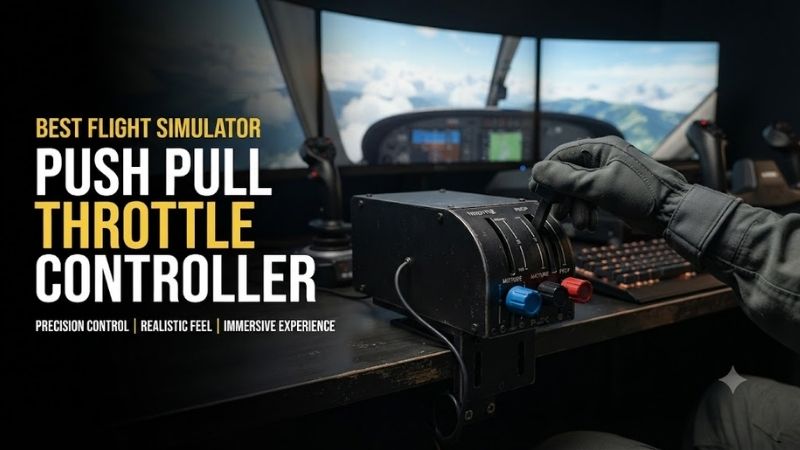
That distinction is important because users searching for a Cessna-style throttle generally want black, blue, and red control knobs representing throttle, propeller pitch, and mixture.
We also examined true vernier adjustment, since twisting a control for fine movement is different from simply pushing or pulling a friction-based rod.
Manufacturer documentation confirms these differences across Flight Sim Stuff configurations, and broader 2026 comparisons identify Honeycomb Sierra, SIMMAX, and Virtual Fly as relevant alternatives.
Detailed Product Recommendations
1. Honeycomb Sierra TPM Module — Best Overall
Best For: General aviation pilots who want engine controls and several additional cockpit functions in one unit.
Why We Picked It: The Sierra combines push-pull engine controls with physical trim, flap, and parking-brake controls.
Key Specifications
-
Three engine-control axes
-
Vernier-style throttle, propeller, and mixture controls
-
Adjustable trim wheel
-
Flap lever
-
Parking-brake control
-
PC and Mac compatibility
-
USB connection
Features and Practical Performance
The main advantage is consolidating common general aviation controls into one product.
For a Cessna-style aircraft, pilots can adjust throttle, propeller, and mixture without using keyboard shortcuts.
The trim wheel provides another frequently used physical control.
This is particularly useful during approach and cruise because small trim corrections reduce continuous pressure on the yoke.
The flap and parking-brake controls also make the Sierra more complete than a basic three-axis TPM controller.
Pros: Broad general aviation functionality, realistic engine-control layout, integrated trim.
Cons: Larger mounting requirements, unnecessary extra functions for very simple aircraft.
Buy If: You want a comprehensive Cessna-inspired engine-control panel.
Skip If: You only need a single throttle axis.
2. Flight Sim Stuff True Vernier TPM — Best Value
Best For: Pilots who want a traditional throttle-propeller-mixture layout with fine-adjustment controls.
Why We Picked It: Flight Sim Stuff offers genuine push-pull operation for all three axes and vernier-style twist adjustment for propeller and mixture.
Key Specifications
-
Three push-pull axes
-
Fine-adjustment twist mechanism for propeller and mixture
-
Throttle locking nut
-
Desktop mount
-
10-foot USB cable
-
Mainly 3D-printed ABS construction
-
PC and compatible Mac simulation support
Features and Practical Performance
The vernier feature is the most important difference from a basic push-pull controller.
A pilot can push or pull to make a larger adjustment and rotate the control for finer changes.
That is useful when setting a constant-speed propeller or refining the fuel mixture during cruise.
The throttle locking mechanism also helps maintain a selected position.
The trade-off is construction. The housing uses 3D-printed materials rather than a fully machined metal enclosure.
Pros: Authentic control concept, desktop mounting, practical USB compatibility.
Cons: Printed construction, no integrated flap or trim controls.
Buy If: You want realistic TPM interaction without a large integrated cockpit module.
Skip If: You require a full-metal premium assembly.
3. Flight Sim Stuff TPM with Flaps — Best for Added Flap Control
Best For: Pilots who want three engine controls and a dedicated flap switch.
Why We Picked It: This configuration adds a momentary flap control to the company’s vernier TPM layout.
Key Specifications
-
Three push-pull axes
-
Vernier propeller and mixture adjustment
-
Throttle friction lock
-
Momentary flap switch
-
Desktop mounting option
-
USB connection
-
PC and compatible Mac support
Features and Practical Performance
The flap switch provides a useful physical input during takeoff and landing.
Instead of looking for a keyboard shortcut, the pilot can move the switch to command the next flap position.
The switch automatically returns to its center position.
That behavior is different from a maintained lever and needs appropriate simulator mapping.
The product otherwise retains the main advantages of the standard Flight Sim Stuff TPM configuration.
Pros: Dedicated flap input, authentic push-pull axes, simple desktop mounting.
Cons: No integrated trim wheel, largely the same engine-control mechanism as the basic version.
Buy If: You regularly fly aircraft with discrete flap settings.
Skip If: You already own a dedicated flap-control panel.
4. Project-X GA Sim Controls Throttle Quadrant — Best Configurable Choice
Best For: Pilots who want engine controls matching a specific training aircraft.
Why We Picked It: Project-X offers multiple physical configurations rather than requiring every buyer to purchase a three-axis TPM layout.
Key Specifications
-
Available throttle and mixture configurations
-
Optional propeller control
-
Optional carburetor-heat control
-
Optional flap control
-
Windows PC compatibility
-
Support for Microsoft Flight Simulator, X-Plane, Aerofly FS, and Prepar3D
Features and Practical Performance
A Cessna 152-style aircraft generally needs throttle and mixture controls, while a complex single-engine aircraft may also require propeller pitch.
Project-X allows buyers to select an arrangement that better reflects the intended aircraft.
This can reduce unused controls and make the cockpit more visually consistent.
However, the available configurations should not be treated as interchangeable after purchase.
Buyers need to select the actual hardware arrangement required by their aircraft.
Pros: Aircraft-specific configurations, dedicated push-pull design, several supported simulators.
Cons: Configuration selection requires care, not a universal solution for every aircraft.
Buy If: You want a panel tailored to a particular general aviation aircraft.
Skip If: You frequently switch between widely different engine-control layouts.
5. SIMMAX TPM Single Engine Throttle — Best Adjustable Friction Option
Best For: Home cockpit builders seeking a dedicated three-axis engine-control panel.
Why We Picked It: SIMMAX provides separate push-pull engine controls with individually adjustable friction.
Key Specifications
-
Three axes: Throttle, propeller, mixture
-
Adjustable friction for each control
-
Aluminum control tubes
-
Aluminum base plate
-
Printed enclosure components
-
Optional suction-cup mounting arrangement
Features and Practical Performance
The adjustable resistance is particularly useful because different pilots prefer different levels of force.
A very loose control can make precise adjustments difficult.
An excessively stiff control can require too much effort for small changes.
SIMMAX allows users to adjust the feel of each axis separately.
The product also provides the familiar black, blue, and red engine-control layout.
Pros: Adjustable friction, dedicated TPM design, suitable for cockpit integration.
Cons: Some printed components, mounting stability depends on installation.
Buy If: You value control resistance adjustment and a conventional engine-panel layout.
Skip If: You require fully metal construction throughout.
6. Virtual Fly TPM V3RNIO Plus — Best Premium Option
Best For: Serious general aviation enthusiasts building a dedicated home cockpit.
Why We Picked It: Virtual Fly offers a specialist vernier TPM product aimed at more demanding simulation installations.
Key Specifications
-
Product: TPM V3RNIO Plus
-
Three general aviation engine controls
-
Push-pull and vernier-style control interaction
-
Dedicated cockpit-oriented construction
-
Computer flight simulator compatibility
-
Permanent or semi-permanent mounting arrangement
Features and Practical Performance
The V3RNIO Plus is appealing to pilots who want to practice engine management using a more elaborate physical interface.
Compared with a conventional throttle quadrant, it more closely represents aircraft using separate push-pull engine controls.
Its specialist design makes sense for dedicated training-style setups.
However, premium construction does not automatically improve simulated aircraft performance.
The practical benefit comes from realistic physical control interaction and consistent calibration.
Pros: Specialist design, realistic TPM control layout, suitable for high-end cockpits.
Cons: Premium cost, more specialized mounting requirements.
Buy If: You want a dedicated premium push-pull throttle system.
Skip If: You primarily fly Airbus or Boeing airliners.
Buying Guide: Choosing a Push-Pull Throttle Controller
Understand Throttle, Propeller, and Mixture
Throttle controls engine power.
Propeller control changes the governor setting in aircraft equipped with a constant-speed propeller.
Mixture manages the fuel-air mixture where the simulated aircraft models that function.
Not every aircraft uses all three controls.
Choose True Vernier or Basic Push-Pull
A basic push-pull mechanism moves the control directly along an axis.
A true vernier arrangement provides fine adjustment through rotation.
This can make small changes easier, especially during cruise.
However, true vernier functionality adds mechanical complexity.
Match the Controller to the Aircraft
A Cessna 152-style cockpit typically needs throttle and mixture controls.
More complex general aviation aircraft may need throttle, propeller, and mixture.
Some aircraft also use carburetor heat.
Choose a physical layout that matches what you fly most frequently.
Check Mounting Depth
Push-pull rods need space to move.
A controller may occupy little desk width but still require additional clearance behind the panel.
Measure the desk, mounting location, and available cable space.
Configure Axis Calibration
Calibrate each input from its minimum to maximum position.
Check that the simulator recognizes the correct movement direction.
If pushing the throttle forward decreases power, reverse the assigned axis in the simulator settings.
Avoid Treating Every Controller as Universal
PC-compatible USB controls do not necessarily work on Xbox.
A panel may also require aircraft-specific binding for mixture cutoff, propeller feathering, or flap commands.
Review the exact platform and aircraft requirements.
Frequently Asked Questions
Is a push-pull throttle better than a lever quadrant?
It is more realistic for aircraft that use push-pull engine controls. Lever quadrants are more appropriate for many multi-engine and airliner configurations.
What does TPM mean?
TPM commonly stands for throttle, propeller, and mixture.
Do I need a propeller control for a Cessna 152?
Typically not for a standard fixed-pitch propeller arrangement.
Can a push-pull throttle work in Microsoft Flight Simulator 2024?
Yes, where the hardware is supported and the axes are configured correctly.
Can I use a vernier controller with X-Plane?
Many PC-compatible USB TPM controllers can be used with X-Plane after appropriate mapping.
Conclusion
The Honeycomb Sierra TPM Module is the strongest overall recommendation among the best flight simulator push pull throttle controller options for pilots seeking several general aviation controls in one unit. Flight Sim Stuff offers practical vernier-style alternatives, Project-X provides aircraft-specific configurations, and Virtual Fly targets premium cockpit installations. Choose based on the aircraft’s engine-control layout, mounting clearance, fine-adjustment requirements, and supported simulator.