🛒 Best Price Today on Amazon
Prime members get fast, free shipping on everything above, plus member-only deals. New members get a 30-day free trial — cancel anytime.
- What each standard actually is
- Side-by-side comparison
- How each one behaves in everyday play
- Which device wants which mode
- Why most new games lean on XInput
- Wireless, dongles and mode switches
- Quick decision flow
- A worked example: do you need DirectInput?
- Mistakes players make
- When to stop troubleshooting
- Related guides
- Frequently asked questions
You plug in a controller, launch a game, and the sticks drive the menu while the jump button does nothing. Or the game says no controller detected while Windows shows one connected. Nine times out of ten that is XInput meeting DirectInput, two different ways Windows games read pads, and a quick mode change fixes it.
The short answer: pick XInput for current PC games and Xbox-style pads, pick DirectInput for flight and racing gear and for older titles that predate Xbox pads on PC. This explainer from the Editorial team draws on published API documentation and manufacturer manuals, and sets out the differences in plain terms, plus steps for fixing mismatches.
What each standard actually is
DirectInput arrived in the 1990s as a general interface for any input device. It does not define what a “button” or an “axis” means, so each controller reports its own layout and the game has to map it. That flexibility is why it suits oddball hardware: pedals, throttles, hat switches, wheels.
XInput came with the Xbox 360 era and standardized everything. It defines one pad: two sticks, two analog triggers, a D-pad, a set of face and shoulder buttons, and two rumble motors. A game that reads XInput never asks which controller you own. It just knows that button A is A. For developers that is easier, and for players it means less setup.
Side-by-side comparison
| Trait | XInput | DirectInput |
|---|---|---|
| Layout | Fixed Xbox-style pad | Device decides; games map manually |
| Axes and buttons | Two sticks, two triggers, about 10 buttons plus D-pad | Up to 8 axes and 128 buttons per device |
| Triggers | Two separate analog inputs | Often merged into one axis on Xbox pads |
| Rumble | Simple two-motor vibration | Richer force-feedback effects, if the device supports them |
| Number of devices | Up to four | No fixed cap of four |
| Best fit | Modern games, gamepads | Sticks, wheels, HOTAS, older titles |
| Microsoft status | Current, though newer APIs now exist | Deprecated but still supported |
The merged trigger point matters in racing games. On an Xbox pad read through DirectInput with a basic driver, the two triggers can share one axis, so throttle and brake fight each other. Under XInput they are independent.
How each one behaves in everyday play
With XInput the experience is plug and play. Menu prompts show correct button icons, rumble works, and the game does not ask you to bind every control. Most PC games released in the last decade treat XInput as the primary path for gamepads.
With DirectInput you often meet a binding screen. Games that support it offer a “configure controller” step, and some forget to save the choice. When a game has no DirectInput support, the pad simply is not seen, which explains the “controller connected but unrecognized” reports. Wrappers and input layers exist to translate one standard into the other, and launcher overlays can do the same.
Which device wants which mode
| Device or game type | Pick | Why |
|---|---|---|
| Xbox-style pad, current game | XInput | Fixed layout, rumble, separate triggers |
| PlayStation-style pad on PC | XInput via a translator, or native support | Many games expect Xbox prompts; check the game’s settings |
| Flight stick, throttle, rudder pedals | DirectInput | Needs more axes and buttons than XInput offers |
| Racing wheel with force feedback | DirectInput, or the maker’s driver | Force-feedback effects live here |
| Older game (pre Xbox-pad era) | DirectInput | Never learned XInput |
| Third-party pad with a mode switch | Start with XInput | Fall back if a specific game fails |
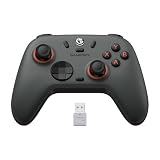
If you are still picking hardware, the 8BitDo and GameSir pad comparison shows how listings describe their PC connection options, and the Xbox controller comparison covers the pad most games assume.
Why most new games lean on XInput
A studio shipping on PC and Xbox wants one input path that behaves identically on both. XInput gives that: a known set of buttons, known dead-zone conventions and a known vibration call. Supporting DirectInput as well means writing a mapping UI, testing dozens of third-party layouts and answering support tickets about unusual hardware, so many teams skip it. Microsoft has since introduced newer input APIs, and launcher-level layers such as Steam Input can translate devices for games that only speak one standard. The practical result is that a pad speaking XInput, or a pad that a launcher can present as one, has the widest compatibility.
DirectInput survives because hardware with unusual shapes still depends on it. A throttle quadrant with a dozen toggles does not fit the Xbox template, and a driving wheel with a clutch pedal needs the extra axes. Those devices keep their own drivers and profiles, and many sims read them directly.
Wireless, dongles and mode switches
Wireless pads add a wrinkle. The same model may present as XInput over its dongle, as a generic DirectInput device over Bluetooth, and as something else again when wired. That is why “it worked yesterday” reports often trace back to a different connection method. Many third-party pads have a small slider or a button combination held while powering on to select Xbox, DirectInput or console modes. The names vary by maker, so use the manual rather than guessing.
When you read a product listing, look for the words “XInput”, “Windows support” or “PC mode” and for a list of supported platforms. A listing that only says “compatible with PC” without naming a mode leaves the question open, so check the maker’s documentation before buying. A pad that offers both modes gives you the most room to adapt to a stubborn game.
Quick decision flow
Run this sequence when a controller misbehaves. It takes about five minutes.
- Open the Windows game controller settings (the joy.cpl panel) and check whether the device shows up and responds.
- If the game says no controller, switch the pad to XInput mode (many third-party pads have a switch, or a button combination at power-on, explained in the manual).
- If buttons are misplaced, try the opposite mode, then re-bind inside the game.
- If the game still disagrees, add it to a launcher with controller-translation support and enable it for that title.
- Restart the game after every mode change; many titles read the device list once at startup.
A worked example: do you need DirectInput?
Assume a flight setup with one stick that has 3 axes, 1 hat switch and 14 buttons, one throttle with 2 axes and 12 buttons, and rudder pedals with 1 axis. That totals 6 axes and 26 buttons across three devices.
| Check | Setup total | One XInput pad offers | Result |
|---|---|---|---|
| Buttons | 26 | About 10 | Too many for XInput |
| Analog axes | 6 plus hat | 4 stick axes plus 2 triggers | Fits only by merging |
| Devices | 3 | Up to 4 slots total | OK, but each slot is a pad |
Conclusion: this rig needs DirectInput or the maker’s own driver. The numbers are assumed for the illustration, so substitute your own counts from the device manual.
Mistakes players make
- Switching modes while the game is open and expecting it to notice.
- Assuming a wired pad and a wireless pad use the same mode; a dongle can present a different mode from the cable.
- Forcing XInput on a device that needs DirectInput, which strips buttons.
- Leaving several controller-mapping layers running at once (a launcher overlay plus a manufacturer app), so two layers fight over the same device.
- Judging a pad by the box logo instead of its manual, where the supported modes are listed.
One more habit worth building: note which mode each of your controllers uses, ideally on a sticker under the battery cover or in a text file. When you return to a game months later, or reinstall Windows, that note saves a round of trial and error. Also keep manufacturer firmware current, since updates occasionally fix mode-switch bugs or add better PC support.
When to stop troubleshooting
If Windows does not show the controller at all in joy.cpl, even after trying another USB port and cable, the fault is hardware or the driver, not the mode. Try another PC. If it still fails, contact the maker with the model number, since the warranty often covers dead controllers. For stick drift or worn buttons, replacement is usually cheaper than repair. Wheels and flight gear should have the firmware checked on the maker’s support page before any replacement decision.
Related guides
- Logitech G Pro X 2 Vs Steelseries Arctis Nova Pro Wireless
- Travel Controller Case For 8Bitdo Ultimate Series
- Gaming Pc Under 600 For Roblox And Minecraft
Frequently asked questions
Which is better for PC gaming, XInput or DirectInput?
For modern PC games, XInput is the safer default because it uses a fixed Xbox-style layout that almost every current title expects, with working rumble and separate analog triggers. DirectInput is better for flight sticks, racing wheels and older games that never added XInput support. Better depends on the game and the device, not on one API winning overall.
Why does my controller work in one game but show wrong buttons in another?
The controller is probably presenting itself in a different mode than the game expects. A game built for XInput may ignore a DirectInput device or read its buttons in the wrong order, while an older game may only see DirectInput. Switching the controller’s mode, or routing it through a launcher’s input layer such as Steam Input, usually fixes the mismatch.
Can I use both modes at once?
A single controller reports one mode at a time, so you pick one per session. Some pads have a mode switch or a button combination at power-on to change it. A PC can have several controllers using different modes at the same moment, which is common when a gamepad and a flight stick are plugged in together.
Does DirectInput have more input lag?
There is no strong reason to expect a noticeable difference from the API alone. Lag usually comes from the connection type, polling interval, wireless dongle quality and the game’s own frame pacing. If you suspect delay, test the same controller wired in both modes and compare feel rather than assuming one API is slower.
Is DirectInput dead?
It is deprecated by Microsoft, yet still present in Windows and still used by many joysticks, wheels and older titles. New games tend to target XInput, newer Windows input APIs, or Steam Input. Hardware that depends on DirectInput features will keep working in most cases, but you may need a wrapper for newer games.