🛒 Best Price Today on Amazon
Prime members get fast, free shipping on everything above, plus member-only deals. New members get a 30-day free trial — cancel anytime.
A graphics card holder helps support the outer edge of a heavy GPU so the card does not droop over time. Modern triple-slot and oversized graphics cards can place significant leverage on the PCIe slot and motherboard. The best holders are stable, easy to adjust, compatible with your case, and discreet enough to preserve a clean build.
Quick Comparison Table
| Product | Best For | Key Advantage | Limitation |
|---|---|---|---|
| Cooler Master ARGB GPU Support Bracket | Best overall | Strong support with clean ARGB design | Requires compatible internal space |
| ASUS ROG Herculx | Premium gaming builds | Tool-free height adjustment | More expensive than simple stands |
| Lian Li GB-001 | Hidden support | Mounts directly to motherboard area | Less universal than floor stands |
| EZDIY-FAB GPU Support Bracket | Budget RGB builds | Adjustable with lighting | RGB wiring adds clutter |
| upHere Graphics Card Support | Best budget | Simple vertical anti-sag stand | Basic appearance |
| Thermalright GPU Support Bracket | Compact builds | Small adjustable footprint | Less decorative |
| DeepCool GH-01 A-RGB | Large gaming GPUs | Broad support arm and lighting | Takes more visual space |
Best Graphics Card Holder Picks
Cooler Master ARGB GPU Support Bracket
Best For: Builders who want strong anti-sag support with a polished gaming aesthetic.
Cooler Master’s ARGB GPU support bracket is designed to hold the outer edge of large graphics cards while adding coordinated lighting to the interior of the case. Rather than using a small vertical post, it uses a broader support structure that can be positioned beneath the GPU and adjusted to match different card heights.
Key Features:
- Adjustable GPU support position
- ARGB lighting
- Broad support surface
- Stable internal mounting
- Compatible with many mid-tower cases
- Designed for large graphics cards
- Clean gaming-oriented appearance
A wider support contact area can distribute pressure more evenly than a tiny post touching one point on the GPU shroud. That is useful with large cards because excessive point pressure on a plastic shroud or fan housing is something builders should avoid.
What Makes It Different: Cooler Master combines structural support with interior lighting, so the bracket looks like part of the build rather than an improvised prop. This is especially attractive in tempered-glass cases where every internal component remains visible.
Performance & Use Case: It works best in gaming towers with enough horizontal and vertical clearance around the graphics card. The bracket should support the shroud or frame without touching fan blades, and the GPU should remain level without being pushed upward excessively.
Pros:
- Strong visual integration
- Adjustable support
- Useful for heavy triple-slot GPUs
Cons:
- More expensive than basic stands
- ARGB cable adds another connection
Who Should Buy It: Choose the Cooler Master bracket if you want reliable anti-sag support that also contributes to the visual design of an RGB gaming PC.
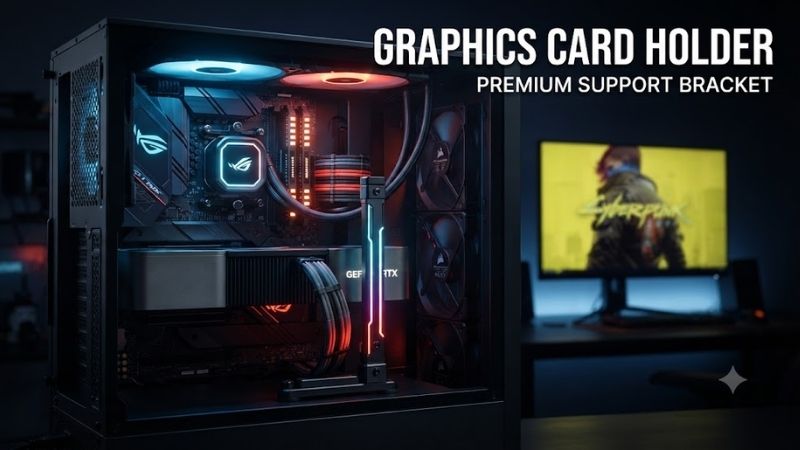
ASUS ROG Herculx Graphics Card Holder
Best For: Premium builds using oversized modern GPUs.
ASUS ROG Herculx is a highly adjustable graphics card holder designed for large GPUs. It uses a tool-free mechanism that allows height changes without repeatedly loosening small screws, and the broad support platform helps stabilize thick cards that extend far beyond the motherboard’s PCIe slot.
Key Features:
- Tool-free height adjustment
- Broad GPU support platform
- Integrated spirit-level feature
- ROG styling
- ARGB lighting
- Wide adjustment range
- Freestanding internal design
The ability to fine-tune height matters because GPU sag should be corrected gently. A holder that is too short provides no support, while one adjusted too high can bend the graphics card upward and place unnecessary force on the PCIe connector.
What Makes It Different: Herculx is designed as a premium accessory rather than a basic metal post. Its large adjustment mechanism, visual detailing, and integrated leveling aid make setup easier for builders who want precise alignment.
Performance & Use Case: It suits large RTX and Radeon cards that use thick heatsinks and long PCBs. The freestanding design also avoids tying the holder directly to the motherboard, which can make installation simpler in compatible cases.
Pros:
- Easy fine adjustment
- Excellent for large GPUs
- Premium appearance
Cons:
- Higher price
- Larger footprint than minimalist supports
Who Should Buy It: Choose Herculx if your graphics card is large, visible, and expensive enough that you want a premium support solution rather than the cheapest available bracket.
Lian Li GB-001 Anti-Sag Bracket
Best For: Builders who want anti-sag support hidden behind the graphics card.
Lian Li GB-001 takes a different approach from floor-standing GPU holders. Instead of adding a visible vertical post beneath the card, it mounts near the motherboard and provides support from a more concealed position. This can create a cleaner look in minimalist cases.
Key Features:
- Motherboard-area mounting
- Hidden support design
- Metal construction
- Adjustable support position
- Minimal visual footprint
- No floor-space requirement
- Designed for horizontal GPU mounting
A hidden mounting system is useful when the bottom of the case is occupied by intake fans, a radiator, or decorative components. Vertical post holders often need a clear section of the PSU shroud or case floor, while the GB-001 avoids that requirement.
What Makes It Different: The main advantage is visual discretion. Once installed, the support structure is much less noticeable than a freestanding pillar, allowing the graphics card to remain the visual focus.
Performance & Use Case: It works well in compatible ATX-style builds where the motherboard mounting area provides enough clearance. The exact fit depends more heavily on motherboard and case layout than a universal vertical stand, so compatibility deserves extra attention.
Pros:
- Very clean appearance
- Does not occupy case floor
- Strong metal construction
Cons:
- Less universal
- Installation is more involved
Who Should Buy It: Choose the GB-001 if you care about clean interior presentation and want anti-sag support that remains mostly hidden.
EZDIY-FAB GPU Support Bracket
Best For: Budget gaming builds that want RGB anti-sag support.
EZDIY-FAB offers GPU support brackets aimed at builders who want both structural support and lighting without paying premium-brand prices. Many versions use a vertical adjustable design with RGB or ARGB elements that can be coordinated with the rest of the case lighting.
Key Features:
- Adjustable vertical support
- RGB or ARGB versions
- Metal support structure
- Anti-sag design
- Wide case compatibility
- Simple installation
- Gaming-oriented appearance
The vertical post style is one of the easiest anti-sag solutions to understand. Position the base on a flat area beneath the graphics card, extend the support upward until it just contacts the GPU, and stop before applying noticeable upward pressure.
What Makes It Different: Value is the primary attraction. It provides a more decorative solution than generic metal posts while remaining accessible for budget and midrange gaming builds.
Performance & Use Case: It is suitable for long triple-fan graphics cards, particularly in cases with clear space on the PSU shroud. Builders should secure lighting cables away from GPU fans and verify that the support pad contacts a solid portion of the card.
Pros:
- Affordable
- Adjustable
- Adds RGB styling
Cons:
- Lighting adds cable clutter
- Finish quality may be simpler than premium models
Who Should Buy It: Choose an EZDIY-FAB bracket if you want visible anti-sag support and RGB lighting without spending heavily on a premium accessory.
upHere Graphics Card Support
Best For: Buyers who want a simple and inexpensive anti-sag solution.
upHere GPU support stands are among the simplest ways to stabilize a long graphics card. Typical designs use a vertical metal post with an adjustable support section, allowing the user to set the exact height needed beneath the outer edge of the card.
Key Features:
- Vertical support post
- Adjustable height
- Metal construction
- Small base footprint
- Simple installation
- No software or lighting
- Suitable for many tower cases
A basic mechanical design has several advantages. There are no lighting cables, controllers, moving electronics, or motherboard connections to manage. Installation can take only a few minutes if the case has a flat surface beneath the GPU.
What Makes It Different: Simplicity is the main strength. For builders who only care about preventing sag, a basic stand can perform the essential job without adding visual or electrical complexity.
Performance & Use Case: It is ideal for standard horizontal GPU installations where the card overhangs the PCIe slot. The small support head should be positioned carefully so it does not interfere with a fan or sit against a fragile plastic edge.
Pros:
- Very affordable
- Easy to install
- No extra cables
Cons:
- Basic appearance
- Requires a flat support surface
Who Should Buy It: Choose an upHere support if you want an inexpensive anti-sag fix and do not care about RGB lighting or premium styling.
Thermalright GPU Support Bracket
Best For: Compact and understated gaming builds.
Thermalright graphics card support brackets typically use a compact adjustable post design that focuses on function rather than lighting. This makes them useful in builds where space is limited or where the user wants the holder to remain visually subtle.
Key Features:
- Adjustable height
- Compact footprint
- Metal construction
- Anti-slip contact surfaces
- Simple mechanical operation
- No lighting
- Suitable for horizontal GPUs
A smaller base can be easier to fit between bottom-mounted fans, power-supply shrouds, and front-panel cables. This matters in cases where there is not enough open floor area for a large decorative support bracket.
What Makes It Different: Thermalright focuses on a minimalist form factor. There is little visual distraction, which works well in professional-looking or non-RGB systems.
Performance & Use Case: It provides enough support for many long graphics cards as long as it is positioned beneath a rigid section of the cooler. The small footprint can make alignment slightly more important than with wide platforms.
Pros:
- Compact
- Simple
- Easy to hide visually
Cons:
- Minimal styling
- Small support area requires careful positioning
Who Should Buy It: Choose a Thermalright support if you want a discreet solution for a case with limited open space beneath the graphics card.
DeepCool GH-01 A-RGB GPU Holder
Best For: Large gaming builds that want a broad illuminated support arm.
DeepCool GH-01 A-RGB uses a more substantial support design than a simple vertical pillar. It is intended to hold large graphics cards securely while also integrating addressable lighting into the interior of the case.
Key Features:
- Adjustable support structure
- ARGB lighting
- Broad GPU contact area
- Metal construction
- Designed for heavy graphics cards
- Cable-management capability
- Gaming-oriented appearance
The broader support mechanism can feel more secure with very long graphics cards because the bracket provides support across a wider section rather than balancing the card on a narrow post.
What Makes It Different: DeepCool combines structural support and cable presentation. In some builds, the bracket can help keep GPU power cables organized while also adding an illuminated visual element.
Performance & Use Case: It is best suited to mid-tower and full-tower gaming cases with enough internal space for the bracket body. Small cases may find it intrusive, especially if bottom fans or thick front radiators already reduce available clearance.
Pros:
- Broad support
- ARGB styling
- Useful for large GPUs
Cons:
- Takes more internal space
- Less subtle than minimalist supports
Who Should Buy It: Choose the GH-01 A-RGB if you want your anti-sag bracket to become part of the visual presentation rather than disappearing into the background.
Graphics Card Holder Buying Guide
Why GPU Sag Happens
Modern graphics cards are long and heavy because they use large heatsinks, multiple fans, metal backplates, and thick cooling assemblies. The rear I/O bracket and motherboard PCIe slot hold one end of the card, while the opposite end extends outward with much less structural support.
Over time, gravity can make the outer edge sit lower. A small amount of visible sag does not automatically mean the card is damaged, but significant movement can place unnecessary stress on the slot, PCB, cooler, and mounting hardware.
Choose the Right Holder Type
There are three common anti-sag approaches: vertical floor stands, motherboard-mounted brackets, and case-mounted support arms. Vertical stands are the most universal, while hidden motherboard brackets provide the cleanest appearance.
Case-mounted arms can provide excellent stability but depend heavily on chassis design. Choose the method that fits your internal layout rather than buying solely based on appearance.
Measure Available Height
A vertical graphics card holder must extend from the case floor or PSU shroud to the underside of the GPU. Measure this distance before buying, especially in compact cases.
A stand that cannot extend high enough is useless, while an oversized model may not retract enough to fit. Adjustable range matters more than the maximum advertised height alone.
Check the Base Surface
Magnetic bases work well when the PSU shroud or case floor is steel. Aluminum, glass, or plastic surfaces will not hold a magnet, so the stand must rely on rubber feet or another mounting method.
Make sure the base sits completely flat. A holder that rocks or rests on cable openings can shift when the case is moved.
Avoid GPU Fans
Never position a support pad directly beneath a spinning fan. The safest contact point is usually a rigid section of the cooler frame or shroud near the outer edge of the graphics card.
After installation, rotate each nearby fan gently by hand while the PC is off to confirm nothing touches the blades.
Do Not Overcorrect the Sag
The goal is to return the graphics card to a natural level position, not force the outer edge upward. Too much upward pressure can create stress in the opposite direction.
Raise the holder gradually until it just takes the weight of the card. A small bubble level can help, but visual alignment with the case or motherboard is usually sufficient.
Consider GPU Power Cables
Modern graphics cards often use thick power cables that bend near the card. These cables can either pull the GPU downward or push it upward depending on routing.
Adjust the cable first, then set the support height. Otherwise, the holder may be compensating for cable pressure rather than simply supporting the card’s weight.
Graphics Card Holder Types
Vertical GPU Support Stand
A vertical stand is the easiest option for most builds. It sits beneath the outer end of the graphics card and adjusts upward until it supports the cooler.
These stands are inexpensive, reusable, and compatible with many cases. Their main limitation is that they require a clear horizontal surface beneath the GPU.
Motherboard-Mounted Anti-Sag Bracket
Motherboard-mounted brackets attach near existing motherboard screws or expansion areas. They support the card without placing a post on the case floor.
This method creates a cleaner look but requires more installation work and may not fit every motherboard or graphics card combination.
RGB GPU Support Bracket
RGB brackets combine anti-sag support with lighting. They can match illuminated RAM, fans, coolers, and case strips, making the support look intentional.
The trade-off is an additional cable and controller connection. Builders focused on minimal wiring may prefer a plain metal support.
GPU Sag and PC Safety
Can GPU Sag Damage the Motherboard?
Severe sag can increase mechanical stress on the PCIe slot and surrounding motherboard area. Modern reinforced slots are designed to support graphics cards, but reducing unnecessary leverage is still sensible with especially large GPUs.
A holder is inexpensive compared with the graphics card and motherboard, making it a reasonable precaution in heavy builds.
Does GPU Sag Affect Performance?
Minor sag does not normally reduce frame rates or GPU performance. The issue is primarily mechanical rather than computational.
However, extreme movement could potentially affect connector seating or cooling alignment, so a visibly drooping heavy card should be supported even if the system currently works normally.
Do Small GPUs Need a Holder?
Short dual-fan graphics cards usually do not need one unless the cooler is unusually heavy. Long triple-fan and multi-slot cards benefit much more.
If the outer corner remains level after installation and does not move when cables are connected, a separate holder may provide little practical benefit.
FAQ
Is a Graphics Card Holder Necessary?
It is not mandatory for every graphics card, but it is useful for large and heavy GPUs that visibly sag. A support bracket reduces leverage on the PCIe slot and helps keep the card level. Smaller two-fan graphics cards often remain stable without additional support, especially when the case expansion screws are tightened properly.
Can a GPU Support Bracket Damage the Graphics Card?
Yes, if adjusted incorrectly. A bracket should gently support the GPU rather than force it upward. It should also contact a solid part of the cooler or shroud and never interfere with fan blades. Apply only enough pressure to remove visible sag and verify that the card remains fully seated in the PCIe slot.
Where Should a Graphics Card Holder Be Placed?
Place the support near the outer end of the GPU, where leverage is greatest. The contact point should be beneath a rigid section of the cooler assembly, not a fan. For vertical stands, ensure the base rests on a flat, stable surface and cannot slide into a fan or other moving component.
Are Magnetic GPU Supports Safe?
Yes. The small magnets used in support bases are not powerful enough to harm modern PC components under normal use. Their purpose is simply to keep the stand from sliding on a steel case surface. Magnetic bases will not attach properly to aluminum, glass, or plastic sections of the chassis.
Does a Vertical GPU Mount Need a Support Bracket?
A vertically mounted graphics card usually experiences less traditional downward sag because its weight is oriented differently. However, very heavy vertical mounts can still benefit from structural support depending on the bracket and riser design. Check the case manufacturer’s mounting recommendations before adding a separate support.
Can I Use Any Object to Support My GPU?
An improvised support can work mechanically, but purpose-built holders are safer because they are adjustable, stable, and designed for PC interiors. Loose objects can shift when the case moves, block airflow, touch fans, or create conductive contact. A proper anti-sag bracket is inexpensive and easier to position accurately.
Conclusion
The best graphics card holder depends on how much support, adjustment, and visual styling your build needs. Cooler Master offers a strong all-around ARGB solution, ASUS ROG Herculx suits premium heavy GPUs, Lian Li provides hidden support, while upHere and Thermalright deliver simple low-cost fixes. Whatever model you choose, support the card gently and avoid overcorrecting its position.