🛒 Best Price Today on Amazon
Prime members get fast, free shipping on everything above, plus member-only deals. New members get a 30-day free trial — cancel anytime.
- Computer Power Supply Parts Compared
- EMI Filter
- Rectifier and Active PFC Stage
- Primary Capacitors
- Switching MOSFETs
- Main Transformer
- Secondary Regulation and Output Capacitors
- Cooling Fan and Thermal Control
- Modular Connectors and Output Cables
- Protection Circuits Inside a PSU
- How Computer Power Supply Parts Work Together
- What Matters Most When Buying a Computer Power Supply?
- FAQ
- Conclusion
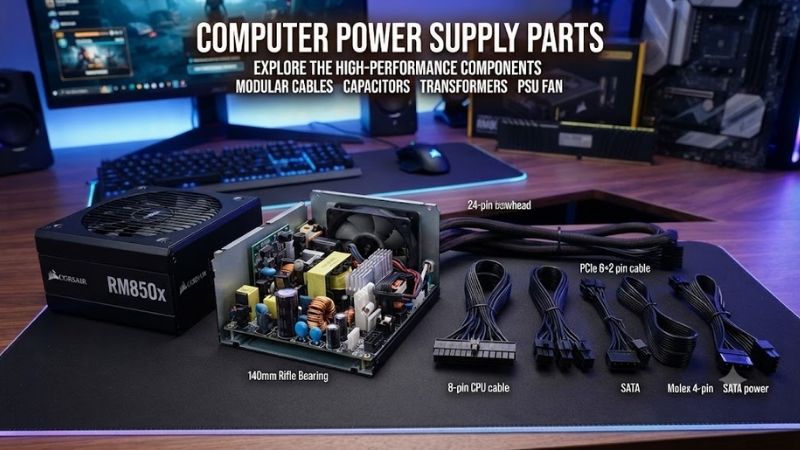
Computer power supply parts work together to convert wall AC electricity into stable DC power for the motherboard, CPU, graphics card, storage drives, and other hardware. Although a PSU looks simple from the outside, its internal design includes filtering circuits, switching components, transformers, capacitors, protection systems, cooling hardware, and output connectors.
Quick answer: Our top pick in 2026 is the Power Supply Part — our #1 rated choice. See the full ranked comparison, alternatives and buying advice below.
Computer Power Supply Parts Compared
A modern ATX power supply is a switching-mode power supply rather than a simple transformer. Electricity passes through several stages before reaching PC components. Each section has a specific job, from filtering incoming AC power to regulating 12V, 5V, and 3.3V outputs.
| Power Supply Part | Main Function | Why It Matters | Common Failure Effect |
|---|---|---|---|
| EMI Filter | Reduces electrical interference | Cleaner input and lower emissions | Noise or unstable operation |
| Rectifier and PFC Stage | Converts and conditions AC power | Efficiency and stable operation | PSU may fail to start |
| Main Capacitors | Store and smooth energy | Stable power delivery | Ripple or shutdowns |
| Switching MOSFETs | High-speed power switching | Controls conversion efficiency | Complete PSU failure |
| Transformer | Isolates and converts voltage | Creates usable output rails | No or incorrect output |
| Secondary Regulation | Produces stable DC rails | Protects PC components | Voltage instability |
| Cooling Fan | Removes internal heat | Extends PSU component life | Overheating and shutdown |
EMI Filter
Best For: Controlling electrical noise at the AC input
The EMI filter is one of the first sections electricity reaches after entering a computer power supply. EMI stands for electromagnetic interference, and this circuit is designed to reduce unwanted electrical noise traveling between the PSU and the mains power system.
A typical input filter contains components such as X capacitors, Y capacitors, common-mode chokes, and sometimes additional inductors. These parts work together to suppress high-frequency interference produced by the rapid switching inside a modern power supply.
Without adequate filtering, electrical noise generated inside the PSU could travel back through the power cable and potentially interfere with other electronic devices. External interference could also enter the PSU more easily and affect stable operation.
The filter does not increase the wattage available to the computer. Its purpose is power quality and electromagnetic compatibility. This makes it easy to overlook when comparing power supplies because marketing specifications usually focus on wattage, efficiency, and modular cables.
A quality PSU generally has a more complete input-filtering stage than an extremely inexpensive design. However, users cannot accurately judge filter quality by looking through a ventilation grille. Detailed reviews and electrical testing are more useful than exterior appearance.
Some power supplies also include a metal oxide varistor in this area. A MOV can help absorb certain short voltage spikes, although it should not be confused with the full surge protection offered by a properly designed surge protector or UPS.
What makes the EMI filter important is that it prepares incoming power before the more demanding conversion stages begin. Stable computer power starts long before electricity reaches the 12V output cable connected to the graphics card.
Key Components:
- X capacitors
- Y capacitors
- Common-mode chokes
- Inductors
- Surge-suppression components
- Input fuse
Pros:
- Helps reduce electrical interference
- Supports cleaner PSU operation
- Important for regulatory compliance
- Protects later circuitry from some disturbances
Cons:
- Does not correct every power-quality problem
- Difficult for consumers to evaluate directly
Use Case: Every ATX, SFX, and similar switching power supply used in a desktop computer.
Why It Matters: Good input filtering supports stable operation and reduces unwanted high-frequency electrical noise.
Rectifier and Active PFC Stage
Best For: Preparing incoming AC power for efficient conversion
After input filtering, the power supply must convert alternating current from the wall into direct current that its switching circuitry can process. A bridge rectifier normally performs the first major conversion, producing high-voltage DC from the incoming AC waveform.
Modern quality PC power supplies also use active power factor correction, commonly called active PFC. The PFC stage improves how efficiently the PSU draws current from the electrical grid and helps maintain a more suitable high-voltage DC bus for the main switching stage.
Power factor should not be confused with 80 PLUS efficiency. Efficiency describes how much input power becomes useful output power instead of heat. Power factor describes the relationship between voltage and current drawn from the mains.
The active PFC circuit normally uses power semiconductor devices, inductors, a controller, diodes, and large capacitors. This section can operate at hundreds of volts internally, which is one reason users should never open a PSU casually.
Most modern desktop power supplies support a wide AC input range automatically. Rather than using the old manual 115V/230V selector found on some historical designs, active PFC supplies can typically adapt across the supported input range without user adjustment.
Failure in the rectification or PFC stage can prevent the power supply from starting at all. In other cases, protection circuitry may detect abnormal conditions and immediately shut the PSU down before power reaches the computer.
What makes this section important is efficiency and consistency. Before the transformer and secondary circuits can create stable low-voltage outputs, the incoming AC must first be transformed into a controlled high-voltage DC source.
Key Components:
- Bridge rectifier
- PFC controller
- PFC MOSFET
- Boost diode
- PFC inductor
- High-voltage capacitor
Pros:
- Supports broad input-voltage operation
- Improves power factor
- Helps modern PSUs achieve high efficiency
- Provides controlled high-voltage DC
Cons:
- Contains dangerous high voltage
- Failures usually require professional repair
Use Case: Modern ATX and SFX power supplies across mainstream and high-end PCs.
Why It Matters: It creates the electrical foundation used by the PSU’s main conversion stage.
Primary Capacitors
Best For: Storing energy and smoothing the high-voltage DC bus
Capacitors are among the most recognizable computer power supply parts. Large primary capacitors sit on the high-voltage side of the PSU and temporarily store electrical energy after the rectification and PFC stages.
This stored energy helps smooth variations in the high-voltage DC supply. Instead of allowing the switching circuitry to receive a highly uneven input, capacitors provide a more stable reservoir of energy.
Capacitor quality is frequently discussed in PSU reviews because temperature rating, manufacturer quality, design margin, and operating conditions can affect longevity. However, judging an entire power supply only by the country or brand of its capacitors is overly simplistic.
A power supply’s thermal environment also matters. Even a high-quality capacitor ages faster when subjected to excessive heat. Good cooling, appropriate electrical design, and reasonable component loading can therefore be just as important as the capacitor label.
One specification related to this section is hold-up time. A properly designed PSU can continue supplying regulated output for a very short period when AC input disappears. Energy stored in the primary capacitor contributes to this behavior.
Capacitors can retain dangerous voltage after a PSU is disconnected. This is why opening a computer power supply is significantly more hazardous than opening most other desktop components. Unplugging the unit does not guarantee every internal component is immediately safe to touch.
What makes primary capacitors important is their ability to store and stabilize energy before high-frequency conversion. Without adequate capacitance, the switching section would have a much less stable source to work from.
Key Features:
- High-voltage energy storage
- DC smoothing
- Supports hold-up time
- Temperature-rated construction
- Works with the PFC circuit
Pros:
- Essential for stable power conversion
- Helps handle short input disturbances
- Reduces fluctuations in the DC bus
Cons:
- Naturally ages over time
- Can retain hazardous voltage after unplugging
Use Case: Energy storage and filtering on the high-voltage primary side of the PSU.
Why It Matters: Stable stored energy allows the switching circuit to operate consistently.
Switching MOSFETs
Best For: High-speed electrical power conversion
MOSFETs are semiconductor switches used throughout modern computer power supplies. In the main switching stage, they rapidly switch high-voltage DC on and off at frequencies far above normal mains frequency, allowing the PSU to convert energy efficiently through a much smaller transformer.
This high-frequency operation is one reason modern PC power supplies can deliver hundreds or even more than a thousand watts from relatively compact enclosures. A conventional low-frequency transformer capable of similar output would be far larger and heavier.
Different PSU platforms use different switching topologies. Common modern designs include LLC resonant converters on the primary side, particularly in higher-efficiency power supplies. The exact topology affects complexity, efficiency, component stress, and regulation behavior.
MOSFET quality and cooling are important because these devices handle substantial electrical power. Every switching event creates some loss, and that loss becomes heat. Efficient designs minimize these losses through appropriate components and control strategies.
Additional MOSFETs are frequently used on the secondary side for synchronous rectification. Instead of relying only on traditional diodes, efficient PSUs can use actively controlled MOSFETs to reduce losses during the conversion of transformer output into DC.
A failed MOSFET can cause a power supply to stop working immediately. Properly designed PSUs include protection circuits intended to prevent failures from damaging connected computer hardware, although no electrical product can guarantee protection from every possible failure mode.
What makes switching MOSFETs important is that they are responsible for the rapid controlled switching that makes modern high-efficiency PC power supplies possible.
Key Features:
- High-speed switching
- Primary conversion role
- Secondary synchronous rectification
- Controlled by dedicated PSU circuitry
- Mounted to cooling structures where required
Pros:
- Enables high-efficiency conversion
- Supports compact PSU designs
- Handles significant electrical power
- Essential to modern switching topologies
Cons:
- Produces heat during operation
- Failure can disable the entire PSU
Use Case: Primary switching, synchronous rectification, and voltage-regulation circuitry.
Why It Matters: MOSFETs perform much of the active electrical work required to convert power efficiently.
Main Transformer
Best For: Voltage conversion and electrical isolation
The main transformer is one of the central parts inside a computer power supply. After the primary switching circuit converts high-voltage DC into high-frequency electrical pulses, the transformer transfers that energy to the secondary side.
One critical function is electrical isolation. The transformer separates the dangerous mains-connected primary circuitry from the low-voltage outputs connected to the motherboard, graphics card, and storage devices.
The transformer also changes voltage according to its winding design and the operating characteristics of the converter. Because the system works at high frequency, the transformer can be significantly smaller than a transformer designed to operate directly at 50 or 60 Hz.
In modern high-output power supplies, the 12V rail is often the most important result of the main conversion stage. CPU voltage regulators, graphics cards, and many other high-power components depend primarily on 12V input.
The motherboard itself does not receive CPU core voltage directly from the PSU. Instead, motherboard voltage-regulation modules convert 12V into the much lower voltages required by the processor and other components.
The exact transformer design is specific to the PSU platform. Users do not normally replace or upgrade it independently. A power supply should be treated as one engineered electrical system rather than as a collection of user-serviceable internal modules.
What makes the main transformer essential is the combination of energy transfer, voltage transformation, and isolation. It forms the bridge between the dangerous high-voltage primary side and the low-voltage secondary side used by the computer.
Key Features:
- High-frequency transformer
- Primary-to-secondary isolation
- Voltage conversion
- Designed around PSU topology
- Supports major output rails
Pros:
- Provides essential electrical isolation
- Enables compact switching PSU design
- Handles substantial power transfer
- Central to output-voltage creation
Cons:
- Not user-serviceable
- Incorrect design can limit overall PSU capability
Use Case: Transferring electrical energy from primary switching circuitry to low-voltage output stages.
Why It Matters: Without the transformer, the PSU could not safely deliver isolated low-voltage power to PC hardware.
Secondary Regulation and Output Capacitors
Best For: Producing stable 12V, 5V, and 3.3V outputs
After energy crosses the main transformer, the PSU still needs to rectify, filter, and regulate the output. This secondary section is responsible for delivering the stable DC rails used by computer hardware.
Many modern power supplies generate a strong 12V output first, then create 5V and 3.3V through DC-to-DC converter modules. This approach generally provides better voltage regulation than older group-regulated designs when modern systems place most of their load on 12V.
Secondary-side MOSFETs, inductors, capacitors, and controller circuitry work together to keep voltage within the required range despite changing computer loads. A graphics card can move rapidly between low and high power states, so the PSU must respond without excessive voltage fluctuation.
Output capacitors help smooth ripple created by the switching process. Ripple is a small residual AC component present on top of the DC output. Excessive ripple can increase electrical stress on motherboard and graphics-card voltage regulators.
Quality power supplies are designed to keep ripple and voltage regulation comfortably within ATX specification limits. Independent laboratory testing is the best way to evaluate this because advertised wattage alone reveals nothing about electrical output quality.
The 5V standby rail is another important output. It remains active whenever the PSU receives AC power and its main switch is on, even if the PC itself is shut down. This rail allows functions such as motherboard soft power control and certain wake features.
What makes secondary regulation important is precision. The PSU is not finished once it reduces voltage; it must supply low-voltage DC that remains stable while system power demand changes rapidly.
Key Components:
- Synchronous rectifier MOSFETs
- DC-to-DC modules
- Output inductors
- Electrolytic capacitors
- Polymer capacitors
- Voltage-monitoring circuitry
Pros:
- Creates stable PC power rails
- Supports modern high 12V loads
- Reduces output ripple
- Responds to changing workloads
Cons:
- Poor design can produce unstable voltage
- Capacitors still age with heat and time
Use Case: Supplying regulated power to every major PC component.
Why It Matters: Output quality directly affects how cleanly and reliably the computer receives power.
Cooling Fan and Thermal Control
Best For: Keeping internal PSU components within safe temperatures
The cooling fan is the most visible moving part of a computer power supply. Its job is to pull or push air through the PSU so heat produced by MOSFETs, rectifiers, transformers, inductors, and other components can escape.
Most mainstream ATX power supplies use a fan around 120 to 140 mm, although dimensions vary with enclosure size and platform design. SFX power supplies require smaller cooling systems because the chassis itself is much more compact.
Many modern premium PSUs include semi-passive or zero-RPM operation. Under light loads, the fan can stop completely because efficiency is high enough for passive cooling. Once temperature or power rises beyond a defined point, the fan starts automatically.
Fan bearing design affects noise and long-term durability. Fluid dynamic and similar high-quality bearing systems are frequently used in premium models because they can provide a good balance between operating noise and service life.
Cooling behavior cannot be judged from fan diameter alone. Fan curve, internal airflow, efficiency, heatsink design, component placement, and operating temperature all influence how loud a power supply becomes.
A PSU with higher efficiency wastes less input power as heat. For example, if two units supply the same DC output but one operates more efficiently, the more efficient design generally has less waste heat for its cooling system to remove.
What makes the fan important is component longevity. Heat accelerates aging, particularly in capacitors. Keeping internal temperature under control helps the entire power supply operate within its intended thermal range.
Key Features:
- Temperature-controlled fan speed
- 120–140 mm sizes common in ATX units
- Smaller fans used in compact PSUs
- Semi-passive modes on selected models
- Multiple bearing technologies
Pros:
- Protects internal electronics from excessive heat
- Can remain quiet at low loads
- Helps improve long-term reliability
Cons:
- Mechanical part can wear over time
- Aggressive fan curves create noise
- Dust accumulation can restrict airflow
Use Case: Cooling all heat-producing components inside the power supply.
Why It Matters: Electrical efficiency and component quality mean little if internal temperatures are not controlled.
Modular Connectors and Output Cables
The cables leaving a PSU are technically outside much of the power-conversion circuitry, but they are among the most important computer power supply parts from the builder’s perspective. They distribute 12V, 5V, 3.3V, ground, and control signals to system components.
The 24-pin ATX connector powers the motherboard. EPS connectors supply the CPU power section, while PCIe or newer high-power GPU connectors serve graphics cards. SATA power supports SSDs, hard drives, fan hubs, and accessories.
Fully modular power supplies allow every removable cable to disconnect from the PSU. Semi-modular units normally keep essential motherboard cables permanently attached while making peripheral and GPU cables removable.
Modularity mainly improves cable management. It does not inherently make electrical performance better. A high-quality non-modular PSU can outperform a poorly designed modular model electrically.
Never assume modular cables are interchangeable between power supply brands or even between models from the same manufacturer. The connector on the PSU side is not universally standardized. Using an incompatible modular cable can send the wrong voltage to a component and cause permanent damage.
Modern high-power graphics cards may use 12V-2×6 or related high-current connectors depending on the card and PSU generation. These connections should be fully seated and routed without excessive stress near the plug.
Protection Circuits Inside a PSU
A quality power supply also contains monitoring and protection circuitry. Common protections include over-voltage protection, under-voltage protection, over-current protection, over-power protection, short-circuit protection, and over-temperature protection.
These systems monitor conditions that could otherwise damage the PSU or connected hardware. If an unsafe condition is detected, the controller can shut down the unit rather than continuing to supply abnormal power.
Protection quality is one of the strongest reasons to avoid unknown ultra-cheap power supplies. Wattage printed on the label does not reveal whether the protection thresholds, component quality, or actual sustained output are appropriate.
How Computer Power Supply Parts Work Together
Power enters through the AC socket and first passes through the fuse and EMI filtering stage. The bridge rectifier then converts AC into high-voltage DC, while active PFC conditions that power for the primary switching circuit.
MOSFETs switch the energy at high frequency, allowing the transformer to transfer it efficiently to the electrically isolated secondary side. Rectification and filtering then produce stable output power.
DC-to-DC circuits create the lower 5V and 3.3V rails where required, while capacitors smooth the outputs. Protection circuitry continuously monitors operating conditions, and the fan controls temperature.
The cables finally distribute these regulated voltages to the motherboard, CPU, GPU, drives, and accessories.
What Matters Most When Buying a Computer Power Supply?
Wattage
Choose enough capacity for the CPU, GPU, and other hardware with reasonable headroom. Buying an enormous PSU does not automatically make a computer safer or faster.
Electrical Quality
Voltage regulation, ripple suppression, transient response, and protection circuitry are more important than exterior appearance. Look for competent independent electrical reviews when comparing models.
Efficiency
Higher efficiency reduces wasted electrical energy and heat. Efficiency certification is useful, but it should not be treated as a complete measure of PSU quality.
Connector Support
Check motherboard EPS connectors and graphics-card power requirements before purchasing. A PSU can have enough wattage but still lack the correct number or type of cables.
Warranty
Long warranties can indicate the manufacturer’s intended product tier, although warranty length should still be considered alongside platform quality and independent testing.
FAQ
What Are the Main Parts of a Computer Power Supply?
Major parts include the EMI filter, rectifier, active PFC circuit, primary capacitors, switching MOSFETs, transformer, secondary regulation circuitry, output capacitors, cooling fan, protection circuits, and output cables.
What Does the Transformer Do in a PC Power Supply?
It transfers energy between the primary and secondary sides, changes voltage, and provides electrical isolation between mains power and low-voltage computer components.
What Do Capacitors Do in a PSU?
Capacitors store and smooth electrical energy. Primary capacitors stabilize the high-voltage DC bus, while secondary capacitors help reduce ripple on the low-voltage output rails.
Can I Replace Individual PSU Parts?
Internal PSU repair is not recommended for normal PC users. High-voltage capacitors can retain dangerous energy even after the unit is unplugged. Replace a faulty PSU or use a qualified electronics repair professional.
Which PSU Part Powers the Graphics Card?
The PSU’s secondary circuitry produces the required 12V output, which reaches the graphics card through PCIe or newer dedicated high-power GPU connectors.
Does a Better PSU Increase Gaming Performance?
A power supply normally does not increase frame rate. A properly sized, high-quality unit provides stable power and supports reliable operation under gaming loads.
Conclusion
Computer power supply parts include far more than a fan and a set of cables. EMI filters clean the input, rectifiers and PFC prepare high-voltage DC, MOSFETs switch power, transformers isolate and convert it, capacitors smooth energy, secondary circuits regulate output rails, and protection systems monitor faults. Understanding these parts makes it easier to judge PSU quality beyond wattage alone.
Ready to decide? Our #1 pick for 2026 is the Power Supply Part.
Live price & availability on Amazon.