🛒 Best Price Today on Amazon
Prime members get fast, free shipping on everything above, plus member-only deals. New members get a 30-day free trial — cancel anytime.
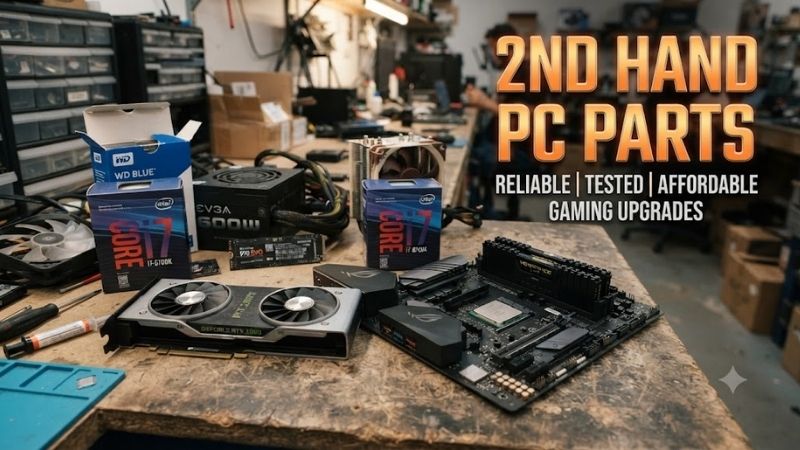
Buying 2nd hand PC parts can reduce the cost of a gaming or productivity build without sacrificing much real-world performance. The safest used purchases are usually components with low mechanical wear, easy testing, and strong compatibility. CPUs, RAM, cases, coolers, and selected GPUs can offer excellent value when inspected carefully before purchase.
Quick answer: For most people in 2026, the best 2nd hand pc parts is the Used PC Part — our #1 rated choice. See the full ranked comparison, alternatives and buying advice below.
Best 2nd Hand PC Parts at a Glance
| Used PC Part | Buying Confidence | Main Benefit | Main Risk |
|---|---|---|---|
| CPU | High | Strong performance for less | Bent pins or socket damage |
| Graphics Card | Medium to High | Biggest potential savings | Heavy prior use or fan wear |
| RAM | High | Easy to test | Hidden instability |
| PC Case | High | Very little performance-related wear | Missing screws or damaged ports |
| Air Cooler | High | Long usable life | Missing mounting hardware |
| Monitor | Medium | Large savings | Dead pixels or panel damage |
| Motherboard | Medium | Can unlock cheap upgrades | Socket, BIOS, or port issues |
| Storage Drive | Low to Medium | Cheap extra capacity | Limited remaining lifespan |
Used CPU
Best For: High-value performance upgrades
A used CPU is one of the safest second-hand PC parts because processors have no moving mechanical components and usually experience little physical wear during normal operation. If the chip has not been damaged by improper voltage, overheating, bent pins, or installation mistakes, it can continue performing almost identically to a new unit.
Used processors are particularly attractive when upgrading an older platform. Instead of replacing the motherboard and memory, a buyer may install a faster compatible CPU from the same socket generation. This can significantly improve gaming minimums, productivity performance, and multitasking while avoiding the cost of a complete platform upgrade.
Compatibility is the most important check. Confirm the motherboard socket, chipset, BIOS version, memory support, and cooling requirements before purchasing. Two processors may physically fit the same socket while still requiring a BIOS update or chipset support that the existing board does not provide.
Inspect pin condition when the processor uses exposed pins, and check contact pads for burns or contamination on models that place the pins inside the motherboard socket. Ask whether the CPU has been overclocked aggressively, but do not assume overclocking automatically means damage. Testing under sustained load is more useful than relying on seller descriptions.
What to Check
- Exact CPU model
- Socket compatibility
- BIOS support
- Bent or missing pins
- Damaged contact pads
- Signs of overheating
- Stable operation under load
- Included cooler, if relevant
Why It Is a Good Used Buy
Processors usually lose market value faster than they lose useful performance. A previous-generation gaming CPU can still deliver strong frame rates while costing substantially less than a current platform requiring a new motherboard and memory.
Pros
- Low mechanical wear
- Easy to benchmark
- Strong upgrade value
- Often performs like new
- Good for extending an existing platform
Cons
- Physical pin damage can make it unusable
- No guarantee of prior voltage settings
- Old platforms can limit future upgrades
Use Case: Gaming upgrades, workstation improvements, budget builds, and extending the life of an existing motherboard.
Who It’s For: Buyers who know their motherboard compatibility and want more CPU performance without rebuilding the entire PC.
Used Graphics Card
Best For: Maximum gaming savings
A graphics card is often the most expensive component in a gaming PC, which makes the second-hand market especially attractive. A well-priced previous-generation GPU can deliver significantly better performance than a new entry-level card at the same budget, particularly for 1080p or 1440p gaming.
Used GPUs require more careful inspection than CPUs because they contain fans, thermal pads, memory chips, power-delivery components, and a large heatsink. They may also have operated for long periods under sustained load. None of this automatically makes a used GPU unreliable, but the number of potential failure points is higher.
Test the card in real games and a sustained graphics workload when possible. Look for artifacting, crashes, unusual fan noise, unstable clock speeds, excessive temperatures, or black screens. Inspect the display outputs and power connectors for damage, and verify that the exact VRAM capacity matches the advertised model.
Mining history is often treated as an automatic reason to avoid a GPU, but operating conditions matter more than the label. A card kept cool and undervolted may have experienced less thermal cycling than one used for years in a poorly ventilated gaming case. Actual testing is more useful than assumptions.
What to Check
- Exact GPU model and VRAM
- Display output functionality
- Fan noise and bearing condition
- Temperature under load
- Visual artifacts
- Stability in games
- Power connector damage
- Corrosion or heavy dust
- Whether the BIOS appears modified
What Makes It a Good Used Buy
Graphics cards often provide the largest absolute savings on the second-hand market. Buyers willing to accept an older generation can redirect the saved budget toward a better monitor, larger SSD, stronger CPU, or higher-quality power supply.
Pros
- Potentially large savings
- Easy performance comparison
- Strong value for older GPUs
- Useful for budget gaming systems
Cons
- Higher failure risk than CPUs
- Fan wear is possible
- Previous workload may be unknown
- No guarantee of remaining warranty
Use Case: 1080p gaming, 1440p gaming, budget upgrades, secondary PCs, and older gaming systems.
Who It’s For: Buyers comfortable stress-testing hardware before finalizing the purchase.
Used RAM
Best For: Cheap capacity upgrades
RAM is another strong second-hand purchase because memory modules contain no moving parts and can be tested quickly. A used kit can be a simple way to move from 16GB to 32GB or build an older DDR4 system without paying current retail pricing for memory that may no longer be the newest standard.
Match memory type first. DDR3, DDR4, and DDR5 are physically and electrically different, and they cannot be mixed across platforms. Frequency, timings, capacity, and voltage should also be checked, especially if adding modules to an existing system rather than replacing the entire kit.
Buying a matched kit is usually safer than mixing separate modules from unrelated kits. Even sticks with similar specifications can use different memory chips or subtimings, which may reduce stability when XMP or EXPO profiles are enabled. Testing the complete set together is more important than visual similarity.
Run a proper memory test after installation rather than assuming that successful Windows startup proves stability. RAM errors can appear only under heavy loads and may cause application crashes, corrupted files, or random blue screens that are difficult to diagnose later.
What to Check
- DDR generation
- Total capacity
- Number of modules
- Rated speed
- Timings and voltage
- XMP or EXPO support
- Physical damage
- Memory-test stability
Why It Is a Good Used Buy
Memory performance does not degrade gradually in the way mechanical devices do. A stable used module can perform just like a new one, making RAM one of the lowest-risk ways to save money when building or upgrading a PC.
Pros
- Low failure rate
- Easy to test
- Significant savings on older standards
- Good for capacity upgrades
- No mechanical components
Cons
- Mixed kits may be unstable
- Compatibility still matters
- RGB models can have lighting defects even when memory works
Use Case: Gaming PCs, multitasking upgrades, older DDR4 systems, workstations, and secondary computers.
Who It’s For: Nearly anyone who can verify the correct memory standard and test the modules after installation.
Used PC Case
Best For: Low-risk budget builds
A used PC case is one of the safest components to buy because it has little effect on electrical reliability. A case does not become slower with age, and cosmetic wear rarely affects performance. If the frame is straight and the required mounting points remain intact, an older enclosure can continue serving through several complete PC builds.
The biggest issues are usually missing accessories. Sellers may lose motherboard screws, drive trays, PCIe slot covers, dust filters, front-panel cables, or proprietary brackets. Replacing standard screws is easy, but missing custom panels or drive cages can be difficult if the manufacturer no longer sells spare parts.
Inspect the front USB ports, audio jack, power button, filters, side panels, and glass carefully. Tempered-glass panels should not have chipped corners or damaged mounting points. Also confirm GPU length and CPU cooler clearance because older cases may not fit newer oversized graphics cards or large tower coolers.
Airflow deserves special attention. Older sealed-front cases can run hotter than modern mesh designs. A cheap used chassis is not a bargain if poor ventilation causes the CPU and GPU fans to operate loudly or reduces performance under sustained gaming load.
What to Check
- Side panels
- Front I/O
- Power and reset buttons
- Dust filters
- Motherboard standoffs
- Drive trays
- PCIe slot covers
- GPU clearance
- Cooler clearance
- Front airflow
What Makes It a Good Used Buy
Cases depreciate heavily despite changing little in functional capability. A quality airflow case from a previous generation can provide essentially the same cooling and hardware protection as a new enclosure for much less money.
Pros
- Very low electronic failure risk
- Easy to inspect
- Large potential savings
- Can last through multiple builds
- Cosmetic damage rarely affects function
Cons
- Missing proprietary parts
- Older designs may have weak airflow
- Shipping large cases can be expensive
Use Case: Budget builds, secondary systems, gaming PCs, home servers, and rebuild projects.
Who It’s For: Buyers who can inspect the case locally and verify component dimensions before purchase.
Used Air CPU Cooler
Best For: Reliable low-cost cooling
Air coolers are excellent second-hand components because the heatsink itself experiences almost no meaningful wear. Aluminum fins, copper heat pipes, and mounting plates can remain effective for years. The fan is the primary replaceable wear component, making a used tower cooler far less risky than many liquid coolers.
The critical issue is mounting hardware. CPU socket standards change over time, and a cooler without the correct brackets may be impossible to install even if the heatsink is physically perfect. Confirm that the package includes the backplate, screws, spacers, brackets, and clips required for your exact socket.
Check the heat pipes for severe bends and inspect the base for deep scratches or physical damage. Dust is normally easy to clean. Fan bearing noise is also simple to diagnose, and most standard-size fans can be replaced without discarding the heatsink.
Used all-in-one liquid coolers are a different category. Pump age, coolant permeation, internal contamination, and unknown operating history make them harder to evaluate. A second-hand air cooler is generally the safer option when long-term reliability matters.
What to Check
- Socket mounting hardware
- Backplate
- Fan condition
- Fan clips
- Heat-pipe damage
- Heatsink base
- Case clearance
- RAM clearance
What Makes It a Good Used Buy
The expensive part of a quality air cooler is largely passive metal. Even if the fan eventually fails, it can often be replaced cheaply, allowing a good heatsink to remain useful across multiple systems.
Pros
- Very low risk
- Long usable lifespan
- Fans are replaceable
- Easy to inspect
- Strong value
Cons
- Missing brackets can make it unusable
- Large coolers may not fit every case
- Socket compatibility needs verification
Use Case: Gaming CPUs, quiet builds, budget upgrades, and long-term systems.
Who It’s For: Builders who want dependable cooling at a lower price without the uncertainty of a used liquid cooler.
Used Monitor
Best For: Larger displays on a limited budget
Monitors can offer substantial second-hand savings because display technology changes quickly and users frequently upgrade to higher resolutions or refresh rates. A good older 1440p high-refresh screen may cost much less used while still delivering an excellent gaming experience.
Panel inspection is essential. Display a solid white, black, red, green, and blue image to look for dead or stuck pixels, discoloration, uneven backlighting, image retention, and unusual lines. Check every input and test the monitor at its advertised resolution and refresh rate.
Inspect the stand, power adapter, VESA mounting points, and buttons. A damaged stand may not matter if you plan to use a monitor arm, but replacement power adapters should match the original electrical requirements precisely.
OLED monitors require additional caution because panel wear can be difficult to judge from a short inspection. For LCD monitors, visible condition and functional testing generally provide a more straightforward assessment.
What to Check
- Dead pixels
- Backlight uniformity
- Refresh rate
- Resolution
- HDMI and DisplayPort
- Screen scratches
- Stand condition
- Power supply
- Image retention
- Flickering
What Makes It a Good Used Buy
Monitors often remain useful long after newer specifications appear. A previous-generation 144Hz or 165Hz display can still feel excellent for gaming, making the second-hand market a strong option for buyers upgrading from a basic 60Hz screen.
Pros
- Large savings possible
- Easy visual inspection
- Older high-refresh models remain useful
- Strong value for secondary monitors
Cons
- Dead pixels may appear
- Shipping can damage panels
- OLED wear is harder to assess
Use Case: Gaming, productivity, secondary screens, budget dual-monitor setups, and office use.
Who It’s For: Buyers able to inspect the panel in person before paying.
Used Motherboard
Best For: Extending an older platform
A used motherboard can make sense when repairing an older system or upgrading within a discontinued platform. It may allow you to continue using the existing CPU and RAM instead of replacing several components at once.
Motherboards are riskier than CPUs or RAM because they contain many ports, controllers, power-delivery circuits, and a delicate socket. One damaged pin can prevent memory channels, PCIe lanes, or the processor from functioning correctly.
Inspect the socket carefully, especially on boards where the pins are inside the socket. Test every RAM slot, M.2 slot, major USB port, networking connection, and PCIe slot when possible. Also check BIOS compatibility with the processor you plan to install.
Used boards are best purchased from sellers who can demonstrate the system booting. A visually perfect motherboard may still contain faults that are impossible to detect without assembling a complete system.
Pros
- Can rescue an older platform
- Often much cheaper than changing platforms
- Useful for discontinued sockets
Cons
- Many possible hidden faults
- Socket damage can be severe
- Harder to test completely
- Missing I/O accessories are common
Use Case: Repairs, old-platform upgrades, secondary builds, and replacement systems.
Who It’s For: Experienced builders who can test multiple ports and inspect the socket carefully.
Used SSD or Hard Drive
Best For: Non-critical secondary storage
Storage is one of the components where buying used requires the most caution. SSDs have finite write endurance, while hard drives contain mechanical parts that accumulate operating hours and wear. A low price does not necessarily provide good value if the drive has already consumed much of its usable life.
Check SMART information before purchasing. For SSDs, look at health percentage, total bytes written, media errors, and available spare information. For hard drives, review power-on hours, reallocated sectors, pending sectors, and error history.
Used storage should not contain the only copy of important data. It can work for temporary files, game libraries, or secondary storage when health information is good, but critical documents and backups deserve more predictable hardware.
Pros
- Cheap extra capacity
- Useful for non-critical files
- Easy to benchmark
Cons
- Unknown remaining lifespan
- Storage failure risks data
- Heavy prior writes may reduce SSD endurance
- HDD mechanical wear is difficult to reverse
Use Case: Secondary storage, game libraries, temporary data, testing systems, and non-critical files.
Who It’s For: Experienced buyers who understand SMART data and maintain proper backups.
PC Parts You Should Usually Buy New
The power supply is one component where buying new is often the safer choice. Internal capacitor aging, unknown electrical stress, missing modular cables, and poor storage conditions can create risks that are difficult to assess through a quick inspection. A quality new PSU also usually includes meaningful warranty coverage.
Used liquid coolers deserve similar caution because pump health and coolant condition are not easy to verify. Storage drives containing important data are also better purchased new unless the used price is exceptionally low and the buyer understands the remaining endurance.
How to Inspect 2nd Hand PC Parts
Ask for the exact model number before meeting the seller. Generic descriptions such as “RTX card” or “16GB gaming RAM” are not enough because specifications can vary dramatically within one product family. Exact identification allows compatibility and expected performance to be checked beforehand.
Whenever possible, test the component in a working PC. Run a CPU or GPU load, memory test, storage benchmark, and basic port checks appropriate to the product. A seller unwilling to demonstrate expensive hardware should be treated more cautiously unless buyer protection is available.
Physical inspection also matters. Look for corrosion, missing screws, burned connectors, cracked PCBs, heavy dust, damaged pins, improvised repairs, and unusual smells. Minor dust or cosmetic scratches are normal; electrical damage and corrosion are not.
Used Parts vs New Parts
Used parts provide the best value when performance matters more than warranty or having the latest generation. A two-year-old CPU or GPU can remain highly capable while selling for substantially less than new hardware.
New components are preferable when reliability is difficult to test, warranty coverage matters, or used pricing is too close to retail. Saving ten percent on a risky component is usually less attractive than paying slightly more for a full warranty and known history.
FAQ
Are 2nd Hand PC Parts Safe to Buy?
Yes, when the component can be inspected and tested properly. CPUs, RAM, cases, and air coolers are relatively low-risk purchases. Graphics cards and motherboards require more testing, while storage devices, power supplies, and used liquid coolers deserve greater caution.
What Used PC Part Is Safest to Buy?
CPUs, RAM, cases, and air coolers are among the safest second-hand components. They either contain no moving parts or are simple to inspect. Compatibility and physical condition still need to be verified before purchase.
Is Buying a Used GPU Worth It?
It can be. Used graphics cards often provide excellent performance per dollar, but test the card under load and inspect temperatures, fans, outputs, and stability. A strong discount should compensate for the reduced warranty and unknown history.
Should I Buy a Used SSD?
Only when the health data is good and the price is low enough to justify the risk. Check SMART information and total writes. Used SSDs are better for non-critical storage than for files that exist nowhere else.
Is a Used Power Supply a Good Idea?
Usually not for inexperienced buyers. PSU condition is difficult to judge externally, and old or damaged power supplies can affect other components. A new quality unit with proper connectors and warranty coverage is generally the safer investment.
How Much Should Used PC Parts Cost?
There is no universal percentage because value depends on age, condition, remaining warranty, current new pricing, and performance. Compare the used item against the price of both the same product new and newer alternatives before deciding whether the discount is worthwhile.
Conclusion
The best 2nd hand PC parts are components that are easy to test and experience little mechanical wear. Used CPUs, RAM, cases, air coolers, monitors, and carefully tested GPUs can offer excellent value, while motherboards and storage require more caution. For power supplies and questionable liquid coolers, buying new is usually the safer choice.
Ready to decide? Our #1 pick for 2026 is the Used PC Part.
Live price & availability on Amazon.