🛒 Best Price Today on Amazon
Prime members get fast, free shipping on everything above, plus member-only deals. New members get a 30-day free trial — cancel anytime.
- What Is the Standard Computer Table Height?
- Ideal Computer Desk Height by User Height
- Why Desk Height Matters
- Correct Desk Height for Typing
- Computer Table Height for Gaming
- Computer Table Height for Laptop Use
- Standing Computer Desk Height
- Sit-Stand Desk Height Range
- How to Measure the Correct Desk Height
- Adjust the Chair Before Replacing the Desk
- Monitor Height Is Separate From Desk Height
- Desk Thickness and Legroom
- Fixed Desk vs Adjustable Desk
- Common Desk Height Mistakes
- FAQ
- Conclusion
The standard computer table height in inches is usually around 28 to 30 inches from the floor, with 29 to 30 inches being common for fixed desks. However, the ideal height depends on your body size, chair position, keyboard level, and monitor setup. A desk that fits one person perfectly can feel uncomfortable for another.
Quick answer: Our top pick in 2026 is the User Height — our #1 rated choice. See the full ranked comparison, alternatives and buying advice below.
What Is the Standard Computer Table Height?
Most standard computer desks measure approximately 28 to 30 inches high. This range is designed to accommodate an average adult sitting in a conventional office chair. A height around 29 inches is common because it provides enough legroom while placing a keyboard at a practical level for many users.
The problem with a fixed 29-inch desk is that human body proportions vary considerably. Shorter users may need to raise their chair and add a footrest, while taller users may need more legroom or a slightly higher work surface. An adjustable desk makes it easier to match the workstation to the individual.
Ideal Computer Desk Height by User Height
Desk height should allow the elbows to stay close to the body while the forearms remain approximately level with the keyboard. The shoulders should not need to lift toward the ears, and the wrists should not bend sharply upward. These relationships matter more than following one universal desk measurement.
| User Height | Approximate Sitting Desk Height |
|---|---|
| 5’0″–5’3″ | 24–26 inches |
| 5’4″–5’7″ | 26–28 inches |
| 5’8″–5’11” | 28–30 inches |
| 6’0″–6’3″ | 29–31 inches |
| 6’4″ and taller | 31 inches or higher |
These figures are starting points rather than strict ergonomic rules. Arm length, torso length, chair height, keyboard thickness, and footwear can all change the correct measurement. The best setup is one where the work surface supports a relaxed upper body without leaving the feet unsupported.
Why Desk Height Matters
A desk that is too high forces the user to raise the shoulders or bend the wrists upward while typing. Over a long session, this position can create unnecessary tension through the shoulders, upper back, forearms, and wrists, particularly when the keyboard and mouse are used continuously.
A desk that is too low can create the opposite problem. The user may lean forward, round the upper back, or lower the chair too far in an attempt to reach the keyboard. This can reduce legroom and make it harder to maintain comfortable contact with the chair backrest.
Correct Desk Height for Typing
For typing, the keyboard should normally sit around elbow height or slightly below it. When your hands rest on the keyboard, your shoulders should feel relaxed and the elbows should remain near the sides of your body rather than reaching forward or outward.
If a fixed desk is too high, raising the chair can improve arm position, but a footrest may then be necessary. If the desk is too low, adjustable desk legs or a different workstation may be better than lowering the chair until the knees and hips feel cramped.
Computer Table Height for Gaming
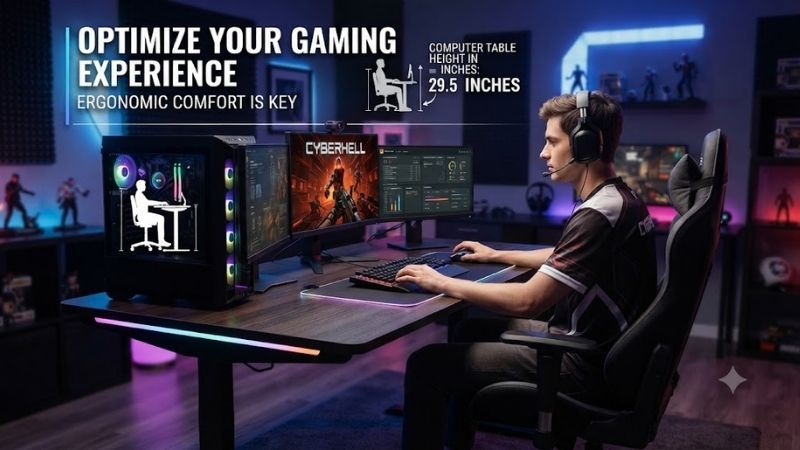
Gaming desks generally follow the same ergonomic principles as office desks, even when they are marketed differently. A height of roughly 28 to 30 inches works for many players, but the correct setting depends on whether the gamer uses low mouse sensitivity, large arm movements, or a compact keyboard.
Players using large mouse sweeps often benefit from keeping the shoulders relaxed and allowing the forearm to move freely across the desk. If the surface is too high, large movements can become tiring. If it is too low, the player may lean forward and place excessive weight through the arms.
Computer Table Height for Laptop Use
Laptop users have a more difficult ergonomic problem because the keyboard and display are attached. A table height that places the keyboard correctly often leaves the screen too low, encouraging the user to bend the neck downward throughout the day.
For long sessions, use the desk at a comfortable keyboard height and raise the laptop screen with a stand. Connect an external keyboard and mouse so the display can sit higher while the input devices remain near elbow level. This separates two requirements that a bare laptop cannot satisfy simultaneously.
Standing Computer Desk Height
Standing desk height varies much more because it must match the user’s standing elbow level. For many adults, the correct working surface falls somewhere around 38 to 46 inches, but body height and arm proportions can move the ideal setting outside that range.
When standing, adjust the desk until the elbows remain comfortably bent and the shoulders stay relaxed. The wrists should remain close to neutral while typing. Avoid raising the desk simply to lift the monitor because monitor height should be adjusted separately using a stand or arm.
Sit-Stand Desk Height Range
A sit-stand desk should move low enough for proper seated typing and high enough for comfortable standing. This is especially important for shorter users because some adjustable desks do not descend far enough, forcing the chair upward and making a footrest necessary.
Taller users should check the maximum height for the opposite reason. A desk that stops too low may require leaning forward while standing. When comparing adjustable desks, the usable height range is often more important than the tabletop size or motor speed.
How to Measure the Correct Desk Height
Sit in your normal working chair with your feet supported and your back resting comfortably against the backrest. Relax your shoulders and bend your elbows naturally. Measure from the floor to the underside of your forearms or the level where your hands would comfortably rest on a keyboard.
That measurement provides a useful target for the desk surface, although keyboard thickness can require a small adjustment. Test the setup while typing rather than relying only on measurements because comfort depends on the complete relationship between chair, desk, keyboard, mouse, and monitor.
Adjust the Chair Before Replacing the Desk
A computer table that feels slightly too high can often be corrected by raising the chair. The important point is keeping the feet supported. If the chair must be raised enough that the feet no longer reach the floor comfortably, add a footrest rather than accepting unsupported legs.
Armrests should also fit beneath or beside the desk without forcing the user to sit farther away. If armrests prevent the chair from moving close enough, lower or reposition them when possible. Being able to sit near the desk helps keep the keyboard and mouse within comfortable reach.
Monitor Height Is Separate From Desk Height
Do not choose an excessively high desk simply to raise the monitor. The desk should primarily support the keyboard, mouse, and arms. The monitor can then be positioned independently using its stand, a monitor riser, or an adjustable arm.
A useful starting point is to place the upper portion of the screen around eye level or slightly below. The exact position depends on screen size, viewing distance, eyesight, and whether you wear glasses. You should be able to view the display without repeatedly lifting or lowering your head.
Desk Thickness and Legroom
Desk height alone does not determine comfort because tabletop thickness and drawers reduce the space available underneath. A 30-inch desk with a thick drawer unit may provide less usable legroom than a thinner 29-inch tabletop.
Check whether your thighs clear the underside of the desk when the chair is adjusted properly. Tall users and people who prefer thicker chair cushions should pay particular attention to this measurement. More legroom makes it easier to change position during long computer sessions.
Fixed Desk vs Adjustable Desk
A fixed computer table can work well when one person uses it and the height already matches that user. It is usually simpler, less expensive, and more stable than a motorized design, especially when supporting heavy monitors or large desktop systems.
An adjustable desk is more flexible for shared workstations or users who alternate between sitting and standing. It also allows small height changes to accommodate different chairs, keyboard trays, or tasks. The main advantage is fit rather than the ability to stand continuously.
Common Desk Height Mistakes
One common mistake is choosing desk height based only on appearance. A thick gaming desk may look substantial but can place the keyboard too high once the user sits down. Another mistake is adjusting the chair for foot position first without considering whether the arms can then reach the work surface comfortably.
Another issue is using the same desk setup for users with very different heights. A shared family or office workstation often needs an adjustable chair, footrest, and preferably adjustable desk. Small changes in desk height can have a large effect when someone uses the computer for several hours each day.
FAQ
Is 30 Inches Too High for a Computer Desk?
Thirty inches works for many average and taller adults, but it may be too high for shorter users. If your shoulders rise while typing or your wrists bend upward, raise the chair or use a lower desk.
Is 28 Inches a Good Desk Height?
Yes. A 28-inch desk can work well for many users, especially those of average or slightly shorter height. The correct measurement still depends on chair height and arm position.
What Is the Best Desk Height for Gaming?
For many gamers, 28 to 30 inches is a practical range. The ideal height keeps the shoulders relaxed while allowing comfortable keyboard and mouse movement without excessive wrist bending.
How High Should a Desk Be for a 6-Foot Person?
A person around six feet tall may find a desk near 29 to 31 inches comfortable, but arm and torso proportions matter. Measure elbow height while seated instead of relying only on overall body height.
Should My Desk Be Level With My Elbows?
The keyboard surface should generally sit near elbow height or slightly below it. This helps keep the shoulders relaxed and the wrists closer to a neutral position while typing or gaming.
Conclusion
The ideal computer table height in inches is usually around 28 to 30 inches, but the best measurement depends on your body proportions and chair setup. Keep the keyboard near elbow level, support your feet, leave enough legroom, and adjust the monitor separately. An adjustable desk offers the easiest way to fine-tune the workstation for long-term comfort.
Ready to decide? Our #1 pick for 2026 is the User Height.
Live price & availability on Amazon.