🛒 Best Price Today on Amazon
Prime members get fast, free shipping on everything above, plus member-only deals. New members get a 30-day free trial — cancel anytime.
- Is Buying Second Hand PC Parts Online Worth It?
- Best PC Parts to Buy Used
- PC Parts to Buy Used More Carefully
- PC Parts Usually Better Purchased New
- How to Check a Used PC Part Listing
- Check the Seller Before Buying
- Ask for Real Photos
- Compare Used Price With New Price
- Check Compatibility Before Ordering
- Understand Return Protection
- How to Test Used PC Parts After Delivery
- Warning Signs to Avoid
- Is Refurbished Better Than Used?
- How Much Should You Save Buying Used?
- FAQ
- Conclusion
Buying second hand PC parts online can cut the cost of a gaming PC, workstation, or upgrade significantly, but used hardware requires more careful checking than new components. The safest approach is to compare realistic prices, verify exact model numbers, study seller history, understand return terms, and test each component as soon as it arrives.
Is Buying Second Hand PC Parts Online Worth It?
Used PC hardware can offer excellent value when the discount is large enough to justify the additional risk. Graphics cards, processors, memory, and cases often remain useful for years after release, so buyers can build a capable system without paying current-generation retail prices for every component.
The key is avoiding purchases where the savings are too small. A used component that costs only slightly less than a new model with a warranty is rarely attractive. Consider the entire value package, including shipping, missing accessories, remaining warranty, return protection, and the cost of replacement if the part fails.
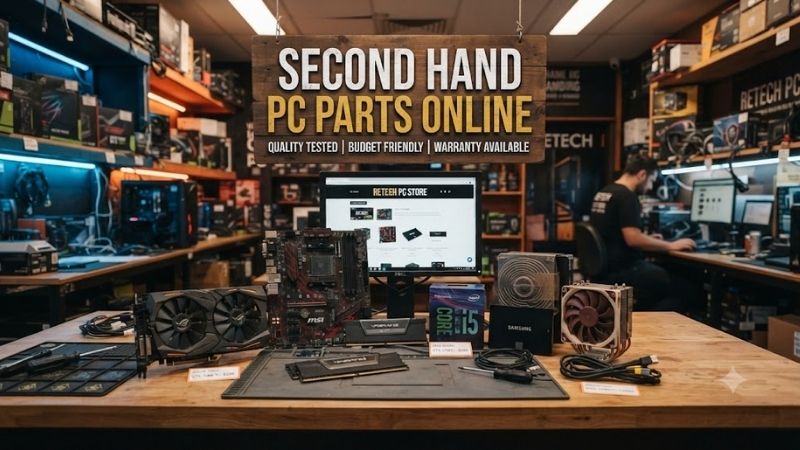
Best PC Parts to Buy Used
Graphics Cards
Graphics cards are among the most common second hand PC parts online because gamers frequently upgrade before their old GPU becomes unusable. A previous-generation graphics card can provide strong value when performance is still appropriate for your resolution and games.
Check for unusual fan noise, damaged connectors, corrosion, missing screws, or evidence of rough disassembly. Ask whether the card has been repaired or modified. Mining history does not automatically mean a GPU is defective, but condition, operating temperature, maintenance, and seller transparency matter more than a simple yes-or-no answer.
Processors
CPUs are generally attractive used purchases because they contain few parts that physically wear during normal operation. A processor that has operated within appropriate temperatures and voltages can remain reliable for many years, making older CPUs useful for budget upgrades.
Inspect photos for bent or damaged pins when the processor design places pins on the CPU. Contact pads should also be clean and undamaged. Confirm the exact model instead of relying on a listing title because processors within the same family can have significantly different specifications.
RAM
Used RAM can be a relatively low-risk purchase because memory modules have no mechanical components. They are also easy to test after installation with memory-testing software and normal system use.
Confirm capacity, module count, memory generation, speed, and ideally the exact kit model. Mixing unrelated memory kits can work, but stable operation at advertised speeds is not guaranteed. Buying a complete matched kit is usually easier than adding random modules individually.
PC Cases
A second hand computer case can be excellent value because cosmetic wear usually does not affect performance. Cases also do not become obsolete as quickly as CPUs or graphics cards, provided they support the motherboard size, graphics card length, cooling hardware, and power supply required by the build.
Check whether drive cages, screws, dust filters, front-panel cables, side panels, brackets, and PCIe slot covers are included. Missing proprietary hardware can become frustrating because replacement accessories for older cases may be difficult to find.
PC Parts to Buy Used More Carefully
Motherboards
Motherboards require more caution because they contain many connectors, controllers, power-delivery components, and socket contacts. A board can appear visually normal while having an intermittent memory slot, network controller, USB port, or BIOS problem.
Ask for evidence that the motherboard boots correctly and recognizes memory, storage, and expansion devices. Inspect the CPU socket carefully, particularly on socket designs with exposed motherboard pins. Bent socket pins can make an otherwise attractive deal unusable.
CPU Coolers
Air coolers can be good used purchases if the heatsink, fan, brackets, and mounting hardware are complete. A missing mounting kit can make the cooler impossible to install on your platform.
Used liquid coolers require more caution because pumps and seals age. Their remaining service life is harder to estimate than that of a large metal air cooler. Unless the price is especially attractive and condition is well documented, a new cooler may provide better long-term value.
PC Parts Usually Better Purchased New
Power Supplies
A power supply is one of the parts where buying new often makes sense. Its internal components age, operating history may be unknown, and poor-quality or damaged units can affect expensive hardware connected to them.
If considering a used PSU, confirm the exact model, age, warranty status, and original cables. Never substitute modular PSU cables from another model merely because the connectors appear to fit. Wiring can differ between units and incorrect cables can damage components.
Storage Drives
Used SSDs and hard drives can be inexpensive, but storage devices have measurable wear and contain your data. SSD flash has write endurance, while mechanical hard drives contain moving parts that accumulate operating hours.
Ask for drive-health information where possible and never trust a single used drive with irreplaceable files. For a main operating-system drive, a new SSD is often worth the extra cost because new storage has become relatively affordable.
How to Check a Used PC Part Listing
Start with the exact model number rather than the seller’s description. Marketing names can cover many variants with different memory capacities, cooler designs, revisions, or specifications. Search the model independently and confirm that photos match the product being advertised.
Read the entire description for phrases such as untested, for parts, no returns, intermittent, repaired, or pulled from working system. These phrases can significantly change the risk. A lower price is not necessarily a bargain if the seller is clearly transferring uncertainty to the buyer.
Check the Seller Before Buying
Seller reputation matters almost as much as the hardware itself. Look at feedback history, number of completed transactions, account age where available, and comments from buyers purchasing similar electronics.
A seller with detailed photos, clear testing information, accurate model numbers, and reasonable answers is generally preferable to someone using stock images and vague descriptions. Avoid sellers who refuse basic questions about condition while pressuring you to complete the transaction quickly.
Ask for Real Photos
Real photos can reveal damage that specification tables cannot. Look for bent brackets, cracked fan blades, corrosion, burned areas, missing screws, stripped screw heads, and damaged connectors.
For expensive components, ask for images of serial labels and important connection areas. Serial information can also help identify whether the item matches the advertised model, although you should not expect sellers to expose sensitive purchase information publicly.
Compare Used Price With New Price
Never judge a used deal in isolation. Compare it against the current cost of new hardware with similar real-world performance. An older premium component may still be expensive because of its original reputation even when a newer mid-range option performs similarly.
Also include shipping, tax, accessories, and warranty value. A used part costing 80 to 90 percent of a comparable new option may offer too little savings unless the condition and remaining warranty are unusually strong.
Check Compatibility Before Ordering
A good price is irrelevant when the part does not fit your system. Verify processor socket and BIOS compatibility, RAM generation, case clearances, graphics card dimensions, power requirements, and available connectors.
For graphics cards, also confirm PSU capacity and power connectors. For motherboards, check form factor and case support. For storage, determine whether the system accepts SATA, M.2 SATA, PCIe NVMe, or a particular M.2 length before purchasing.
Understand Return Protection
Return terms are especially important when buying used electronics because some faults appear only under sustained load. A graphics card may display the desktop normally but fail during gaming, while memory instability can take time to reproduce.
Prefer marketplaces or sellers that provide clear return procedures for defective items. Read the conditions carefully because buyer-remorse returns and defective-product returns may be treated differently.
How to Test Used PC Parts After Delivery
Inspect the package before installation. Check for physical damage and compare the model with the listing. Photograph serious shipping damage before changing anything.
Once installed, verify that the system recognizes the correct component. Test GPUs under demanding graphical workloads, memory with dedicated memory tests, storage with health-monitoring tools, and CPUs under sustained load while watching temperatures and stability.
Do not immediately modify firmware, replace thermal pads, or disassemble expensive hardware before confirming that it works. Altering the product first can complicate a legitimate return if a fault was already present.
Warning Signs to Avoid
Very low prices deserve extra scrutiny rather than immediate excitement. Scammers often rely on buyers acting quickly because a deal appears impossible to miss.
Avoid listings with copied photographs, contradictory model information, requests to pay outside the marketplace, vague condition descriptions, or claims that expensive hardware cannot be tested for unexplained reasons. A missing box is normal for used hardware; a missing explanation for obvious damage is not.
Is Refurbished Better Than Used?
Refurbished and used do not always mean the same thing. A used product may simply be resold in its existing condition, while refurbished hardware may have been inspected, cleaned, repaired, or tested.
However, the word refurbished has no value by itself. Check who performed the refurbishment, what testing was completed, what warranty is provided, and whether parts were replaced. A reputable refurbished product can be safer than an unknown private sale.
How Much Should You Save Buying Used?
There is no universal discount because component age, demand, warranty, and condition vary. The important question is whether the savings compensate for reduced warranty coverage and increased uncertainty.
A larger discount usually becomes necessary as the product gets older or more difficult to test. Rare hardware can follow different pricing rules, but ordinary gaming components should be compared against modern alternatives rather than only against their original launch prices.
FAQ
Is It Safe to Buy Second Hand PC Parts Online?
Yes, if you use buyer protection, verify the seller, check exact specifications, and test the hardware immediately. Risk varies by component, with CPUs, RAM, cases, and many GPUs often easier to evaluate than used power supplies or aging storage drives.
Which Used PC Part Is the Safest to Buy?
CPUs and RAM are often among the safer options because they have no moving mechanical parts and can be tested after installation. Cases are also low risk if all required mounting hardware and panels are present.
Should I Buy a Used Graphics Card?
A used graphics card can offer excellent value if its condition is documented and the price is meaningfully lower than equivalent new hardware. Check stability, temperatures, fan behavior, video outputs, and physical condition as soon as possible.
Should I Buy a Used Power Supply?
Usually, buying a new PSU is preferable because the operating history of a used unit may be unknown. If you do buy used, choose a reputable model with known age, original modular cables, and a clear history.
Can Used PC Parts Damage My Computer?
A faulty part can create problems, although the risk differs by component. Incorrect power cables, damaged power supplies, badly repaired hardware, or electrical faults deserve particular caution. Carefully inspect used hardware before connecting it to valuable components.
Conclusion
Buying second hand PC parts online can save substantial money when you verify the exact model, seller reputation, compatibility, condition, return policy, and real market value. CPUs, RAM, cases, and carefully tested GPUs are often strong used choices, while power supplies and storage deserve more caution. Test every purchase promptly before relying on it.