🛒 Best Price Today on Amazon
Prime members get fast, free shipping on everything above, plus member-only deals. New members get a 30-day free trial — cancel anytime.
- Razer DeathAdder V2 Pro Specifications
- Design and Ergonomics
- Wireless Performance
- Focus+ Optical Sensor
- Optical Switches and Click Feel
- Battery Life and Charging
- Razer Synapse and Profiles
- Gaming Performance
- Everyday and Productivity Use
- What Makes the DeathAdder V2 Pro Different?
- Pros and Cons
- Who Is the Razer DeathAdder V2 Pro For?
- FAQ
- Conclusion
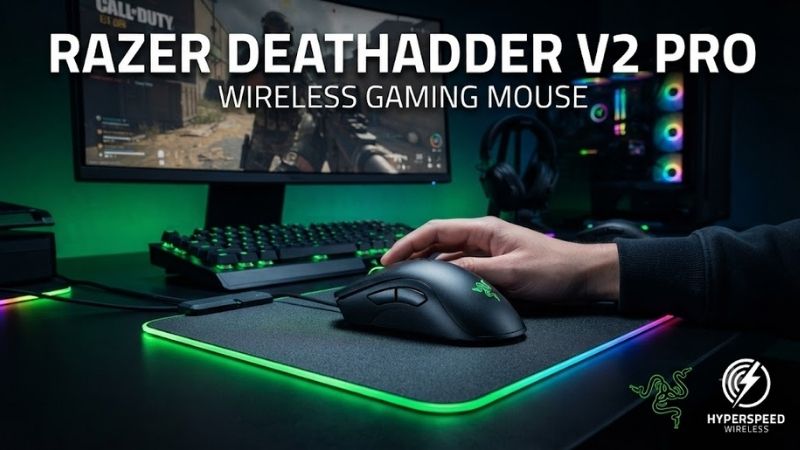
The Razer DeathAdder V2 Pro Wireless Gaming Mouse brings the familiar right-handed DeathAdder shape into a flexible wireless design. It combines HyperSpeed, Bluetooth, and wired operation with a 20,000 DPI Focus+ sensor, optical switches, onboard profiles, and strong battery life for gaming and everyday PC use.
Quick answer: Our top pick in 2026 is the Specification — our #1 rated choice. See the full ranked comparison, alternatives and buying advice below.
Razer DeathAdder V2 Pro Specifications
The DeathAdder V2 Pro uses Razer’s Focus+ optical sensor with up to 20,000 DPI, 650 IPS tracking speed, 50 G acceleration, and 99.6% resolution accuracy. It weighs about 88 grams and uses a right-handed ergonomic shell measuring 127 mm long, 61.7 mm wide at the grip, and 42.7 mm high.
It supports three connection methods: HyperSpeed 2.4 GHz through the included USB receiver, Bluetooth for lower-power use, and wired operation with its Speedflex cable. Razer rates battery life at about 70 hours through HyperSpeed and up to 120 hours through Bluetooth when lighting is disabled.
| Specification | Razer DeathAdder V2 Pro |
|---|---|
| Sensor | Razer Focus+ Optical |
| Maximum DPI | 20,000 DPI |
| Tracking Speed | Up to 650 IPS |
| Acceleration | Up to 50 G |
| Weight | Approx. 88 g |
| Connectivity | 2.4 GHz, Bluetooth, wired |
| Battery | Up to 70h 2.4 GHz / 120h Bluetooth |
| Programmable Buttons | 8 |
| Switches | 2nd Gen Razer Optical |
| Switch Rating | 70 million clicks |
| Feet | 100% PTFE |
| Shape | Right-handed ergonomic |
Design and Ergonomics
The DeathAdder V2 Pro uses a large right-handed ergonomic shell with a pronounced rear hump and a broad front section. It naturally supports palm grip and relaxed claw grip, particularly for medium-to-large hands. Compared with symmetrical esports mice, it fills more of the hand and prioritizes support over minimum weight.
Injection-molded rubber grips cover both sides, providing additional traction during fast swipes without requiring separate adhesive grip tape. The 88-gram weight is no longer ultralight by current gaming standards, but the mouse still feels reasonably agile considering its size, internal battery, wireless hardware, and ergonomic construction.
The main limitation is physical fit. Smaller hands and aggressive fingertip users may find the body too large or tall, while left-handed gamers cannot use its thumb buttons naturally. Players already comfortable with the DeathAdder shape should adapt quickly, but users coming from a compact symmetrical mouse will notice the difference immediately.
Wireless Performance
HyperSpeed 2.4 GHz is the connection mode to use for gaming because it is designed around low-latency wireless input. The included receiver creates a dedicated link rather than relying on standard Bluetooth. For FPS, action, or competitive multiplayer games, it provides the responsiveness expected from a proper wireless gaming mouse.
Bluetooth is better suited to office work, browsing, laptops, and situations where maximum battery life matters more than gaming response. Having both wireless systems makes the mouse more versatile, especially if the HyperSpeed receiver remains attached to a desktop while Bluetooth handles occasional use with another compatible computer.
Wired operation remains available when the battery is depleted, allowing the mouse to charge while it is still being used. The flexible Speedflex cable reduces the dragging sensation associated with stiff rubber cables. The drawback is the Micro-USB connector, which feels dated now that USB-C is standard on many newer gaming mice.
Focus+ Optical Sensor
The Focus+ sensor offers a maximum sensitivity of 20,000 DPI, but maximum DPI is not the main reason to choose this mouse. Tracking consistency, high movement-speed capability, and configurable lift-off behavior matter far more in real games. Dedicated buttons behind the wheel make it easy to switch between configured sensitivity stages.
Competitive FPS players will normally operate far below 20,000 DPI and combine moderate sensitivity with a larger mouse pad. The sensor still benefits this approach because it can track rapid swipes reliably. Users can also tune lift-off and landing distance, helping the cursor remain predictable when repeatedly repositioning the mouse.
DPI buttons can be reassigned through Razer Synapse if sensitivity switching is unnecessary. This turns them into useful controls for push-to-talk, media playback, ability activation, productivity shortcuts, or other commands. The flexibility makes the eight-button layout more practical than its standard configuration might initially suggest.
Optical Switches and Click Feel
Razer uses second-generation optical mouse switches for the primary buttons, rated for 70 million clicks. Instead of registering input through conventional electrical contacts, the switches use optical actuation. This design avoids the debounce behavior required by traditional contact switches and is intended to reduce unwanted double-click issues.
Click feel remains a matter of preference. The primary buttons provide clear tactile feedback, although users familiar with mechanical switches may notice a different sound and response. The practical advantage is dependable actuation rather than a particular click tone, making the switches appropriate for both competitive games and normal desktop work.
Two thumb buttons are positioned on the left side and remain easy to identify without looking. Along with the primary buttons, scroll click, and DPI controls, they provide enough programmable inputs for shooters, RPGs, browsing, editing, and productivity without creating the crowded side layout associated with MMO-focused gaming mice.
Battery Life and Charging
Razer’s rated battery figures give the DeathAdder V2 Pro two very different wireless personalities. HyperSpeed offers around 70 hours for gaming, while Bluetooth stretches the estimate to about 120 hours when lighting is disabled. Actual battery life varies with RGB settings, sleep behavior, connection mode, and individual usage habits.
Charging takes place through the front Micro-USB port, and wired operation remains available during charging. The mouse is also compatible with Razer Mouse Dock Chroma hardware sold separately. A dock can make charging more convenient, but buyers should factor the accessory into the total setup cost rather than treating it as an included feature.
A compartment on the underside stores the HyperSpeed USB receiver when the mouse is being transported. That small detail is useful for laptop users because losing the proprietary receiver can be inconvenient. The internal rechargeable battery is convenient day to day, although it will naturally age over a long ownership period.
Razer Synapse and Profiles
Razer Synapse controls sensitivity stages, button mapping, Chroma RGB, sensor behavior, macros, and game-specific profiles. Razer Hypershift can assign a secondary layer of commands, effectively allowing physical controls to perform more than one function when a designated modifier is held during gaming or normal desktop use.
Onboard memory stores several profiles, so sensitivity and button mappings can remain available when the mouse moves between computers. Razer lists four onboard profiles plus an active profile arrangement. This is useful for tournament systems, secondary PCs, or work machines where Synapse may not be installed or running.
Basic mouse operation does not depend on keeping configuration software open constantly. A user can configure preferred DPI levels and button assignments, save them, and rely on onboard memory. Synapse becomes more valuable when several Razer peripherals share lighting, macros, profiles, or application-specific control schemes.
Gaming Performance
For FPS gaming, the DeathAdder V2 Pro combines accurate wireless tracking with a stable ergonomic shape. Its broad shell can make aiming feel controlled for palm-grip users, although the 88-gram weight requires more effort than today’s very light esports mice during repeated low-sensitivity swipes across a large mouse pad.
Players who favor extremely low mouse weight may prefer a newer competitive model, but weight is not the only factor in aiming comfort. The DeathAdder distributes its mass across a large shell and provides broad hand support, making it easier for some users to maintain a relaxed grip during long sessions instead of pinching a tiny mouse.
RPG and action-game players can make good use of the side and DPI buttons for abilities, inventory commands, melee attacks, push-to-talk, or weapon switching. Eight programmable inputs provide more flexibility than a minimalist esports mouse while avoiding the learning curve and thumb congestion of a twelve-button MMO grid.
Everyday and Productivity Use
Bluetooth makes the DeathAdder V2 Pro more useful outside gaming. A user can keep the HyperSpeed receiver connected to a main gaming desktop and switch the mouse to Bluetooth for another compatible device. This flexibility is convenient in mixed gaming and office setups where one mouse handles both entertainment and everyday work.
The ergonomic shape also suits browsing, document work, and editing when the user’s hand matches the shell. A larger palm-supported mouse can feel more relaxing than an ultralight symmetrical model during long desktop sessions. Smaller hands should still consider fit carefully because ergonomics depends heavily on individual hand dimensions.
What Makes the DeathAdder V2 Pro Different?
The strongest feature is not a single specification but the combination of a proven ergonomic shape and three connection modes. HyperSpeed handles gaming, Bluetooth extends battery life and device flexibility, and wired operation provides a fallback while charging. That combination allows one mouse to move comfortably between competitive and everyday tasks.
Its age is more visible when compared with newer gaming mice offering USB-C, lower weight, newer sensors, and higher polling-rate options. However, those improvements do not make the V2 Pro suddenly inaccurate. Its Focus+ sensor, optical switches, onboard memory, PTFE feet, and wireless connection remain technically capable for modern games.
Pros and Cons
Pros
- Comfortable right-handed ergonomic shape
- HyperSpeed 2.4 GHz wireless
- Bluetooth and wired connectivity
- Accurate Focus+ optical sensor
- Eight programmable buttons
- Up to 120-hour Bluetooth rating
- Multiple onboard profiles
- Optical mouse switches
- 100% PTFE mouse feet
- Optional charging dock support
Cons
- Uses Micro-USB instead of USB-C
- 88 grams is heavy beside modern ultralight mice
- Large shell may not suit smaller hands
- Right-handed design only
- Charging dock is sold separately
- No modern ultra-high polling-rate mode
Who Is the Razer DeathAdder V2 Pro For?
The DeathAdder V2 Pro is best suited to right-handed gamers who prefer a larger ergonomic mouse and value comfort over chasing the lowest possible weight. Palm-grip users and medium-to-large hands are the clearest match, while the flexible wireless modes also work well for users who combine gaming with regular office tasks.
It is less suitable for small-handed fingertip players, left-handed users, or competitive gamers specifically seeking an ultralight shell and very high wireless polling rates. Anyone who wants every peripheral to use USB-C may also dislike the older charging connector, even though it has little effect on actual gaming performance.
FAQ
Is the Razer DeathAdder V2 Pro Good for FPS Games?
Yes. The Focus+ sensor, HyperSpeed wireless connection, PTFE feet, and optical switches give it the core hardware needed for FPS gaming. Its main disadvantage is weight. At around 88 grams, it is noticeably heavier than many current esports mice, especially during repeated low-sensitivity movements.
Does the DeathAdder V2 Pro Have Bluetooth?
Yes. Bluetooth is available alongside HyperSpeed 2.4 GHz and wired operation. It is primarily useful for longer battery life, laptops, or general productivity. Razer rates Bluetooth endurance at up to 120 hours without lighting, while HyperSpeed is the preferred wireless connection for gaming.
Does the DeathAdder V2 Pro Have Onboard Memory?
Yes. The mouse supports onboard profile storage, allowing sensitivity levels and button mappings to remain available when it is connected to another PC. This is useful when moving between gaming systems or using a computer without Synapse actively running in the background.
Is the DeathAdder V2 Pro USB-C?
No. It uses a Micro-USB connection for charging and wired operation. This is one of the clearest signs of its generation because newer gaming mice commonly use USB-C. The included Speedflex cable remains usable, but owners need to remember the connector type when carrying a spare charging cable.
Is the DeathAdder V2 Pro Good for Large Hands?
Yes. Its large right-handed ergonomic shell is particularly well suited to medium and large hands using palm or relaxed claw grip. Smaller users may struggle to reach all controls comfortably while maintaining a natural hand position, making hand size and preferred grip more important than maximum DPI.
Conclusion
The Razer DeathAdder V2 Pro Wireless Gaming Mouse remains a capable choice for gamers who value ergonomic comfort, reliable 2.4 GHz wireless, Bluetooth, optical switches, and onboard profiles. Its 88-gram weight and Micro-USB port reveal its age, but its Focus+ sensor and proven shape still provide a dependable gaming experience.
Ready to decide? Our #1 pick for 2026 is the Specification.
Live price & availability on Amazon.