🛒 Best Price Today on Amazon
Prime members get fast, free shipping on everything above, plus member-only deals. New members get a 30-day free trial — cancel anytime.
- What Is the Razer Basilisk X Hyperspeed?
- Wireless Connectivity
- Sensor Performance
- Shape and Ergonomics
- Weight and Balance
- Battery Life
- Buttons and Controls
- Razer Synapse Software
- Gaming Performance
- Productivity and Everyday Use
- HyperSpeed vs Bluetooth
- Who Should Buy It?
- Who Should Skip It?
- Razer Basilisk X Hyperspeed for FPS Games
- Razer Basilisk X Hyperspeed for MMO and RPG Games
- Razer Basilisk X Hyperspeed for Work
- Maintenance and Battery Replacement
- FAQ
- Conclusion
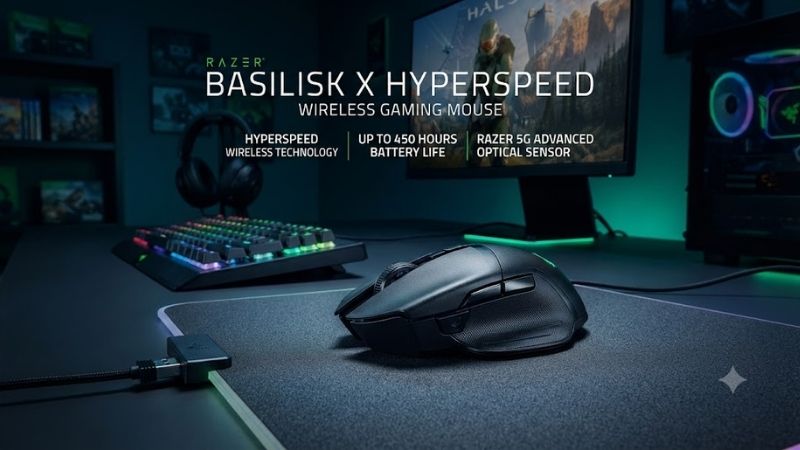
The Razer Basilisk X Hyperspeed Wireless Gaming Mouse is a right-handed wireless model built for users who want long battery life, reliable gaming performance, and both 2.4 GHz and Bluetooth connectivity. It combines a familiar ergonomic shape with a focused feature set rather than RGB lighting or extensive onboard controls.
What Is the Razer Basilisk X Hyperspeed?
The Razer Basilisk X Hyperspeed is part of Razer’s Basilisk family, which is known for an ergonomic right-handed shape and pronounced thumb support. This model is positioned as a simpler wireless option, emphasizing battery life, dual-mode connectivity, and dependable sensor performance without the extra hardware found on premium Basilisk versions.
Its design makes it suitable for mixed gaming and productivity because the mouse can switch between Razer HyperSpeed Wireless and Bluetooth. HyperSpeed is intended for low-latency gaming through the included USB receiver, while Bluetooth is useful when battery efficiency or connecting to a laptop without occupying a USB port matters more.
Wireless Connectivity
The mouse supports two wireless modes. Razer HyperSpeed Wireless uses the included 2.4 GHz USB dongle and is the preferred connection for gaming because it is designed around lower latency and more consistent input response. Bluetooth offers broader convenience for laptops and everyday work but is not the primary competitive gaming mode.
A hardware switch underneath the mouse allows users to choose between Bluetooth, HyperSpeed Wireless, and off. This arrangement makes it easy to move between a gaming desktop and a secondary device without changing the basic mouse setup, although it is not intended as a seamless multi-device productivity mouse with instant device switching.
Sensor Performance
Razer equips the Basilisk X Hyperspeed with its 5G Advanced Optical Sensor, rated up to 16,000 DPI. That ceiling is far higher than most players need in practice, but the important benefit is that the sensor is designed for accurate tracking across common gaming sensitivities and does not require acceleration-based assistance.
DPI can be adjusted through software and cycled with the dedicated sensitivity button. Competitive players usually benefit more from finding a consistent sensitivity than from using extremely high DPI values. The sensor’s role is to translate hand movement cleanly, while aim performance still depends on game settings, mousepad space, and individual control.
Shape and Ergonomics
The Basilisk X Hyperspeed uses an ergonomic right-handed body with a thumb rest on the left side. This shape supports palm and relaxed claw grips particularly well, depending on hand size. The raised rear and sculpted side provide more hand contact than lightweight symmetrical esports mice designed for fingertip movement.
That ergonomic shape can be comfortable during long work or gaming sessions, but it also makes the mouse less universal. Left-handed users are effectively excluded, and players who prefer very low-profile or ultralight shapes may find the Basilisk body too substantial. Fit should therefore matter more than brand or maximum DPI.
Weight and Balance
The Basilisk X Hyperspeed uses a removable AA battery, so its final weight changes slightly depending on the battery installed. This makes it heavier than many modern ultralight gaming mice. The trade-off is that users gain very long runtime and can replace the battery immediately rather than waiting for an internal battery to recharge.
For strategy games, RPGs, productivity, and slower-paced shooters, the additional weight may not be a problem. Competitive FPS players who rely on rapid flicks and frequent low-sensitivity movement may prefer a lighter design. Weight preference is highly personal, so the mouse should not be judged by grams alone.
Battery Life
Battery efficiency is one of the Basilisk X Hyperspeed’s strongest features. Razer rates the mouse for up to 285 hours in HyperSpeed Wireless mode and up to 450 hours over Bluetooth with a compatible AA battery. Actual runtime varies with battery type, usage pattern, polling behavior, and connection mode.
Using a replaceable battery also changes the maintenance experience. There is no charging cable to connect during gameplay and no internal battery gradually running empty between sessions. Keeping a spare AA battery nearby can return the mouse to full operation immediately, which is useful for players who dislike charging routines.
Buttons and Controls
The mouse includes six programmable buttons, covering the standard left and right clicks, scroll-wheel click, two side buttons, and a DPI control. This layout is enough for common gaming and productivity shortcuts without turning the mouse into an MMO-style design covered in additional thumb buttons.
The side buttons work well for browser navigation, push-to-talk, melee, reload, or other frequently used commands. Players needing many abilities directly on the mouse may find six buttons limiting, while users focused on shooters or general gaming will likely appreciate the simpler layout and lower learning curve.
Razer Synapse Software
Razer Synapse provides button remapping, sensitivity adjustment, polling-related settings, and profile customization for supported Razer peripherals. Users can assign keyboard commands, multimedia functions, or macros to programmable controls, allowing the Basilisk X Hyperspeed to move between gaming and productivity roles more easily.
The mouse does not emphasize RGB lighting, so software use is mainly functional rather than cosmetic. That can be an advantage for users who want to configure performance and buttons once and then leave the mouse alone. It also helps battery efficiency because there is no lighting system consuming additional power during normal use.
Gaming Performance
For general gaming, the Basilisk X Hyperspeed offers responsive tracking and stable wireless operation when used through the 2.4 GHz receiver. RPGs, action games, strategy titles, MOBAs, and casual shooters all fit its ergonomic shape and button layout well, particularly for players who prefer a fuller mouse under the palm.
Competitive FPS players can also use it successfully, but modern ultralight alternatives may feel faster during repeated flicks and wide swipes. The Basilisk’s appeal is broader comfort and versatility rather than minimum mass. It works best for gamers who value control and hand support over the lightest possible chassis.
Productivity and Everyday Use
The thumb rest, long battery life, and Bluetooth support make the mouse useful beyond gaming. Office work, spreadsheets, browsing, and creative applications benefit from the ergonomic shape and programmable side buttons. Bluetooth also makes it easy to pair with laptops when a USB receiver would occupy a limited port.
Because the mouse uses an AA battery and lacks an integrated rechargeable cell, it can remain in service for long periods without a charging schedule. That makes it especially practical for mixed work-and-gaming desks where reliability and low maintenance matter more than premium lighting or docking accessories.
HyperSpeed vs Bluetooth
HyperSpeed Wireless should be the default choice for gaming because it prioritizes responsiveness through the 2.4 GHz receiver. Bluetooth is better when extending battery life or using the mouse with a device that lacks available USB ports. The two modes serve different priorities rather than being interchangeable in every situation.
If the mouse is permanently connected to a desktop gaming PC, HyperSpeed offers the more appropriate experience. If it travels with a laptop for work or school, Bluetooth can reduce the need to move the dongle. Users can therefore select connectivity based on context without buying a separate mouse.
Who Should Buy It?
The Basilisk X Hyperspeed is best suited to right-handed users who want an ergonomic wireless gaming mouse with long battery life and dual connectivity. It works particularly well for mixed gaming and productivity, where comfort, low maintenance, and a familiar button layout matter more than extremely low weight.
It is also a sensible fit for users who dislike charging rechargeable gaming mice. A replaceable AA battery provides months of potential use depending on connection mode and workload, and swapping a fresh battery takes only seconds. That simplicity can be more appealing than a premium charging dock.
Who Should Skip It?
Players who prioritize ultralight construction may prefer a lighter esports-oriented mouse. The Basilisk shape and AA battery create more mass than many recent competitive designs. Similarly, MMO players needing a large number of thumb buttons may find the six-button layout too limited for ability-heavy games.
Left-handed users should also look elsewhere because the body is strongly shaped for the right hand. Users who want RGB lighting, a rechargeable internal battery, premium scroll-wheel features, or advanced multi-button controls may be better served by higher-end models in Razer’s lineup.
Razer Basilisk X Hyperspeed for FPS Games
The mouse performs well enough for FPS gaming thanks to its accurate optical sensor and low-latency HyperSpeed connection. The larger question is whether its weight and ergonomic shell match the player’s aiming style. High-sensitivity players may appreciate the stability, while low-sensitivity players may prefer something lighter.
Its two side buttons cover common shooter functions such as melee, push-to-talk, crouch, or weapon actions. The shape also gives the thumb a stable resting position. However, competitive players accustomed to sub-70-gram mice may notice additional effort during repeated wide movements across a large mousepad.
Razer Basilisk X Hyperspeed for MMO and RPG Games
RPG players can benefit from the comfortable shape and long battery life because these games often involve extended sessions rather than constant rapid aiming. The side buttons can handle frequently used actions, while software remapping provides flexibility for inventory, map, or ability controls depending on the game.
For MMOs with large skill bars, six programmable buttons may not be enough. Dedicated MMO mice provide considerably more thumb inputs for abilities and macros. The Basilisk X Hyperspeed is therefore better for RPGs, action RPGs, and less button-intensive online games than for players who want an entire rotation mapped to the mouse.
Razer Basilisk X Hyperspeed for Work
For work, the mouse offers several practical advantages: Bluetooth connectivity, strong battery life, an ergonomic right-handed body, and programmable side buttons. Browser navigation and repeated productivity shortcuts can be assigned to the thumb controls, while the larger shape provides more palm support than compact travel mice.
The main limitation is that it lacks productivity-focused features such as a free-spinning premium scroll wheel or dedicated multi-device switching across several paired computers. It remains a gaming mouse first, but its restrained design makes it easier to use in a professional environment than many aggressive RGB-heavy alternatives.
Maintenance and Battery Replacement
Battery replacement is simple because the top shell provides access to the AA compartment and wireless receiver storage. Keeping the USB dongle inside the mouse when traveling helps prevent loss, while carrying a spare battery avoids unexpected downtime. Users should remove old batteries if the mouse will remain unused for an extended period.
The optical sensor area should also be kept clean because dust or debris can interfere with tracking. A clean mousepad and periodic exterior cleaning are usually sufficient. Since there is no charging port or internal battery to manage, routine maintenance is relatively straightforward compared with rechargeable wireless gaming mice.
FAQ
Is the Razer Basilisk X Hyperspeed Good for Gaming?
Yes. The mouse combines an accurate optical sensor with Razer’s 2.4 GHz HyperSpeed Wireless connection, making it suitable for shooters, RPGs, strategy games, and general gaming. Its relatively substantial weight means players focused exclusively on competitive FPS may prefer lighter alternatives, but performance remains capable.
Does the Basilisk X Hyperspeed Have Bluetooth?
Yes. It supports both Bluetooth and Razer HyperSpeed Wireless. Bluetooth is useful for laptops and power-efficient everyday operation, while HyperSpeed uses the included USB receiver and is the preferred mode for gaming because it is designed around lower latency and more responsive input.
Is the Basilisk X Hyperspeed Rechargeable?
No. It uses a replaceable AA battery rather than an integrated rechargeable battery. This allows very long runtime and immediate battery replacement, but users need to keep spare batteries available. People who prefer USB-C charging or charging docks should consider a different wireless mouse.
How Many Buttons Does It Have?
The Razer Basilisk X Hyperspeed has six programmable buttons. This is sufficient for normal gaming, browsing, and productivity shortcuts, but it is far below the button count offered by dedicated MMO mice. The layout is intentionally simpler and better suited to general-purpose gaming.
Does It Work for Large Hands?
The ergonomic Basilisk shape can work well for medium and larger hands, especially with palm or relaxed claw grips. Exact comfort depends on hand dimensions and grip style. Users with very small hands or fingertip grips may find the body larger and heavier than more compact symmetrical gaming mice.
Is the Basilisk X Hyperspeed Still Worth Using?
Yes, if the feature set matches your priorities. Its strengths remain long battery life, reliable wireless gaming, Bluetooth, ergonomic comfort, and straightforward controls. Players seeking an ultralight shell, rechargeable battery, extensive RGB lighting, or many additional buttons should consider newer alternatives instead.
Conclusion
The Razer Basilisk X Hyperspeed Wireless Gaming Mouse remains a practical choice for users who value ergonomic comfort, long AA battery life, HyperSpeed gaming performance, and Bluetooth flexibility. It is less suited to ultralight FPS or MMO specialists, but its balanced feature set works well for everyday gaming and work.