🛒 Best Price Today on Amazon
Prime members get fast, free shipping on everything above, plus member-only deals. New members get a 30-day free trial — cancel anytime.
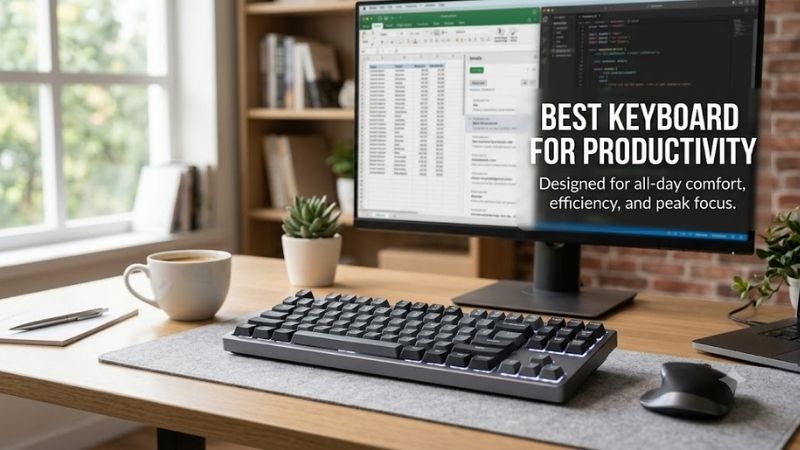
The best keyboard for productivity should make long work sessions faster, quieter, and more comfortable without adding friction to your setup. This roundup compares office-focused, mechanical, low-profile, and ergonomic options so you can choose the right layout, feel, connectivity, and workflow features for daily work.
Quick answer: For most people in 2026, the best keyboard for productivity is the Keyboard — our #1 rated choice. See the full ranked comparison, alternatives and buying advice below.
Best Keyboards for Productivity Compared
| Keyboard | Layout | Switch Style | Main Strength | Best For |
|---|---|---|---|---|
| Logitech MX Keys S | Full-size | Scissor | Quiet, familiar typing | General office work |
| Logitech MX Mechanical | Full-size | Low-profile mechanical | Stronger key feedback | Heavy typists |
| Keychron Q1 Max | 75% | Mechanical | Deep customization | Programmers and power users |
| NuPhy Air75 V2 | 75% | Low-profile mechanical | Compact programmable design | Hybrid and mobile workers |
| Logitech Ergo K860 | Full-size ergonomic | Scissor | Split ergonomic layout | Long typing sessions |
For most people, productivity comes from reducing small interruptions. A keyboard that wakes quickly, switches between devices, keeps frequently used keys within easy reach, and feels predictable over long sessions can save more time than flashy extras. The right choice depends on your desk, typing style, software, and tolerance for noise.
This list focuses on keyboards that genuinely fit writing, spreadsheets, coding, communication, research, and mixed office use. Some favor quiet laptop-like typing, while others prioritize programmability, mechanical feedback, or wrist comfort. None is automatically best for every worker, so the differences matter more than a simple ranking.
Logitech MX Keys S
Best For: Quiet everyday productivity
Key Features:
- Full-size layout with number pad
- Low-profile scissor keys
- Backlit keys
- Multi-device switching
- Bluetooth and Logi Bolt connectivity
- USB-C rechargeable battery
What Makes It Different: Laptop-like typing combined with a full desktop layout.
Pros:
- Quiet key action
- Familiar low-profile feel
- Dedicated number pad
- Easy multi-device switching
- Minimal learning curve
Cons:
- Limited switch customization
- Less tactile than mechanical keyboards
- Full-size footprint takes more desk space
Use Case: Documents, email, spreadsheets, research, administration, and mixed office work.
Who It’s For: Laptop users, office workers, writers, managers, and anyone prioritizing quiet typing.
Logitech MX Keys S is built for users who want a familiar, low-profile typing feel with minimal setup. Its scissor switches, full-size layout, backlighting, and multi-device controls suit email, documents, spreadsheets, and browser-heavy work. It feels closer to a premium laptop keyboard than a mechanical board.
What makes MX Keys S different is how little attention it demands during a workday. Easy-Switch keys let you move between paired devices, while the full layout keeps navigation and number entry immediately available. The trade-off is limited switch customization, so users seeking a deep mechanical feel may find it too restrained.
Use it for shared home offices, corporate desks, writing stations, or any setup where low noise matters. It is especially suitable for users moving from laptops who want a larger board without relearning key travel. The flat profile also reduces the adjustment period compared with taller mechanical keyboards.
Logitech MX Mechanical
Best For: Mechanical typing in a professional workspace
Key Features:
- Full-size layout
- Low-profile mechanical switches
- Multiple switch options
- Backlighting
- Multi-device switching
- Bluetooth and Logi Bolt connectivity
- USB-C charging
What Makes It Different: Mechanical feedback with a lower, office-oriented design.
Pros:
- More tactile feedback than scissor keys
- Full number pad
- Multi-device support
- Lower profile than standard mechanical boards
- Suitable for work and occasional gaming
Cons:
- Louder than MX Keys S
- Less customizable than enthusiast mechanical boards
- Large footprint
Use Case: Writing, programming, analysis, spreadsheets, office work, and mixed work-and-play setups.
Who It’s For: Heavy typists who prefer mechanical feedback but want a professional-looking keyboard.
Logitech MX Mechanical targets users who want mechanical feedback without turning a work desk into a gaming station. It uses low-profile mechanical switches, offers a full-size layout, supports multiple devices, and includes backlighting. The result is more tactile key response while keeping the overall height and look office-friendly.
Its main advantage over MX Keys S is switch feel. Keystrokes have a more distinct mechanical response, which can help typists who prefer clearer actuation and rhythm. The trade-off is more audible typing and a firmer feel, so quiet offices or shared rooms may favor scissor switches instead of mechanical ones.
This model suits writers, analysts, programmers, and power users who type for hours and want more feedback than a laptop-style board provides. It is also a practical bridge for gamers who use the same desk for work and play but do not need the aggressive lighting, styling, or compact layouts common on gaming keyboards.
Keychron Q1 Max
Best For: Custom productivity workflows
Key Features:
- 75% layout
- Mechanical switches
- Hot-swappable switch support
- QMK/VIA programmability
- Bluetooth connectivity
- 2.4 GHz wireless connectivity
- USB-C wired operation
What Makes It Different: Extensive key remapping and switch customization in a compact layout.
Pros:
- Highly programmable
- Hot-swappable switches
- Dedicated arrow keys
- Function row retained
- Multiple connection modes
- Smaller than a full-size keyboard
Cons:
- No dedicated number pad
- Taller than low-profile keyboards
- Customization requires setup time
- Heavier and less travel-oriented than slim boards
Use Case: Coding, editing, design applications, shortcut-heavy software, and customizable office workflows.
Who It’s For: Programmers, creators, enthusiasts, and users who want keyboard commands tailored to specific software.
Keychron Q1 Max is a 75% mechanical keyboard for users who want strong customization without giving up dedicated arrows or the function row. It combines a compact footprint with hot-swappable switches, QMK/VIA support, wired use, Bluetooth, and 2.4 GHz wireless, making it flexible for both workstation and mixed-use setups.
The Q1 Max stands out because key behavior can be changed around a workflow rather than accepted as fixed. Users can remap shortcuts, layers, and macros through QMK/VIA, which is useful for coding, editing, design tools, or repetitive commands. The trade-off is added setup time and a taller mechanical profile.
Choose it if you enjoy tuning switch feel, keymaps, and shortcuts, or if your productivity depends on custom commands. The 75% layout saves desk space while retaining more navigation access than smaller 60% boards. It is less ideal for users who rely heavily on a dedicated number pad throughout the day.
NuPhy Air75 V2
Best For: Compact low-profile productivity
Key Features:
- 75% layout
- Low-profile mechanical switches
- QMK/VIA support
- Bluetooth connectivity
- 2.4 GHz wireless
- USB-C wired mode
- Hot-swappable low-profile switches
What Makes It Different: Low-profile portability combined with mechanical switches and programmable controls.
Pros:
- Thin mechanical design
- Compact footprint
- Programmable keymap
- Multiple connectivity options
- Dedicated arrow keys
- More mouse space than a full-size board
Cons:
- No dedicated number pad
- Compact spacing requires adaptation
- Not ideal for constant numeric entry
Use Case: Hybrid work, coding, writing, travel setups, productivity, and combined work-and-gaming desks.
Who It’s For: Laptop users who want mechanical feedback without moving to a tall, full-size mechanical keyboard.
NuPhy Air75 V2 is a low-profile 75% mechanical keyboard that targets users who want mechanical switches in a thinner, more portable format. It supports wired, Bluetooth, and 2.4 GHz connections, along with QMK/VIA customization. Its compact layout keeps arrows and a function row while reducing width on the desk.
Its biggest difference is the combination of low-profile hardware and programmable controls. That makes it easier to move between laptop and keyboard typing than with a tall mechanical board, while still allowing custom layers and shortcuts. The smaller layout, however, removes a dedicated number pad and some full-size spacing.
It works well for hybrid workers, travelers, developers, and users with limited desk depth who still want mechanical feedback. The compact body also leaves more room for a mouse, which can help mixed productivity and gaming setups. Spreadsheet-heavy users should consider whether losing a permanent number pad slows their workflow.
Logitech Ergo K860
Best For: Ergonomic long-session typing
Key Features:
- Split curved keyframe
- Full-size layout
- Dedicated number pad
- Integrated wrist support
- Wireless connectivity
- Low-profile office-oriented keys
What Makes It Different: The entire keyboard is shaped around a divided, curved hand position.
Pros:
- Split ergonomic layout
- Integrated wrist support
- Dedicated number pad
- Useful for long typing sessions
- Quiet office-oriented key feel
Cons:
- Large desktop footprint
- Split layout requires adaptation
- Less portable than conventional keyboards
- Not designed around mechanical switch customization
Use Case: Writing, administration, documents, spreadsheets, and long desk-based work sessions.
Who It’s For: Users who prefer a split ergonomic layout and spend substantial time typing each day.
Logitech Ergo K860 is designed around comfort rather than compactness. Its split, curved keyframe and integrated wrist support encourage a more natural hand position during long typing sessions. The full-size layout keeps a number pad and common office keys available, making it suitable for sustained document, admin, and spreadsheet work.
What makes the K860 different is that ergonomics shape the entire layout. The split design can reduce wrist twisting for users who adapt well to it, but it also requires a learning period because the key zones feel different from a standard board. Its large footprint is another trade-off on smaller desks or portable setups.
It is best for users who spend much of the day typing and already feel cramped on straight keyboards. The full layout supports office work without sacrificing a number pad, while the wrist support encourages a fixed typing position. Users who frequently switch between laptops and desktop boards may need time to adjust.
Which Productivity Keyboard Fits Your Workflow?
For quiet office work, MX Keys S is the most conventional option because its low-profile scissor design feels familiar and produces less mechanical noise. MX Mechanical adds stronger feedback, while Q1 Max and Air75 V2 provide deeper customization. Ergo K860 changes the physical typing posture rather than the switch experience.
Layout should match the work you do most often. Full-size boards are easier for frequent numeric entry, while 75% layouts save space and keep the mouse closer to the typing position. Compact boards can improve desk efficiency, but workers who constantly use a number pad may lose time if they must enter numbers through an extra layer.
How to Choose the Best Keyboard for Productivity
Choose the Right Switch Type
Start with switch type because it affects every keystroke. Scissor switches are low, quiet, and familiar to laptop users. Low-profile mechanical switches add more feedback without as much height as standard mechanical designs. Traditional mechanical switches offer the most variety, but they can be louder and require more wrist adjustment.
Match the Layout to Your Work
Next, consider layout. Full-size keyboards are practical for finance, accounting, data entry, and spreadsheet-heavy roles because the number pad is always available. Tenkeyless and 75% boards free desk space and shorten mouse reach. Smaller layouts are efficient only if the missing keys do not interrupt your most common tasks.
Consider Connectivity
Connectivity matters when one keyboard serves several systems. Bluetooth is useful for broad wireless pairing, while a dedicated 2.4 GHz connection can provide another wireless option on supported models. Wired USB is simple and dependable. Multi-device switching helps workers who alternate between a laptop, desktop, or tablet.
Decide Whether You Need Programmability
Programmability can turn a keyboard into a workflow tool. Remapping keys, creating layers, and assigning macros may reduce repeated hand movement in coding, editing, or software with complex shortcuts. The benefit is highest for users with stable routines. The trade-off is setup time, and poorly planned layers can make a layout harder to remember.
Think Beyond the Wrist Rest
Ergonomics is more than adding a wrist rest. Keyboard height, split angle, key spacing, desk height, and typing posture all influence comfort. A curved or split board can help users who dislike inward wrist rotation, while a low-profile board may suit people who prefer flatter hands. Adaptation time should be part of the decision.
FAQ
Is a Low-Profile or Mechanical Keyboard Better for Productivity?
A low-profile keyboard is often better for office users who prefer short travel, quieter typing, and an easy transition from a laptop. A mechanical keyboard is better when you value stronger feedback, switch choice, or programmability. Productivity depends on fit, so choose the feel that supports your routine with fewer corrections.
Do I Need a Full-Size Keyboard for Productivity?
For heavy spreadsheet work, a full-size keyboard is usually more practical because the number pad, navigation cluster, and function keys are immediately available. A 75% board can still work well for mixed tasks, but frequent numeric entry may feel slower unless you add an external numpad or build a custom layer you can use confidently.
Are Mechanical Keyboards Good for Office Productivity?
Mechanical keyboards can be productive because clear actuation and programmable layouts can support fast, repeatable typing. They are not automatically better. Noise, taller keycaps, and unfamiliar switch weight can reduce comfort in shared offices. Choose mechanical switches because you prefer their feel or customization.
Is a Wireless Keyboard Reliable Enough for Daily Work?
Wireless keyboards are suitable for serious productivity when the connection is stable and the device-switching features match your setup. They reduce cable clutter and make multi-device desks easier to manage. Wired keyboards remain attractive for users who want the simplest connection and never need to move between computers during the day.
What Keyboard Layout Is Best for Productivity?
The best layout for productivity depends on task mix. Full-size boards favor numeric work, 75% layouts balance space and key access, and ergonomic boards prioritize hand position. A compact design saves room only when removed keys are rarely used. Start with the keys you press most, then choose a layout that keeps them convenient.
Conclusion
The best keyboard for productivity is the one that removes friction from your daily tasks. MX Keys S favors quiet familiarity, MX Mechanical adds tactile feedback, Q1 Max emphasizes customization, Air75 V2 saves space, and Ergo K860 focuses on posture. Match layout, switch feel, and connectivity to the work you repeat every day.
Ready to decide? Our #1 pick for 2026 is the Keyboard.
Live price & availability on Amazon.