Keyboard size guide details perplex many enthusiastic shoppers who struggle with cramped desk surfaces, awkward wrist posture, or missing functional keys during daily computer tasks. This comprehensive handbook explores different layout percentages and switch ergonomics so you can confidently pick the right desktop gear.
How to Choose the Right Keyboard Size
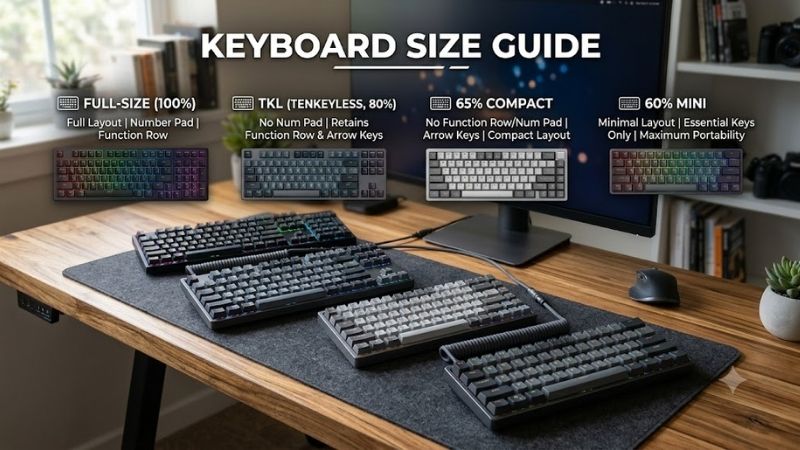
Navigating this GKeyboard size guide requires balancing desktop surface dimensions, daily typing habits, and mouse mobility. You must evaluate numeric pad necessity, dedicated navigation keys, and overall ergonomics to ensure your chosen hardware delivers seamless comfort across long gaming and productivity sessions.
Desk Real Estate and Mouse Movement Space
Competitive gamers requiring extensive mousepad space frequently discover that oversized peripherals restrict swift hand movements. When your primary typing board spans sixteen inches or wider, physical contact between sweeping mouse flicks and keyboard edges occurs regularly, spoiling aim during intense competitive duels.
Downsizing to more compact form factors liberates valuable square inches on your desktop for continuous arm adjustments. Maintaining ample clearance on your mousepad enhances agility in tactical action titles while allowing you to position your hands closer together for naturally relaxed upper body shoulder alignment.
Number Pad Requirements and Data Entry Needs
Accounting professionals and spreadsheet analysts must consult this GKeyboard size guide before sacrificing the traditional tenkey cluster. The dedicated mathematical layout accelerates numeric calculations, rapid currency entries, and financial database entries far beyond what ordinary alphanumeric top rows achieve.
Casual gamers who rarely enter numeric figures can comfortably bypass the dedicated pad without reducing operational speed. If your daily computer routine focuses predominantly on digital entertainment and creative media editing, clearing out those extra keys grants superior ergonomic positioning across all tasks.
Dedicated Arrow and Navigation Key Clusters
Coding programmers and document editors rely heavily on dedicated arrow keys, page navigation controls, and delete toggles. Losing immediate mechanical access to home and end buttons introduces annoying key combination layers, which can interrupt creative writing momentum and complicate code debugging workflows.
Choosing intermediate form factors preserves these indispensable navigation keys while shedding extraneous outer chassis borders. You retain instantaneous cursor repositioning without memorizing complex secondary function layers, striking an optimal middle ground between spatial economy and daily operational efficiency.
Portability and Travel Convenience Factors
Mobile professionals who commute between corporate offices and home work environments benefit immensely from a GKeyboard size guide assessment. Bulky peripheral equipment strains backpack seams and adds substantial luggage weight, transforming simple daily commutes into cumbersome physical transit struggles.
Miniature peripheral designs slide effortlessly into standard travel bags alongside laptop chargers and external monitors. Choosing sturdy detachable cables alongside compact framing ensures you maintain familiar tactile typing precision wherever your remote workplace assignments or LAN party travels take you.
Top Picks for Every Desk Setup
Our practical GKeyboard size guide selections feature four distinguished peripherals that cater to diverse mechanical preferences and physical workspace limits. We researched leading market alternatives to spotlight superior hardware builds offering exceptional acoustic damping, responsive switches, and remarkable durability.
| Model | Form Factor | Switch Options | Connectivity | Best For |
|---|---|---|---|---|
| Keychron Q1 Pro | 75 Percent | Custom Mechanical | Wireless & USB | Customization Seekers |
| SteelSeries Apex Pro TKL | 80 Percent | Adjustable Magnetic | Detachable USB | Tournament Competitors |
| Razer Huntsman Mini | 60 Percent | Linear Optical | Detachable USB | Minimalist Gamers |
| Logitech G915 Lightspeed | 100 Percent | Low Profile GL | Wireless & Bluetooth | Complete Office Suites |
Keychron Q1 Pro Wireless Custom Mechanical Board
Customization enthusiasts wanting luxurious build quality will adore this premium aluminum unit featuring hot-swappable sockets and sound dampening foam. The compact layout retains critical navigation arrows while reducing overall width, making it a stellar hybrid option for both programming duties and casual gaming sessions.
The heavy aluminum chassis delivers remarkable desk stability, but the dense metal frame makes frequent travel transport impractical. While wireless connectivity operates smoothly across modern operating systems, the stock keycaps exhibit slight acoustic resonance that may require lubrication tuning from enthusiasts.
SteelSeries Apex Pro TKL Gaming Keyboard
Competitive esports competitors analyzing this GKeyboard size guide will find extraordinary competitive speed inside this tenkeyless model. Its innovative magnetic switches permit granular actuation tuning per key, allowing swift directional strafing inputs that give competitive shooters an undeniable advantage in matches.
The integrated digital display provides helpful hardware profile feedback, yet the accompanying proprietary software consumes notable computer memory resources. Furthermore, the compact form factor lacks a number pad entirely, making heavy financial spreadsheet calculations awkward without a separate numeric accessory.
Razer Huntsman Mini Optical Gaming Device
Minimalist gamers with tiny desktop areas will appreciate this ultra-compact device designed for maximum sweeping mouse freedom. The linear optical switches register keystrokes near the speed of light, ensuring lightning-fast reflex responses during chaotic battle royale encounters where microsecond delays determine victory.
The sturdy aluminum top plate easily resists aggressive downward impacts, but the aggressive sixty percent format removes arrow keys completely. Users must rely on secondary function layer combinations for basic cursor movement, creating an irritating learning curve for writers who produce extensive daily articles.
Logitech G915 Lightspeed Wireless Mechanical Board
Corporate executives and home workers who refuse to surrender functional utility will welcome this ultra-thin full-size luxury keyboard. It incorporates a comprehensive number pad alongside dedicated multimedia volume rollers, providing complete convenience for massive data spreadsheets and multimedia playback control.
The low-profile key switches enable remarkably comfortable ergonomic typing angles, though the proprietary stem mounts severely limit aftermarket custom keycap replacements. In addition, the wide full-size footprint consumes abundant desktop territory, occasionally interfering with wider mousepad sweeps during gaming.
Frequently Asked Questions About Keyboard Sizes
Studying our comprehensive GKeyboard size guide resolves common dilemmas surrounding form factor compromises, switch layouts, and workstation ergonomics. We answered four popular community questions to help you determine which dimensional layout harmonizes flawlessly with your personal gaming approach and desktop space.
Is a Tenkeyless Model Superior for Competitive Gaming?
Adopting advice from our GKeyboard size guide shows that tenkeyless models represent the premier standard for competitive gaming enthusiasts. Removing the rightside numeric pad permits a more natural arm alignment, reducing shoulder tension during marathon gaming matches while creating generous clearance for broad mouse swipes.
Retaining dedicated arrow keys and navigation clusters allows seamless browsing without memorizing secondary keyboard shortcuts. Unless your daily vocational work demands extensive numerical data logging, stepping down to a tenkeyless layout provides an ideal balance of functional convenience and competitive agility.
What Are the Tradeoffs of a Sixty Percent Format?
Compact sixty percent peripherals maximize open desk space and travel convenience by trimming away everything outside the alphanumeric core. This severe reduction allows hyper-fast mouse repositioning and effortless backpack storage, appealing directly to minimalist players attending competitive travel tournaments.
The principal drawback involves relying continuously on function layer keys to access fundamental navigation arrows and function rows. Creative editors and software developers frequently find this nested layout cumbersome, as simple coding tasks require pressing awkward two-key shortcuts to reposition digital text cursors.
Why Do Many Typists Prefer Seventy Five Percent Boards?
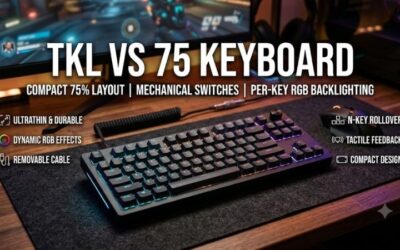
The seventy-five percent profile has emerged as a beloved form factor because it intelligently balances spatial economy with functional completeness. It retains the essential top function row and dedicated vertical arrow column while condensing key spacing together, shrinking width significantly compared to standard boards.
Typists preserve instant mechanical control over text navigation without sacrificing precious desk real estate for gaming mouse sweeps. This unified layout feels immediately intuitive to newcomers transitioning away from full-size boards, making it the most versatile everyday layout for mixed productivity and gaming.
Does a Full Size Board Still Offer Modern Advantages?
Full-size boards remain the undisputed champions for comprehensive data management, spreadsheet compilation, and dedicated macro control. Having an integrated number pad and distinct navigational island allows corporate accountants and digital creators to work efficiently without toggling nested software layouts.
The major drawback centers entirely on dimensional bulk, as broad borders demand immense desk real estate and push mice far outward. For sprawling workstations where desk surface is plentiful and competitive gaming takes a back seat, traditional full-size boards still supply unmatched convenience and mechanical utility.
View more products:
Final Thoughts on Choosing Your Ideal Keyboard
Ultimately, applying this GKeyboard size guide guarantees you achieve an optimal harmony between desktop space, typing efficiency, and gaming agility. Assess your specific daily workload and physical desk area carefully, then choose the balanced form factor that supports your personal ergonomics and elevates daily computing.