
🛒 Best Price Today on Amazon
Prime members get fast, free shipping on everything above, plus member-only deals. New members get a 30-day free trial — cancel anytime.
The best budget gaming laptop with an RTX 4070 in 2026 is the HP OMEN 16 with the i7-14700HX and 32GB of RAM. If you want a sharper screen, the MSI Katana 15 QHD is the pick. Keep in mind that the RTX 4070 Laptop GPU is now previous generation. Buy one only when it is clearly discounted, comes with 32GB of RAM, or runs the GPU at a higher power limit. If an RTX 5070 laptop costs the same or less, such as the Acer Nitro V 16 or GIGABYTE Gaming A16, the newer chip is usually the smarter buy.
Below are six laptops: four RTX 4070 models that still make sense at the right price and two RTX 5070 alternatives to compare them against.
RTX 4070 vs RTX 5070 Laptop: Is the Older Chip Still Worth It?
The two GPUs are closer than the model numbers suggest. Both have 4,608 CUDA cores and 8GB of VRAM on a 128-bit bus. The RTX 5070 Laptop moves to faster GDDR7 memory, which raises bandwidth from about 256 GB/s to about 384 GB/s. It also supports DLSS Multi Frame Generation, which the RTX 40 series does not. In most published benchmarks, the RTX 5070 Laptop runs anywhere from roughly even with the RTX 4070 Laptop to around 10 to 12 percent ahead, and it is noticeably more power-efficient.
The biggest factor is how much power each laptop gives its GPU. NVIDIA lets manufacturers set the RTX 4070 Laptop GPU from about 35W up to 115W, plus Dynamic Boost, for a ceiling of around 140W. The RTX 5070 Laptop has a lower range of roughly 50W to 100W. A well-cooled RTX 4070 at 105W to 120W can match or beat an RTX 5070 limited to about 80W, while a full-power RTX 5070 will pull ahead.
Here is the simple rule:
- Buy an RTX 4070 laptop when it costs noticeably less than a comparable RTX 5070 machine, when it comes with 32GB of RAM or a QHD screen the newer option lacks, or when it runs the GPU at 105W or more.
- Buy an RTX 5070 laptop when the price is the same or lower, when you want Multi Frame Generation in supported games, or when you care about battery life and heat under load.
- Don’t upgrade from one to the other. The gap is too small.
Comparison Table: The 6 Laptops at a Glance
| Model | GPU (max graphics power) | CPU | RAM | Storage | Display | Typical price range |
|---|---|---|---|---|---|---|
| MSI Katana 15 (B13VGK-484US) | RTX 4070, 8GB GDDR6 (about 105W) | Core i7-13620H | 16GB DDR5 | 1TB | 15.6″ 1920×1080, 144Hz | $1,400–$1,550 |
| MSI Katana 15 QHD (B13VGK) | RTX 4070, 8GB GDDR6 (105W) | Core i7-13620H | 16GB DDR5 | 1TB | 15.6″ 2560×1440, 165Hz | $1,500–$1,650 |
| HP OMEN 16 | RTX 4070, 8GB GDDR6 (up to about 120W) | Core i7-14700HX | 32GB DDR5-5600 | 1TB | 16.1″ 1920×1080, 165Hz | $1,400–$1,550 |
| MSI Katana A15 AI (B8VG-450US) | RTX 4070, 8GB GDDR6 (105W) | Ryzen 9 8945HS | 32GB DDR5-5600 | 1TB | 15.6″ 2560×1440, 165Hz | $1,450–$1,750 |
| Acer Nitro V 16 | RTX 5070, 8GB GDDR7 | Intel Core 7-class (varies by SKU) | 16GB | 512GB | 16″, 180Hz (resolution varies by SKU) | $1,150–$1,350 |
| GIGABYTE Gaming A16 | RTX 5070, 8GB GDDR7 (about 80–85W) | Core i7-13620H | 16GB DDR5 | 1TB | 16″ 1920×1200, 165Hz | $1,350–$1,500 |
Quick Decision Matrix
| Your budget | Resolution | Main use | Best pick |
|---|---|---|---|
| Under about $1,300 | 1080p / 1200p | Esports and mainstream AAA | Acer Nitro V 16 (RTX 5070) |
| About $1,350–$1,500 | 1080p / 1200p | Gaming plus a roomier 16:10 screen | GIGABYTE Gaming A16 (RTX 5070) |
| About $1,400–$1,550 | 1080p | AAA gaming, streaming, multitasking | HP OMEN 16 (32GB, higher GPU power) |
| About $1,400–$1,550 | 1080p | Lowest-cost RTX 4070 with 1TB | MSI Katana 15 FHD |
| About $1,500–$1,650 | 1440p | Sharper AAA visuals, light photo work | MSI Katana 15 QHD |
| About $1,450–$1,750 | 1440p | Gaming plus creator apps, heavy multitasking | MSI Katana A15 AI (32GB) |
The 6 Best Budget RTX 4070 Laptops (and RTX 5070 Alternatives)
1. MSI Katana 15 (B13VGK-484US): Entry-Level RTX 4070 at 1080p

msi Katana 15 15.6" 144Hz FHD Gaming Laptop: 13th Gen Intel Core i7, RTX 4070, 16GB DDR5, 1TB NVMe SSD, USB-Type C, Cooler Boost 5, Win11 Home: Black B13VGK-484US
Included for 'Best Budget RTX 4070 Gaming Laptops 2026: 6 Picks vs RTX 5070' as a representative gaming laptop in this roundup; selection reflects the product set returned for this topic.
View on AmazonThis is the original budget RTX 4070 Katana. It pairs a Core i7-13620H with the RTX 4070 at about 105W, 16GB of dual-channel DDR5 (2x8GB), a 1TB SSD, and a 15.6-inch 1080p 144Hz panel. It weighs about 4.96 lb (2.25 kg). Testing generally shows small gains above roughly 110W to 115W on the RTX 4070, so its 105W limit costs little.
The weak spots are the screen and battery. The panel covers only about 45 percent of NTSC color, so it looks washed out next to better displays, and the 53Wh battery won’t last long away from an outlet. Buy it only when it is clearly cheaper than the OMEN 16 or an RTX 5070 laptop. At full price, the newer options give you more for the money.
2. MSI Katana 15 QHD (B13VGK): Best Budget RTX 4070 for 1440p

msi Katana 15 15.6” 165Hz QHD Gaming Laptop: Intel Core i7-13620H, NVIDIA Geforce RTX 4070, 16GB DDR5, 1TB NVMe SSD, Cooler Boost 5, Win 11: Black B13VGK-2000US
Included for 'Best Budget RTX 4070 Gaming Laptops 2026: 6 Picks vs RTX 5070' as a representative gaming laptop in this roundup; selection reflects the product set returned for this topic.
View on AmazonThis Katana uses the same CPU, GPU power limit (105W with Dynamic Boost), 16GB of DDR5-5200 and 1TB Gen4 SSD as the model above. The difference is the display: a 15.6-inch 2560×1440 165Hz IPS panel that MSI rates at 100 percent DCI-P3. It is the most color-rich screen in this group. Weight is about 4.96 lb.
At 1440p, the RTX 4070 handles most current games at high settings, with DLSS filling the gap in heavier titles. The 8GB of VRAM is the limit to watch. When it drops well below its usual price during sales, it is one of the strongest RTX 4070 buys of 2026.
3. HP OMEN 16 (i7-14700HX, 32GB): Best Overall RTX 4070 Value

HP OMEN 16.1"" FHD 165Hz Gaming Laptop Computer, 14th Gen Intel Core i7-14700HX Twenty-Core, NVIDIA GeForce RTX 4070, 32GBDDR5 RAM, 1TB PCIe SSD, RGB Backlit, WiFi 6E, Windows 11 Home, Gray
Included for 'Best Budget RTX 4070 Gaming Laptops 2026: 6 Picks vs RTX 5070' as a representative gaming laptop in this roundup; selection reflects the product set returned for this topic.
View on AmazonThe OMEN 16 brings the strongest CPU here, a 20-core i7-14700HX, along with 32GB of DDR5-5600 (2x16GB), a 1TB SSD, and a 16.1-inch 1080p 165Hz panel rated for 100 percent sRGB and 300 nits. HP’s listings for i7-14700HX and RTX 4070 OMEN 16 configurations show GPU power up to about 120W. That is more than the Katana models’ 105W, so check the exact SKU before you buy. It adds an 83Wh battery, two Thunderbolt 4 ports and Ethernet, and weighs about 5.29 lb.
This is the clearest case for an RTX 4070 laptop over an RTX 5070 one. You get double the RAM of the RTX 5070 picks, a higher GPU power limit, and a bigger battery, often at a similar price. The trade-off is a 1080p screen.
4. MSI Katana A15 AI (B8VG-450US): 32GB and QHD on AMD
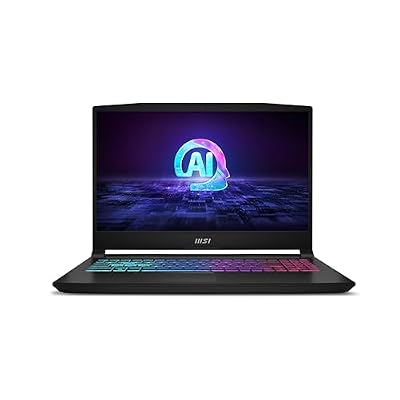
msi Katana A15 AI Gaming Laptop 15.6” QHD 165Hz – Ryzen 9-8945HS, RTX 4070, 32GB DDR5, 1TB SSD, Cooler Boost 5, Windows 11: Black B8VG-450US
Included for 'Best Budget RTX 4070 Gaming Laptops 2026: 6 Picks vs RTX 5070' as a representative gaming laptop in this roundup; selection reflects the product set returned for this topic.
View on AmazonThe Katana A15 AI swaps in an 8-core Ryzen 9 8945HS and comes with 32GB of DDR5-5600, a 1TB Gen4 SSD, and a 15.6-inch 2560×1440 165Hz display. The RTX 4070 is limited to 105W, and a MUX switch lets the GPU bypass integrated graphics. Measured weight is about 5.07 lb (2.3 kg), and it uses the same compact 15.6-inch chassis as the Intel Katana.
Independent testing found other RTX 4070 laptops ahead by roughly 9 to 16 percent in synthetic graphics tests because of the 105W limit. Choose this model if you want 1440p and 32GB in the same machine for gaming plus editing, streaming, or dozens of browser tabs. Near the top of its price range, the HP OMEN 16 or an RTX 5070 machine is better value.
5. Acer Nitro V 16 (RTX 5070): Newer-Generation Value Pick
This is the newer-generation alternative, and often the cheapest way into this performance tier. You get an RTX 5070 Laptop GPU with 8GB of GDDR7, 16GB of RAM, a 512GB SSD, and a 16-inch 180Hz panel (resolution varies by SKU, so check the listing). The CPU varies by SKU, from Intel Core 7 to Core Ultra 7 chips depending on the version. Comparable models weigh about 2.4 kg. GPU power varies by version, so check the spec sheet.
If this costs the same as or less than an RTX 4070 laptop, it is usually the better buy. You get slightly better performance per watt, DLSS Multi Frame Generation, and a taller 16:10 screen with the fastest refresh rate in this group. The 512GB SSD will fill up quickly with modern games, so plan on adding a second drive or replacing it.
6. GIGABYTE Gaming A16 (RTX 5070): 1TB and 16:10 at a Mid-Range Price

GIGABYTE - Gaming A16 Gaming Laptop - 165Hz 1920x1200 WUXGA - NVIDIA GeForce RTX 5070 - Intel i7-13620H - 1TB SSD with 16GB DDR5 RAM - Windows 11 Home AD Gaming A16 CWHI3US894SH
Included for 'Best Budget RTX 4070 Gaming Laptops 2026: 6 Picks vs RTX 5070' as a representative gaming laptop in this roundup; selection reflects the product set returned for this topic.
View on AmazonThe Gaming A16 is the second newer-generation alternative. It pairs the familiar i7-13620H with an RTX 5070 Laptop GPU (8GB GDDR7), 16GB of DDR5 in two SO-DIMM slots that support up to 64GB, a 1TB SSD with a second M.2 slot, and a 16-inch 1920×1200 165Hz panel. GIGABYTE lists the weight at about 2.2 kg (4.85 lb), with a slim 19.5 to 23 mm chassis.
The catch is GPU power. Retailer listings put it around 80W to 85W, near the low end of the RTX 5070 range, and the 45 percent NTSC panel is basic. In practice, it performs close to a 105W RTX 4070. It wins when you value the lighter build, the 1TB of storage, and room to upgrade. Don’t pay more for it than for the HP OMEN 16.
Specs That Matter More Than the GPU Name
- GPU power (TGP): For an RTX 4070, look for 105W or higher. For an RTX 5070, the strongest configurations sit near the top of its 50W to 100W range plus boost. If a listing doesn’t show wattage, check the manufacturer’s spec sheet.
- MUX switch: Sending the GPU’s output straight to the display, instead of routing it through integrated graphics, can add a few to around 15 percent more frames in many games. The gain is usually biggest at 1080p and high frame rates.
- 1080p vs 1440p: 1080p or 1200p panels give higher frame rates and help 8GB of VRAM last longer. 1440p looks noticeably sharper on a 15 to 16 inch screen but pushes the GPU harder, so expect to rely on DLSS in demanding titles.
- RAM: 16GB in dual channel (2x8GB) is the minimum for smooth gaming in 2026. 32GB is worth it if you stream, edit video, or keep many apps open, which is why the 32GB OMEN 16 and Katana A15 AI hold their value.
- Cooling and chassis: Thicker chassis with larger fans generally hold their power limits longer under sustained load than the slimmest designs.
FAQ
Is an RTX 4070 laptop still worth buying in 2026?
Yes, at the right price. It still handles 1080p at high to ultra settings and most 1440p games at high settings with DLSS. Buy one when it is discounted below a comparable RTX 5070 machine or offers something extra, such as 32GB of RAM, a QHD screen, or a higher GPU power limit.
Is the RTX 5070 laptop GPU much faster than the RTX 4070?
No. At similar power limits, it is typically even to around 10 to 12 percent faster in standard rendering. Its main advantages are efficiency, faster GDDR7 memory, and Multi Frame Generation support. A low-power RTX 5070 can trail a higher-power RTX 4070.
Is 8GB of VRAM enough for 1440p gaming?
For most games, yes, but the newest titles may need texture quality lowered from ultra to high at 1440p. Both the RTX 4070 and RTX 5070 laptop GPUs here have 8GB, so VRAM doesn’t separate these six laptops.
Should I upgrade the RAM or storage myself?
Most of these models use socketed SO-DIMM memory and have a spare M.2 slot, but confirm on your exact configuration before buying parts. Moving a 16GB model to 32GB, or adding a second SSD to the 512GB Nitro V 16, is one of the cheapest ways to extend the laptop’s useful life.









