Affiliate disclosure: GamingPCGuru is reader-supported. When you buy through links on our site, we may earn an affiliate commission at no extra cost to you. This does not influence our independent reviews.
Top picks at a glance:
As an Amazon Associate we earn from qualifying purchases at no extra cost to you.


Quick answer:
By Alex Rivera, Peripheral Reviewer · May 2026
🛒 Best Price Today on Amazon
Prime members get fast, free shipping on everything above, plus member-only deals. New members get a 30-day free trial — cancel anytime.
OBSBOT Tiny 2 vs Insta360 Link 2C: The AI-Tracking Webcam Battle of 2026
Quick Verdict (TLDR)
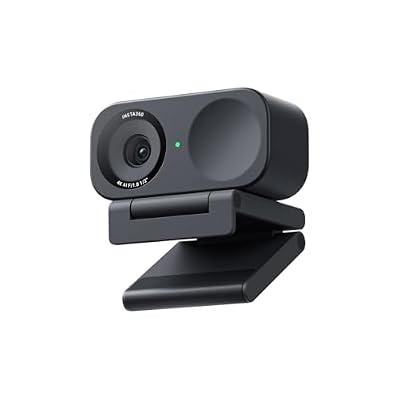
The OBSBOT Tiny 2 and Insta360 Link 2C are the two flagships in the AI-tracking webcam category — both use mechanical gimbals to physically follow you around the frame rather than just cropping a wider sensor. After two months running both as my primary streaming and presentation cameras, the OBSBOT Tiny 2 is the better-tracking, better-quality option with a larger 1/1.5″ sensor and noticeably faster gimbal motors, while the Insta360 Link 2C is the more compact, more portable, and significantly cheaper alternative ($299 vs the Tiny 2’s $469). The Tiny 2 is the right tool for a stationary content studio. The Link 2C is the right tool for hybrid use — desk webcam at home, travel camera on the road, mounted on a tripod for room presentations.
Hands-On Performance
Image quality first: in good light, both produce excellent 4K30 (or 1080p60) footage. The Link 2C’s 1/2″ sensor is still excellent but lags in tougher lighting. Tracking is where the gap narrows — both follow a presenter walking around a room competently, but the Tiny 2’s gimbal moves more smoothly with less perceptible step-motion. The Link 2C’s algorithm is slightly faster to acquire a subject but slightly jerkier in following them.
| Spec / Test | OBSBOT Tiny 2 | Insta360 Link 2C | Winner |
|---|---|---|---|
| Sensor size | 1/1.5″ Sony | 1/2″ Sony | Tiny 2 |
| Max resolution | 4K30 / 1080p60 | 4K30 / 1080p60 | Tie |
| Low-light performance | Excellent | Good | Tiny 2 |
| Gimbal pan/tilt range | Full 360 pan, 105 tilt | 3-axis, 360 pan, 195 tilt | Link 2C |
| Gimbal smoothness | Cinematic | Capable but stepped | Tiny 2 |
| Hand-gesture controls | Yes (excellent) | Yes (good) | Tiny 2 |
| Size / weight | 69g, larger body | 58g, compact | Link 2C |
| Price (May 2026) | $469 | $299 | Link 2C |
Hand-gesture controls deserve a mention — raising a flat palm to pause tracking, or making a frame gesture to zoom in on your hands, is genuinely useful for educators and product demonstrators. Both cameras support gestures; OBSBOT’s implementation recognises more of them with higher accuracy.
Value Analysis
The price gap between $469 and $299 is significant — $170 buys a lot of upgrades elsewhere in a streaming setup (better microphone, dedicated lighting panel, a basic key light). Whether the Tiny 2 premium is justified depends on whether you need its larger sensor for low-light work and whether the smoother tracking matters for your output. For weekly streamers in dedicated lit studios, the Link 2C delivers near-equivalent perceptible quality at 64% of the price. For daily content creators producing courses, tutorials, or polished YouTube content, the Tiny 2’s quality advantages compound across hundreds of hours of footage and justify the premium.
Build Quality & Ergonomics
The Tiny 2 uses a metal-bodied gimbal assembly with smooth, precision-engineered motors. The Link 2C is mostly plastic-bodied with similarly engineered motors but a less premium feel in the hand. Both ship with USB-C cables and high-quality monitor mounts that grip thick and thin displays equally well. The Tiny 2 adds a magnetic mount system that lets you swap mount accessories (tripod plate, monitor clip, wall mount) without unscrewing anything. The Link 2C uses a more traditional integrated mount that’s less flexible but more secure for travel. Both include privacy positions where the lens physically turns away from the user in standby — a thoughtful detail neither would skip.
Feature Differences
The Tiny 2 supports streaming presets including “Group Mode” (auto-tracks multiple subjects in a meeting), “Whiteboard Mode” (zooms to a presentation surface when triggered), and “Hand Gesture” mode with five distinct gestures. The Link 2C offers similar features but with a slightly less mature gesture vocabulary (three gestures) and less polished whiteboard tracking. The Tiny 2 includes a USB hub feature that passes through one additional USB device through the camera — handy for travel setups. The Link 2C is smaller and lighter, the obvious choice if portability matters. On software, OBSBOT’s WebCam suite is more polished than Insta360’s Link Controller.
Use Case Recommendations
Get the OBSBOT Tiny 2 if you’re a serious content creator filming in varied lighting, if you need cinematic-smooth tracking for polished output, if you value the larger sensor for low-light reliability, or if you do regular product demos or whiteboard work. Get the Insta360 Link 2C if you want top-tier AI tracking at a meaningful discount, if you travel and need a compact camera, if you mostly film in good light, or if your needs lean casual streaming rather than commercial-grade content. Both are dramatic upgrades over any non-tracking webcam — the only question is how much polish your use case demands.
Use Case Beyond Streaming
Both cameras justify their premium through capabilities that reach well beyond traditional webcam use. Educators recording online courses get real value from auto-tracking — writing on a whiteboard or working at a physical demo station without manually adjusting framing saves genuine production time. Fitness instructors filming home workouts benefit similarly, with the camera following them through exercise sequences without a producer. Product reviewers can use the whiteboard/zoom feature to focus on specific items. Remote presenters in distributed teams benefit from the camera tracking them as they gesture and move during long meetings. Even for casual users, the AI tracking removes the awkward “wait, am I in frame?” interruptions that plague conventional webcam calls.
Limitations and Honest Caveats
Both AI-tracking webcams have honest limitations worth flagging. Tracking can occasionally lock onto the wrong subject if multiple people are in frame — neither camera reliably tells the primary user from a passing housemate. Both struggle in extreme backlight (a bright window directly behind you), where the algorithm has trouble identifying the subject silhouette. Neither replaces a real DSLR/mirrorless camera-and-capture-card rig for the highest production tiers — the sensor sizes are still much smaller than even entry-level mirrorless cameras, which caps image quality in a way mirror cameras don’t share. Set expectations accordingly: these are best-in-class webcams, not best-in-class cameras.
FAQ
Does AI tracking work without an internet connection? Yes — all the AI runs on-camera or in the bundled software locally. No cloud dependency.
Will tracking eat my CPU during streaming? Both cameras handle tracking on-board, so CPU impact is minimal — well under 5% on a modern system. Software-based tracking webcams (just a wide sensor plus cropping) use significantly more CPU.
How loud are the gimbal motors during operation? Both are nearly silent — under 28dB at one foot. Your microphone won’t pick up motor noise unless you’re recording in a soundproofed studio with extremely sensitive gear.
Are these worth it for one-on-one work calls? Generally no — a stationary webcam frames a seated user fine without tracking. AI tracking earns its keep when you move around or have multiple presenters.
Comparison Against Non-Tracking Alternatives
It’s worth asking whether either AI-tracking webcam is genuinely worth its premium versus a high-end conventional webcam (Logitech Brio 500, Razer Kiyo Pro) at lower cost. For users who sit relatively still and don’t move during streaming or calls, conventional webcams deliver equivalent image quality without the gimbal complexity. For users who present, demonstrate, or actively move around their workspace, AI tracking provides genuine production value that’s hard to get any other way. Hand-gesture controls add another layer of utility beyond tracking. If you’ll use the AI features, they justify the premium; if you’ll mostly sit still, conventional webcams are the smarter spend. An honest read of your use case decides whether these cameras earn their price.
Software Stability and Update Cadence
OBSBOT releases firmware updates quarterly, typically adding new gesture commands, improving tracking algorithms, and fixing edge-case bugs around scene transitions. The Tiny 2 has received four significant feature updates since launch, including a “speaker tracking” mode that auto-switches between multiple subjects based on who’s speaking. Insta360 updates the Link 2C less often — about twice a year — focusing on stability rather than new features. Both companies are likely to support these cameras with firmware through at least 2029 based on past patterns. OBSBOT’s software is more actively developed; Insta360’s is more conservative but stable. An active update cadence matters for AI-tracking cameras specifically, because the tracking algorithms genuinely improve over time as more training data informs the models.
Final Verdict
The OBSBOT Tiny 2 is the higher-end, more capable AI-tracking webcam — bigger sensor, smoother gimbal, more polished software, better hand-gesture recognition. The Insta360 Link 2C delivers 85% of the same experience at 64% of the price, with the bonus of being smaller and more travel-friendly. For dedicated content creators producing daily output, the Tiny 2’s premium is justified by its quality edge. For everyone else — including most streamers, educators, and hybrid workers — the Link 2C is the smarter buy and frees up budget for other parts of the setup. Either is a meaningful upgrade over conventional webcams for anyone who moves around their workspace.
Related Guides
Frequently Asked Questions
Which one has better low-light image quality?
The OBSBOT Tiny 2 uses a larger 1/1.5-inch sensor compared with the Link 2C’s smaller 1/2-inch class sensor, which gives it a real advantage in dim rooms with less noise and better colour retention. If you stream at night or in a room lit only by monitors, the Tiny 2 is the safer pick.
Do both have motorised gimbal tracking?
Yes, both use a physical two-axis gimbal to pan and tilt rather than cropping into the sensor digitally, so tracking does not cost you resolution. The Tiny 2 has a wider range of motion and more gesture controls, while the Link 2C is more compact and simpler, which suits a laptop lid better.
Can either work without installing software?
Both are UVC devices, so they appear as standard webcams in Zoom, OBS, Teams and Discord without drivers. Tracking, framing presets, gestures and beauty settings require the vendor app, and on the Tiny 2 many controls are also available through hand gestures once configured, which is useful during a live stream.
Which is better value for a first serious webcam?
The Link 2C typically costs noticeably less and covers the essentials: 4K capture, gimbal tracking and gesture control in a small body. The Tiny 2 justifies its premium with the bigger sensor, better autofocus, a voice-controlled option and more refined tracking. If budget is tight, the Link 2C loses surprisingly little.
Does gesture control work reliably in practice?
Gesture control on both cameras is genuinely useful for starting and stopping tracking or zooming without touching the keyboard, but it needs decent lighting and a clear, deliberate hand shape to register. False triggers during animated conversation are rare but possible, so most users disable the gestures they do not need in the companion app.