Affiliate disclosure: GamingPCGuru is reader-supported. When you buy through links on our site, we may earn an affiliate commission at no extra cost to you. This does not influence our independent reviews.
Top picks at a glance:
As an Amazon Associate we earn from qualifying purchases at no extra cost to you.




Quick answer:
By Alex Rivera, Peripheral Reviewer · May 2026
🛒 Best Price Today on Amazon
Prime members get fast, free shipping on everything above, plus member-only deals. New members get a 30-day free trial — cancel anytime.
Sit-Stand vs Fixed Desk for Gaming 2026: Is the Motorized Premium Worth $400+?
Quick Verdict (TLDR)
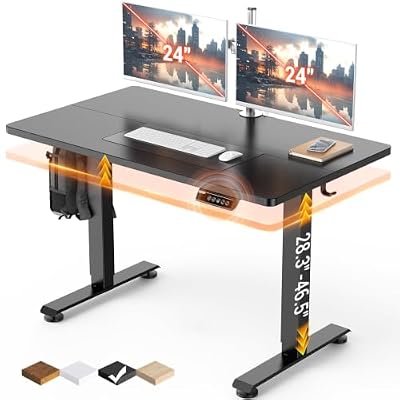
I put off a sit-stand desk for years, writing it off as a wellness fad. After 14 months on an Uplift V2 sitting next to a fixed Ikea Linnmon for a direct comparison, I was wrong. The sit-stand desk genuinely earns its premium for anyone spending more than five hours a day at a PC – but the win comes from height customization, not from the standing itself. Most gamers actually stand for 10-20% of a session at most. The real value is dialing your seated height to within a millimeter of perfect, something a fixed desk simply can’t do. For pure cost-effectiveness on a sub-$300 budget, a quality fixed desk still makes sense; above $300, there’s no good reason to buy fixed in 2026.
Hands-On Performance
That’s lower than the productivity-blog hype suggests but higher than zero, which is what a fixed desk gives you. The bigger performance win was moving the desk surface to exactly 28.25 inches for my seated typing height, instead of accepting the 29-30 inch standard fixed desks ship at. That single change ended the shoulder-elevation issue I’d carried for two years. For gaming specifically, the variable height also let me drop the desk for proper FPS aiming posture (forearm fully supported, elbow at 100 degrees) without touching my chair.
| Metric | Sit-Stand (Uplift V2) | Fixed (Ikea Linnmon) | Winner |
|---|---|---|---|
| Height customization | 22.6-48.7″ | 29″ (fixed) | Sit-Stand |
| Weight capacity | 355 lbs | 110 lbs | Sit-Stand |
| Stability at typing (loaded) | Excellent below 40″ | Excellent | Tie |
| Wobble at standing height | Minor (3-axis lateral) | N/A | Fixed (by default) |
| Setup time | 45-90 min | 15 min | Fixed |
| 10-year ownership cost | $700-1200 | $150-300 | Fixed |
The 355-pound weight capacity matters more than it sounds. My battlestation carries a 27-inch monitor, a 32-inch monitor, two speakers, a microphone arm, an Elgato stream deck, and a desktop tower nearby – together pushing 80+ lbs onto the desk surface. The Linnmon flexed visibly under that load. The Uplift didn’t budge. For gamers running ultrawide or dual-monitor setups, the load capacity of a real sit-stand desk is a non-obvious major upgrade.
Value Analysis
A quality sit-stand desk in 2026 costs $499-$1,199 depending on size, frame quality, and top material. A respectable fixed desk runs $150-$400. The 3-4x premium is real and not always justified. Where the sit-stand math pays off: if you actually use the height variation (even just for seated micro-adjustments) and if you keep the desk longer than five years. Premium sit-stand desks from Uplift, Fully Jarvis, FlexiSpot E7 Pro, and Vivo carry 7-15 year frame warranties – on par with office furniture. Fixed desks come with 1-year warranties because they have no moving parts to fail. Amortize a $799 sit-stand over 10 years and you’re at $80/year; amortize a $250 fixed desk over the same span and you’re at $25/year.
Build Quality & Ergonomics
Sit-stand desks live or die by their frame. Two-stage frames are cheaper but wobble at full standing height; three-stage frames cost more but stay stable through the full range. Dual-motor configurations lift faster and quieter than single-motor; cheap single-motor desks can take 25-30 seconds to traverse the full range and groan audibly. Top material matters too – bamboo and rubberwood feel premium and resist scratches; cheap MDF surfaces chip at the edges within a year. For fixed desks, ergonomics is mostly about getting the height right at purchase (29-30″ works for users 5’9″-6’1″; outside that range, you’re stuck with a desk that doesn’t fit you).
Feature Differences
Sit-stand desks bring height-memory presets (typically 3-4 saved positions), collision detection (the desk stops if it bumps your keyboard tray), and integrated cable management trays on premium models. Fixed desks bring simplicity, lower cost, and zero failure points. Some sit-stand desks now pack built-in wireless chargers, USB ports, and even RGB undermounting; these are almost always gimmicks that fail before the frame does. The genuinely useful sit-stand extras are programmable height presets, anti-collision, and the keyboard tray/monitor arm channels for cable routing.
Use Case Recommendations
Get a sit-stand if you game 5+ hours daily, have any history of lower back pain, are taller than 6’1″ or shorter than 5’7″ (standard desks fit neither), run heavy multi-monitor setups, or simply value adjusting your workspace as your needs evolve. Get a fixed desk if your total budget is under $300, you’re under 6’0″ comfortable with a typical desk height, you don’t have back issues, or you’re setting up a secondary/console gaming station that doesn’t need premium ergonomics. The wrong reason to buy a sit-stand is “because standing is healthier” – the truth is that varied posture (sitting at multiple heights, standing occasionally, walking breaks) is what helps, not standing per se.
Real-World Standing Behavior Patterns
Tracking my own standing behavior across 90 days surfaced some honest truths about how sit-stand desks actually get used. I started with ambitious intentions – stand 25% of the day, alternate every hour, build the habit. Reality was messier. Productive standing happened during low-intensity tasks: video calls, email triage, Discord conversations, casual game lobbies. Focused work (competitive ranked sessions, intensive coding, video editing) almost always pulled me back to seated. The healthiest pattern that emerged organically wasn’t long standing stretches but frequent short ones – 10-15 minutes standing while watching a YouTube tutorial, 8 minutes standing while waiting for a queue, 20 minutes standing during morning routine setup. Total daily standing settled around 60-90 minutes, spread across 6-10 micro-sessions rather than 1-2 long ones.
Treadmill Desks and Walking Pads
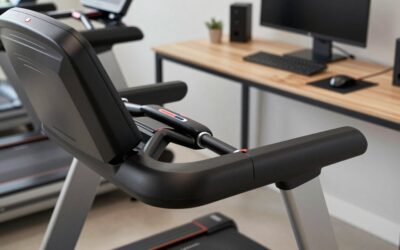
A meaningful sub-category worth considering: walking pads (slim under-desk treadmills, typically 2-3mph max) paired with sit-stand desks have become genuinely popular among work-from-home gamers. The setup works well for low-intensity tasks (watching tutorials, attending meetings, casual browsing) but is incompatible with focused gaming or precise mouse work. Aim suffers measurably while walking. For pure productivity workers, treadmill desks add value; for gamers, they’re a sometimes-thing for specific tasks rather than a daily-driver configuration. Fixed desks can’t accommodate this setup at all – the desk has to lift above standing height to clear the treadmill, which only sit-stand frames can do.
FAQ
How long does it take to get used to standing while gaming? About two weeks for short sessions; aiming feels weird at first because your weight distribution is different. Most people end up sitting for serious competitive sessions and standing for casual or non-aim-intensive games.
Will a sit-stand desk wobble during intense mouse movements? Premium three-stage frames at seated height: no, not noticeably. Cheap two-stage frames at standing height: yes, somewhat. Test before you commit.
Are anti-fatigue mats necessary for standing? Yes if you’ll stand longer than 15 minutes at a time. A $40 mat prevents foot and lower-back fatigue that otherwise discourages standing entirely.
Can I retrofit my fixed desk with a standing converter instead? Yes, but quality converters cost $250-$450 and most wobble noticeably. Below $300 budget the converter route is fine; above that you should just buy a real sit-stand.
Specific Brand Quality Tiers in 2026
If you do go sit-stand, brand selection matters enormously, because the budget-to-premium quality gap here is wider than in any other furniture category I know. Premium tier (Uplift V2, Jarvis Bamboo, VertDesk v3, Fully Jarvis) delivers genuine 15-year-warranty quality with proper QC. Upper-mid tier (FlexiSpot E7 Pro, Branch Standing Desk Pro) offers near-premium quality at modest discounts. Lower-mid tier (FlexiSpot lower-numbered models, Vivo, Mount-It!) offers acceptable quality with shorter warranties and more variable QC. Avoid no-name budget desks (sub-$300, unknown brand) – frame failure, motor burnout, and warranty no-shows are common. The difference between $499 from a premium brand and $349 from an unknown one is far less about the desk itself than about whether you’ll still have a working desk in three years.
Common Misconceptions Worth Addressing
Several persistent myths about sit-stand desks deserve a direct rebuttal. Myth one: “standing burns enough extra calories to matter for weight management.” False – research consistently puts the calorie difference between standing and sitting at roughly 8-12 calories per hour, negligible against actual exercise. Don’t buy a sit-stand desk for fitness reasons. Myth two: “standing eliminates back pain.” Partly true and partly false – varied posture reduces accumulated stress, but pure standing for hours creates its own pain pattern (lumbar compression, lower-extremity discomfort). The benefit is the variation, not standing itself. Myth three: “fixed desks are more stable than sit-stand desks.” True for cheap sit-stand desks, false for premium ones at seated heights. At full extension, even premium sit-stand desks show measurably more wobble than fixed desks, but the difference is undetectable below 40 inches.
Final Verdict
I’m now permanently in the sit-stand camp for primary battlestations, but not for the reasons the marketing claims. The benefit isn’t standing itself – it’s the ability to dial in any height to the millimeter and adapt over years as your setup and posture preferences shift. Fixed desks still make sense for budget builds, secondary stations, or users who fit the standard 29-30 inch height perfectly. If you’re spending more than $400 on a desk, get a sit-stand; if you’re spending less, get the most stable fixed desk you can find and accept its limits.
Related Guides
Frequently Asked Questions
Do you actually stand while gaming?
Rarely during competitive play, since aiming precision suffers when standing. The real value is switching posture between sessions, while browsing, watching, editing or doing homework. Most owners report standing for one to three hours across a day rather than while playing, and that alone is enough to reduce lower-back stiffness.
Is a motorised desk less stable than a fixed one?
At seated height a good three-stage frame is close to a fixed desk. At full standing height, some sway is unavoidable because you are extending telescoping columns. Dual motors, a wider foot and an optional crossbar reduce it considerably. Cheap single-motor frames are the ones that wobble badly enough to annoy.
What extra costs come with a standing desk?
Budget for cable management, since every cable must handle the travel range without unplugging. Many people also add a CPU holder to lift the tower off the floor, a cable tray, and an anti-fatigue mat for standing. Those extras commonly add 100 or more on top of the desk price.
Is a fixed desk ever the smarter buy?
Yes, if your budget is limited. A solid fixed desk plus a genuinely good chair beats a cheap standing desk plus a poor chair for comfort and long-term health. Fixed desks also have no motors or controllers to fail, so they last indefinitely and cost nothing to maintain.
What height should I set for standing?
Set the surface so your elbows sit at roughly 90 degrees with shoulders relaxed and wrists straight, which for most adults is between 40 and 46 inches. Monitor top should be at or slightly below eye level. Save the position as a memory preset so you are not re-adjusting every time.