⚡ Key Takeaways
- What Drives the Price of a Gaming PC
- 2026 Gaming PC Price Tiers
- The Sweet Spot: Why Mid-Range Wins for Most People
- Hidden Costs People Forget
- Build vs. Buy: The Cost Difference
- How to Allocate Your Budget Wisely
- Saving Money Without Sacrificing Quality
- Where to Spend on Peripherals
- Top-Rated Picks
- Frequently Asked Questions
- Conclusion
- Related Articles
- Before looking at price tiers, it helps to understand where your money goes.
- Prebuilt systems typically add a few hundred dollars for assembly and warranty.
- For the majority of gamers, the $1,000 to $1,400 range offers the best value by a wide margin.
- The tower itself is only part of the story.
One of the first questions every newcomer asks is about gaming PC cost: how much do you really need to spend to play modern games well? The honest answer is that there’s no single number, because a gaming PC can range from a budget machine that handles esports titles to a no-compromise 4K powerhouse. What matters is matching your spend to the resolution and frame rate you actually want. This guide breaks down realistic 2026 price tiers so you know exactly what your money buys at each level.
🛒 Best Price Today on Amazon
Prime members get fast, free shipping on everything above, plus member-only deals. New members get a 30-day free trial — cancel anytime.
What Drives the Price of a Gaming PC
Before looking at price tiers, it helps to understand where your money goes. The graphics card is almost always the single most expensive component and the biggest factor in gaming performance. After that, the CPU, RAM, storage, motherboard, power supply, and case round out the build. Peripherals and a monitor are separate costs that people often forget to budget for.
- GPU: Typically 35–50% of a gaming-focused budget
- CPU: Around 15–25%, depending on whether you also stream or create content
- RAM and storage: Roughly 10–15% combined
- Motherboard, PSU, case, cooler: The remaining foundation
2026 Gaming PC Price Tiers
Here’s a clear breakdown of what you can expect at each budget level, based on current US pricing for self-built machines. Prebuilt systems typically add a few hundred dollars for assembly and warranty.
| Budget Tier | Price Range | Target Experience | Example Components |
|---|---|---|---|
| Entry / Esports | $600–$800 | 1080p high, esports at high FPS | RTX 5060 or RX 9060, Ryzen 5, 16GB RAM |
| Mid-Range | $1,000–$1,400 | 1080p ultra / 1440p high | RTX 5070 or RX 9070, Ryzen 7, 32GB RAM |
| High-End | $1,800–$2,400 | 1440p ultra / entry 4K | RTX 5080, Ryzen 7 X3D, 32GB RAM |
| Enthusiast / 4K | $2,800–$4,000+ | 4K ultra with ray tracing | RTX 5090, Ryzen 9 X3D, 32–64GB RAM |
The Sweet Spot: Why Mid-Range Wins for Most People
For the majority of gamers, the $1,000 to $1,400 range offers the best value by a wide margin. At this level you get a graphics card capable of maxing out 1080p and handling 1440p comfortably, a CPU that won’t bottleneck your GPU, and enough RAM and fast storage for years of use. The jump to high-end and enthusiast tiers brings diminishing returns: you pay disproportionately more for each extra frame, especially at the very top.
Spending less than $600, by contrast, often forces painful compromises like minimal storage or a weak power supply that limits future upgrades. The entry tier is fine if your budget is firm, but stretching to mid-range pays off over the life of the machine.
Hidden Costs People Forget
The tower itself is only part of the story. A complete gaming setup includes several extras that can add hundreds of dollars:
- Monitor: A good high-refresh 1440p display is essential to actually enjoy your hardware.
- Operating system: A Windows license if you don’t already have one.
- Peripherals: Keyboard, mouse, headset, and a mousepad.
- Surge protection and accessories: Small but worthwhile.
Budget at least a few hundred dollars on top of the tower for these. A great rig connected to a cheap monitor and mushy peripherals never feels as good as it should.
Build vs. Buy: The Cost Difference
Building your own PC almost always costs less than an equivalent prebuilt, since you skip the assembly markup and can shop component deals. The savings vary, but you also gain control over part quality and easier upgrades down the line. Prebuilts make sense if you value the convenience, a single warranty, and not wanting to troubleshoot, but you pay for that peace of mind. If you’re curious about the full assembly process, building is more approachable than most people expect.
How to Allocate Your Budget Wisely
Once you’ve settled on a total budget, the next challenge is splitting it sensibly across components. The classic mistake is pouring everything into the graphics card and skimping on the parts that support it. A flagship GPU choked by a weak CPU, slow RAM, or an unreliable power supply never reaches its potential, and you end up with a machine that underdelivers despite its price tag.
A balanced approach for most gaming builds looks like this: dedicate the largest single slice to the GPU, give the CPU enough power to keep up without bottlenecking, and never cut corners on the power supply, since it feeds every other part. RAM and storage are relatively inexpensive, so it’s worth getting 32GB and a fast SSD rather than the bare minimum. The motherboard should have the features you need without overspending on premium models loaded with extras you’ll never use. Spending a little thought here ensures every dollar contributes to actual performance.
Saving Money Without Sacrificing Quality
There are smart ways to trim costs that don’t hurt your experience, and others that come back to bite you. Knowing the difference is key to a great-value build:
- Worth doing: Watch for sales on GPUs and SSDs, reuse a monitor or peripherals you already own, and choose a previous-generation CPU that offers similar gaming performance for less.
- Worth doing: Buy a capable but not flagship motherboard, since the extra features on premium boards rarely affect gaming.
- Avoid: Cheap, no-name power supplies that risk your entire system to save a few dollars.
- Avoid: Buying too little storage or RAM up front, which forces an early, inconvenient upgrade.
The goal is to spend where it improves your gaming and economize where it doesn’t. Done well, this approach can shave a meaningful amount off your total without you ever noticing a difference in how games run.
Where to Spend on Peripherals
Once the tower is sorted, smart peripheral choices stretch your enjoyment further than another GPU tier would. A quality gaming keyboard and gaming mouse directly affect how every game feels, while a reliable gaming mousepad keeps tracking consistent. If you stream, factor in a good streaming microphone. And if portability matters, a handheld like the ROG Ally X can be a cost-effective second system.
Top-Rated Picks
As an Amazon Associate we earn from qualifying purchases at no extra cost to you.





| Product | Brand | Rating | Reviews | Price |
|---|---|---|---|---|
| Redragon K552 Mechanical Gaming Keyboard, 87-Key Comp… | REDRAGON | ★ 4.5 | 51.5k | Check on Amazon |
| Redragon S101-3 PRO Gaming Keyboard and Mouse, RGB Ba… | REDRAGON | ★ 4.5 | 51.3k | Check on Amazon |
| Redragon S101M-KS Gaming Keyboard and Mouse Wireless … | REDRAGON | ★ 4.5 | 51.3k | Check on Amazon |
| HyperX Alloy Origins 60 – Mechanical Gaming Keyboard,… | HyperX | ★ 4.7 | 15.1k | Check on Amazon |
| HyperX Alloy Origins – Mechanical Gaming Keyboard, So… | HyperX | ★ 4.7 | 15.1k | Check on Amazon |
Frequently Asked Questions
How much does a good gaming PC cost in 2026?
A genuinely good all-rounder lands between $1,000 and $1,400. That budget delivers smooth 1080p ultra and capable 1440p gaming with components that stay relevant for years. You can spend less, but this range is the value sweet spot.
Can you build a gaming PC for under $700?
Yes. With a current entry-level GPU, a six-core CPU, and 16GB of RAM, a sub-$700 build handles esports titles at high frame rates and most AAA games at 1080p with tuned settings. It’s a solid starting point you can upgrade later.
Why are gaming PCs so expensive?
The graphics card drives most of the cost, and high demand for GPUs keeps prices elevated. Modern games also push for more VRAM, faster storage, and stronger CPUs, all of which add up. Building yourself helps trim the total.
Is it worth spending more than $2,500 on a gaming PC?
Only if you target 4K with ray tracing or do heavy content creation. For 1080p and 1440p gaming, the extra money brings diminishing returns. Most players are better served putting savings toward a great monitor and peripherals.
Do prebuilt gaming PCs cost more than building one?
Generally yes, because of the assembly premium and warranty. The gap varies with market conditions, but self-building almost always stretches your dollar further and gives you better control over component quality.
Conclusion
Gaming PC cost ultimately tracks the experience you’re after: roughly $600–$800 for solid 1080p, $1,000–$1,400 for the mid-range sweet spot, and $1,800 and up for high-end 1440p and 4K. Don’t forget to budget for a monitor and peripherals, since they shape your experience as much as the tower. Spend where it counts, lean toward the mid-range if you’re unsure, and you’ll get a machine that delivers far more enjoyment than its price suggests.
Top picks from this guide
 KOTINKOTIN Prebuilt Gaming PC RTX 5070 12GB, Ryzen 7 9700X,…$2,300 \xc2\xb7 99/100
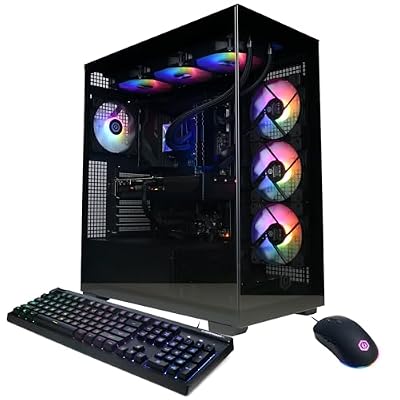 CyberpowerPCCyberPowerPC Gaming PC, Intel Core i9-14900KF, GeForce RTX 5070 12GB…$2,500 \xc2\xb7 99/100
 CyberpowerPCCyberPowerPC Gaming PC, Intel Core i5-14400F, GeForce RTX 5060 8GB…$1,289 \xc2\xb7 96/100
 CyberpowerPCCyberPowerPC Gaming PC, AMD Ryzen 7 8700F, GeForce RTX 5060…$1,499 \xc2\xb7 95/100