⚡ Key Takeaways
As an Amazon Associate we earn from qualifying purchases at no extra cost to you.








- A metal baseplate sits on your processor, drawing heat into a set of copper heat pipes.
- An all-in-one liquid cooler, the most common type, uses a sealed loop.
- For most processors, a good air cooler and a midsize liquid cooler perform within a few degrees of each other.
- A large air cooler can run its fan slowly because its big fin stack does the heavy lifting, making it very quiet under typical loads.
The debate over air vs liquid cpu cooling is one of the most enduring in PC building, and for good reason. Both approaches can keep a processor running cool, but they make different tradeoffs in price, noise, reliability, aesthetics, and installation difficulty. The marketing around liquid cooling often implies it’s strictly superior, while air cooling purists insist a good tower cooler matches anything with a pump. The truth sits in the middle and depends heavily on your specific processor, case, and priorities. In this guide I’ll cut through the hype, explain how each cooling method actually works, compare them across the metrics that matter, and help you decide which belongs in your next build.
🛒 Best Price Today on Amazon
Prime members get fast, free shipping on everything above, plus member-only deals. New members get a 30-day free trial — cancel anytime.
How Air Cooling Works
An air cooler is beautifully simple. A metal baseplate sits on your processor, drawing heat into a set of copper heat pipes. Those pipes carry the heat up into a stack of thin aluminum fins, and a fan blows air through the fins to carry the heat away. There’s no pump, no liquid, and very little that can fail. A quality tower cooler is a chunk of metal and a fan, and that simplicity is its greatest strength.
Modern high-end air coolers are genuinely powerful. Large dual-tower designs with multiple heat pipes can handle all but the most extreme processors under heavy load. The main limitations are physical size, which can interfere with tall memory modules or small cases, and weight, which puts stress on the motherboard.
How Liquid Cooling Works
An all-in-one liquid cooler, the most common type, uses a sealed loop. A pump sits on the processor and circulates coolant through tubes to a radiator mounted to your case, where fans dissipate the heat. Because the radiator can be larger than any air cooler’s fin stack and mounts away from the processor, liquid cooling can move more heat in tight spaces and relocates that heat to the edge of the case.
The key advantages are a cleaner look around the processor socket, better clearance for tall memory, and strong performance for hot processors. The tradeoffs are higher cost, a pump that can eventually fail, and the small but real possibility of a leak over many years. Most modern units are extremely reliable, but they have more failure points than a plain heatsink.
Performance Compared
For most processors, a good air cooler and a midsize liquid cooler perform within a few degrees of each other. The gap only widens with very hot, high-core-count processors running sustained heavy workloads, where a large radiator pulls ahead. For typical gaming, both keep temperatures comfortably in the safe range.
| Factor | Air Cooling | Liquid Cooling (AIO) |
|---|---|---|
| Cooling capacity | Good to excellent | Excellent |
| Price | Lower | Higher |
| Reliability | Very high | High |
| Noise | Low to moderate | Low (plus pump hum) |
| Installation | Simple to moderate | Moderate |
| Memory clearance | Can interfere | Excellent |
The honest takeaway is that cooling capacity is rarely the deciding factor for gaming builds. Both options handle gaming loads with ease, so your decision usually comes down to noise preference, aesthetics, case size, and budget.
Noise Considerations
Noise is more nuanced than many expect. A large air cooler can run its fan slowly because its big fin stack does the heavy lifting, making it very quiet under typical loads. A liquid cooler’s radiator fans can also run slowly, but it adds a pump that produces a faint hum some people notice in a silent room. Neither is inherently quieter; it depends on the specific models and fan curves you choose.
If silence is your top priority, a premium air cooler with a slow, high-quality fan is often the quietest option overall because it has no pump. If you want the case to look clean and don’t mind a barely audible pump, liquid cooling delivers low noise with a tidier appearance. A quiet system pairs beautifully with a low-profile gaming keyboard and a quiet gaming mouse for distraction-free play.
Reliability and Longevity
Here air cooling has a clear edge. With no pump and no liquid, an air cooler can run for a decade with nothing more than an occasional dusting. The only moving part is the fan, which is cheap and easy to replace. This makes air cooling the safe choice for builds you intend to keep for many years with minimal maintenance.
Liquid coolers are reliable but not eternal. The pump is a mechanical part that will eventually wear out, typically after many years of service, and a failed pump means a rapid temperature spike if you’re not monitoring. Leaks are rare in modern sealed units but not impossible. For most users these risks are acceptable, but if absolute longevity and peace of mind matter most, air wins.
Which Should You Choose
Choose air cooling if you want maximum reliability, the lowest cost, or near-silent operation, and your case and memory have room for a large heatsink. It’s the pragmatic, set-and-forget choice that serves the vast majority of gaming builds perfectly well.
Choose liquid cooling if you’re running a very hot processor, want a clean look around the socket, have a compact case where a tall air cooler won’t fit, or simply prefer the aesthetic. It also makes sense if you stream and run your processor hard while a capture card and a streaming microphone add to your workload. For most gamers, either choice will keep temperatures safe; pick based on your priorities rather than chasing a few degrees.
Installation and Maintenance Differences
The two cooling types differ meaningfully in how you install and maintain them. An air cooler mounts directly to the processor socket and is a single rigid unit. Installation is usually straightforward, though large coolers can be heavy and awkward to position, and you must be careful not to obstruct memory slots. Once installed, an air cooler needs almost no attention beyond occasional dusting of its fins and fan.
A liquid cooler involves more steps. You mount the pump block on the processor and the radiator to a case panel, then route the tubing between them and connect the radiator fans. This requires planning where the radiator will fit, which depends on your case’s supported mounting locations. Maintenance is also slightly more involved because you have a pump to monitor and fans on both the radiator. Neither is difficult, but air cooling is the simpler, more forgiving option for first-time builders. If you’re new to building and want the least fuss, a quality air cooler removes a layer of complexity from your project while still keeping temperatures firmly in the safe zone.
Frequently Asked Questions
Is liquid cooling always better than air cooling? No. For most processors and gaming loads, a good air cooler performs within a few degrees of a liquid cooler. Liquid only pulls clearly ahead with very hot, high-core-count chips under sustained heavy workloads.
Can a liquid cooler leak and damage my PC? It’s possible but rare in modern sealed all-in-one units. The risk is low enough that millions use them without issue, though air cooling eliminates the possibility entirely.
Which is quieter, air or liquid? It depends on the models. A premium air cooler with a slow fan is often the quietest overall because it has no pump, while liquid coolers add a faint pump hum some people notice in silent rooms.
Do I need liquid cooling for gaming? Almost never. Gaming loads are well within the reach of quality air coolers. Liquid cooling is more about aesthetics, clearance, and very demanding processors than necessity for gaming.
How long does a liquid cooler last? Typically many years, limited mainly by the pump’s lifespan. Air coolers can outlast liquid units because their only moving part is an easily replaced fan.
Conclusion
The air versus liquid cooling debate has no universal winner. Air cooling offers unmatched reliability, low cost, and quiet operation, while liquid cooling delivers a clean look, excellent clearance, and strong performance for hot processors. For most gaming builds either keeps temperatures safe, so choose based on your case, budget, and aesthetic preference rather than the marketing hype.
Top picks from this guide
 Cooler MasterCoolerMaster MasterLiquid ML240L RGB V2, Close-Loop AIO CPU Liquid Cooler,…$80 \xc2\xb7 99/100
 ThermalrightThermalright Assassin X120 Refined SE CPU Air Cooler, 4 Heat…$18 \xc2\xb7 97/100
 ThermalrightThermalright Peerless Assassin 120 SE CPU Cooler, 6 Heat Pipes…$31 \xc2\xb7 96/100
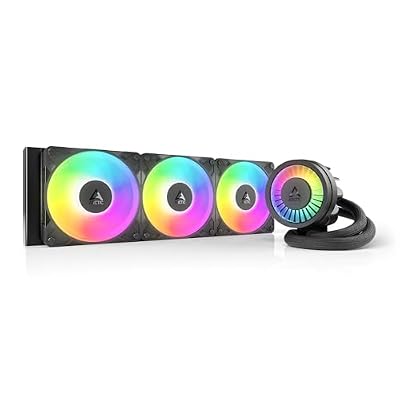 ARCTICARCTIC Liquid Freezer III Pro 360 A-RGB - AIO CPU…$77 \xc2\xb7 96/100