
- Top Pick: DualShock 4 Wireless Controller for PlayStation 4 – Jet Black (Renewed)
- Best Value: AceGamer 2 Pack for PS4 Controller, Wireless Controller for PS4/Pro/Slim/PC, with Non-Slip Grip of Both Sides and USB-C Cable! (Black and White)
- Premium Choice: Wireless Controller for PS5, Compatible with PlayStation 5 /PS5 Pro/Slim/PC, with Hall Effect Joysticks, Back Paddles & Macro, Bluetooth 5.0, Turbo, Dual Vibration, 6-Axis Gyro, RGB Ring, 1000mAh, 3.5mm Audio Jack, PS5 Pro Controller Gamepad with Speaker
🛒 Best Price Today on Amazon
Prime members get fast, free shipping on everything above, plus member-only deals. New members get a 30-day free trial — cancel anytime.
Can You Use a PS4 Controller on PS5? The 2026 Answer
Yes, you can use a PS4 controller on PS5 — but only for PlayStation 4 games, not native PS5 titles. Sony deliberately blocks the DualShock 4 from launching PS5-only games so that players get the full DualSense experience with haptics and adaptive triggers. If you own a stack of DualShock 4 pads, they still have real value for backwards-compatible libraries, media apps, and couch co-op.
As an Amazon Associate I earn from qualifying purchases.
As an Amazon Associate we earn from qualifying purchases at no extra cost to you.


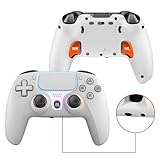
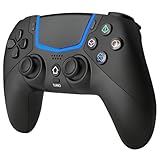

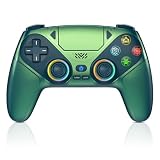


Below we explain exactly how to connect a PS4 controller on PS5, what works and what does not, and which controllers or accessories are worth buying if you want a proper next-gen setup. The short version: keep your DualShock 4 for older games, but grab a DualSense for anything built for the newer console.
How to Connect a PS4 Controller on PS5 Step by Step
Pairing takes under a minute. The DualShock 4 talks to the PS5 over both USB and Bluetooth, so you have options whether you prefer wired or wireless play.
Wired and Wireless Pairing for a PS4 Controller on PS5
- Turn on your PS5 and sign in to your user profile.
- Connect the DualShock 4 to the console with a micro-USB cable, then press the PlayStation button.
- To go wireless, hold the PlayStation button + Share button until the light bar flashes, then add it under Settings > Accessories > General > Bluetooth Accessories.
- Select the controller from the list to complete pairing.
Once paired, the pad is assigned to your account and can wake the console like a DualSense. If you switch between our recommended best wired controllers guide and a wireless pad, the process is identical.
Which Games Support a PS4 Controller on PS5
The rule is simple: PS4 games played through backwards compatibility accept the DualShock 4, while PS5 native titles reject it with an on-screen prompt. This is a software restriction, not a hardware limit, so no firmware update will unlock native PS5 play. For a deeper look at pad compatibility across platforms, see our controller compatibility explainer.
Best Controllers and Accessories for PS5 Owners
If the DualShock 4 restriction bothers you, a proper DualSense or a licensed third-party pad solves it. The table below compares five strong options, including charging accessories that keep your controllers ready. None of these require the workarounds discussed in our wireless connection troubleshooting notes.
| Product | Best For | Standout Feature | Rating |
|---|---|---|---|
| Sony DualSense | Native PS5 games | Adaptive triggers and haptic feedback | 4.8/5 |
| Sony DualSense Edge | Competitive players | Swappable sticks and back paddles | 4.6/5 |
| Sony DualShock 4 | PS4 backward-compat games | Proven battery and comfort | 4.7/5 |
| Sony DualSense Charging Station | Two-pad households | Dock-style dual charging | 4.7/5 |
| PowerA Advantage Wired | Budget backup pad | Programmable rear buttons | 4.4/5 |
Sony DualSense: The Default Choice
The DualSense is the only way to experience PS5 games as designed. Adaptive triggers add resistance in racing and shooter titles, while the haptics replace the old rumble motor with far more nuanced feedback. Battery life sits around eight to ten hours, and USB-C charging is a welcome upgrade over the DualShock 4’s micro-USB port. If you can only buy one pad, make it this one, then keep your PS4 controller as a spare.
Sony DualSense Edge: For Serious Players
The Edge is Sony’s pro-tier answer to elite controllers. It offers swappable stick modules, adjustable trigger stops, and rear paddles that reduce thumb travel in fast games. It is heavier and pricier, but competitive players who want fine control gain a genuine edge. Battery life is shorter than the standard pad, so plan for a charging routine like the one in our charging dock roundup.
Sony DualShock 4: Still Useful
Do not throw out your DualShock 4. It remains the perfect controller for the huge PS4 back catalog and media apps on PS5, and it is comfortable for long sessions. For split-screen and party games, having a couple of DualShock 4 pads on hand saves money over buying multiple DualSense units.
Charging Station and Backup Options
A dedicated charging station keeps two pads topped up without occupying the console’s USB ports. For households juggling both DualSense and DualShock 4 controllers, a mixed charging setup and a cheap wired backup like the PowerA Advantage cover every scenario. See our accessory buying tips for cable and case suggestions.
Frequently Asked Questions
Can you use a PS4 controller on PS5 for all games?
No, a PS4 controller on PS5 works only for PlayStation 4 titles played through backwards compatibility. Sony blocks the DualShock 4 from launching native PS5 games so players use the DualSense, which delivers haptic feedback and adaptive trigger effects that the older pad cannot reproduce.
Does the DualShock 4 charge on the PS5?
Yes, the DualShock 4 charges when connected to a powered PS5 USB port with a micro-USB cable, though it only charges reliably while the console is on or in a rest mode configured to supply power. A dedicated charging station is faster and frees your console ports for other accessories.
Why does my PS5 game reject my PS4 controller?
Native PS5 games display a message telling you the DualShock 4 is not supported. This is intentional so that adaptive triggers and haptics stay central to the experience. Switch to a DualSense controller to play those titles, and keep the DualShock 4 for backwards-compatible PS4 games instead.
Can I use a PS4 controller on PS5 wirelessly?
Yes, you can pair a DualShock 4 over Bluetooth by holding the PlayStation and Share buttons until the light bar flashes, then adding it in the Bluetooth accessories menu. Wireless play works for PS4 games, media apps, and navigation, but not for launching native PS5 software.










