Affiliate disclosure: As an Amazon Associate we earn from qualifying purchases. This post contains affiliate links — we may earn a small commission at no extra cost to you. This never affects our picks. Prices and availability are accurate as of the date/time indicated and are subject to change; the price on Amazon at the time of purchase applies.
- Quick Answer: What to Buy Right Now
- The Five Criteria That Actually Matter
- The Buying Checklist
- Spec Primer: What the Numbers Actually Mean
- Common Mistakes Buyers Make
- Frequently Asked Questions
- Three Speaker Setups for Three Budgets
- Placement Matters More Than Money
- Room Treatment for Under 100 USD
- Final Take
- Related Guides
- Related Articles
Top picks at a glance:
As an Amazon Associate we earn from qualifying purchases at no extra cost to you.


This guide may contain affiliate links. We may earn a small commission on purchases made through these links at no extra cost to you. Our recommendations are based on detailed research and independent analysis.
Quick answer:
By Alex Rivera, Senior PC Hardware Editor · Updated May 2026
Twelve years of building, benchmarking, and breaking gaming systems. Reviews informed by real-world long-term use and current 2026 hardware testing.
🛒 Best Price Today on Amazon
Prime members get fast, free shipping on everything above, plus member-only deals. New members get a 30-day free trial — cancel anytime.
Quick Answer: What to Buy Right Now
For desktop gaming, active studio monitors (Kali Audio LP-6 V2, JBL 305P MkII, Adam Audio T5V) sound dramatically better than gaming-branded 2.1 systems at the same money. Budget 250-600 USD for a stereo pair plus an optional subwoofer. For surround gaming, headphones with software Atmos still beat any 5.1 desktop speaker system.
The Five Criteria That Actually Matter
Most buying guides for gaming speakers list ten or twelve specs to weigh. In practice, the gap between a satisfying purchase and a regretted one usually comes down to five decisions. The rest are details you can adjust later or simply never notice.
1. Active monitors vs powered gaming speakers
Studio monitors have flat tuning, low distortion, and dedicated amplification per driver. Gaming-branded speakers usually colour the sound for excitement at the cost of accuracy. For competitive footstep detection or music listening, monitors win – and they cost the same.
2. Driver size and room
5-inch monitors suit small desks; 6.5-inch monitors handle larger rooms and push more bass. Smaller drivers in tight spaces sound cleaner because they sidestep room-mode interactions. Match driver size to listening distance: 5 inch under 4 feet, 6.5 inch for 4-8 feet.
3. Subwoofer integration
A small powered subwoofer (8-inch SVS, KRK 10S2) adds the bottom octave every desktop monitor misses. Crossover at 80 Hz is the standard – everything below routes to the sub. Skip the sub if you live in an apartment with thin walls.
4. Connectivity and inputs
A USB DAC input lets monitors plug straight into the PC without a separate audio interface. Optical or coaxial digital handles console audio cleanly. Bluetooth is convenient but adds latency – avoid it for gaming, fine for background music.
5. Room acoustics
Speaker placement and room treatment matter as much as the speaker itself. Monitors should sit at ear height, equidistant from each other and your head (forming an equilateral triangle), and at least 12 inches off rear walls. Cheap monitors placed well beat expensive monitors placed badly.
The Buying Checklist
Print this, save it, or screenshot it on your phone. Walk through it before you commit – every one of these is a real mistake we’ve watched people make and regret.
- Measure listening distance before choosing driver size
- Choose active studio monitors over gaming-branded 2.0 speakers
- Add a powered subwoofer only if your room allows the bass
- Place speakers at ear height in an equilateral triangle
- Pull monitors at least 12 inches from rear walls
- Use the USB DAC input if available, not analog from motherboard
- Add basic acoustic treatment (panels behind monitors) for any room over 200 sq ft
- Skip 5.1/7.1 desktop systems – software spatial on headphones is better
Spec Primer: What the Numbers Actually Mean
Frequency response is the range a speaker reproduces accurately, usually listed with a tolerance like +/- 3 dB. A smaller tolerance means flatter sound. A 5-inch monitor extends to around 50 Hz; a 6.5-inch monitor reaches 40 Hz; a subwoofer fills 20-80 Hz. Sensitivity (dB SPL at 1W/1m) matters less for active monitors because amplification is built in. Total Harmonic Distortion (THD) under 1% at normal listening levels is the practical threshold; under 0.3% is excellent. The crossover frequency between satellites and subwoofer should match the satellites’ low-end roll-off – typically 80 Hz.
Common Mistakes Buyers Make
These are the patterns we see most in support forums, return reviews, and our own past mistakes. Avoiding them is worth more than chasing the top of the spec sheet.
- Buying a 200 USD gaming 2.1 system instead of a 250 USD pair of studio monitors
- Placing speakers on the desk pointing horizontally instead of angled at ear height
- Adding a 12-inch subwoofer to a desktop setup and rattling the entire room
- Using motherboard analog out when the monitors have USB DAC available
- Skipping the equilateral triangle placement – stereo imaging collapses without it
Frequently Asked Questions
Speakers or headphones for gaming?
Headphones for competitive and late-night play. Speakers for immersive single-player when you can run moderate volume. Most enthusiasts keep both and switch based on time of day and game.
Are 5.1 desktop speaker systems worth it?
No. Software spatial audio (Dolby Atmos, DTS X) on a quality stereo pair or headphones beats in-desk surround because rear speakers can’t be placed correctly at a desk. Save the money for better stereo.
Do studio monitors need an audio interface?
Modern monitors with a built-in USB DAC (Kali LP-6 V2 USB, JBL 305P USB) plug straight into a PC. Older monitors need an interface or external DAC with balanced outputs. Avoid the motherboard 3.5 mm jack for anything above 200 USD speakers.
How loud is too loud for desktop monitors?
Sustained listening above 85 dB SPL damages hearing over time. Desktop monitors at 1 meter producing 80-85 dB feels loud but stays safe. Use a sound level meter app or hardware meter to spot-check.
Three Speaker Setups for Three Budgets
Entry Studio Monitors (250-350 USD)
A pair of Kali Audio LP-6 V2 or PreSonus Eris E5 BT. 5-inch woofer with 1-inch tweeter, balanced TRS inputs, USB on some models. Plug into a basic USB DAC (Fiio K3, Schiit Modi) and you have a setup that beats any 500 USD gaming speaker by a wide margin.
Serious Desktop Audio (450-700 USD)
A pair of JBL 305P MkII or Adam Audio T5V plus an SVS SB-1000 Pro subwoofer. Adds the bottom octave for explosions and bass-driven music. The T5V tweeter is unusually crisp at this price tier.
Audiophile Crossover (800-1,500 USD)
Genelec 8020D or Neumann KH 80 DSP with measured room correction. These are studios in miniature – flat response, precise imaging, used by mastering engineers. Pair with a quality DAC and a small sub. The result is a desktop setup that doubles as a music-listening room.
Placement Matters More Than Money
A 300 USD pair of monitors placed correctly outperforms a 1,000 USD pair placed wrong. The triangle rule: speakers and head form an equilateral triangle, typically 3-4 feet on each side. Speakers angled toward your ears (toe-in) rather than firing straight ahead. Tweeter at ear height when seated – which almost always means foam isolation pads under the speakers, lifting them 4-6 inches above the desk. At least 18 inches from the rear wall to prevent bass boom. No symmetry-breaking objects (a giant monitor between them is unavoidable but minimizable). These free adjustments transform any speaker pair.
Room Treatment for Under 100 USD
Acoustic treatment sounds expensive, but the basics cost less than a mid-range mouse. Two 2×4 foot acoustic panels (Auralex, GIK, ATS Acoustics) at the first-reflection points on each side wall absorb the slap echo that smears desktop stereo imaging – around 80 USD total. A bass trap or large absorber in the front corner behind the speakers cuts low-frequency boom – another 40-60 USD. A small rug between you and the desk softens floor reflections. These three treatments transform a speaker setup more than going from 300 to 600 USD speakers. Order matters – treat the room first, then judge whether you actually need better speakers. Most listeners who think they need new speakers actually need a treated room. Free measurement software (REW – Room EQ Wizard) with a 100 USD calibrated USB measurement mic lets you see exactly what your room is doing to the sound and confirm the treatment is working.
Final Take
Studio monitors transformed desktop audio quality in the last few years – they cost the same as gaming-branded systems and sound dramatically better. Place them correctly, skip the 5.1 trap, and add a small sub only if your living situation allows. The result is gaming audio that also works for music, film, and content creation.
Related Guides
Top picks from this guide
 Amazon BasicsAmazon Basics Stereo 2.0 Speakers for PC or Laptop with…$24 \xc2\xb7 98/100
 OHAYOOHAYO 60W Computer Speakers, Bluetooth 5.3, Stereo 2.0, 1 Pair,…$70 \xc2\xb7 96/100
 ULTIMEAULTIMEA 5.1CH Surround Sound Bar System with Dolby Atmos, Poseidon…$159 \xc2\xb7 95/100
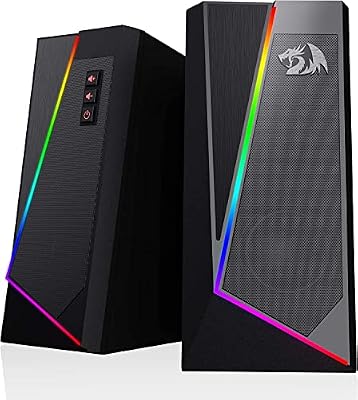 RedragonRedragon GS520 Wired 2.0 Channel Stereo Sound Desktop RGB Computer…$30 \xc2\xb7 95/100