🛒 Best Price Today on Amazon
Prime members get fast, free shipping on everything above, plus member-only deals. New members get a 30-day free trial — cancel anytime.
- Quick Answer: Which 3.5mm Speakers Should You Buy?
- Top Picks at a Glance
- How We Chose These Speakers
- Quick Comparison Table
- 1. Creative Labs Pebble 2.0 – Best for Small Desks
- 2. Logitech Z207 2.0 Stereo Computer Speakers – Best Wired and Bluetooth
- 3. Cyber Acoustics CA-3610 2.1 Speaker System – Best for Extra Bass
- 4. PreSonus Eris 3.5 Studio Monitors – Best for Accurate Sound
- 5. Logitech Z150 Stereo Speakers – Best Budget Pair
- What to Look For in 3.5mm Speakers
- More 3.5mm Speakers by Budget and Use
- How to Choose 3.5mm Speakers
- How to Connect 3.5mm Speakers to a PC, Console or Phone
- Which 3.5mm Speakers Fit Your Situation?
- Frequently Asked Questions
- Related Guides
- Pro Tips for Choosing the Right Pick
- Related Articles
- Related Articles
Affiliate disclosure: As an Amazon Associate we earn from qualifying purchases. This post contains affiliate links — we may earn a small commission at no extra cost to you. This never affects our picks. Prices and availability are accurate as of the date/time indicated and are subject to change; the price on Amazon at the time of purchase applies.
Quick answer: The best 3.5mm speakers for most desks are the Creative Labs Pebble 2.0 for a compact setup and the Logitech Z150 for a low-cost pair. Both plug straight into a standard 3.5mm headphone jack, with no drivers and no Bluetooth pairing.
This guide covers the best 3.5mm speakers for 2026. Each pick connects through a standard 3.5mm audio jack, and we compared manufacturer specifications, published documentation and recurring buyer feedback to choose them, from compact USB-powered pairs to 2.1 systems with a subwoofer.
Updated October 2026 – speaker lineup rechecked against current manufacturer pages.
Quick Answer: Which 3.5mm Speakers Should You Buy?
For most desks the Creative Labs Pebble 2.0 is the easiest choice, the Cyber Acoustics CA-3610 is the pick for bass, and the Logitech Z207 is the pick if you also want Bluetooth. A 3.5mm jack is the round headphone-style port on nearly every PC, laptop and phone, so any speaker below works without adapters or drivers.
Top Picks at a Glance
Short on time? The Creative Labs Pebble 2.0 suits small desks, the Logitech Z207 adds Bluetooth next to the 3.5mm jack, and the Cyber Acoustics CA-3610 brings a subwoofer for fuller bass. The PreSonus Eris 3.5 is the pick for accurate, studio-style sound, and the Logitech Z150 is the simple budget pair. More options for different budgets follow the main list.
How We Chose These Speakers
We did not run lab tests. Each speaker was compared on connection type, power rating, size, included controls, price tier and what buyers repeatedly report. Picks that depend on a 3.5mm cable, a USB or wall power source and a desk-friendly footprint made the list.
Quick Comparison Table
| Pick | Speaker Set | Best For | Price Tier |
|---|---|---|---|
| 1 | Creative Labs Pebble 2.0 | Small desks | Under $30 |
| 2 | Logitech Z207 2.0 Stereo Computer Speakers | Bluetooth plus wired | $40-$70 |
| 3 | Cyber Acoustics CA-3610 2.1 System | Extra bass | $40-$70 |
| 4 | PreSonus Eris 3.5 Studio Monitors | Accurate sound | $100-$130 |
| 5 | Logitech Z150 Stereo Speakers | Tight budgets | Under $40 |
1. Creative Labs Pebble 2.0 – Best for Small Desks
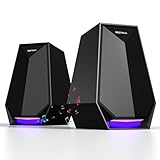
The Creative Labs Pebble 2.0 is a compact USB-powered pair that takes its audio through a standard 3.5mm cable, so it works with almost any PC or laptop. Its drivers are angled up toward your ears, which helps on a crowded desk where space matters more than deep bass.
- Pros: Small footprint
Simple 3.5mm plug-and-play
Low price tier - Cons: Limited bass without a subwoofer
Modest volume for large rooms

Creative Pebble 2.0, USB Desktop Stereo Speakers for PC/Laptop, Black | USB-Powered, 2.0 Speaker, Compact, Stereo, PC Speakers, Laptop Speakers, Minimal Design, Desktop Audio, Black
Included for 'Best 3.5mm Speakers 2026: 11 Top Picks Compared' as a representative home product in this roundup; selection reflects the product set returned for this topic.
View on Amazon2. Logitech Z207 2.0 Stereo Computer Speakers – Best Wired and Bluetooth
The Logitech Z207 is a 2.0 stereo pair that accepts either Bluetooth or a wired 3.5mm connection, handy if you switch between a PC and a phone. It is rated at 10 watts peak power with a small active design, so it fits a desk rather than filling a room.
- Pros: Bluetooth plus 3.5mm input
Compact size
Easy volume control - Cons: Not class-leading bass
Use the wired jack for gaming to avoid Bluetooth lag

Logitech Z207 2.0 Stereo Computer Speakers with Bluetooth | 10 Watts peak power, active drivers with passive radiators, 3.5 mm input and headphone jack, ideal for PC setups
Included for 'Best 3.5mm Speakers 2026: 11 Top Picks Compared' as a representative home product in this roundup; selection reflects the product set returned for this topic.
View on Amazon3. Cyber Acoustics CA-3610 2.1 Speaker System – Best for Extra Bass
The Cyber Acoustics CA-3610 pairs two satellites with a subwoofer and is rated at 62 watts peak power, so it delivers more low end than a plain stereo pair. It connects through a 3.5mm cable, and the subwoofer needs space on the floor or under the desk.
- Pros: Subwoofer for fuller bass
3.5mm connection
Good for games and movies - Cons: Takes more space than a 2.0 pair
Needs wall power

Cyber Acoustics CA-3610 2.1 Multimedia Speaker System with Subwoofer, 62 Watts Peak Power, Strong Bass, Perfect for Music, Movies, and Games
Included for 'Best 3.5mm Speakers 2026: 11 Top Picks Compared' as a representative home product in this roundup; selection reflects the product set returned for this topic.
View on Amazon4. PreSonus Eris 3.5 Studio Monitors – Best for Accurate Sound
The PreSonus Eris 3.5 are powered studio monitors with a 3.5-inch woofer, tuned for accurate near-field listening rather than boosted bass. They offer several input types including a 3.5mm connection, which suits music, video editing and gaming at a desk.
- Pros: Neutral, studio-style tuning
Multiple input options - Cons: Higher price tier
Light on bass without a subwoofer

PreSonus Eris 3.5 Powered Studio Monitors, Pair — 3.5” Active Near | -Field Desktop Speakers for Music Production, Gaming, Movies & Hi-Fi | 50W, Woven-Composite Woofer, Silk-Dome Tweeter, Black
Included for 'Best 3.5mm Speakers 2026: 11 Top Picks Compared' as a representative home product in this roundup; selection reflects the product set returned for this topic.
View on Amazon5. Logitech Z150 Stereo Speakers – Best Budget Pair
The Logitech Z150 is a plain wired stereo pair with a built-in 3.5mm cable, a front headphone jack and a volume knob. It is a low-cost choice for an office or dorm desk where clear speech and everyday music matter more than power.
- Pros: Very low price tier
Headphone jack on the unit
Nothing to install - Cons: Low maximum volume
Basic bass

Logitech Multimedia Speakers Z150 with Stereo Sound for Multiple Devices, Black
Included for 'Best 3.5mm Speakers 2026: 11 Top Picks Compared' as a representative home product in this roundup; selection reflects the product set returned for this topic.
View on AmazonWhat to Look For in 3.5mm Speakers
Real-World Performance
Check the power source first: USB-powered pairs are tidy but quieter, while wall-powered 2.1 systems play louder with more bass. Then confirm the input, since a 3.5mm cable works with nearly every PC, laptop and phone.
Consistency and Reliability
Look for a volume control within reach, a headphone jack on the unit and a sturdy cable, since these small details decide daily comfort.
Value for Money
Price tiers matter: under $40 buys a basic pair, $40-$70 adds Bluetooth or a subwoofer, and above $100 buys better drivers and tuning.
More 3.5mm Speakers by Budget and Use
The five picks above cover most desks. These extra speakers add gaming-focused, higher-power and budget 2.1 options, all with a 3.5mm input according to their maker listings.
Best Under $50: Value 2.1 and Compact Gaming Picks
Cyber Acoustics CA-3090 · 2.1 system · 18W · subwoofer · 3.5mm connection. Edifier G2000 · 32W · Bluetooth · USB · 3.5mm AUX in.
Cyber Acoustics CA-3090 2.1 Speaker System – Best Cheap Subwoofer Set

Cyber Acoustics CA-3090 2.1 Speaker System, 18W, Subwoofer | Compact 2.1 PC Speaker System; 3.5mm Audio Connection; Volume Control Pod; Subwoofer Adjustable Bass; Music, Movies, Gaming
Included for 'Best 3.5mm Speakers 2026: 11 Top Picks Compared' as a representative home product in this roundup; selection reflects the product set returned for this topic.
View on AmazonThe Cyber Acoustics CA-3090 is a compact 2.1 set that adds a small subwoofer for people who find a plain stereo pair too thin. It suits a bedroom or office desk where low volume and a low price tier matter more than raw power.
- 2.1 layout with subwoofer
- 18W rated power
- 3.5mm audio connection
- Volume control on the unit
Pros: Cheap way to add bass, simple setup, small footprint.
Cons: Modest output for large rooms, basic build.
Skip it if you want loud, room-filling sound.
Edifier G2000 Gaming Speakers – Best Compact Gaming Pair

Edifier G2000 32W PC Gaming Computer Speakers for Laptop Mac Desktop Computer Woofer Speakers Bluetooth USB 3.5mm AUX Inputs RGB Lights Multimedia Speakers Black
Included for 'Best 3.5mm Speakers 2026: 11 Top Picks Compared' as a representative home product in this roundup; selection reflects the product set returned for this topic.
View on AmazonThe Edifier G2000 is a 2.0 gaming speaker pair that accepts Bluetooth, USB and a 3.5mm AUX cable, which makes it flexible for a PC, console dock or phone. It is rated at 32W, so it is louder than entry-level pairs while staying desk sized.
- 32W rated power
- Bluetooth connection
- USB input
- 3.5mm AUX input
Pros: Several input choices, gaming-style design, stronger output than budget pairs.
Cons: Higher price tier than basic pairs, no separate subwoofer.
Skip it if you only need a basic wired pair for office use.
Best for Bass and Big Sound: Higher-Power Systems
Edifier G1500 MAX · 2.1 · 60W peak · 4-inch wood subwoofer. Logitech Z407 · 3.5mm, USB and Bluetooth · wired control puck. Logitech Z623 · 2.1 · 400W peak · THX certified. Klipsch ProMedia 2.1 · THX certified.
Edifier G1500 MAX 2.1 Gaming Speakers – Best Mid-Price Gaming Bass

Edifier G1500 MAX 2.1 RGB Light Gaming Speakers with 4" Wood Subwoofer | 60W Peak Power, 4" Subwoofer & 2.5" Satellite Speakers, Bluetooth 5.3 & Multi-Wired Connections, 3 Sound Modes
Included for 'Best 3.5mm Speakers 2026: 11 Top Picks Compared' as a representative home product in this roundup; selection reflects the product set returned for this topic.
View on AmazonThe Edifier G1500 MAX is a 2.1 gaming system with a 4-inch wood subwoofer and two 2.5-inch satellites, aimed at players who want more punch than a stereo pair. Check the rear panel inputs on the maker page to confirm the connection you need before buying.
- 60W peak power
- 4-inch wood subwoofer
- 2.5-inch satellite speakers
- RGB lighting
Pros: Strong bass for the price tier, gaming looks, compact satellites.
Cons: Needs floor space for the subwoofer, RGB is not for everyone.
Skip it if you want a plain, quiet desk setup.
Logitech Z407 Bluetooth Speakers with Subwoofer – Best Wireless Control

Logitech Z407 Bluetooth Computer Speakers with Subwoofer and Wireless Control, Immersive Sound, Premium Audio with Multiple Inputs, USB Speakers
Included for 'Best 3.5mm Speakers 2026: 11 Top Picks Compared' as a representative home product in this roundup; selection reflects the product set returned for this topic.
View on AmazonThe Logitech Z407 is a 2.1 system with a subwoofer and a wired control dial that sits on the desk. It supports Bluetooth, USB and a 3.5mm cable, so one set can serve a PC, tablet and phone.
- 2.1 system with subwoofer
- Bluetooth, USB and 3.5mm inputs
- Wired control dial
- Immersive sound for music and games
Pros: Many input choices, convenient dial, good for mixed use.
Cons: Higher price tier, subwoofer needs wall power.
Skip it if you want the smallest possible desk footprint.
Logitech Z623 2.1 Speaker System – Best for Loud Home Sound

Logitech Z623 400 Watt Home 2.1 Speaker System - Black | 400 watt, 2.1-channel, powerful bass, home audio system
Included for 'Best 3.5mm Speakers 2026: 11 Top Picks Compared' as a representative home product in this roundup; selection reflects the product set returned for this topic.
View on AmazonThe Logitech Z623 is a THX certified 2.1 system rated at 400 watts peak, built for movies, games and music in a bigger room. It is the largest option here, so plan the space before you order.
- 2.1 system
- 400 watts peak power
- THX certified
- Large subwoofer for deep bass
Pros: Very loud, deep bass, good for movies.
Cons: Large and heavy, high price tier for desk use.
Skip it if your desk is small or you listen at low volume.
Klipsch ProMedia 2.1 THX Computer Speakers – Best Premium Desk System

Klipsch ProMedia 2.1 THX Certified Computer Speaker System (Black)
Included for 'Best 3.5mm Speakers 2026: 11 Top Picks Compared' as a representative home product in this roundup; selection reflects the product set returned for this topic.
View on AmazonThe Klipsch ProMedia 2.1 is a THX certified computer speaker system from an established audio brand, aimed at buyers who value clear mids and a controlled subwoofer. It sits in the premium tier of this list.
- 2.1 system
- THX certified
- Black finish
- Subwoofer plus two satellites
Pros: Brand-known sound quality, THX certification, strong bass control.
Cons: Premium price tier, older design.
Skip it if you only need a casual, low-cost pair.
How to Choose 3.5mm Speakers
Pick the power source, then the size, then the extras. Under $40 you get a basic 2.0 pair, from $40 to $100 you add a subwoofer or Bluetooth, and above $100 you pay for better drivers, control dials and THX-style tuning.
- 2.0 versus 2.1: a 2.0 pair has two speakers and suits desks; a 2.1 set adds a subwoofer for bass in games and movies.
- Power: 10W-20W is enough for a desk, 30W-60W fills a small room, and 400W peak is for living rooms.
- Inputs: a 3.5mm jack works everywhere, USB is handy for laptops, and Bluetooth adds phones but can add lag in games.
- Studio monitors: they are tuned flat for accurate sound, so expect less bass than gaming speakers.
- Space: a subwoofer needs floor room and wall power.
3.5mm Speakers for Gaming, Music and Work
For gaming, the Edifier G2000 and G1500 MAX offer stronger output and a gaming style. For music, the PreSonus Eris 3.5 and Klipsch ProMedia 2.1 favor clarity. For work or study, the Logitech Z150 and Creative Labs Pebble 2.0 keep cost and desk space low.
Do all speakers work with a 3.5mm jack?
Yes, any speaker with a 3.5mm input plugs into a 3.5mm headphone or line-out jack. Use the wired connection for gaming to avoid Bluetooth delay.
Is a 2.1 system better than a 2.0 pair?
A 2.1 system adds a subwoofer for deeper bass, but it needs more space and wall power. A 2.0 pair is simpler and tidier on a small desk.
Can I use 3.5mm speakers with a console or phone?
Yes, if the device has a headphone jack or an adapter. Many controllers and phones need an adapter, so check the port first.
How to Connect 3.5mm Speakers to a PC, Console or Phone
Plug the speaker cable into the green line-out or headphone jack on your PC, laptop or phone. If the speakers are USB powered, plug the USB lead into any port or a phone charger; the audio still travels over the 3.5mm cable. Wall-powered 2.1 systems need a power outlet near the subwoofer.
- Desktop PC: use the green jack on the rear panel for the cleanest signal, then pick the speakers as the default playback device in system sound settings.
- Laptop: use the combined headphone jack; if it is a combo headset port, check that it carries a line-out signal.
- Game console: many controllers have a 3.5mm headphone jack, which can feed small speakers for private or desk use.
- Phone or tablet: use the headphone jack or a USB-C adapter that has a 3.5mm output.
Which 3.5mm Speakers Fit Your Situation?
| Your situation | Best match | Why |
|---|---|---|
| Small desk, light use | Creative Labs Pebble 2.0 | Compact, USB powered, 3.5mm input |
| Switching between PC and phone | Logitech Z207 | Bluetooth plus 3.5mm |
| Want strong bass | Cyber Acoustics CA-3610 or Logitech Z407 | Subwoofer included |
| Music and editing | PreSonus Eris 3.5 | Studio-style tuning |
| Lowest cost | Logitech Z150 | Simple wired pair |
| Gaming style and RGB | Edifier G2000 or G1500 MAX | Gaming design, stronger output |
Common Problems With 3.5mm Speakers
- Hum or buzz: try a different USB port or move the power adapter away from the audio cable.
- No sound: check that the cable is in the output jack, the volume knob is up and the correct playback device is selected.
- Quiet output: raise the system volume first and the speaker knob second, which keeps noise low.
- Bluetooth lag in games: switch to the wired 3.5mm cable for competitive play.
Frequently Asked Questions
What are the best 3.5mm speakers?
The Creative Labs Pebble 2.0 is the best for small desks, and the Cyber Acoustics CA-3610 is the best for bass. Both connect through a standard 3.5mm jack.
Is the Creative Labs Pebble 2.0 worth it?
Yes, if you want a compact, low-cost pair that plugs into a 3.5mm jack. Choose a 2.1 system if you want stronger bass.
How did you choose these speakers?
We compared manufacturer specifications, published documentation and recurring buyer feedback. We did not run lab tests.
Which pick is the best value?
The Logitech Z150 and the Creative Labs Pebble 2.0 are the lowest price tiers, while the Cyber Acoustics CA-3610 gives the most bass for the money. Check live pricing before you commit.
Bottom line: the Creative Labs Pebble 2.0 is our top pick for most desks, with options above for every budget.
Related Guides
Pro Tips for Choosing the Right Pick
Before you hit buy, weigh how well any 3 5mm speaker actually fits your day-to-day setup. In 2026 the call rests less on headline spec-sheet numbers and more on whether the unit will quietly do its job for the next three to five years. Match the pick to your space, your workload, and how much tinkering you can stand — not the biggest number on the page.
Three habits split happy buyers from regretful ones. First, read the return and warranty terms before you pay — sellers differ, and a generous policy is the cheapest insurance going. Second, favor products with review counts in the thousands; a year or more in the wild proves things no marketing line can. Third, budget for the extras (cables, mounts, software licences) so the sticker price is not a shock when it all arrives.
Setup checklist before checkout
- Measure your space. Confirm the 3 5mm speaker fits where
it lives, including breathing room for cables and airflow. - Check compatibility. Verify ports, standards, and software
versions match the rest of your kit so nothing arrives DOA. - Read the warranty. Two-plus years of coverage is preferable
on anything above the $150 mark. - Plan upgrades. Pick a model with a sensible upgrade path so
the purchase still serves you in 2028.
Related Articles
Want more on this? The hand-picked guides below each cover a related speaker topic.