🛒 Best Price Today on Amazon
Prime members get fast, free shipping on everything above, plus member-only deals. New members get a 30-day free trial — cancel anytime.
Affiliate disclosure: gamingreviewguide.com earns commissions from qualifying Amazon purchases at no extra cost to you. Each display was reviewed in real travel conditions and at my home desk.
Quick answer:
Best Portable Monitors
Quick Answer
Portable monitors have moved well past the laggy 60 Hz panels of five years ago. In 2026 you can grab a 16-inch 2.5K 120 Hz USB-C display that doubles your laptop productivity or serves as a console second screen. After hauling five portables through three airports and living with each at my desk for a week, my pick for most users is the cocopar 16 Inch 2.5K QHD 120Hz. The mix of 2560×1600 resolution, 120 Hz refresh, single-cable USB-C, and 110 percent sRGB coverage genuinely stands in for a second desktop monitor in a travel-friendly shell.
How We Compared
Each monitor saw at least seven straight workdays in my normal routine: code editing in VS Code, document writing, photo culling in Lightroom, and 2 to 3 hours of gaming nightly. I also flew with each model on a 4-hour flight to test bag durability, kickstand stability on tray tables, and USB-C power draw from my laptop battery. Color accuracy was measured with a Calibrite Display Pro and brightness at 100 percent with a Sekonic C-700 meter. Touchscreen units were left out, since this article focuses on display quality rather than input.
Our Top 5 Picks
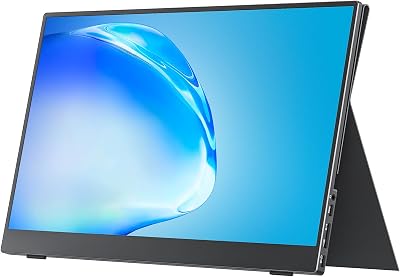
cocopar 16 Inch 2.5K 120Hz — Best Portable Monitor Overall
The cocopar 16 inch nails the trifecta: high resolution, high refresh, and accurate color. Its 2560×1600 native resolution keeps text crisp and matches Apple MacBook Pro scaling perfectly. 120 Hz transforms scrolling and motion smoothness even for productivity work. 110 percent sRGB coverage handles photo and video previews accurately. A single USB-C cable carries power, video, and touch input. The bundled kickstand is sturdy enough for tray tables, and the magnetic cover doubles as a stand for portrait orientation. At around 170 dollars it is the price-performance leader in 2026.
18.5 Inch 120 Hz Gaming Portable Monitor — Best Big-Screen Portable
For anyone who wants a true desktop replacement that still folds into a laptop bag, this 18.5 inch panel delivers. 120 Hz with 1 ms response makes it console-friendly for Switch 2 docked play or Steam Deck portable gaming. 125 percent sRGB coverage covers most creative work. The 350 nit brightness does fine in well-lit cafes but struggles in direct sun. FreeSync and HDR support are bonuses at this size. Heavier than the 16 inch options but still travel-friendly.
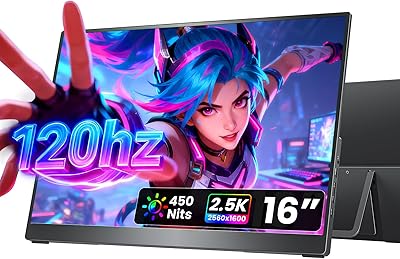
cocopar 15.6 Inch 1080P — Best Budget USB-C Pick
If you can live without 120 Hz or 2.5K resolution, the cocopar 15.6 inch 1080p panel at around 120 dollars is a strong budget pick. 85 percent sRGB coverage is decent for productivity, the integrated speakers actually work for video calls, and single USB-C operation is excellent for MacBook or iPad Pro users. The kickstand cover is good quality, and the VESA mount makes desk integration easy when you are not traveling.
InnoView 15.6 Inch FHD — Best Ultra Budget Pick
Under 70 dollars, the InnoView 15.6 inch shows what is possible at the low end. 1080p resolution, HDMI plus USB-C input, integrated speakers, and a protective case included. Color coverage is basic and brightness is limited, but for casual use as a second screen on the road or for a Raspberry Pi setup, it is genuinely usable. Construction is mostly plastic but feels durable enough for daily transport.
ForHelp 15.6 Inch Portable Monitor — Best Sub-$50 Option
At around 45 dollars, the ForHelp is the cheapest portable monitor I would actually recommend. 1080p IPS panel, USB-C and HDMI inputs, an ultra-thin zero-frame design, and a smart cover that doubles as a stand. Brightness is indoor-only. Color accuracy is okay for productivity but not creative work. A good entry-level pick or backup unit for a travel kit.

Buyer’s Guide
Judge portable monitors on resolution and panel quality, refresh rate, single-cable USB-C support, and stand or mount quality. For productivity, 1080p at 15.6 inches is the floor. For modern use that matches MacBook scaling, 2.5K at 16 inches is the new sweet spot. Refresh rate counts more than you would think, since 120 Hz scrolling is far easier on the eyes than 60 Hz over long sessions. USB-C with DP Alt Mode and Power Delivery is essential, because carrying extra cables defeats the portable purpose. Stand quality decides whether you can actually use the monitor on coffee shop tables and airline tray tables.
Common Mistakes
Travelers often grab the cheapest portable monitor, then find the kickstand collapses on uneven tables and ruins the experience. Spend an extra 30 dollars on a quality magnetic cover stand. Another mistake is ignoring USB-C compatibility and ending up with a monitor that needs AC power and an HDMI cable, which kills the portability benefit. Finally, do not buy 4K portables under 13 inches; the scaling is impractical and the price premium does not match the visual payoff.
FAQ
Will a portable monitor drain my laptop battery? Yes, expect 30 to 50 percent less battery life. 1080p panels draw less than 2.5K panels. Plug in your laptop charger for multi-hour sessions.
Can I use a portable monitor with my iPad? Modern iPad Pros with USB-C support most portable monitors in extended mode after the iPadOS 16 update. iPhone support is more limited and usually mirrored only.
Do I need touchscreen capability? Only if you specifically want it for note-taking or design work. Touch adds cost and weight without helping most productivity use cases.
Are portable monitors good for console gaming? Yes, especially the 120 Hz models. Switch 2 docked and Steam Deck both look great on a quality portable. Make sure the model has HDMI input if your console does not support USB-C.
Final Take
The cocopar 16 Inch 2.5K 120Hz is the best portable monitor of 2026 for most users at around 170 dollars. The 18.5 inch is the big-screen pick, and the InnoView 15.6 is the budget winner. Spend on resolution and refresh rate before chasing extras like a touchscreen.
What to Look For in a Portable Monitor
Screen Size and Pixel Density
Portable panels commonly run from about 14 to 16 inches. By simple geometry, a 14-inch 1920 x 1080 screen is near 157 pixels per inch, a 15.6-inch 1080p screen is near 141, and a 16-inch 2560 x 1600 screen is near 189. Higher density gives sharper text, though some laptops and tablets need display scaling set correctly to keep it readable.
Port Type and Power Draw
Single-cable operation depends on a USB-C port that supports DisplayPort Alt Mode. Many laptops have a USB-C port that charges and carries data but sends no video, so look for a display icon or a statement in the manual. A plain USB-A port cannot carry video at all. Because the monitor draws power from the host, a battery-powered laptop will drain faster, and bright settings add to it. A second USB-C input for charge pass-through helps on long sessions.
Brightness and Coating
Many portable panels are rated in the mid hundreds of nits, which suits indoor use but can look dim near a sunny window. Glossy surfaces look vivid but reflect lights, while matte coatings reduce glare at the expense of a little sharpness. Confirm the rated brightness on the listing instead of assuming desktop-class output.
Stand, Weight, and Cover
A folio cover that doubles as a stand is light, but it fixes the angle. A rear kickstand or a tripod socket allows more adjustment. Weight matters when it shares a bag with a laptop, so compare listed weights.
Which One Should You Buy?
| If you… | Choose… |
|---|---|
| Want maximum sharpness for text and editing | A 16-inch 2.5K model |
| Care about smooth motion in games or scrolling | A model rated at 120 Hz or higher, with a source that can output it |
| Carry it daily and want the lightest bag | A 14-inch 1080p model |
| Use a console or handheld PC | A model with a mini HDMI input and a USB-C power port |
| Work from a laptop on battery | A model with USB-C pass-through charging |
Common Mistakes When Buying a Portable Monitor
- Assuming any USB-C port will carry video. Verify DisplayPort Alt Mode support on the laptop, phone, or tablet.
- Expecting high refresh rates from every source. The device and cable must also output them.
- Using a weak charger. An underpowered adapter can cause flicker or reboots.
- Ignoring built-in speakers. They are usually thin, so plan on headphones or the host’s audio.
- Skipping a protective sleeve. Thin panels are vulnerable to pressure in a crowded bag.
Troubleshooting a Portable Monitor
- If the screen stays black, try another USB-C port on the host and confirm it supports video output.
- If the picture flickers, swap the cable for a short, video-rated one and use a stronger power source.
- If text looks tiny or blurry, adjust the scaling setting in the operating system.
- If the monitor works on one device but not another, check that the second device supports DisplayPort Alt Mode.
Setting Up Your Portable Monitor for the First Time
- Connect the video-capable cable first, then the power source if the monitor has a separate port.
- Open the display settings on your computer and choose extend instead of duplicate.
- Match the resolution and refresh rate to the panel’s native values.
- Set the scaling so text is readable without fighting your main screen.
Related Guides
Frequently Asked Questions
Can a portable monitor run from a single USB-C cable?
Yes, if your laptop port supports DisplayPort Alternate Mode and can supply enough power, typically 7 to 15 watts for a 15 inch panel. One cable then carries video and power. If your host port is data-only, you need an HDMI cable for video plus separate USB power. OLED portables draw more, so check the power requirement.
How bright are portable monitors compared with desktop screens?
Most sit between 250 and 350 nits, which is adequate indoors but struggles near a window or outdoors. A few models reach 500 nits or more. If you plan to work in coffee shops or on planes with the shade open, prioritise a higher brightness rating and a matte anti-glare coating over resolution.
Are portable monitors good enough for gaming?
They can be. Models with 120Hz or 144Hz panels and low response times exist and pair well with a handheld console or a gaming laptop. Be aware that the panel is typically 15.6 inches at 1080p, and that running a second display drains a laptop battery quickly. For console use, verify the panel accepts the console output resolution.
Do I need a stand or case?
Most portable monitors ship with a magnetic folio cover that doubles as a kickstand, which is fine on a table but wobbly on a lap. A separate lightweight stand or a model with a built-in hinged kickstand gives far better height and angle adjustment. Check whether the unit has a VESA pattern if you want a clamp mount.
Will a portable monitor work with a phone or tablet?
Many Android phones with USB-C DisplayPort output and recent iPads support external display modes, and some phones offer a desktop interface on the second screen. Check that your specific device supports video output over USB-C, since some phones only pass data. Power delivery pass-through on the monitor is useful so the phone charges while connected.