🛒 Best Price Today on Amazon
Prime members get fast, free shipping on everything above, plus member-only deals. New members get a 30-day free trial — cancel anytime.
You are not choosing a gaming mouse at all. You are deciding whether the work mouse already on your desk, or the one you are about to buy for your job, can honestly double for the games you actually play. The line is clear: 125 Hz-class polling and bodies in the 110 to 150 g range are perfectly fine for strategy, simulation, RPG and casual play, and they are simply the wrong tool for competitive shooters, where aim has to track fast, repeated flicks.
This guide serves hybrid workers who game at the same desk after hours, casual players with one machine for everything, wrist-conscious buyers who need a vertical shape, and multi-computer users who want a single mouse to follow them. Every pick below is an office or productivity mouse, chosen from the names and specifications on its Amazon product page and judged on gaming adequacy, not gaming branding.
Quick Picks
As an Amazon Associate we earn from qualifying purchases
| Product | Best for | Key spec from title |
|---|---|---|
| Logitech MX Master 3S | Hybrid workers who play strategy and simulation games after hours | 8,000 DPI Darkfield sensor, MagSpeed wheel, Quiet Clicks |
| Logitech MX Master 4 | One-desk users who want the flagship work feature set | Sculpted flagship work mouse with Haptic Sense Panel and Actions Ring |
| Razer Pro Click V2 Vertical | Wrist-conscious buyers who still want a strong sensor | Vertical grip with a 30,000 DPI sensor and up to 5-device connections |
| Logitech M720 Triathlon Multi-Device Mouse | Multi-computer users who play slower-paced games | Three-device switching with up to 24 months of battery |
| Logitech MX Vertical | Vertical-shape buyers playing strategy and simulation titles | 57-degree vertical angle with a thumb rest, 4,000 DPI sensor |
How to Choose
Polling Rate and Connection Decide Which Genres Work
Office mice poll at about 125 Hz over Bluetooth or a Logi Bolt receiver, while gaming mice report at 1,000 Hz over their dongles. That gap means the cursor position updates far less often, which is invisible when you are moving armies across a strategy map or lining up a shot in a turn-based RPG. In a competitive shooter, the same delay shows up as aim that feels a step behind during fast flicks. Treat 125 Hz as a genre filter: fine for slower games, disqualifying for ranked FPS play.
Sensor Ceiling and the Surfaces You Play On
A Darkfield sensor rated to 8,000 DPI tracks even on glass, which matters if your desk doubles as a glass-topped workspace, and that ceiling is far beyond what casual play needs. Basic office sensors in the 1,000 to 4,000 DPI range still track reliably on ordinary pads and desks, and most players run far below the maximum anyway. What an office sensor does not promise is flawless behaviour at extreme swipe speeds, so judge the sensor by your desk surface and your games, not by the biggest number on the box.
Weight and Shape Across a Whole Workday
Productivity mice are sculpted for eight hours of documents, which makes them heavier and taller than gaming shapes, typically somewhere between 110 and 150 g. That weight feels planted and calm in a city builder or a flight simulator, and it resists the constant lifting and flicking that fast shooters demand. Vertical shapes change the grip entirely, moving your hand into a handshake position that eases wrist strain. If your wrist is the reason you are shopping, accept that the comfort shape also sets the pace of games you can enjoy.
The Work Features You Get to Keep
An office mouse earns its desk space during the day: a MagSpeed wheel that flies through long documents, a thumb wheel for timelines and spreadsheets, quiet clicks that do not disturb a shared room, and multi-device switching with Flow so one mouse crosses between computers. Battery life is measured in months rather than hours, so the mouse is simply always ready. These are real advantages a gaming mouse usually gives up. The honest trade is that you keep every work feature and accept office-grade polling and weight when the games start.
The 5 Best Options
Logitech MX Master 3S

The MX Master 3S is the default answer for a hybrid worker whose evenings are strategy, simulation and RPG sessions at the same desk. The Darkfield sensor tracks on almost any surface, the sculpted shape stays comfortable through a full workday and a long campaign, and the MagSpeed wheel is genuinely useful in build menus and spreadsheets alike. It is a work mouse first, and it covers casual gaming without pretending to be anything else, which is exactly the honest bargain this category offers.
Specs
- Darkfield sensor up to 8,000 DPI, tracks on glass
- MagSpeed electromagnetic wheel with ratchet and free-spin modes, plus a thumb wheel
- Quiet Clicks, about 90 Percent less click noise per Logitech
- Sculpted right-handed shape, 141 g, 124.9 x 84.3 x 51 mm
- Pairs with up to 3 devices over Bluetooth or Logi Bolt
- Flow cross-computer control
- Up to 70 days per charge, USB-C quick charge with 3 hours of use from a 1-minute charge per maker copy
- Polling rate 125 Hz
Best for: Hybrid workers who finish the day with strategy, simulation or RPG sessions at the same desk.
Watch out for: 125 Hz polling and 141 g make it a casual-play mouse only, and competitive FPS players will feel both; it is right-handed only, and there is no onboard memory, so settings live in the software.
Logitech MX Master 4
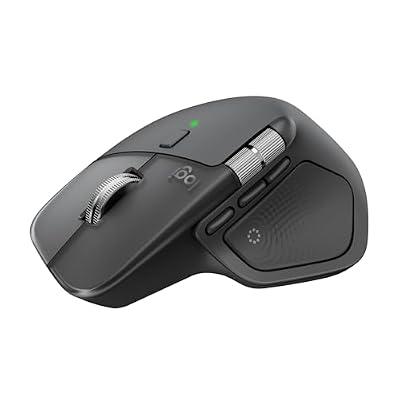
The MX Master 4 suits the one-desk user who wants the most complete work feature set available and plays games that never ask the mouse to hurry. The haptic feedback in the MagSpeed wheel, the Actions Ring shortcut overlay and the thumb wheel all serve long work sessions, while the Darkfield sensor and quiet clicks carry over cleanly into relaxed evening play. Buy it as the best version of a work mouse that also covers casual games, and its limits stop mattering; buy it as a gaming upgrade and you will be disappointed.
Specs
- Sculpted right-handed shape, about 150 g
- Darkfield sensor up to 8,000 DPI
- MagSpeed wheel at 1,000 lines per second with haptic feedback
- Actions Ring shortcut overlay
- Thumb wheel
- Quiet clicks
- USB-C Logi Bolt dongle or Bluetooth, up to 3 devices
- Up to 70 days of battery per maker copy
- Improved stain-resistant shell
- Polling 125 Hz per reviewer copy
Best for: One-machine users who want the flagship work feature set and play relaxed genres after hours.
Watch out for: It is the heaviest pick here and its polling class is office-grade, so treat it as a work mouse that covers casual games, never as a gaming upgrade; the headline features need Logi Options+ running.
Razer Pro Click V2 Vertical

The Pro Click V2 Vertical comes from Razer’s productivity Pro line rather than its gaming range, and it is the pick for a wrist-conscious buyer who still wants a capable sensor under the hand. The vertical grip with its base support takes the forearm out of the flat, twisted position, while the high-ceiling sensor and six programmable buttons handle strategy and simulation play comfortably. Multi-device connections across work machines are built in. The shape is the compromise and the point at the same time: comfort first, pace second.
Specs
- Vertical shape with base support grip
- Sensor up to 30,000 DPI per the listing copy
- 6 programmable buttons
- 2.4 GHz HyperSpeed or Bluetooth connections to up to 5 devices
- Up to 6 months of battery
- AI Prompt Master shortcut button
- 18-zone lighting
Best for: Wrist-conscious buyers who need a vertical grip and play slower-paced games.
Watch out for: A vertical grip changes aim mechanics, so allow an adaptation period and do not expect FPS flicks to transfer from a flat mouse.
Logitech M720 Triathlon Multi-Device Mouse

The M720 Triathlon is the practical pick for someone whose desk holds more than one computer and whose gaming runs to turn-based tactics, strategy and casual titles. It switches between three machines, carries files across them with Flow, and runs for up to two years on a single AA battery, so it disappears into a work routine in the best way. The hyper-fast scroll wheel earns its place in long documents. Nothing about it chases gaming performance, and for the right player that honesty is a feature, not a flaw.
Specs
- Full-size sculpted right-handed shape with rubber body
- 6 buttons
- Hyper-fast scroll wheel with free-spin and click-to-click modes
- Switches between 3 computers
- Logitech Flow across computers
- Bluetooth or Unifying receiver
- Up to 24 months on one AA battery
- Basic office-class sensor at about 1,000 DPI
Best for: Multi-computer users who want one mouse for every machine and play slower-paced games.
Watch out for: The sensor and polling are office-grade, so it suits turn-based, strategy and casual play, not fast shooters; if gaming is the priority, this is the wrong purchase.
Logitech MX Vertical

The MX Vertical exists for one reason: the 57-degree handshake angle and thumb rest take strain off the wrist and forearm during long days, and that comfort is what you are buying. The 4,000 DPI sensor with a one-press speed switch is enough for strategy, simulation and management games, where the cursor moves deliberately and sessions run long. If a standard mouse leaves your wrist aching, this is the shape that keeps both work and relaxed play comfortable, provided your games never ask for speed.
Specs
- 57-degree vertical handshake shape with thumb rest and textured rubber surface
- 4,000 DPI sensor
- One-press cursor-speed (DPI) switch
- Wireless via USB receiver or Bluetooth
- Right-handed shape
Best for: Wrist-conscious buyers who play strategy and simulation games and need the handshake grip all day.
Watch out for: The 4,000 DPI ceiling and the vertical grip suit strategy and simulation play, while fast-paced aim does not adapt well; allow about a week to adjust to the handshake angle.
Which One Fits Your Situation
You Work All Day at One Desk and Play Strategy After Hours
The MX Master 3S fits this routine best. Its sculpted shape and MagSpeed wheel serve the workday, the Darkfield sensor tracks on whatever surface your desk happens to be, and 125 Hz polling never gets in the way of strategy or simulation pacing. The MX Master 4 is the step up if you want the haptic wheel and Actions Ring for work.
One Machine Has to Cover Both Work and Play
Choose between the MX Master 3S and the MX Master 4 based on how much the work features matter to you. Both pair with multiple devices, run for weeks per charge and handle casual genres comfortably. The 3S is lighter; the 4 adds haptics and the shortcut overlay at the cost of extra weight you will notice in faster games.
Your Wrist Hurts and You Need a Vertical Shape
The MX Vertical is the established comfort pick, with its 57-degree angle and thumb rest, and it handles strategy and simulation play well. The Razer Pro Click V2 Vertical is the alternative if you want a stronger sensor, more buttons and longer battery alongside the vertical grip. Either way, give your aim about a week to relearn the angle.
You Move Between a Laptop and a Gaming PC
The M720 Triathlon was built for exactly this, switching between three computers and carrying content across them with Flow, on a battery that lasts up to two years. The MX Master models also pair with three devices if you want the better sensor and wheels. Pick based on whether the second machine is a work laptop or a true gaming rig.
Common Mistakes
- Expecting an office mouse to keep up in competitive shooters, where 125 Hz polling and a heavy body work against every flick.
- Judging an office sensor only by its maximum DPI instead of how it tracks on your actual desk surface.
- Buying a vertical mouse for gaming first and comfort second, then blaming the shape when fast aim feels wrong.
- Ignoring weight: a 141 to 150 g mouse feels calm in strategy games and sluggish in anything that needs constant lifting.
- Forgetting that settings live in companion software on most office mice, with no onboard memory to carry profiles between computers.
Frequently Asked Questions
Can an office mouse handle competitive shooters?
Not honestly, no. Office mice poll at about 125 Hz, so the cursor updates far less often than on a 1,000 Hz gaming mouse, and their heavier bodies resist fast flicking. Ranked or competitive FPS play will feel delayed and tiring. Slower genres never expose the gap, which is why the genre you play decides the answer.
Which games suit a productivity mouse?
Strategy, simulation, city builders, management games, turn-based tactics and most RPGs all suit an office mouse, because the cursor moves deliberately and sessions reward comfort over speed. Casual action and slower-paced adventure games are usually fine too. Anything built around fast, repeated flick aiming is where the polling and weight limits show up.
Is a vertical mouse good for gaming?
A vertical mouse is good for the games that match its pace: strategy, simulation and turn-based titles feel natural once your hand adapts to the handshake angle. It is a poor fit for fast shooters, because the grip changes how your arm produces quick movements. Buy it for wrist comfort first and let your game library follow.
What should I check before using my work mouse for games?
Check the polling rate, the sensor ceiling and the weight, then match them against your genres. Confirm the connection is stable over Bluetooth or the receiver, and remember that settings usually live in the maker’s software rather than onboard memory. If the numbers say 125 Hz and over 110 g, plan on casual play.