Our Short List of 3
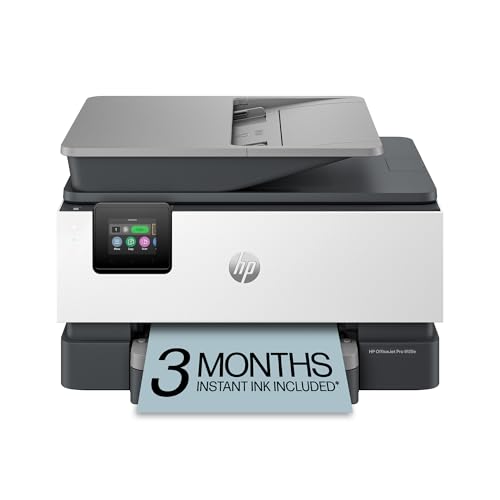
- Best for: Home offices printing and scanning documents every day
- Print, scan, copy, and fax with automatic document feeder
- Print speed up to 22 ppm black and 18 ppm color
- 250-sheet input tray
- Automatic two-sided (duplex) printing

- Best for: Families who print steadily and hate buying cartridges
- Cartridge-free refillable ink tank system (EcoTank)
- Print, scan, and copy functions
- Included ink rated up to 4,500 pages black and 7,500 pages color
- Wireless Wi-Fi printing from computers and mobile devices

- Best for: Text-heavy households that print in bursts and want minimal upkeep
- Monochrome (black and white) laser printer, print only
- Print speed up to 36 pages per minute
- Automatic duplex (two-sided) printing
- 250-sheet paper tray capacity
All 5 Picks at a Glance
| Product | Specs | Action |
|---|---|---|
| HP OfficeJet Pro 9125e |
| Check price on Amazon |
| Epson EcoTank ET-2800 |
| Check price on Amazon |
| Brother HL-L2460DW |
| Check price on Amazon |
 Brother MFC-J1010DW |
| Check price on Amazon |
 Canon PIXMA TS7720 |
| Check price on Amazon |
🛒 Best Price Today on Amazon
Prime members get fast, free shipping on everything above, plus member-only deals. New members get a 30-day free trial — cancel anytime.
The decision that actually matters with a home printer is not the box you carry home, it is the ink arrangement you are signing up for. A cartridge machine, a refillable tank model, and a toner laser can all print the same school essay, yet they differ enormously in how often you buy supplies, what a color page costs you in consumables, and how the printer behaves when it sits idle for three weeks between jobs.
This roundup is for households printing from a Windows or Mac computer: parents handling school paperwork, remote workers printing reports, and anyone replacing a printer that ate cartridges. Every pick below was chosen from the specifications and feature lists on its Amazon product page, and the lineup deliberately mixes ink systems so you can pick the running-cost model that fits your habits first, then the machine.
Quick Picks
As an Amazon Associate we earn from qualifying purchases
| Product | Best for | Key spec from title |
|---|---|---|
| HP OfficeJet Pro 9125e | Busy home offices that print, scan and copy daily | Up to 22 ppm black, 250-sheet tray, auto document feeder |
| Epson EcoTank ET-2800 | Families tired of buying ink cartridges | Refillable ink tanks, up to 7,500 color pages per ink set |
| Brother HL-L2460DW | Text-only printing in fast, cheap bursts | Monochrome laser, up to 36 ppm, automatic duplex |
| Brother MFC-J1010DW | Compact desks needing print, scan and copy | 1.8-inch color display, duplex printing, cloud print |
| Canon PIXMA TS7720 | Photos, crafts and mixed home documents | 15 ipm black / 10 ipm color, 2.7-inch touchscreen |
How to Choose
Decide how you will pay for ink before anything else
Three supply models sit behind these five printers, and they reward different habits. Cartridge inkjets like the Brother MFC-J1010DW and Canon PIXMA TS7720 keep the purchase simple but ask for replacement cartridges on a cycle set by your page volume. The Epson EcoTank ET-2800 flips that around: you refill open tanks with bottles, and the included ink is rated for thousands of pages. The Brother laser uses a toner cartridge plus a separate drum, which suits text because toner does not dry out between jobs. Pick the model whose refill rhythm matches how your household actually prints.
Match the function set to the paper that crosses your desk
A printer connected to a home computer quickly becomes the household copier, scanner, and form-filling station, so count the jobs beyond printing. If you scan multi-page insurance forms or copy a stack of worksheets, an automatic document feeder, like the one on the HP OfficeJet Pro 9125e, saves real time over lifting a flatbed lid for every sheet. If your scanning is the odd receipt or signature page, a basic flatbed on the EcoTank or PIXMA is enough. And if you never scan at all, the print-only Brother laser stops you paying for hardware you will not touch.
Check how the printer will talk to your computer
Every model here connects over Wi-Fi and USB, but the details decide how painless setup feels. Dual-band Wi-Fi, offered on the HP and the Brother laser, keeps the printer reachable on the same band as a modern laptop instead of forcing a router change. Mobile and cloud printing matter once family members send jobs from phones and Chromebooks, which the Brother MFC-J1010DW and Canon PIXMA TS7720 both support alongside computer printing. If your desk sits next to the PC, a simple USB connection is the most reliable option of all, and every pick here keeps that port as a fallback.
Size speed and paper capacity to your real monthly volume
Print speed figures only matter relative to your queue. A household printing a few pages a week will never notice the difference between the Canon’s 15 pages per minute and the HP’s 22, while a home office printing a report every morning will feel every second of it, which is where the Brother laser’s 36 ppm earns its place. Paper capacity works the same way: a 250-sheet tray, as on the HP and the Brother laser, means refilling monthly instead of weekly. Automatic two-sided printing is the other quiet saver, halving paper use on long documents.
The 5 Best Options
HP OfficeJet Pro 9125e
- Best for: Home offices printing and scanning documents every day
- Print, scan, copy, and fax with automatic document feeder
- Print speed up to 22 ppm black and 18 ppm color
- 250-sheet input tray
- Automatic two-sided (duplex) printing
Home offices printing and scanning documents every day
This printer only works with cartridges carrying HP chips, so budget for genuine HP 936 ink, and decide deliberately about the Instant Ink subscription rather than drifting into it after the trial.
This is the pick for a home computer that doubles as a work machine. The OfficeJet Pro 9125e is a full all-in-one with print, scan, copy, and fax, a 250-sheet tray, and an automatic document feeder, so multi-page contracts and school packets move through without babysitting. Its rated speeds, up to 22 pages per minute in black and 18 in color, are the quickest among the inkjets here, and two-sided printing is automatic. HP includes a three-month Instant Ink trial, which suits households that would rather have replacement cartridges arrive on a schedule than think about ink levels at all.
Epson EcoTank ET-2800
- Best for: Families who print steadily and hate buying cartridges
- Cartridge-free refillable ink tank system (EcoTank)
- Print, scan, and copy functions
- Included ink rated up to 4,500 pages black and 7,500 pages color
- Wireless Wi-Fi printing from computers and mobile devices
Families who print steadily and hate buying cartridges
There is no automatic two-sided printing and no document feeder, so long double-sided documents and multi-page scans are manual work, and print speeds are modest next to the HP.
The ET-2800 answers the most common home printing complaint, which is the endless cartridge cycle. Its four ink tanks refill from bottles, and Epson rates the included ink for up to 4,500 black pages and 7,500 color pages, so a typical family can go a very long time between refills. It prints, scans, and copies in color, connects over Wi-Fi for computer and phone printing, and its footprint is modest enough for a shelf or side table. This black version suits buyers who want the lowest-fuss running costs for schoolwork, forms, and everyday color documents rather than raw speed.
Brother HL-L2460DW
- Best for: Text-heavy households that print in bursts and want minimal upkeep
- Monochrome (black and white) laser printer, print only
- Print speed up to 36 pages per minute
- Automatic duplex (two-sided) printing
- 250-sheet paper tray capacity
Text-heavy households that print in bursts and want minimal upkeep
It cannot scan, copy, or print color at all, so a single household photo or a form you need to copy means a trip to another machine; the included starter toner is a small cartridge, so plan on a TN-830XL before long.
Some home computers only ever print text: shipping labels, tax forms, essays, boarding passes. For that job this compact monochrome laser is the most sensible machine in the roundup. It prints only in black and white, but it does so at up to 36 pages per minute with automatic two-sided printing, and toner never clogs or dries during the quiet weeks between jobs. Dual-band Wi-Fi, Ethernet, and USB cover any desk arrangement, the 250-sheet tray rarely needs attention, and Brother’s Mobile Connect app plus Alexa support round out a machine built to be forgotten about until the moment you need a page.
Brother MFC-J1010DW
- Best for: Small desks and shared family computers needing full all-in-one functions
- Color inkjet all-in-one: print, scan, and copy
- Automatic duplex (two-sided) printing
- 1.8-inch color display
- Wireless printing with mobile and cloud print support
Small desks and shared family computers needing full all-in-one functions
It runs on individual cartridges, so heavy color printing will cost more per page than the EcoTank over time, and the small display is less comfortable than a touchscreen for setup tasks.
Brother’s compact inkjet all-in-one is aimed squarely at smaller home desks. It prints, scans, and copies in color, handles two-sided printing automatically, and pairs a 1.8-inch color display with the Brother Mobile Connect app so setup and everyday jobs stay simple from a computer or a phone. Cloud printing support means documents stored online can be printed without routing everything through one PC, which helps in homes where the printer is shared between a family computer, laptops, and tablets. It is the balanced middle option here: full all-in-one functions and automatic duplex without the size or the office ambitions of the HP.
Canon PIXMA TS7720
- Best for: Homes printing photos, crafts, and mixed documents from one computer
- Wireless all-in-one inkjet: print, copy, and scan
- Print speed 15 ipm black and 10 ipm color
- Automatic two-sided (duplex) printing
- 2.7-inch color touchscreen
Homes printing photos, crafts, and mixed documents from one computer
The two-cartridge system means the single tri-color cartridge gets replaced when any one color runs out, and this configuration has no automatic document feeder for multi-page scans.
The TS7720 is the home all-in-one shaped around photos and creative projects as much as documents. Rated at 15 pages per minute in black and 10 in color, with automatic two-sided printing and a 2.7-inch touchscreen, it handles the everyday mix of homework, forms, and borderless photo prints on varied media, from envelopes to banners. Canon designed it specifically as a compact home machine, and the setup routine is one of the simpler ones here. For a household computer that prints as many pictures and craft pages as essays, this is the most natural fit of the five.
Which One Fits Your Situation
You print school and household paperwork most weeks
Steady, predictable volume is exactly what the EcoTank ET-2800 was built for, since its bottled ink stretches across thousands of pages of worksheets, permission slips, and coloring pages. If your desk space is tight and you also want automatic two-sided printing, the Brother MFC-J1010DW is the alternative, accepting cartridge refills as the trade for its smaller footprint.
You work from home and live in documents
Choose the HP OfficeJet Pro 9125e. The document feeder, 250-sheet tray, fax function, and the fastest inkjet speeds in this lineup match a desk that scans signed pages and prints reports daily. The Instant Ink trial also fits this pattern, because a predictable monthly page count is precisely what a scheduled ink delivery is designed around.
You print rarely, but it is always urgent text
The Brother HL-L2460DW is your machine. Toner sits ready through months of inactivity without drying out, the printer wakes and delivers pages at up to 36 per minute, and automatic duplex keeps long forms tidy. As long as everything you print is black and white text, nothing else here is as set-and-forget.
Your computer prints photos and projects as often as essays
Take the Canon PIXMA TS7720. Its borderless photo handling, media flexibility, and touchscreen controls suit a family computer used for school projects, greeting cards, and picture printing, while automatic duplex still covers the document side. Just budget for the tri-color cartridge habit described in its Watch out for note. Keep spare cartridges on hand so a big project never stalls midway.
Common Mistakes
- Choosing a printer by its shelf appeal and ignoring the ink system, then discovering the cartridge cycle costs more in a year than a tank model would have.
- Buying a print-only laser for a household that regularly needs to scan signed forms and copy IDs, which turns one missing function into a recurring errand.
- Skipping automatic duplex to save a little, then paying for it in doubled paper use on every long document the family prints.
- Setting up a Wi-Fi printer in a far corner of the house where the signal is weak, then blaming the printer for dropped jobs that a dual-band connection or a USB cable would have fixed.
- Feeding an HP OfficeJet Pro third-party cartridges without HP chips and being surprised when the printer refuses them outright.
Frequently Asked Questions
Is a laser printer better than an inkjet for a home computer?
It depends on what leaves the tray. For black-and-white text printed in bursts, a laser like the Brother HL-L2460DW is faster and its toner never dries out. For color documents, photos, and scanning in one machine, an inkjet all-in-one is the more versatile choice. Many households genuinely need the inkjet’s flexibility more than the laser’s speed.
Will these printers work with both Windows and Mac computers?
Yes. All five connect over Wi-Fi and USB and are set up through the manufacturer’s software or app, which covers current Windows and macOS machines. The wireless models also accept jobs from phones and tablets on the same network, so the printer is not tied to a single computer once it is on your home Wi-Fi.
What does automatic duplex printing actually save?
Duplex printing puts content on both sides of the sheet automatically, which roughly halves paper consumption on long documents like reports, study guides, and terms paperwork. Four of the five printers here include it; the EcoTank ET-2800 is the exception, so ET-2800 owners printing long documents will be flipping pages by hand.
How long does the EcoTank ET-2800 ink last before a refill?
Epson rates the ink included with the ET-2800 for up to 4,500 pages in black and 7,500 pages in color. A household printing a few dozen pages a week can therefore go a very long time before buying 522 refill bottles, which is the entire point of the tank design: fewer, cheaper refills instead of frequent cartridge swaps.