Our Short List of 3
All 3 Picks at a Glance
| Product | Specs | Action |
|---|---|---|
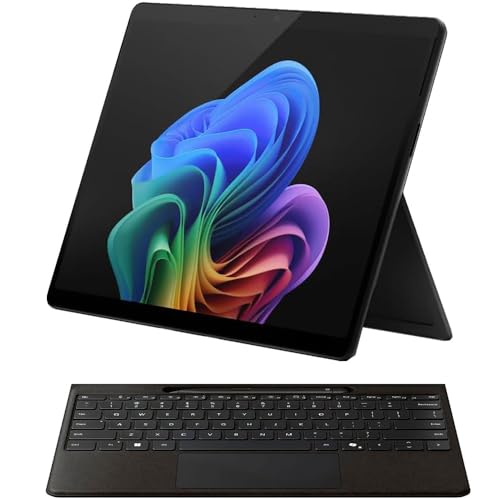 Microsoft Surface Pro 11 | Check price on Amazon | |
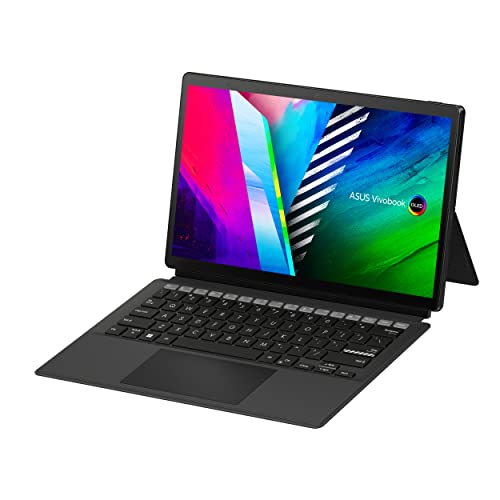 ASUS Vivobook 13 Slate OLED | Check price on Amazon | |
 Lenovo Chromebook Duet Gen 9 | Check price on Amazon |
🛒 Best Price Today on Amazon
Prime members get fast, free shipping on everything above, plus member-only deals. New members get a 30-day free trial — cancel anytime.
The best small laptops with detacable keyboard designs are really tablets with a proper keyboard attached, and that combination is hard to beat for travel. A detachable laptop gives you a full keyboard and trackpad when you need to type, and a thin, light tablet when you want to read, draw, or watch a film. Unlike a traditional laptop, the screen comes right off, so the machine can shrink to the size of a clipboard and slip into a bag that would never fit a clamshell.
Small means 11 to 13 inches here. That size keeps the whole package under a kilogram in most cases, and it is big enough for real work: documents, email, web browsing, video calls, and light photo editing. This guide compares four detachable machines that are listed on Amazon: the Microsoft Surface Pro 11, the Lenovo IdeaPad Duet 5 Chromebook, the ASUS Vivobook 13 Slate OLED, and the Lenovo Chromebook Duet Gen 9. Each one takes a different approach to size, operating system, and value, so read the buying criteria first and then match a machine to your needs.
How to Choose
1. Check whether the keyboard is included
This is the most important detail in a detachable laptop, and it is the easiest to get wrong. Some detachable machines ship with the keyboard in the box, while others sell it separately, which adds a meaningful cost on top of the tablet itself. The Surface Pro 11 is usually sold both ways, so the exact bundle matters. The Lenovo and ASUS models in this guide include the keyboard, which is part of their value. Always confirm what is in the box before ordering.
2. Pick the screen size for your bag and your eyes
An 11-inch detachable is the most portable option and the best fit for a small bag, a plane tray table, or a crowded lecture hall. A 13-inch model gives you more room for documents side by side and a larger keyboard, at the cost of a little extra weight and size. If you work with spreadsheets or write long documents, the 13-inch screen is worth the trade. If you carry the machine everywhere and value lightness above all, go 11 inches.
3. Decide between Windows and ChromeOS
Windows detachables run full desktop software, including Microsoft Office, Adobe apps, and anything else you would install on a normal PC. Chromebooks run ChromeOS, which is built around the browser, web apps, and Android apps, and they are simpler, faster to boot, and easier to keep secure. If your work lives in a browser and Google Docs, a Chromebook is plenty. If you need specific Windows software, choose Windows.
4. Look at the display, not just the size
Two 13-inch screens can look very different. An OLED display, found on the Surface Pro 11 and the Lenovo Duet 5 and ASUS Slate in this guide, produces deeper blacks and more vivid color than a standard LCD, which matters for films, photos, and drawing. Resolution matters too: a 2K or higher display keeps text sharp on a small screen. If you watch films or edit photos on your detachable, the display is worth paying for.
5. Weigh processor, memory, and storage together
A detachable laptop is only as capable as its weakest component. For everyday browsing, documents, and video calls, 8GB of memory and 128GB of storage are a reasonable floor, and 4GB of memory can feel cramped once you have many browser tabs open. Windows machines benefit from a modern processor and 16GB of memory if you run several apps at once. Chromebooks are lighter on resources, so 4GB can work, but 8GB is more comfortable for the long term.
6. Check battery life and charging
A detachable laptop should last a full day away from a charger, since its whole point is portability. Look for a machine rated for a full working day of mixed use, and check whether it charges over USB-C, which means you can top it up from a phone charger or a power bank in a pinch. A machine that needs a proprietary charger is less convenient on the road.
7. Think about ports, cameras, and the pen
A detachable tablet has less room for ports than a normal laptop, so one or two USB-C ports is normal. If you need to connect an external display, a USB drive, and a charger at the same time, a small USB-C hub is a useful companion. A good front camera matters for video calls, and a stylus is worth having if you take handwritten notes or draw. Check whether the pen is included or sold separately, since that affects the real cost.
Top Picks
Microsoft Surface Pro 11
Microsoft Surface Pro 11 on Amazon
The Surface Pro 11 is the most capable detachable laptop in this guide and the closest thing to a full Windows laptop that comes apart. It runs on a Qualcomm Snapdragon X Elite processor, with 16GB of memory and 1TB of storage in this configuration, and a 13-inch OLED touchscreen with a 120Hz refresh rate that makes scrolling and inking feel smooth. This listing is a bundle that includes the Surface Pro Keyboard, so the machine arrives ready to use as a laptop, and it also includes a Slim Pen in the bundle description.
As a Copilot+ PC running Windows 11, the Surface Pro 11 handles office work, browsing, video calls, and light creative work with ease, and its battery life is strong for a Windows machine. The kickstand is built into the tablet, so it stands on its own on a desk or a tray table, and the magnetic keyboard attaches in a second. The OLED display is the best screen in this group, with deep blacks and vivid color that suit films and photo work.
Who it is for: Anyone who wants a detachable that can genuinely replace a laptop, including office workers, students, and creators who need full Windows software in a tablet-sized package.
Caveats: This is the premium option in this group, and the bundle price reflects that. The Snapdragon processor runs Windows on ARM, so a small number of older Windows apps may run through emulation rather than natively; check compatibility if you rely on a specific older program. Confirm the bundle contents before ordering, since Surface Pro keyboards are sold separately in many listings.
Lenovo IdeaPad Duet 5 Chromebook
Lenovo IdeaPad Duet 5 Chromebook on Amazon
The IdeaPad Duet 5 is the media lover’s Chromebook. Its 13.3-inch OLED touchscreen is the standout feature at this size, with rich color and deep blacks that make films and photos look far better than on a standard laptop display. It runs ChromeOS on a Qualcomm Snapdragon processor, with 4GB of memory and 64GB of storage in this configuration, and the detachable folio keyboard and kickstand cover are included in the box.
This machine suits a household that lives in the browser: email, Google Docs, streaming, video calls, and Android apps. ChromeOS boots fast, updates itself, and is hard to break, which makes it a good choice for students and for anyone who wants a machine that just works. The Duet 5 is thin and light, and its battery life covers a full day of mixed use.
Who it is for: Students, casual users, and media watchers who want a beautiful OLED screen and a simple, secure Chromebook with the keyboard included.
Caveats: This is an older model, first sold in 2021, and new stock now often comes through third-party sellers rather than Lenovo’s own store, so check the seller and condition before ordering. The 4GB of memory is enough for browsing and documents but can feel tight with many tabs open, and 64GB of storage fills quickly, so plan on using cloud storage.
ASUS Vivobook 13 Slate OLED
ASUS Vivobook 13 Slate OLED on Amazon
The Vivobook 13 Slate OLED is the most affordable Windows detachable in this guide, and its screen punches far above its class. The 13.3-inch OLED touchscreen covers the full DCI-P3 color range, which makes it a strong choice for watching films and for light photo work. It runs Windows 11 Home on an Intel Pentium N6000 processor, with 8GB of memory and a 256GB SSD in this configuration, and the detachable keyboard is included, along with a cover stand and a stylus in the box.
The Slate is a good fit for a household that wants a Windows machine for documents, browsing, and media without paying for a premium tablet. The keyboard has desktop-sized key spacing and a fingerprint sensor for quick sign-in, and the included pen makes it useful for notes and sketching. It is light enough to carry everywhere, and the OLED display is the reason to choose it over a cheaper LCD tablet.
Who it is for: Budget-conscious buyers who want a Windows detachable with a great OLED screen, a keyboard and pen included, and enough power for everyday work.
Caveats: The Pentium processor is modest, so this machine is best for everyday tasks rather than heavy multitasking or demanding software. This is an older model, so check the seller and condition, and expect shorter battery life under load than the newer machines in this guide.
Lenovo Chromebook Duet Gen 9
Lenovo Chromebook Duet Gen 9 on Amazon
The Chromebook Duet Gen 9 is the newest and smallest machine in this guide, and the best choice if portability is your top priority. Its 11-inch FHD+ touchscreen keeps the whole package compact enough for a small bag, and it runs ChromeOS on a MediaTek Kompanio 838 processor, with 4GB of memory and 128GB of storage. The detachable keyboard is included, and the machine ships with ChromeOS, a webcam, and Wi-Fi 6.
This is a 2025 model, which means it carries the latest ChromeOS features and a longer support window than the older Chromebooks in this guide. It suits students, travelers, and anyone who wants a second machine for notes, browsing, and video calls. The 11-inch screen is small for split-screen work, but for single-task use on the move it is the right size, and the machine is light enough to forget you are carrying it.
Who it is for: Travelers, students, and anyone who wants the smallest, newest detachable Chromebook with the keyboard included.
Caveats: The 11-inch screen is cramped for working with two documents side by side, and 4GB of memory limits heavy multitasking. This is a browser-first machine, so it is not the right choice if you need Windows desktop software.
Comparison Table
| Laptop | Screen | System | Memory and storage | Keyboard | Best for |
|---|---|---|---|---|---|
| Microsoft Surface Pro 11 | 13-inch OLED, 120Hz | Windows 11 | 16GB, 1TB | Included in this bundle | Replacing a laptop |
| Lenovo IdeaPad Duet 5 Chromebook | 13.3-inch OLED | ChromeOS | 4GB, 64GB | Included | Films, browsing, school |
| ASUS Vivobook 13 Slate OLED | 13.3-inch OLED | Windows 11 | 8GB, 256GB | Included | Budget Windows detachable |
| Lenovo Chromebook Duet Gen 9 | 11-inch FHD+ | ChromeOS | 4GB, 128GB | Included | Travel, smallest package |
Which One Is Right for You?
Begin with the operating system. If you need Windows software, the choice is between the Surface Pro 11 and the ASUS Vivobook 13 Slate. The Surface Pro 11 is faster, has a better screen and far more storage, and is the machine to buy if this will be your only computer. The Vivobook Slate costs much less and still gives you Windows and an OLED screen, which makes it the right pick for a second machine or a tight budget.
If your work lives in a browser, the Chromebooks are simpler and better value. The Lenovo IdeaPad Duet 5 has the bigger, better screen and suits a household that watches films and works at a desk. The Lenovo Chromebook Duet Gen 9 is smaller, newer, and more portable, and it suits travel, school, and carrying everywhere.
Whatever you choose, confirm the keyboard is included in the listing you order, since a detachable without its keyboard is just a tablet. Check the storage and memory against your needs, and remember that a small machine benefits from cloud storage more than a large one does.
Frequently Asked Questions
Is a detachable laptop as good as a normal laptop?
For everyday work it can be, with one trade-off: the keyboard on a detachable is thinner and has less key travel than a normal laptop keyboard, and the kickstand needs a flat surface, so typing on your lap is less comfortable. If you type at a desk most of the time, a detachable is a full replacement. If you type on a sofa or in bed, a traditional laptop may suit you better.
Can a Chromebook run Microsoft Office?
Yes, through the web versions of Word, Excel, and PowerPoint, which run in the Chrome browser, and through Android apps where available. For most document work that is enough. If you need the full desktop version of Office with advanced features, a Windows detachable is the better choice.
How do I know if the keyboard is included?
Read the listing carefully before ordering. Look for the words “keyboard included” in the product description, check the “what’s in the box” section, and look at the product photos to see whether a keyboard appears. If the listing is unclear, assume the keyboard is sold separately and budget for it.
Are OLED screens worth it on a small laptop?
Yes, for most people. OLED displays produce deeper blacks, stronger contrast, and more vivid color than standard LCD screens, which makes films, photos, and even web pages look better. The difference is most noticeable in a dark room. OLED screens can use more power when showing bright content, so battery life depends on what you display.
Disclosure: As an Amazon Associate, we may earn from qualifying purchases.