🛒 Best Price Today on Amazon
Prime members get fast, free shipping on everything above, plus member-only deals. New members get a 30-day free trial — cancel anytime.
As an Amazon Associate we earn from qualifying purchases.
A backlit keyboard sounds like a small extra until the first evening you try to finish an essay, a spreadsheet or a long email in a dim room. Then it becomes the feature that decides whether a laptop is pleasant to use after dark or quietly frustrating. This guide is built around that single requirement. Every laptop below has a listing that states a backlit keyboard in its own product information, in the keyboard description field and in the special features field, so the feature is not being guessed from a photograph or inferred from a related model in the same family.

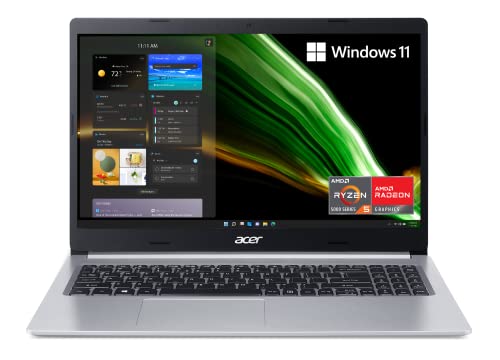
That caution matters because keyboard backlighting is one of the most commonly confused specifications in this class of laptop. Makers sell the same chassis under several model codes, and one code can carry an illuminated keyboard while a near-identical code does not. A family name on its own proves nothing. The model code and the exact listing are what count, and the three machines here are separated by model code as much as by processor or storage: an Aspire 3 with a Ryzen 3 chip and modest storage, an Aspire 3 with a Ryzen 5 chip, more memory and a touchscreen, and an Aspire 5 with a six-core Ryzen 5 chip, a fuller port set and room to grow inside the chassis.
All three are Acer machines. That is the honest outcome of applying the verification rule used for this guide, which required an Amazon US listing whose product information states the backlit keyboard directly. Listings from other makers were checked during the research for this article, but the ones that surfaced either described higher-tier configurations outside the intent of this keyword or did not state the keyboard backlighting clearly enough in their own product information to be included without guessing. Rather than pad the list with uncertain entries, this guide covers the three verified laptops in depth and gives the full checklist for judging any other candidate a reader finds.
Disclosure: This article contains affiliate links. If you buy through these links, we may earn a commission at no additional cost to you.
How to choose a laptop with a backlit keyboard
Confirm the backlight on the exact model code
Start with the listing, not the brand page. Look for the keyboard description field and the special features field on the listing for the exact model code you are about to order, and confirm that both point to a backlit keyboard. If a listing is silent on the keyboard, treat the machine as unlit, however similar it looks to a sibling model that does glow. Sellers sometimes reuse photographs across a family, and a picture of illuminated keys is not a specification. The three listings in this guide each state the feature in their product information, which is why they are here and why other, vaguer listings are not.
Also check what kind of backlighting is described. In this class the usual arrangement is a single-zone white backlight under the full keyboard, which is entirely sufficient for working in low light.
Match the processor to the work
The processors here span two useful steps. A quad-core Ryzen 3 7320U handles browsing, documents, video calls, streaming and light photo work without drama, and it is the right level for a machine bought mainly for school or home administration. A quad-core Ryzen 5 7520U adds headroom for heavier multitasking and larger spreadsheets. A six-core Ryzen 5 5500U adds two more cores and is the comfortable choice for a reader who keeps many applications open at once, works with bigger files, or expects the laptop to stay responsive for longer before it feels dated. None of these machines is a gaming laptop in the dedicated-graphics sense, and none should be bought for demanding modern games; their integrated Radeon graphics suit casual titles, older games and everyday media.
Treat memory and storage as the daily-speed decision
Memory decides how many things can stay open at once. An 8GB machine is workable for a focused routine of browser, documents and calls, especially when the memory is a fast LPDDR5 type, but a 16GB machine feels noticeably calmer when tabs, documents and applications pile up together. Storage decides how soon file management becomes a chore. A 128GB solid-state drive fills quickly once applications, updates and a modest photo library accumulate, and it suits a reader who works mainly in cloud storage. A 256GB drive gives breathing room, and a 512GB drive is the comfortable long-term choice for local files, media and a growing document archive. All three machines here use solid-state storage, so all three start quickly and load applications briskly compared with older mechanical drives.
Check the display, ports and operating system mode
Each laptop here has a 15.6-inch Full HD display at 1920 by 1080, which is the resolution to insist on in this class: text stays sharp and two windows can sit side by side. One of the three adds a touchscreen, which suits readers who scroll, annotate or present directly on the screen. For ports, count what you actually plug in. A USB Type-C port, several USB Type-A ports and an HDMI output cover most desks, and the Aspire 5 in this guide adds a wired Ethernet connection for readers whose wireless coverage is unreliable. Finally, read the operating system line carefully. One listing describes Windows 11 Home in S mode in its product description, a mode that limits installations to applications from the built-in store until the reader switches out of it, so confirm the mode on the listing and plan accordingly.
Acer Aspire 3 A315-24P-R7VH
The Aspire 3 A315-24P-R7VH is the leanest machine in this guide and the natural starting point for a student or home user whose work is browsing, documents, email, video calls and streaming. Its Amazon US listing states an AMD Ryzen 3 7320U quad-core processor running up to 4.1 GHz, AMD Radeon graphics, 8GB of LPDDR5 memory and a 128GB NVMe solid-state drive, behind a 15.6-inch Full HD display at 1920 by 1080. The listing states Wi-Fi 6 and Bluetooth connectivity and Windows 11 Home, and it gives a weight of 3.92 pounds, which is light enough to move between rooms or carry in a backpack without thinking about it.
The keyboard is the reason this model leads the guide. The product information for ASIN B0BS4BP8FB states Backlit Keyboard in its special features and gives the keyboard description as Backlit, so the defining feature of this keyword is stated on the listing itself rather than assumed from the Aspire 3 name. That combination — a stated backlit keyboard on an entry-level model code — is rarer than it should be, because many entry machines in this family omit backlighting entirely.
- Processor stated: AMD Ryzen 3 7320U, quad-core, up to 4.1 GHz
- Memory stated: 8GB LPDDR5
- Storage stated: 128GB NVMe SSD
- Display stated: 15.6-inch Full HD, 1920 by 1080
- Keyboard stated: backlit, in both the special features and keyboard description fields
- Connectivity stated: Wi-Fi 6, Bluetooth, HDMI output
- Operating system stated: Windows 11 Home
- Weight stated: 3.92 pounds
Choose this Aspire 3 if your routine is light and your files live mostly in cloud storage. The honest limits are the storage and memory figures: 128GB asks for tidiness, and 8GB is a working amount rather than a generous one. A reader who downloads large game libraries, keeps years of photographs on the machine itself, or runs many heavy applications together should step up to one of the two models below instead of expecting this configuration to stretch. For focused school and home work in rooms that are not always bright, it covers the brief precisely.
Acer Aspire 3 A315-24PT-R0UX
The Aspire 3 A315-24PT-R0UX keeps the same slim 15.6-inch form and the same stated weight of 3.92 pounds, then strengthens almost every figure that decides daily comfort. Its listing states an AMD Ryzen 5 7520U quad-core processor running from 2.8 GHz up to 4.3 GHz, AMD Radeon graphics, 16GB of LPDDR5 memory and a 512GB NVMe solid-state drive. The display is a 15.6-inch Full HD IPS touchscreen at 1920 by 1080, so this is the one machine in the guide that can be driven by touch as well as by the touchpad. The listing states Wi-Fi 6, Bluetooth 5.0, three USB ports including a Type-C connection, and an HDMI output, with Windows 11 Home as the operating system.
Its keyboard evidence is stated the same way as its sibling. The product information for ASIN B0CJV41KZN lists Backlit Keyboard among its special features and gives the keyboard description as Backlit. The listing also states a battery life figure of 13 hours in its product information, the longest stated figure in this guide, although every reader should treat maker battery figures as a best-case guide rather than a promise for a heavy working day.
- Processor stated: AMD Ryzen 5 7520U, quad-core, up to 4.3 GHz
- Memory stated: 16GB LPDDR5
- Storage stated: 512GB NVMe SSD
- Display stated: 15.6-inch Full HD IPS touchscreen, 1920 by 1080
- Keyboard stated: backlit, in both the special features and keyboard description fields
- Connectivity stated: Wi-Fi 6, Bluetooth 5.0, USB Type-C, HDMI output
- Operating system stated: Windows 11 Home
- Weight stated: 3.92 pounds
Choose this Aspire 3 if you want the strongest everyday specification in the guide without moving to a larger or heavier machine. The doubled memory and quadrupled storage compared with the model above are the differences you will feel every day, in calmer multitasking and in not having to manage local files. The touchscreen is a genuine extra for readers who annotate, present or simply prefer to scroll and tap, and it costs nothing in stated weight. A reader who never uses touch is paying for a feature that will sit idle, but the memory and storage figures justify this model on their own.
Acer Aspire 5 A515-45-R74Z
The Aspire 5 A515-45-R74Z is the step up in processor and connectivity. Its listing states an AMD Ryzen 5 5500U hexa-core mobile processor running at 2.1 GHz with boost up to 4.0 GHz, AMD Radeon graphics, 8GB of DDR4 memory and a 256GB NVMe solid-state drive, behind a 15.6-inch Full HD IPS display at 1920 by 1080 with narrow borders. The listing states Intel Wireless Wi-Fi 6, Bluetooth 5.0 and a gigabit Ethernet port, and its port list is the fullest here: a USB 3.2 Type-C port, two USB 3.2 ports, a USB 2.0 port and an HDMI 2.0 port. The stated weight is 3.9 pounds, the stated battery life is up to 11 hours, and the manufacturer text describes an aluminium top cover.
The keyboard evidence follows the same pattern as the two Aspire 3 models. The product information for ASIN B09J1MXS2Z states Backlit Keyboard in its special features, gives the keyboard description as Backlit, and the manufacturer section describes working comfortably in any environment with a back-lit keyboard. This model also offers the clearest growth path in the guide: its product information states a maximum memory figure above the installed amount with a memory slot available, and its description notes an available hard drive bay, so a confident owner has options that the sealed-down configurations above do not advertise.
- Processor stated: AMD Ryzen 5 5500U, six cores, up to 4.0 GHz
- Memory stated: 8GB DDR4, with a stated maximum above the installed figure
- Storage stated: 256GB NVMe SSD, with an available drive bay described
- Display stated: 15.6-inch Full HD IPS, 1920 by 1080
- Keyboard stated: backlit, in the special features, keyboard description and manufacturer text
- Connectivity stated: Wi-Fi 6, Bluetooth 5.0, gigabit Ethernet, HDMI 2.0
- Operating system stated: Windows 11 Home
- Weight stated: 3.9 pounds
Choose this Aspire 5 if wired networking, a fuller port set or the six-core processor matters to you, or if you like the idea of a machine with stated room to expand memory and storage later. Its installed memory and storage figures sit between the two Aspire 3 models, so a reader who wants the most memory and storage on day one, without opening the chassis, should choose the touchscreen Aspire 3 above. A reader whose desk has a wired connection waiting, or who plugs in several peripherals at once, will get more from this model every day.
Comparison table
| Model | ASIN | Processor stated | Memory stated | Storage stated | Display stated | Keyboard stated |
|---|---|---|---|---|---|---|
| Acer Aspire 3 A315-24P-R7VH | B0BS4BP8FB | Ryzen 3 7320U | 8GB LPDDR5 | 128GB NVMe SSD | 15.6-inch Full HD | Backlit |
| Acer Aspire 3 A315-24PT-R0UX | B0CJV41KZN | Ryzen 5 7520U | 16GB LPDDR5 | 512GB NVMe SSD | 15.6-inch Full HD IPS touch | Backlit |
| Acer Aspire 5 A515-45-R74Z | B09J1MXS2Z | Ryzen 5 5500U | 8GB DDR4 | 256GB NVMe SSD | 15.6-inch Full HD IPS | Backlit |
Read the table by your bottleneck. If storage fills first in your life, the second row is your answer. If applications and peripherals pile up first, the third row answers it. If neither piles up and the work is school, home administration and media, the first row covers it with the least machine to carry and maintain.
Frequently asked questions
How can I be sure a laptop really has a backlit keyboard before I order?
Check the product information on the listing for the exact model code, in the keyboard description and special features fields. All three listings in this guide state the feature in those fields. If the listing for the code you are ordering does not state it, assume the keyboard is unlit, even when a related model in the same family has one, and look for a code whose listing states it plainly.
Is a backlit keyboard worth insisting on for a home or student laptop?
For anyone who types in the evening, in a shared room with the lights low, in a lecture space or while travelling, yes. It removes the hunt for keys that slows typing and causes errors, and it cannot be added later to a laptop that lacks it.
How much memory and storage do I actually need?
For browsing, documents, email, calls and streaming, 8GB of memory and a solid-state drive are workable, and the first model here is built to exactly that level. Step up to 16GB if you keep many tabs and applications open together, and step up in storage if your photographs, media and files live on the machine rather than in cloud storage. The second model here pairs 16GB with the largest drive in the guide, which is why it is the calmest long-term choice of the three.
Can these laptops play games?
Their listings state integrated AMD Radeon graphics and no dedicated graphics card, so they suit casual games, older titles and media rather than demanding modern releases. Readers whose main purpose is gaming should look at machines built around dedicated graphics instead of expecting any laptop in this guide to stretch into that role.
What should I check on the listing on the day I order?
Confirm the model code, the keyboard description field, the memory and storage figures, and the operating system line, including whether the listing describes an S mode that limits where applications can come from until it is switched out of. Listings are revised over time, and the model code plus those fields are the quickest way to confirm that the machine described is the machine you intended to buy.
Conclusion
A backlit keyboard is a specification to verify, not a family trait to assume, and that single discipline shapes this whole guide. The Acer Aspire 3 A315-24P-R7VH at ASIN B0BS4BP8FB is the focused choice for light school and home work, with the feature stated plainly on an entry-level listing. The Acer Aspire 3 A315-24PT-R0UX at ASIN B0CJV41KZN is the strongest everyday specification here, pairing the stated backlit keyboard with 16GB of memory, a 512GB drive and a touchscreen at the same stated weight. The Acer Aspire 5 A515-45-R74Z at ASIN B09J1MXS2Z is the connectivity and expansion choice, with six processor cores, Ethernet, the fullest port set and stated room to grow. Match the model code to your bottleneck, re-check the keyboard field on the listing before ordering, and any of the three will let you keep working comfortably long after the room lights go down.