🛒 Best Price Today on Amazon
Prime members get fast, free shipping on everything above, plus member-only deals. New members get a 30-day free trial — cancel anytime.
A live monitor mix decides whether a singer stays in tune and whether a guitarist hears a cue over stage wash. Floor wedges throw sound across a room and bleed into vocal microphones. A wireless in-ear monitor system changes that, because each performer can carry a mix in a beltpack receiver and hear it through earphones that seal out much of the room. The real decision is whether the transmitter accepts the feed your mixer sends, whether the link stays steady while you move, and whether one transmitter can feed more than one receiver.
This guide is for singers, guitarists, drummers, keyboard players, worship teams, and small bands who play live and want an in-ear monitor system that is simple to run from a mixer. It is also for solo performers who move across a stage and need their monitor mix to move with them. The system below was chosen from its Amazon listing title, with every specification taken from that listing title.
Quick Picks
As an Amazon Associate we earn from qualifying purchases.
| Product | Best for | Key spec from title |
|---|---|---|
| LEKATO Wireless in Ear Monitor System MS-02 | A singer or band member who wants a simple wireless stage mix | Upgraded 2.4G Stereo IEM System Low Latency with Transmitter Beltpack Receiver Auto-Pairing, One to More |
How to Choose
Start with the wireless link and latency
Latency is the delay between a note leaving an instrument and the same note reaching your ear, and on stage even a small delay can pull timing apart. A system that describes itself as low latency is built for live use, where the monitor feed must feel immediate rather than smeared behind the sound coming from the room. The wireless band matters too, because a crowded venue may already carry other wireless traffic, and a link that drops out mid-song is worse than a wired connection. Ask how the transmitter and receiver pair, whether pairing happens automatically when both units switch on, and whether the link recovers cleanly if it is interrupted.
Match the transmitter to your mixer feed
An in-ear monitor system is only as useful as the signal feeding it, so the transmitter input must match what your mixer, audio interface, or personal monitor send can deliver. Check whether your mixer has a spare auxiliary send, a monitor output, or a headphone output that can feed the transmitter, and confirm that the cable you already own fits the transmitter input. Stereo matters here, because a stereo feed lets a mix place vocals in the centre and instruments across the field, while a mono feed collapses everything into one flat layer. If your band shares one mix, decide who controls the balance and whether that person can adjust it during a set.
Check one-to-more sharing and receiver handling
Many small bands do not need a separate mix for every player, and a transmitter that can feed more than one receiver can cover a whole group from a single mixer send. That arrangement keeps setup simple, because one transmitter sits near the mixer while each player wears a beltpack receiver and a set of earphones. Before choosing, count the receivers you need on a typical night, including a spare for a guest musician or a backup if one unit fails. Look at how the receiver clips to a belt or strap, whether its controls are easy to reach without looking down, and whether its volume control is protected from accidental knocks.
Get the earphone fit and isolation right
Earphones decide how much stage sound reaches your ears and how clearly the monitor mix cuts through it. A good seal keeps drum bleed and amplifier wash at bay, which means the monitor mix can stay at a sensible level instead of being turned up to fight the room. Try the supplied ear tips first, then change size if the seal feels loose, if bass sounds thin, or if one side keeps slipping. Comfort matters over a long set, so an earphone that presses, itches, or works loose will become a distraction before the second half. Keep spare tips in your gig bag, and insert the earphones the same way every time so the seal stays consistent.
The 1 Best Option
LEKATO Wireless in Ear Monitor System MS-02

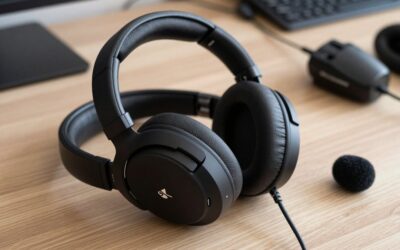
The LEKATO MS-02 suits a singer, guitarist, or band member who wants a wireless monitor mix without a complicated personal monitoring rig. Its listing describes an upgraded 2.4G stereo system with low latency, a transmitter, and a beltpack receiver: the transmitter takes the mix from your mixer, the receiver carries it to your belt, and the earphones deliver it to your ears. Auto-pairing removes a setup step that often goes wrong before a set, and the one-to-more feature suits a small band, since a single transmitter can serve more than one receiver when several players share the same cue mix.
Specs
- Upgraded 2.4G stereo IEM system
- Low latency wireless link
- Transmitter with beltpack receiver
- Auto-pairing between transmitter and receiver
- One-to-more operation for multiple receivers
- In-ear monitoring for church, band, singer, and stage
Best for: A singer or band member who wants a simple wireless stage mix with automatic pairing and shared receivers.
Watch out for: Confirm that your mixer has a suitable output to feed the transmitter, and check the earphone fit and seal before your first live set.
Which One Fits Your Situation
You sing lead and move across the stage
Choose the LEKATO MS-02, because its beltpack receiver travels with you and its auto-pairing removes a manual step before you step on stage. A stereo monitor mix keeps your vocal clear in the centre while instruments sit around it, and a sealed earphone fit keeps stage wash from pulling you off pitch. Practise moving in rehearsal with the receiver clipped where you will wear it live, so cable routing and volume control feel familiar before the audience arrives.
You play in a small band that shares one mix
Choose the LEKATO MS-02, because its one-to-more operation lets one transmitter feed more than one receiver when the band shares the same cue mix. That keeps the setup near the mixer simple, with one transmitter to place and one mix to balance, while each player controls volume at the beltpack. Agree on the shared balance in rehearsal, keep one spare receiver charged and ready, and confirm that every player has earphones that seal well.
You play in a worship team or a church band
Choose the LEKATO MS-02, because its listing names church use alongside band and stage use, and its simple pairing suits rotating volunteers who may not run the system every week. A shared mix works well when the team follows one leader, and the wireless link frees singers and players from floor wedges. Keep the setup routine written down, label the transmitter and receivers, and sound-check every vocal and instrument in the shared mix.
You are buying your first in-ear monitor system
Choose the LEKATO MS-02, because its shape is easy to understand: transmitter at the mixer, beltpack receiver on your belt, earphones in your ears. Auto-pairing shortens the learning curve, and the one-to-more feature leaves room to add another receiver later if a second player joins. Start with one shared mix, learn how the balance and volume controls behave in rehearsal, and only consider a more complex personal mixing setup once you know what your current mix is missing.
Safety Notes
Wireless in-ear monitor systems use rechargeable batteries and mains-powered transmitters, so handle charging and power with care. Charge receivers and transmitters on a flat, ventilated surface, away from bedding, curtains, and other flammable material, and unplug chargers when charging is finished. Keep batteries and chargers dry, do not use a swollen, cracked, or overheating battery, and store spare batteries away from metal objects such as keys. Do not charge a unit that smells of burning, feels unusually hot, or shows damage to its cable or casing; set it aside and replace it. Keep monitor volume at a level that lets you hear clearly without discomfort, and low enough that you can still hear a spoken cue from the stage manager or band leader. Take breaks from in-ear listening between sets, and stop using the earphones if you notice pain, ringing, or muffled hearing after a performance.
Common Mistakes
- Feeding the transmitter from the wrong mixer output, then wondering why the monitor mix is silent or carries the main house mix instead of a dedicated monitor send.
- Skipping a rehearsal with the earphones in, so the first time you hear the monitor mix at full stage volume is during the opening song.
- Using ear tips that do not seal, which lets stage wash in and forces the monitor volume higher than it needs to be.
- Forgetting to charge the beltpack receiver, or leaving the transmitter switched on after a rehearsal, so the system is flat when the next set starts.
- Adding receivers without agreeing on a shared mix first, so every player hears a balance that suits nobody.
Frequently Asked Questions
What is an in-ear monitor system for live performance?
An in-ear monitor system sends a personal monitor mix from a mixer to earphones worn by a performer. A transmitter near the mixer sends the signal, a beltpack receiver worn by the performer picks it up, and earphones deliver the mix directly into the ears. That setup replaces floor wedges, reduces sound bleeding into vocal microphones, and lets each performer hear a mix that suits their part.
Is a wireless in-ear monitor system better than floor wedges?
A wireless system is better when performers move, when stage space is tight, or when wedge bleed causes feedback and muddy sound. Floor wedges still suit players who stay in one spot and prefer hearing the room around them. The best choice depends on how much you move, how many monitor mixes you need, and whether your mixer can feed a transmitter cleanly.
How many receivers can one transmitter feed?
That depends on the system, because some transmitters pair with one receiver while others support one-to-more operation for several receivers sharing the same mix. The LEKATO MS-02 in this guide lists one-to-more operation, so one transmitter can serve more than one receiver on a shared mix. Confirm the receiver count you need before a gig, and carry a spare receiver when a guest joins.
Do I need a separate mix for every band member?
No, a separate mix for every player is best, but it is not required for a small band, a worship team, or a first in-ear monitor setup. Many groups start with one shared mix that carries vocals clearly and keeps the rhythm section balanced, then split mixes later when players want different balances. A shared mix keeps setup simple and works well when the band rehearses its balance together.