🛒 Best Price Today on Amazon
Prime members get fast, free shipping on everything above, plus member-only deals. New members get a 30-day free trial — cancel anytime.
A trackball swaps wrist travel for thumb or finger movement, which is why people with sore forearms, cramped desks, or long spreadsheet days keep returning to them. The catch with a cap of under 50 dollars is that the category is smaller than regular mice, so the choice comes down to a few concrete trade-offs: wired versus wireless, rechargeable versus battery, and how many computers you want to hop between with one device.
This guide is for office workers, laptop users on tight tables, and anyone curious about trackballs who does not want to gamble on a premium model. Seven distinct options are covered below; the Logitech Ergo M575S appears in several color listings, so it is reviewed once. Use the specs in each listing title as your checklist, and expect a learning curve of a few days before thumb control feels natural in 2026 or any other year.
Quick Picks

Logitech Ergo M575S Wireless Bluetooth Trackball Mouse - Graphite Blue Ball | Easy thumb control, precise and smooth tracking, Bluetooth and includes Logi Bolt USB receiver, PC Mac compatible


As an Amazon Associate we earn from qualifying purchases. Product prices and availability are accurate as of the date/time indicated.

PORLEI Wired Ergonomic Trackball Mouse, 34mm Thumb Control, RGB Lighting | Smooth rollerball precision, sculpted comfort, USB-C & USB-A, plug-and-play, 5 adjustable DPI, Windows & Mac compatible


As an Amazon Associate we earn from qualifying purchases. Product prices and availability are accurate as of the date/time indicated.

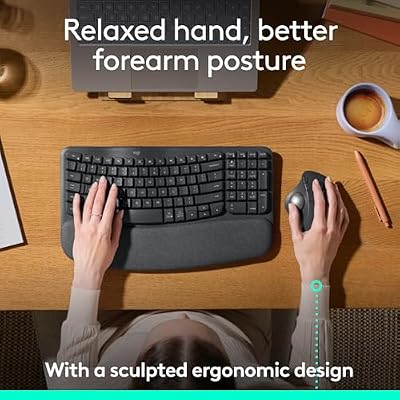
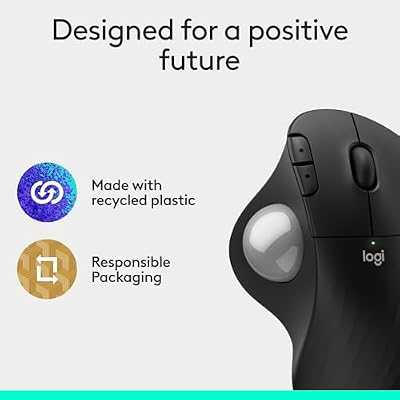
Logitech Ergo M575S Wireless Bluetooth Trackball Mouse - Black Silver Ball | Easy thumb control, precise and smooth tracking, Bluetooth and includes Logi Bolt USB receiver, PC Mac compatible



As an Amazon Associate we earn from qualifying purchases. Product prices and availability are accurate as of the date/time indicated.

Kensington Orbit Trackball Mouse (K64327F), Silver/Black


As an Amazon Associate we earn from qualifying purchases. Product prices and availability are accurate as of the date/time indicated.

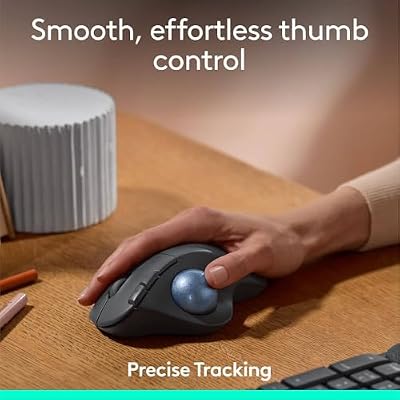
Logitech Ergo M575S Wireless Ergonomic Trackball Mouse, Black/Blue (910-007026)


As an Amazon Associate we earn from qualifying purchases. Product prices and availability are accurate as of the date/time indicated.

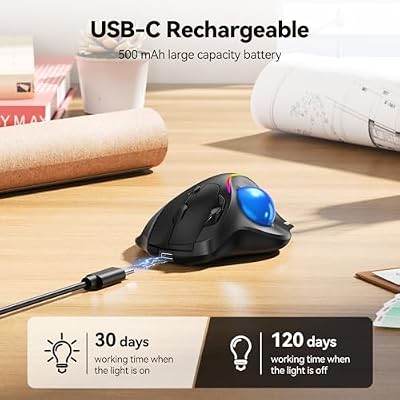
TECKNET Wireless Trackball Mouse, Bluetooth Mouse with Ergonomic, Black | 3-Device Connectivity (Bluetooth & 2.4G), 5 Adjustable DPI, RGB Lighting, PC, Mac & Laptop Compatible




As an Amazon Associate we earn from qualifying purchases. Product prices and availability are accurate as of the date/time indicated.

Nulea M509 Wired Trackball Mouse Ergonomic Thumb Control Type C USB | Smooth tracking mouse with Type C & USB connection, 5 DPI levels, 6 buttons, compatible with PC Mac Windows


As an Amazon Associate we earn from qualifying purchases. Product prices and availability are accurate as of the date/time indicated.
| Product | Best for | Key spec from the title |
|---|---|---|
| Logitech Ergo M575S | Everyday office comfort | Wireless, Bluetooth, thumb control |
| Nulea M501 | Rechargeable multi-device work | 4 DPI levels, Bluetooth plus USB receiver, 3 devices |
| PORLEI Wired Trackball | Plug-and-play desks | 34mm thumb ball, USB-C and USB-A, RGB |
| Kensington Orbit (K64327F) | Brand-name simplicity | Silver and black finish, model K64327F |
| TECKNET Wireless Trackball | Switching between three computers | Bluetooth and 2.4G, 5 adjustable DPI |
| Nulea M509 Wired | Gamers and button users | Type-C and USB, 5 DPI levels, 6 buttons |
| Nulea Tilt Stand Trackball | Wrist angle adjustment | Tilt stand, 4 DPI levels, rechargeable |
How to Choose
Connection: wired, Bluetooth, or receiver
Wired models like the PORLEI and the Nulea M509 never need charging and have no pairing hassles, and USB-C on the mouse end lets you swap the cable. Wireless models free up desk space. If you use a work laptop and a personal tablet, look for Bluetooth plus a 2.4G or USB receiver, and a multi-device switch. Check whether the receiver is included and whether your computer has a free port; a thin laptop with only USB-C ports may need an adapter for a 2.4G dongle.
Ball size and control style
A 34mm thumb ball, like the one named in the PORLEI title, is a common size for thumb-operated designs. Thumb control keeps your hand still, which spares the wrist but can tire the thumb at first. Plan for a short adjustment period and clean the ball and sensor window occasionally.
DPI levels and buttons
Between 4 and 5 adjustable DPI levels is plenty for office work. A mouse with 6 buttons, like the Nulea M509, helps if you want back and forward keys or programmable shortcuts. Ignore very high DPI claims, since a trackball relies on your thumb, not a sensor racing across the desk.
Power and ergonomics
Rechargeable models skip the battery aisle, while models with a tilt stand change the wrist angle. Budget trackballs cut corners on button feel, ball bearings, and wrist support. RGB lighting adds nothing to comfort, so treat it as a styling extra. If you share a desk with someone, a mouse that works for both left and right hands is worth checking for before you commit, since many thumb-ball designs are shaped for one side only.
The 7 Best Options
Logitech Ergo M575S
The Ergo M575S is the name most buyers meet first. The title describes a wireless Bluetooth trackball with easy thumb control and precise, smooth tracking, and it appears in graphite blue, black silver, off-white, and black and blue listings.
- Strength: easy thumb control and smooth tracking are the headline features in the title.
- Strength: Bluetooth connectivity lets it pair with laptops and tablets that lack a spare USB port.
- Trade-off: the titles give no DPI count, so buyers who want many speed steps should look at the others.
It suits a laptop user who wants a recognizable brand and a no-fuss shape for long document days, and the repeated color listings mean you can match it to a desk setup without changing the model. Skip it if you prefer a wired connection, want a dedicated multi-device switch spelled out on the listing, or care about RGB styling. Because four listings share the same name, double-check that the color you pick is the one you are adding to your cart.
Nulea M501
The M501 is described as a wireless trackball with ergonomic thumb control, 4 DPI levels, and a rechargeable battery. Bluetooth and a USB receiver cover different connection needs, and a 3-device mode helps split time between machines.
- Strength: rechargeable power means no loose batteries.
- Strength: Bluetooth, USB receiver, and 3-device use give flexible pairing.
- Trade-off: 4 DPI levels are fewer than some competing models list.
It fits a hybrid worker who moves between a desktop at home and a laptop at a shared office, and who would rather top up a battery on the weekend than hunt for AA cells. It also suits someone sharing a small desk where cable clutter is a nuisance. Skip it if you want a wired mouse with no charging, or if you need more than four speed steps for fine editing work.
PORLEI Wired Ergonomic Trackball
PORLEI keeps it simple: a wired ergonomic trackball with a 34mm thumb ball, RGB lighting, a sculpted shape, and both USB-C and USB-A plugs. The title promises plug-and-play use and a smooth rollerball.
- Strength: wired operation means no pairing or charging.
- Strength: USB-C and USB-A ends fit new and older computers.
- Trade-off: the wire limits how far you can place it from the machine.
Consider it for a fixed desk setup, like a reception counter, a home office tower, or a shared family computer where nobody wants to manage batteries. The sculpted shape is meant to rest the hand naturally. Skip it if you want a wireless mouse for a couch, a lap desk, or a train table, or if you find lighting effects distracting in a dim room.
Kensington Orbit (K64327F)
The Orbit title is short: a trackball mouse in silver and black with the model number K64327F. Kensington is a long-running brand in trackballs, but the listing text itself offers few specs, so base the decision on the product page details you can confirm.
- Strength: a well-known trackball brand with a simple silver and black look.
- Strength: the minimal listing keeps the focus on the form factor.
- Trade-off: the title lists no DPI, connection type, or button count.
It may suit someone who values a traditional trackball shape over a long spec list, or who is replacing an older Kensington unit and wants something familiar. Treat it as the cautious pick for a buyer who will read the full product page before deciding. Skip it if you need to know the connection type, DPI range, and button count before ordering, since the title alone does not say.
TECKNET Wireless Trackball
This one is built around flexibility: Bluetooth and 2.4G wireless, 3-device connectivity, 5 adjustable DPI levels, and RGB lighting in an ergonomic body. The title also mentions PC compatibility.
- Strength: Bluetooth plus 2.4G with three-device switching covers a laptop, desktop, and tablet.
- Strength: 5 DPI levels give a bit more tuning range than 4-level models.
- Trade-off: RGB lighting adds style but not comfort.
It fits someone who juggles a work laptop and a home PC and wants to jump between them with one device, either over Bluetooth or the 2.4G link. It also appeals to buyers who like a bit of lighting on a gaming-style desk. Skip it if you want a stripped-down, lighting-free look, or a rechargeable battery spelled out in the title.
Nulea M509 Wired
The M509 is a wired trackball with ergonomic thumb control, a Type-C and USB connection, 5 DPI levels, and 6 buttons. That button count is the most generous in this group.
- Strength: 6 buttons leave room for shortcuts and browser navigation.
- Strength: wired Type-C and USB means no battery to charge.
- Trade-off: wired use ties it to the port it plugs into.
It suits a spreadsheet user, video editor, or casual gamer who likes extra buttons for undo, copy, and navigation without reaching for the keyboard. The wired link also removes any chance of a dropped connection mid-task. Skip it if you want wireless freedom, or if you want a feature like a tilt stand to change your wrist position.
Nulea Wireless Tilt Stand Trackball
This Nulea variant highlights a tilt stand, with a 21.7 figure in the title, along with thumb control, 4 DPI levels, a rechargeable battery, Bluetooth and 2.4G connections, and 3-device switching.
- Strength: the tilt stand can ease the wrist angle.
- Strength: rechargeable power plus Bluetooth and 2.4G is flexible.
- Trade-off: the added stand makes it bulkier on a small desk.
It is aimed at buyers who feel wrist strain from a flat hand position and want to experiment with a raised angle, such as a writer or accountant who spends hours at the same desk. Skip it if your desk is tiny, you carry the mouse in a laptop bag, or you would rather have a low-profile body that slides under a monitor stand.
Which One Fits Your Situation
You work from a laptop and a tablet
The Nulea M501 or the TECKNET gives you three-device switching and rechargeable or dual-wireless options, so the same trackball follows you between screens.
You want zero maintenance
Choose the PORLEI wired model. No batteries, no pairing, and both USB-C and USB-A ends keep it simple.
You need shortcut buttons
The Nulea M509 is the one with 6 buttons and 5 DPI levels, which suits editing and browsing workflows.
Your wrist hurts on a flat desk
Try the Nulea tilt stand model, since the angled base is the point of the design, then compare it to the Logitech Ergo M575S for a more familiar shape.
Common Mistakes
- Expecting to master thumb control in a single afternoon instead of giving it a week.
- Buying a wireless model for a desk where a cable would be easier.
- Counting RGB lighting as a comfort feature.
- Skipping the ball and sensor cleaning, then blaming the tracking.
- Paying for several color versions of the same model when the specs are identical.
Related guides
- Logitech G Pro X 2 Vs Steelseries Arctis Nova Pro Wireless
- Travel Controller Case For 8Bitdo Ultimate Series
- Gaming Pc Under 600 For Roblox And Minecraft
Frequently Asked Questions
Are trackballs good for gaming?
They can handle casual games, but fast aiming favors regular mice. A model with extra buttons, like the Nulea M509, helps with shortcuts.
Do trackballs reduce wrist strain?
Because the hand stays still, many buyers find less wrist movement. Thumb strain is possible, though, so take breaks early on and raise the speed setting if you find yourself rolling the ball too often. Anyone with existing hand pain should check with a doctor first.
Which is better, wired or wireless?
Wired suits a fixed desk with no charging. Wireless suits laptops, multi-device work, and clutter-free surfaces.
How do I clean a trackball?
Remove the ball when the design allows it, wipe the ball and the sensor area, and put it back. A little cleaning prevents sticky tracking, and it takes under a minute. Avoid harsh solvents on the ball, and let everything dry before reassembling.
Top picks from this guide
LogitechLogitech Ergo M575S Wireless Bluetooth Trackball Mouse - Black Silver…NuleaNulea M509 Wired Trackball Mouse Ergonomic Thumb Control Type C…TECKNETTECKNET Wireless Trackball Mouse, Bluetooth Mouse with Ergonomic, Black |…PORLEIPORLEI Wired Ergonomic Trackball Mouse, 34mm Thumb Control, RGB Lighting…