🛒 Best Price Today on Amazon
Prime members get fast, free shipping on everything above, plus member-only deals. New members get a 30-day free trial — cancel anytime.
- At a Glance: Best 24 Inch Monitors Compared
- How to Choose Among the Best Small PC Monitors
- Best 240Hz Monitors in a 24-Inch Size
- Best 24 G-Sync and FreeSync Gaming Monitors
- Best Office and Eye-Care 24 Inch Monitors (LCD, LED and HD)
- Pick X If… Decision Table
- Fit, Size and Connection Notes
- Alternatives Worth a Look
- Frequently Asked Questions
Updated November 2026 – The best 24 inch monitors split by job: the BenQ Zowie XL2546X for 240Hz esports, the ASUS TUF Gaming VG249Q3A and LG UltraGear 24G411A-B for all-round gaming, the Dell S2425H for an office desk, and the AOC 24G2 series or HP VH240a when the budget is tight.
If you want the short version of the best 24 inch monitors, match the panel to the habit. Fast shooters want refresh rate and clean motion, writers and spreadsheet users want an IPS panel with a comfortable stand, and anyone short on desk space or money can stay with a plain 1080p screen. A 24-inch size (usually 23.8 or 24.5 inches of visible diagonal) remains the standard for competitive play because the whole screen sits inside your field of view, and it also fits two-monitor desks easily. This guide covers the models reviewers keep naming in 2026, what each maker lists, and the limits to know before buying.
At a Glance: Best 24 Inch Monitors Compared
| Monitor | Best for | Key stated specs (maker lists) | Main limit |
|---|---|---|---|
| BenQ Zowie XL2546X | 240Hz esports | 24.5 in · 1080p · TN · 240Hz · DyAc motion blur reduction | TN colour and viewing angles |
| ASUS TUF Gaming VG249Q3A | Budget high-refresh IPS | 23.8 in · 1080p · IPS · up to 180Hz · 1ms GTG · ELMB Sync · G-Sync Compatible | Basic stand options |
| LG UltraGear 24G411A-B | Value gaming and console play | 23.8 in · 1080p · IPS · 120Hz native, overclock to 144Hz · HDR10 support | Overclock is not guaranteed on every unit |
| AOC 24G2 series | Long-running 144Hz IPS value pick | 23.8 in · 1080p · IPS · 144Hz · FreeSync | Series is older; suffixes differ |
| Acer Nitro VG240Y series | Entry gaming bundles and PC builds | 23.8 in · 1080p · IPS · high refresh · FreeSync (suffix-dependent) | Specs change by suffix |
| ViewSonic VX2428 | Mixed work and play | 23.8 in · 1080p · IPS · high refresh · adaptive sync | Limited ergonomics |
| Dell S2425H | Office, home study, eye-care | 23.8 in · 1080p · IPS · 100Hz · built-in speakers on the HS variant | Not built for fast shooters |
| HP VH240a | Cheap second screen | 23.8 in · 1080p · IPS · 60Hz · speakers | 60Hz only |
Maker specifications change between regional versions and suffixes, so always match the full model code on the box to the maker’s product page. Refresh rates and response times in this guide are quoted as the makers list them, not as measured results.
How to Choose Among the Best Small PC Monitors
The best small PC monitors are not always the smallest. For a desk monitor, 24 inches is the point where a screen is large enough for two windows side by side at 1080p but small enough that you do not turn your head to see the corners. Three choices matter most: resolution, panel type and refresh rate.
1080p or 1440p at 24 Inches
Most 24-inch gaming monitors are 1920 x 1080. At this size 1080p is sharp enough for games and general use, and it is easy for mid-range graphics cards to drive at 144Hz or higher. Some makers now sell 24-inch or 25-inch 1440p panels, which give crisper text. If you mostly play fast shooters at high frame rates, 1080p is still the practical choice; if you read documents all day, a 1440p model is worth a look.
IPS, VA or TN
IPS panels are the common choice because they keep colour and brightness steady when you sit off-centre. VA panels generally offer deeper contrast but can smear dark scenes on some models. TN panels are the oldest type, and the BenQ Zowie XL2546X uses one, because the maker targets fast response and motion clarity for competitive players. Reviewers such as Display Ninja call it a leading 240Hz TN option, but you accept narrower viewing angles and weaker colours.
Refresh Rate and Adaptive Sync
Adaptive sync lets the monitor match your graphics card’s frame rate to reduce tearing. G-Sync Compatible means the maker states the monitor works with that technology on supported NVIDIA cards, and FreeSync is the AMD equivalent. Many monitors list both. You will see a note such as G-Sync Compatible on the ASUS TUF Gaming VG249Q3A; read the maker’s page for the exact connection (usually DisplayPort or HDMI) needed for it to work.
Best 240Hz Monitors in a 24-Inch Size
For readers asking about the best 240 MHz monitors (the unit is hertz, not megahertz), the 24-inch size is where 240Hz is easiest to find. A 240Hz panel only pays off if your PC can produce frame rates close to that number in the games you play, so it suits esports titles such as Counter-Strike 2, Valorant and Fortnite far more than heavy single-player games.
BenQ Zowie XL2546X – Best for Competitive 240Hz Shooters
1080p · 24.5 in · TN · 240Hz · DyAc 2 motion blur reduction · height-adjustable stand with shield-style side blinders
The XL2546X is the Zowie line’s 240Hz esports model. The maker lists a 24.5-inch panel with a fast response time and its DyAc motion blur reduction feature, which strobes the backlight to improve clarity in motion. Reviewers describe the stand as highly adjustable, including height, tilt and swivel, and the on-monitor puck-style controller as a simple way to change presets. The trade-off is the TN panel: colours and viewing angles are weaker than IPS, and motion blur reduction modes usually cannot be combined with adaptive sync. Pick it if you play competitive shooters at very high frame rates and care little about colour.
ASUS TUF Gaming VG249Q3A – Best for 180Hz IPS on a Budget
1080p · 23.8 in · IPS · up to 180Hz · 1ms GTG (maker-listed) · ELMB Sync · G-Sync Compatible · HDMI and DisplayPort
The TUF Gaming VG249Q3A is a regular pick in budget roundups because it pairs an IPS panel with a high refresh rate. The maker lists a 1ms GTG response claim and ELMB Sync, ASUS’s name for backlight-strobing blur reduction that can work alongside adaptive sync. Because the 1ms figure is a manufacturer claim taken under best-case settings, treat it as a ceiling rather than a typical result. It suits players who want one monitor for competitive games and everyday browsing. Its limits are a relatively simple stand and the lack of USB hub ports.

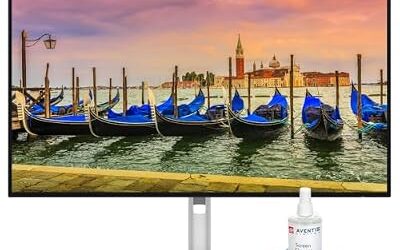
ASUS TUF Gaming VG249Q3A 23.8" 16:9 FHD 180Hz IPS LED HDR Monitor w/St | Includes Gaming Monitor (1 Item) for gaming and entertainment
Included for 'Best 24-Inch Monitors in 2026 (Gaming, Office and Budget)' as a representative home product in this roundup; selection reflects the product set returned for this topic.
View on AmazonBest 24 G-Sync and FreeSync Gaming Monitors
The best 24 G-Sync monitors do not need an expensive hardware module. Most affordable 24-inch gaming models are G-Sync Compatible or FreeSync, which is enough for smooth play on a recent graphics card. Look for the exact wording on the maker’s spec sheet and confirm the connection type that enables it.
LG UltraGear 24G411A-B – Best for Value Gaming and Console Play
1080p · 23.8 in · IPS · 120Hz native · overclock to 144Hz · HDR10 support · adaptive sync
The UltraGear 24G411A-B appears in several 2026 roundups as a frequently recommended value gaming monitor. A review roundup notes it runs at 120Hz out of the box and can be overclocked to 144Hz, which works well for consoles that output 120Hz. The IPS panel brings good viewing angles. Overclocking is not guaranteed on every unit, and the HDR10 label on a 1080p budget panel is more about signal compatibility than a dramatic image, so keep expectations modest.
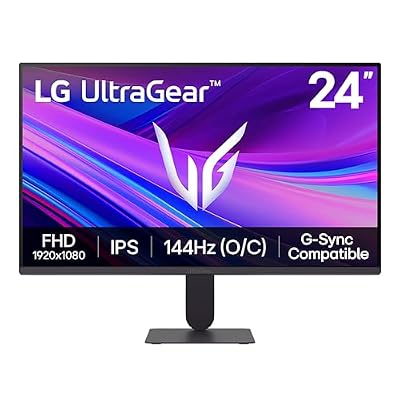
LG 24G411A-B 24-inch Ultragear Full HD (1920 x 1080) IPS Gaming Monitor, 144Hz (O/C), 1ms MBR, NVIDIA G-Sync Compatible, AMD FreeSync, HDR10, HDMI, DisplayPort, Slim Stand, Black
Included for 'Best 24-Inch Monitors in 2026 (Gaming, Office and Budget)' as a representative home product in this roundup; selection reflects the product set returned for this topic.
View on AmazonAOC 24G2 Series – Best for a Proven 144Hz IPS Value Pick
1080p · 23.8 in · IPS · 144Hz · FreeSync · 1ms MPRT (maker-listed) · multiple stand variants
The AOC 24G2 family has been a long-running value benchmark for 144Hz IPS gaming. Newer revisions and sister models (look at the suffix) often add features, so read the specific product page. The series is an older design now, and its stand on lower variants only tilts, but its price-to-performance reputation explains why it still shows up in recommendation lists. Choose it if you want a trusted 144Hz IPS panel on a tight budget, and check which stand version you are buying.
Acer Nitro VG240Y Series – Best for Entry Gaming Builds
1080p · 23.8 in · IPS · refresh rate depends on suffix · FreeSync · HDMI and DisplayPort
Acer’s Nitro line has several 24-inch IPS models sold under the VG240Y name, and the maker’s suffixes denote different refresh rates and ports. They are a common pairing with entry-level gaming towers because they are widely stocked and easy to match with a budget graphics card. Because the exact feature set varies by suffix, read the model code carefully. Pick one if you want a mainstream brand with a straightforward gaming feature set and an easy-to-find warranty process.

acer Nitro VG240Y bmiix 23.8" Full HD (1920 x 1080) IPS Monitor with AMD Radeon FREESYNC Technology - 1ms VRB | 75Hz Refresh | (2 x HDMI Ports & 1 x VGA),Black
Included for 'Best 24-Inch Monitors in 2026 (Gaming, Office and Budget)' as a representative home product in this roundup; selection reflects the product set returned for this topic.
View on AmazonViewSonic VX2428 – Best for Mixed Work and Play
1080p · 23.8 in · IPS · high refresh rate (maker-listed) · adaptive sync · thin-bezel design
The VX2428 is a thin-bezel 24-inch IPS model aimed at people who split time between spreadsheets and games. ViewSonic lists a high refresh rate and adaptive sync support. Reviewers regularly place it just under the more gaming-focused ASUS and LG models, mostly because of its basic stand. If you plan to mount it on a VESA arm anyway, that limit disappears. Check the maker’s page for the VESA pattern and the supported mount size before ordering an arm.
Best Office and Eye-Care 24 Inch Monitors (LCD, LED and HD)
People searching for the best 24 inch LED HD or LCD monitors are mostly looking for a plain Full HD screen that is easy on the eyes for long sessions. Nearly every modern 24-inch screen is an LED-backlit LCD, so the choice comes down to the stand, flicker-free backlight claims and low blue light modes. Those eye-care features are maker-listed comfort settings, not medical treatments; if you have eye strain or headaches that persist, see an eye-care professional.
Dell S2425H – Best for Office and Home Study
1080p · 23.8 in · IPS · 100Hz · speakers on the HS variant · ComfortView eye-care mode (maker-listed) · tilt and height-adjustable stand
The Dell S2425H leads several 2026 office roundups. The maker lists a 100Hz IPS panel and a ComfortView feature that reduces blue light emission. The HS version adds built-in speakers, and some sources list slightly different refresh rates for the HSM variant, so match the full model code. Dell’s S-series stands are generally well built for the category, with tilt and height adjustment on most variants. It is not a competitive gaming monitor, but 100Hz is smoother than a typical 60Hz office screen for scrolling and casual play.

Dell S2425H Monitor - 23.8 Inch, FHD (1920x1080) Display, 100Hz Refresh Rate, 1500:1 Contrast Ratio, 99% sRGB, TÜV Rheinland Eye Comfort 4 Star, Integrated 2x5W Speaker, Tilt- Ash White Color
Included for 'Best 24-Inch Monitors in 2026 (Gaming, Office and Budget)' because the listing lists an explicit depth/thickness, which is the attribute this article compares.
View on AmazonHP VH240a – Best for a Cheap Second Screen
1080p · 23.8 in · IPS · 60Hz · built-in speakers · HDMI and VGA inputs (maker-listed)
HP’s VH240a is a simple office monitor with an IPS panel and integrated speakers. Readers asking about the best monitors HP VH240 are usually looking for a low-cost second screen, and that is where it fits. It is capped at 60Hz and offers a basic stand, so it suits email, documents and video calls rather than fast gaming. If you need a tilt-and-height stand or USB-C charging, step up to a business-class model.

HP VH240a 23.8-inch Full HD 1080p IPS LED Monitor with Built-in Speakers and VESA Mounting, Rotating Portrait & Landscape, Tilt, and HDMI & VGA Ports (2DS80AA#ABA) - Black
Included for 'Best 24-Inch Monitors in 2026 (Gaming, Office and Budget)' as a representative home product in this roundup; selection reflects the product set returned for this topic.
View on AmazonPick X If… Decision Table
| Pick this | If you | Skip it if you |
|---|---|---|
| BenQ Zowie XL2546X | play competitive shooters at 200+ frames per second | want rich colour or edit photos |
| ASUS TUF Gaming VG249Q3A | want an IPS 180Hz panel on a budget | need USB hub ports |
| LG UltraGear 24G411A-B | mix PC and console play | need a very flexible stand |
| AOC 24G2 series | want proven 144Hz IPS value | need a fully ergonomic stand |
| Acer Nitro VG240Y series | are pairing a monitor with an entry-level gaming build | dislike reading suffix tables |
| ViewSonic VX2428 | split time between work and gaming | need height adjustment without an arm |
| Dell S2425H | work long hours and want eye-care features | play fast shooters seriously |
| HP VH240a | need a very low-cost second display | want more than 60Hz |
Fit, Size and Connection Notes
- Desk size: A 24-inch panel is roughly 21 inches wide for a 16:9 screen; add the stand base depth when measuring.
- VESA: Most 24-inch screens accept 100 x 100 mm mounts, but some stands are fixed. Check the maker’s page for the VESA pattern.
- Cables: For 144Hz or higher at 1080p, DisplayPort is the safe choice. HDMI support varies by version; the maker lists which refresh rates work over HDMI.
- Consoles: PlayStation 5 and Xbox Series X output up to 120Hz at supported resolutions, so a 120Hz-capable monitor like the LG UltraGear 24G411A-B suits them; 240Hz is not used by consoles.
- Graphics card: A 240Hz monitor needs a graphics card that can hold very high frame rates in the games you play, otherwise a 144Hz model gives the same experience.
Alternatives Worth a Look
Choosing a 25-Inch or 27-Inch Instead
Some players move up to 25 inches for 1440p or to 27 inches for a bigger picture. A 27-inch 1440p monitor is a common next step for gamers with a stronger graphics card, but it needs more desk depth and more GPU power. A 24-inch screen stays easier to scan for competitive play.
Choosing Another BenQ Zowie Model
The Zowie XL2411K and XL2411 family use 144Hz-class TN panels and similar ergonomics at a lower refresh rate. They are older designs, so confirm the current model code on the maker’s page before ordering.
Choosing a Small TV or Small Portable Screen
Readers who search for small TV monitors or 8-inch monitors usually need a different product class. A small TV can work as a monitor, but it often has weaker text clarity at close range. Portable monitors and tiny 8-inch screens suit travel or dashboards, not a primary desk display.
Frequently Asked Questions
What is the best 24 inch monitor for gaming?
For competitive shooters, the BenQ Zowie XL2546X is the specialist pick, while the ASUS TUF Gaming VG249Q3A and LG UltraGear 24G411A-B suit all-round gaming. The right answer depends on whether you prefer a TN panel’s speed or an IPS panel’s colour.
Is a 240Hz monitor worth it at 24 inches?
It is worth it only if your PC can produce frame rates near 240 in the games you play. Esports titles often can, while demanding single-player games usually cannot. If not, a 144Hz or 165Hz IPS panel gives most of the benefit.
Do I need a G-Sync monitor?
No. Most 24-inch gaming monitors are G-Sync Compatible or FreeSync, which is enough for tear-free play on current graphics cards. Look for the exact wording and connection type on the maker’s spec sheet.
Is IPS better than VA or TN for a 24 inch monitor?
IPS is the best general-purpose choice because of its viewing angles and colour. TN panels favour speed and are used in some esports models, while VA panels offer stronger contrast but can show smearing in dark scenes. Choose by use, not by the panel acronym.
Is 1080p enough on a 24 inch monitor?
Yes for gaming and general use, since 1080p is sharp enough at that size and is easy for mid-range graphics cards to drive. If you read a lot of text or edit documents all day, a 1440p model gives crisper letters, though at higher cost and GPU load.
What should I buy for a cheap work-from-home monitor?
The Dell S2425H and HP VH240a are the usual office-oriented options. The Dell offers a higher refresh rate and eye-care features, while the HP is a basic 60Hz IPS screen with speakers. Match the exact model code and check the available ports before buying.