🛒 Best Price Today on Amazon
Prime members get fast, free shipping on everything above, plus member-only deals. New members get a 30-day free trial — cancel anytime.
- Quick comparison of the best keyboards for typing
- What makes the best keyboards for writing and typing
- Best office keyboards MX: Logitech picks
- Best quiet small keyboards and wireless picks
- Best mechanical keyboards for typing feel
- Best typewriter keyboards and writer’s keyboards
- Pick X if: decision table
- Layout, switch and compatibility notes
- Ergonomics and wrist care
- Alternatives worth considering
- Best office keyboards for different typing habits
- Best keyboards for typing on a Mac, a tablet or several devices
- Keycaps, stabilizers and why they change how typing feels
- Cleaning and caring for a typing keyboard
- How to test a typing keyboard before you commit
- Frequently Asked Questions
Updated November 2026 – The best keyboards for typing are the Logitech MX Keys S for a quiet, low-profile office board, the Keychron Q1 Pro for a gasket-mounted mechanical feel, the Ducky One 3 for a wired enthusiast board, and the Cherry KC 200 MX for a quiet mechanical option.
A good typing keyboard comes down to key feel, noise, layout and connection. Writers and office workers tend to prefer either low-profile scissor keys, which are short, quiet and light, or mechanical switches, which have more travel and feedback. Independent roundups most often name the MX Keys S as a top all-round pick and the Keychron Q-series as the usual mechanical choice. Many of those guides are affiliate-style rather than lab tests, so the notes below attribute claims to makers and outlets and keep specifications to what is publicly listed.
Quick comparison of the best keyboards for typing
| Keyboard | Switch / key type | Connection (as listed) | Best for |
|---|---|---|---|
| Logitech MX Keys S | Low-profile scissor | Bluetooth, Logi Bolt, USB-C charging | Quiet, comfortable office typing |
| Logitech MX Mechanical | Low-profile mechanical | Bluetooth, Logi Bolt | Mechanical feel without a loud clack |
| Keychron Q1 Pro | Hot-swap mechanical, gasket mount | Bluetooth and wired | Premium typing feel and customisation |
| Keychron K3 Pro | Low-profile mechanical | Bluetooth and wired | Slim wireless mechanical |
| Ducky One 3 | Cherry MX hot-swap | Wired | Solid feel, thick keycaps |
| Cherry KC 200 MX | Cherry MX, quiet options | Wired | Quiet mechanical office use |
| Das Keyboard 4 Professional | Cherry MX | Wired | Heavy typists who want a full-size build |
| Realforce R3 | Electro-capacitive Topre-type | Wired and wireless versions | Smooth, domed feel |
| Leopold FC750R PD | Cherry MX, PBT caps | Wired | Compact TKL with quiet reputation |
What makes the best keyboards for writing and typing
Four things decide comfort. First, key feel: the actuation force and travel the maker lists, plus whether the switch is linear, tactile or clicky. Second, noise: lighter, dampened boards suit shared spaces. Third, layout: full-size for number work, tenkeyless (TKL) for a closer mouse, 75% or 65% for compact desks. Fourth, typing position: a low wrist angle matters for long sessions, and a palm rest can help.
Switch types matter in practice. Linear switches press smoothly, tactile switches add a bump that confirms the keypress, and clicky switches add an audible click. For writers who type for hours, tactile or quiet linear switches are common choices, but this is personal. If you can try a keyboard in person, do so.
Best office keyboards MX: Logitech picks
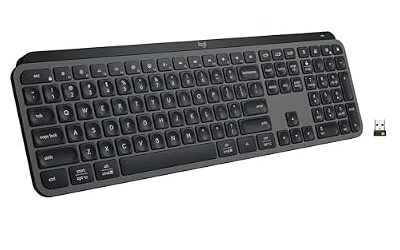
Logitech MX Keys S – Best for quiet, comfortable office typing
Specs the maker lists: low-profile scissor keys with spherical dished caps · Bluetooth Low Energy and Logi Bolt · three-device switching · smart backlighting · USB-C charging · Windows, macOS, Linux, iPadOS, Android support as listed.
Technobezz, Scribbright and Expert Guiders each rank the MX Keys S first or near it in 2026 guides, citing low-profile keys, smart backlighting and broad OS support. It is a full-size layout with a number pad and suits people who type all day and want little noise. A Mac-specific variant exists for macOS layouts.

Logitech MX Keys S Wireless Keyboard Low Profile Fluid Precise - Graphite | USB-C rechargeable, 10 days battery, Pairs 3 devices, Smart backlit keys adapt to environment, Logi Bolt USB receiver
Included for 'Best Keyboards for Typing in 2026 (Comfort, Feel and Speed)' as a representative home product in this roundup; selection reflects the product set returned for this topic.
View on AmazonLogitech MX Mechanical – Best for a mechanical feel without a loud clack
Specs the maker lists: low-profile mechanical switches (tactile, linear and clicky options) · Bluetooth and Logi Bolt · multi-device switching · USB-C charging · full-size and mini versions.
Roundups recommend it for offices that want mechanical feedback with moderate noise. One reviewer criticised its ABS keycaps, so this is a tradeoff between a slim profile and keycap quality.

Logitech MX Mechanical Wireless Illuminated Keyboard Tactile - Graphite | Low-profile full-size, 3 device Bluetooth pairing, Smart backlight auto-adjusts, USB-C rechargeable, Up to 15 day battery
Included for 'Best Keyboards for Typing in 2026 (Comfort, Feel and Speed)' as a representative home product in this roundup; selection reflects the product set returned for this topic.
View on AmazonBest quiet small keyboards and wireless picks
Keychron K3 Pro – Best for a slim wireless mechanical
Specs the maker lists: low-profile mechanical switches · 75% layout · Bluetooth and wired USB-C · hot-swappable on supported versions · QMK and VIA support on Pro models.
The Keychron K Pro line pairs a smaller footprint with wireless use. The 75% layout keeps arrow keys and function keys while saving desk space. Keychron lists Mac and Windows keycaps and layouts in the box on many models. Check the maker’s page for the exact variant you buy.
Cherry KC 200 MX – Best for a quiet mechanical office board
Specs the maker lists: Cherry MX switches · wired USB · full-size layout · switch options including a quiet linear version · compact frame.
Expert Guiders calls the KC 200 MX its top quiet-office pick with Silent Red switches. It is wired and less customisable than enthusiast boards, which suits people who want a no-fuss mechanical.

Cherry KC 200 MX Wired Mechanical Office Keyboard MX2A Silent RED Switches | Modern Design, Aluminum Surface, USB-A Connection, Black/Bronze, Quiet Keys
Included for 'Best Keyboards for Typing in 2026 (Comfort, Feel and Speed)' as a representative home product in this roundup; selection reflects the product set returned for this topic.
View on AmazonBest mechanical keyboards for typing feel
Keychron Q1 Pro – Best for premium typing feel and customisation
Specs the maker lists: 75% layout · full aluminium body · gasket-mounted design · hot-swappable sockets · QMK and VIA support · Bluetooth and wired.
DeskDeploy names the Keychron Q1 as its top typing keyboard, and MechKeyReview and TechSifted both choose the Q1 Pro. The gasket mount is designed to soften keystrokes. It is heavy and aimed at people who enjoy customising switches and keycaps. Technobezz also lists the Q6 Ultra full-size model for those who need a number pad.
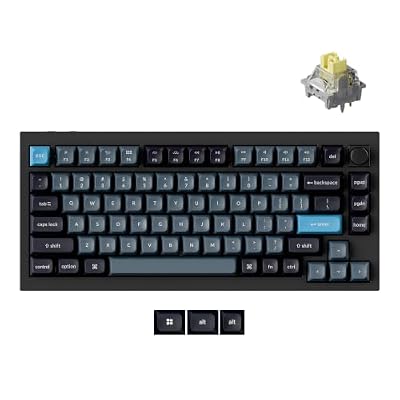
Keychron Q1 Pro Wireless Mechanical Keyboard, Full Aluminum 75% Layout | QMK Launcher, Bluetooth / Wired, Hot-Swap Apex Banana Switch, RGB, PBT Keycaps Compatible with Mac Windows Linux - Black
Included for 'Best Keyboards for Typing in 2026 (Comfort, Feel and Speed)' as a representative home product in this roundup; selection reflects the product set returned for this topic.
View on AmazonDucky One 3 – Best for a solid wired enthusiast board
Specs the maker lists: Cherry MX switches · hot-swap sockets · thick double-shot PBT keycaps · wired USB-C · sizes from full-size to compact.
One source describes sound-dampening foam and hand-lubed stabilisers on the Ducky One 3, and TechSifted notes it lacks QMK and VIA support. It is wired only, so it fits desk typists who do not need wireless.

Ducky One 3 Mechanical Gaming Keyboard, Cherry MX Brown, RGB | Mechanical gaming keyboard with hot-swappable switches, RGB backlight
Included for 'Best Keyboards for Typing in 2026 (Comfort, Feel and Speed)' as a representative home product in this roundup; selection reflects the product set returned for this topic.
View on AmazonDas Keyboard 4 Professional – Best for heavy typists who want a full-size build
Specs the maker lists: Cherry MX switches · full-size layout · aluminium top panel · wired USB · integrated USB hub.
Scribbright picks the Das Keyboard 4 Professional for heavy typists. It is an older design, and Das Keyboard has sold newer models, so look at the maker’s current range for the same line before buying. Das Keyboard also offers a version with blank keycaps for touch typists.

Das Keyboard 4 Professional Wired Mechanical Keyboard, Cherry MX Blue Mechanical Switches, 2-Port USB 3.0 Hub, Volume Knob, Aluminum Top (104 Keys, Black)
Included for 'Best Keyboards for Typing in 2026 (Comfort, Feel and Speed)' as a representative home product in this roundup; selection reflects the product set returned for this topic.
View on AmazonRealforce R3 – Best for a smooth domed feel
Specs the maker lists: electro-capacitive switches (the Topre-type design) · varied actuation weights by model · quiet operation · wired and wireless versions · full-size and TKL.
The Realforce line from Topre Corporation uses capacitive switches rather than mechanical contacts. Enthusiasts describe them as smooth with a soft landing. The Realforce did not appear in the roundups reviewed for this guide, so this entry relies on the maker’s description and general enthusiast coverage. It is a premium-tier board.

Realforce R3 Topre 45g White Bluetooth Dye Sub PBT Mechanical Keyboard
Included for 'Best Keyboards for Typing in 2026 (Comfort, Feel and Speed)' as a representative home product in this roundup; selection reflects the product set returned for this topic.
View on AmazonLeopold FC750R PD – Best for a compact TKL with a quiet reputation
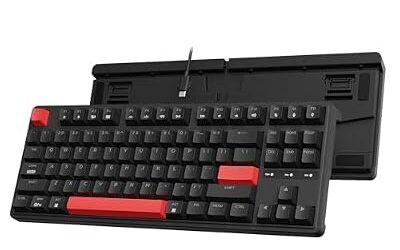
Specs the maker lists: Cherry MX switches · tenkeyless layout · PBT keycaps · wired USB.
Leopold boards are a long-standing enthusiast option, known for plain styling. Availability and the exact model names vary by region, so check the maker’s list. Leopold also sells a full-size version for those who need a number pad.
Best typewriter keyboards and writer’s keyboards
For a typewriter-like feel, buyers usually mean round keycaps and audible clicks. Few mainstream makers sell retro round-key boards, and they are niche products, so read the maker’s listing for switch type and compatibility. Most writers are better served by a quiet tactile board, such as the Keychron Q1 Pro with tactile switches or the Logitech MX Mechanical, with a palm rest to keep wrists neutral.
Pick X if: decision table
| Pick this if you… | Choose |
|---|---|
| Type all day in an office and want quiet | Logitech MX Keys S or Cherry KC 200 MX |
| Want a premium mechanical and enjoy tweaking | Keychron Q1 Pro |
| Want slim and wireless with mechanical switches | Keychron K3 Pro or Logitech MX Mechanical |
| Prefer a no-nonsense wired board | Ducky One 3 |
| Want a smooth, domed feel | Realforce R3 |
| Need a number pad and a heavy full-size frame | Das Keyboard 4 Professional |
| Have a small desk and want TKL | Leopold FC750R PD |
Layout, switch and compatibility notes
- Full-size: includes a number pad; best for data entry.
- TKL (tenkeyless): removes the number pad, giving the mouse more room.
- 75% and 65%: compact, with arrows kept; common in Keychron’s range.
- OS support: Windows, macOS, Linux, iPadOS and Android support is listed per model by the maker. A Mac layout may need a separate variant or keycap set.
- Wireless: battery life depends on backlighting, so read the maker’s figure as a best-case “up to” number.
- Hot-swap: lets you change switches without soldering, useful for tuning feel.
Ergonomics and wrist care
Comfort also depends on your setup. Keep wrists straight, elbows near a right angle and the keyboard at a height that does not force your shoulders up. A palm rest can help, but resting on it while typing can add strain. Take regular breaks. If you have numbness, tingling or pain in your hands or wrists, see a doctor or physiotherapist, since a keyboard cannot treat a medical condition. For ergonomic shapes, the Logitech Ergo K860 is often mentioned as the split-style option.
Alternatives worth considering
- Keychron K8: a budget wireless mechanical TKL, according to roundups.
- Logitech Ergo K860: a curved, split layout aimed at wrist comfort.
- HHKB Professional Hybrid Type-S: a compact Topre-type board popular with programmers, listed here from general enthusiast coverage rather than from the roundups reviewed.
Best office keyboards for different typing habits
Fast touch typists often prefer lighter switches and a lower profile, because they let the fingers move quickly with little effort. Hunt-and-peck typists may prefer a tactile bump that confirms each press, which reduces missed keys. People who type long documents benefit from a keyboard with a stable, solid base that does not slide, and from keycaps with a texture that stays comfortable over time. PBT keycaps are commonly described as more resistant to shine than ABS, and the maker’s listing usually states the plastic.
Noise is the most overlooked factor in shared offices and in homes. Clicky switches are audible to everyone nearby, linear switches are quieter, and silent versions add dampening inside the switch. Case foam and gasket mounting also reduce hollow sounds. If you share a room, choose a quiet linear or low-profile board; if you work alone, a clicky board is fine.
Best keyboards for typing on a Mac, a tablet or several devices
If you switch between a laptop, a tablet and a phone, look for a board that lists multi-device Bluetooth. The Logitech MX Keys S and Keychron’s Bluetooth models list switching between several devices, and Logitech also lists a Mac-specific variant. For iPadOS and Android tablets, check the maker’s compatibility page, because media keys and function rows can behave differently. Boards with a Windows and a macOS mode make this easier, since the modifier keys swap with a switch or software setting.
Wired boards are simple and have no battery, but they tie you to one device at a time unless you use a USB switch. Wireless boards that also support a cable give you a backup when the battery is flat.
Keycaps, stabilizers and why they change how typing feels
Keycap material and thickness change the sound of a keyboard. Thick PBT caps usually give a deeper sound than thin ABS caps. Stabilizers, the small parts that keep long keys such as the space bar level, are another common source of rattle on budget boards. Some makers lubricate stabilizers at the factory, and enthusiasts who use hot-swap boards often upgrade switches or keycaps later. Hot-swap sockets mean a bad switch does not need soldering to change, though warranty terms differ, so read the maker’s policy first.
Opening or modifying a keyboard is a personal choice, and it can void a warranty. Static, bent pins and damage are risks if you are not careful. If you are new to the hobby, start with a board you like out of the box.
Cleaning and caring for a typing keyboard
- Unplug a wired keyboard or switch off a wireless one before cleaning.
- Turn the board upside down and shake out crumbs, then use a soft brush or compressed air.
- Wipe the surface with a lightly dampened cloth, and keep liquid away from the switches and electronics.
- Follow the maker’s guide before removing keycaps, because some low-profile designs use fragile parts.
How to test a typing keyboard before you commit
Type a few paragraphs at your normal speed and watch for missed letters, fatigue in the forearms and noise that bothers people nearby. Try the space bar and the long modifier keys, since rattle often shows there first. Note how tall the board sits at the back and whether you need a palm rest to keep your wrists level. If you can, compare a low-profile board with a full-travel mechanical one back to back, because the difference in key travel is easy to feel and hard to judge from descriptions. Check the return policy before buying online, and keep the packaging until you are sure.
Finally, think about how long you type each day. Occasional users are well served by any board in this guide, while people who write for hours benefit from spending more time on fit, noise and layout. A keyboard that suits your hands and your room will matter more than any spec number printed on the box.
Frequently Asked Questions
What are the best keyboards for typing?
The Logitech MX Keys S, Keychron Q1 Pro, Ducky One 3 and Cherry KC 200 MX are named most often. Choose low-profile scissor keys for quiet offices and mechanical boards for more feedback.
What are the best keyboards for writers?
Writers who want comfort and quiet usually pick the MX Keys S or a tactile mechanical such as the Keychron Q1 Pro. Pair it with a palm rest if it helps your wrists.
What are the best quiet keyboards?
The Cherry KC 200 MX with quiet switches, the Logitech MX Keys S and the Logitech MX Mechanical are common quiet picks. Silent linear switches and dampened cases reduce noise.
Are mechanical keyboards better for typing than membrane or scissor keyboards?
Not always. Mechanical boards give more feedback and travel, while scissor keyboards are slimmer and quieter. It is a matter of preference.
Which is better for typing, wired or wireless?
Both work well. Wired boards have no battery to charge, and Bluetooth models such as the MX Keys S and Keychron Q1 Pro are convenient for multiple devices.
What is a Topre or Realforce keyboard?
Topre switches use a rubber dome and a spring with capacitive sensing rather than metal contacts. Typists often describe the feel as smooth and soft, and the boards are premium-tier.