🛒 Best Price Today on Amazon
Prime members get fast, free shipping on everything above, plus member-only deals. New members get a 30-day free trial — cancel anytime.
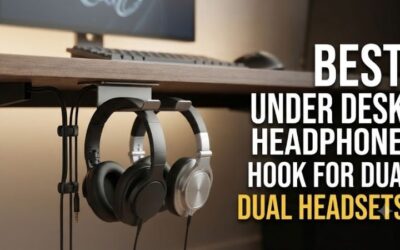
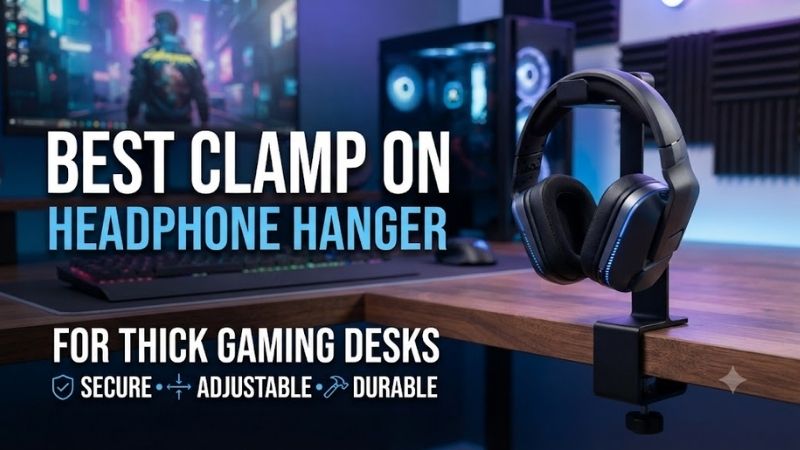
A thick gaming desk creates a surprisingly difficult compatibility problem for ordinary headphone hangers. Many models advertised as adjustable only accommodate desktops around 1.5 inches thick, so choosing the right hanger requires checking the actual clamp opening, edge geometry, and available mounting clearance.
Quick Verdict: Which Clamp-On Headphone Hanger Fits Thick Desks?
For gaming desks approaching two inches thick, a hanger with a documented two-inch clamp range should be prioritized over a conventional model rated only for 38–45 millimeters. Desk thickness is a hard compatibility limit, and tightening a smaller clamp harder will not solve the problem.
The KDD 2-in-1 Headphone Hanger and Cup Holder is a useful option for compatible desktops up to approximately 50 millimeters thick, although it occupies more desk-edge space than a dedicated hook.
The Gravity HP HTC 01 B is our preferred dedicated headphone hanger for desks up to 45 millimeters. Brainwavz Claw and Paw offer alternative mounting shapes for desks up to approximately 40 millimeters.
For desktops thicker than two inches, the practical solution may be an approved adhesive or screw-mounted under-desk hook rather than a conventional clamp.
Quick Comparison Table
Clamp range should be checked before evaluating appearance, rotation, or accessory storage. The models below have different maximum openings, and their suitability depends on whether the desk provides a flat gripping surface without a support rail immediately beneath the edge.
| Product | Maximum Desk Thickness | Design | Best For |
|---|---|---|---|
| KDD 2-in-1 Headphone Hanger/Cup Holder | About 50 mm | Combined clamp | Near-2-inch desks |
| Gravity HP HTC 01 B | 45 mm | Steel clamp | Dedicated headset storage |
| Brainwavz Claw | 40 mm | Adjustable clamp | Wide headband support |
| Brainwavz Paw | 40 mm | Low-profile clamp | Minimal desk-edge setup |
| Gator Frameworks GFW-HP-HANGERDESK | 38 mm | Studio-style clamp | Thick conventional desks |
| Datum Supply Rotating Headphone Hook | 40 mm | Rotating clamp | Concealed storage |
How We Selected Clamp-On Headphone Hangers
A reliable clamp-on hanger must fit the physical desk without damaging its surface or allowing the headset to fall. We considered documented clamp openings, headband support width, mounting hardware, protective materials, cable clearance, and the difference between ordinary thick desks and oversized butcher-block worktops.
Maximum Clamp Opening and Underside Clearance
The advertised clamp range represents the allowable thickness of the mounting surface, not the amount of space needed beneath it. A desk with a thick support apron can be incompatible even when the tabletop thickness falls comfortably inside the product’s published range.
For example, a hanger supporting a 40-millimeter top may still require a clear underside area for the clamping screw and pressure pad.
A steel frame positioned immediately beneath the edge can obstruct that hardware.
Measure the exact mounting location instead of relying on the desk’s nominal thickness.
Headband Support and Cushion Protection
A headphone hanger should distribute contact across a suitable portion of the headband rather than concentrate the headset’s weight on a sharp, narrow point. This matters for premium gaming headsets with padded or suspended headbands.
A broad, curved support is generally preferable to a thin exposed metal hook.
However, even a wide hanger may not accommodate every suspension-strap design.
Users should examine the headset’s headband shape, material, and center of gravity before choosing the support.
Clamping Pressure and Desk Finish
A screw clamp holds the hanger through mechanical pressure, which makes desktop strength and contact protection important. Protective pads can reduce direct contact with metal hardware, but overtightening may still damage softer wood, laminate, or decorative surfaces.
Avoid installing a hanger on an unsupported veneer lip.
A solid contact region is more important than maximum tightening force.
The hanger should remain stable under ordinary use without requiring excessive pressure on the desk.
Best Clamp-On Headphone Hangers Reviewed
These six products provide different mounting configurations, but their published clamp limits vary. The reviews explain which desk thicknesses they accommodate, how their headphone supports are shaped, and when an alternative installation method may be more appropriate.
KDD 2-in-1 Headphone Hanger and Cup Holder — Best for Near-2-Inch Desks
The KDD 2-in-1 combines a headset hanger with a desk-edge cup holder, making it useful when the mounting location must accommodate more than one accessory. Its relatively generous documented clamp range gives it an advantage over hangers restricted to conventional thinner desktops.
Best For: Compatible thick desktops approaching two inches.
Mounting Compatibility
Published specifications for the relevant KDD configuration describe a clamp range of approximately 5–50 millimeters.
That upper limit is near two inches.
However, the actual usable opening depends on the selected model and mounting hardware.
Buyers should verify the exact version rather than assuming every KDD organizer has the same dimensions.
The screw clamp is designed for reversible installation on suitable desk edges.
Accessory Design
The combined unit includes a headphone hook and a beverage holder.
This can reduce the number of independent clamps attached to a gaming desk.
However, placing a drink beside a headset introduces potential spill exposure.
Users should position the product away from exposed charging contacts and other electronics.
Gaming Practicality
The headphone hook can help keep a headset away from the mousepad and keyboard.
However, the larger organizer occupies more space than a dedicated hanger.
It may also conflict with monitor-arm clamps or cable-management accessories.
Pros
-
Relatively generous published clamp range.
-
Combines headphone and beverage storage.
-
Reversible clamp installation.
-
Reduces separate desk-edge accessories.
Cons
-
Exact version requires verification.
-
Larger physical footprint.
-
Beverage storage introduces spill considerations.
-
Not suitable for desks thicker than its stated range.
Buy If: Your desk is close to two inches thick and you want combined accessory storage.
Skip If: You want a compact dedicated hanger or your desktop exceeds the clamp limit.
Gravity HP HTC 01 B — Best Dedicated Metal Clamp Hanger
The Gravity HP HTC 01 B is a studio-oriented headphone holder with a documented steel clamp and a broad plastic support. Its 45-millimeter maximum opening makes it more flexible than many basic headset hooks while retaining a simple dedicated design.
Best For: Gaming desks up to 45 millimeters thick.
Technical Specifications
-
Clamp range: 0–45 millimeters.
-
Support depth: 100 millimeters.
-
Support width: 60 millimeters.
-
Materials: Steel and plastic.
-
Protective clamping screw end: Included.
-
Cable-management slots: Two.
-
Suitable for: One or two compatible headsets.
Construction
The steel clamp provides the mounting structure.
The plastic support is designed to accommodate headphone headbands without requiring a separate desktop stand.
The 60-millimeter support width provides a relatively broad contact region.
This can be preferable for headsets with substantial padded headbands.
However, two large headsets may compete for available space.
Thick-Desk Compatibility
The 45-millimeter range is useful for thick conventional desks.
It does not accommodate a full two-inch worktop.
A two-inch desk measures approximately 50.8 millimeters, exceeding the documented opening.
This difference is small visually but mechanically important.
Cable Management
Two slots allow cable ends and plugs to be positioned near the hanger.
For wired gaming headsets, this can reduce tangling beneath the desk.
However, the cable should not hang under tension from the headset connector.
Pros
-
Clearly documented 45-millimeter clamp range.
-
Steel clamping structure.
-
Broad headset support.
-
Two cable slots.
-
Suitable for selected dual-headset storage.
-
Dedicated professional accessory design.
Cons
-
Does not fit two-inch desktops.
-
Plastic contact surface.
-
Two large headsets may be crowded.
-
Requires clear edge geometry.
Buy If: Your desk is within 45 millimeters and you want a dedicated hanger.
Skip If: You have a two-inch or thicker worktop.
Brainwavz Claw — Best for Broad Headband Support
The Brainwavz Claw uses an adjustable desk clamp and a wide, raised-lip support surface. Its physical shape is designed to hold ordinary over-ear headphones while keeping the headband away from narrow metal contact points.
Best For: Thick conventional desktops with large gaming headset headbands.
Technical Specifications
-
Clamp compatibility: Approximately 5–40 millimeters.
-
Headphone support width: 58 millimeters.
-
Overall dimensions: 170 × 76 × 56 millimeters.
-
Mounting accessories: Felt pads, non-slip pads, bolt, and brace plate.
Headset Protection
The support has a raised lip intended to reduce the possibility of the headband sliding off.
Its broad contact area is useful for headsets with thick padding.
However, suspended headband straps and unusually wide headbands should be checked individually.
A 58-millimeter support width does not mean every headset will rest in the same way.
Installation
The clamp is adjusted mechanically.
Protective pads help reduce direct contact with the desk.
The product is suitable for compatible desktops up to approximately 40 millimeters thick.
That makes it inappropriate for a genuine two-inch solid-wood top.
Gaming Applications
The Claw is useful when the player wants a fixed, accessible headset position.
Its under-desk location can free space beside the keyboard.
However, it should be mounted where the headset will not collide with chair arms or knees.
Pros
-
Broad 58-millimeter headband bed.
-
Raised retaining lip.
-
Mechanical mounting.
-
Protective installation pads.
-
Defined clamp dimensions.
Cons
-
Maximum thickness of 40 millimeters.
-
Fixed support position.
-
Requires unobstructed edge clearance.
-
Not suitable for oversized butcher-block desktops.
Buy If: Your desk is within the clamp range and headset support width matters.
Skip If: Your desk exceeds 40 millimeters thick.
Brainwavz Paw — Best Low-Profile Clamp Hanger
The Brainwavz Paw provides a compact alternative to the Claw, using a lower-profile mounting arrangement and a raised headphone-support lip. It is intended for users who want under-desk storage without a large protruding bracket.
Best For: Gaming desks with limited accessory space near the edge.
Technical Specifications
-
Clamp compatibility: Approximately 5–40 millimeters.
-
Headband support width: 58 millimeters.
-
Overall dimensions: 160 × 100 × 56 millimeters.
-
Mounting: Adjustable mechanical clamp.
-
Protective pads: Included.
Low-Profile Design
The Paw is designed to keep a headset tucked beneath the desk.
This can reduce visual clutter and preserve space around the mousepad.
However, low-profile mounting does not eliminate the need for clearance.
The headset itself may hang substantially below the desktop.
Users should consider the dimensions of the stored headset, not just the hook.
Clamp Performance
The supported thickness is similar to the Claw.
The difference lies primarily in the physical support arrangement.
Both require suitable desk-edge contact.
Neither should be forced onto a surface thicker than the published limit.
Practical Use
The Paw is attractive for ordinary gaming setups with one frequently used headset.
A raised lip helps keep the headband positioned.
However, it does not provide charging or powered headset storage.
Pros
-
Compact under-desk arrangement.
-
Adjustable clamp.
-
Wide headphone support.
-
Raised retaining lip.
-
Protective contact pads.
Cons
-
Limited to 40-millimeter desktops.
-
No charging functionality.
-
Must be positioned clear of knees and chair.
-
Not intended for very thick worktops.
Buy If: You want a compact, mechanically attached headset hanger.
Skip If: Your desk is thicker than 40 millimeters.
Gator Frameworks GFW-HP-HANGERDESK — Best Studio-Style Alternative
The Gator Frameworks GFW-HP-HANGERDESK is a straightforward clamping hanger intended for studio and workstation use. Its simple structure is attractive when a gaming setup needs ordinary headset storage without lighting, USB ports, or accessory compartments.
Best For: Conventional desks up to 1.5 inches thick.
Technical Specifications
-
Maximum supported desk thickness: 1.5 inches, approximately 38 millimeters.
-
Overall dimensions: Approximately 5.5 × 1.9 × 3 inches.
-
Mounting: Mechanical desk-edge clamp.
-
Additional function: Cable hanging.
Construction and Positioning
The hanger attaches to the desk edge rather than occupying desktop space.
It provides a dedicated location for headphones or cables.
This can be useful for gamers who also record audio, stream, or work with studio equipment.
However, the 38-millimeter clamp limit is narrower than the Gravity model.
Practical Advantages
Its simple design avoids unnecessary features.
For a compatible desk, the hanger can be positioned near the headset’s usual resting location.
The main limitation is not the headset category but the desktop geometry.
A thick wooden desk may exceed its supported range.
Pros
-
Straightforward clamp-on installation.
-
Compact structure.
-
Established studio-accessory design.
-
Can organize cables.
-
Documented dimensions.
Cons
-
Limited 38-millimeter opening.
-
No rotation or charging.
-
Less suitable for unusually wide headbands.
-
Not designed for oversized desks.
Buy If: Your desk is within the supported range and you prefer a simple hanger.
Skip If: You have a desktop approaching two inches.
Datum Supply Rotating Headphone Hook — Best Swiveling Option
The Datum Supply rotating hanger uses a clamp-mounted hook that can swing beneath the desktop when not required. This makes it attractive for gamers who want quick headset access without leaving a permanent support arm protruding into the room.
Best For: Gaming desks where the hook should rotate out of the way.
Technical Specifications
-
Supported desk thickness: 10–40 millimeters.
-
Overall dimensions: 109 × 51 × 119 millimeters.
-
Headband support: Up to approximately 60 millimeters.
-
Rotation: 360 degrees.
-
Materials: ABS, PVC, and silicone.
Rotating Mechanism
The hook can be positioned for headset access and rotated inward afterward.
This is useful when the desk sits near a walkway or the user wants to reduce exposed accessories.
However, the stored headset must still have enough room beneath the desk.
Rotation does not make a bulky headset disappear.
Headband Compatibility
The 60-millimeter supported width accommodates many conventional gaming headbands.
Users with unusually wide suspended headbands should verify the fit.
The padded contact surface can help reduce direct contact with hard plastic.
Desk Compatibility
The maximum clamp thickness is 40 millimeters.
That makes it suitable for many ordinary desks but not genuinely thick two-inch worktops.
The required underside contact area must also remain clear of structural obstructions.
Pros
-
360-degree rotating arm.
-
Wide headband compatibility.
-
Padded support.
-
No-drill installation.
-
Compact storage position.
Cons
-
Maximum thickness of 40 millimeters.
-
Plastic-based construction.
-
Headset clearance required during rotation.
-
No integrated cable charging.
Buy If: You want a rotating hanger on a compatible conventional desk.
Skip If: Your desktop exceeds the documented thickness range.
Buying Guide: Choosing a Hanger for Thick Gaming Desks
The most important purchasing step is measuring the actual desktop where the hanger will attach. Thick desks create hard mechanical limitations, and a product with an attractive support arm is useless if its clamp cannot open far enough or seat against a suitable underside surface.
Measure Desk Thickness Accurately
Measure the desktop at the intended mounting position.
Do not estimate from its appearance.
A nominal two-inch worktop may exceed 50 millimeters when finished.
Compare the measurement directly with the product’s maximum clamp range.
A hanger rated for 40 millimeters should not be recommended for a 50-millimeter desktop.
Inspect the Desk’s Edge Construction
Some gaming desks use thick decorative front panels over thinner structural surfaces.
Others have steel crossbars directly beneath the edge.
The clamp must engage a strong, suitable section of the desk.
Avoid relying on unsupported decorative trim.
Choose a Broad Headband Support
A wide, curved support is generally preferable for substantial padded headbands.
Avoid narrow hooks that create concentrated pressure against delicate padding.
Check compatibility with suspension straps and unusual headset shapes.
Consider a Non-Clamp Alternative for Very Thick Desks
If the desktop is thicker than the supported range of available clamps, an approved under-desk adhesive or screw-mounted hanger may be more appropriate.
These alternatives have different surface and installation requirements.
Do not assume that adhesive is suitable for every finish or that drilling is permissible on every desktop.
Position the Hanger Safely
Install the hanger where the headset will remain clear of chair arms, legs, moving desk components, and exposed electrical connections.
For wired headsets, leave enough cable slack to avoid pulling on the earcup connector.
The hanger should be easy to reach without interfering with normal gameplay.
Frequently Asked Questions
Headphone hangers are simple accessories, but thick desktops make compatibility more complicated. The answers below clarify clamp limits, suitable mounting alternatives, headband protection, and why the published maximum opening should always be treated as a firm requirement.
What is the best headphone hanger for a two-inch desk?
A model explicitly supporting approximately 50.8 millimeters or more is required. Check the exact KDD configuration before purchasing.
Can a 40-millimeter clamp fit a two-inch desk?
No. Two inches is approximately 50.8 millimeters, which exceeds the specified opening.
Can clamp-on hangers damage a wooden desk?
Yes, particularly when mounted on delicate finishes or overtightened.
Are rotating headset hangers better?
They are convenient when the hook needs to move out of the way, but they do not solve thickness incompatibility.
Should a headset hang by its padded headband?
Use a broad support compatible with the manufacturer’s headset design and avoid concentrated pressure on delicate padding.
What if my desk is thicker than every available clamp?
Consider an approved adhesive or screw-mounted under-desk hanger, subject to surface compatibility.
Can a clamp hanger hold two headsets?
Some models are designed for one or two, but the combined load and physical spacing must be appropriate.
Final Verdict
For thick gaming desks, verified clamp compatibility matters more than decorative features. The Gravity HP HTC 01 B is a strong dedicated option up to 45 millimeters, while compatible KDD configurations accommodate thicker edges. For two-inch-plus desktops, choose a mounting system explicitly designed for that thickness rather than forcing an undersized clamp.