🛒 Best Price Today on Amazon
Prime members get fast, free shipping on everything above, plus member-only deals. New members get a 30-day free trial — cancel anytime.
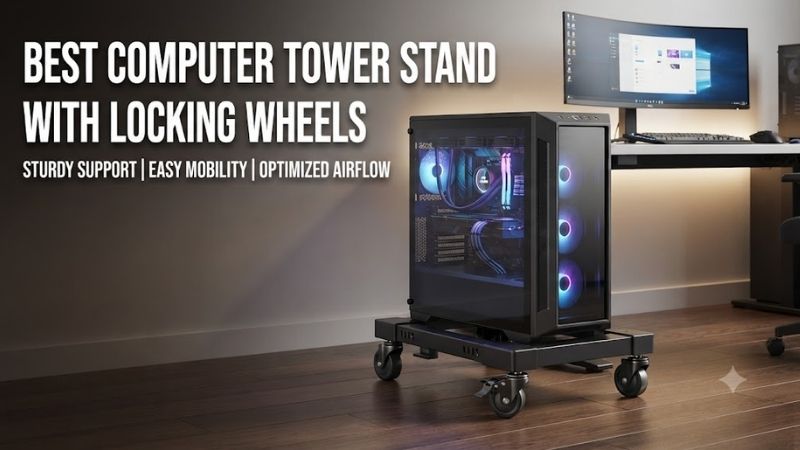
The best computer tower stand with locking wheels raises your PC above the floor while making it easier to move for cleaning, maintenance, and cable access. For gaming systems with large graphics cards and heavy cases, choosing a stand with the correct load capacity, adjustable dimensions, and secure wheel locks is essential.
Quick Verdict
The VIVO Premium Large CPU Cart CART-PC03D is our preferred choice for users with larger gaming towers who need a substantial adjustable rolling platform.
Its published 110-pound weight capacity, adjustable width and length, and two locking casters make it suitable for a wider range of large cases than basic narrow computer stands.
For smaller and lighter towers, the VIVO CART-PC01 and Mount-It! MI-7153 offer compact, adjustable alternatives.
The VIVO CART-PC01L is particularly useful for wider cases, while the VIVO CART-PC03P is better suited to users who want a rolling computer station with additional storage.
The right choice depends on your computer’s actual dimensions and weight. A stand that appears sturdy may still be unsuitable for a heavy tempered-glass gaming PC if its rated capacity or contact area is insufficient.
Quick Comparison Table
| Computer Tower Stand | Best For | Published Capacity | Locking Wheels |
|---|---|---|---|
| VIVO CART-PC03D | Best overall for large PCs | 110 lb | 2 |
| VIVO CART-PC01L | Wide gaming towers | 66 lb | 2 |
| VIVO CART-PC01 | Compact towers | 22 lb | 2 |
| Mount-It! MI-7153 | Budget adjustable stand | 22 lb | 2 |
| VIVO CART-PC03P | PC and accessory storage | 176 lb total | 2 |
| HOOBRO Two-Tier Computer Tower Stand | Storage-oriented setups | Verify exact model | Model-dependent |
| Bfttlity Two-Tier Computer Tower Stand | Alternative gaming cart | Verify exact model | Model-dependent |
For the last two product families, the exact load rating and caster-lock arrangement must be confirmed for the selected listing. They should not be treated as having the same specifications as the verified VIVO or Mount-It! models.
How We Selected the Best Computer Tower Stands
Load Capacity Must Match the Complete PC
A gaming computer’s weight is determined by more than its case.
The graphics card, CPU cooler, power supply, radiators, hard drives, and other components all contribute to the completed system’s weight.
Large tempered-glass panels and substantial water-cooling equipment can further increase total mass.
Therefore, buyers should not select a rolling stand based solely on whether its width matches the computer case.
The stand’s load rating must also support the entire system.
A useful safety margin is advisable, particularly when the computer will be moved regularly.
Wheel Locks and Stability
Locking wheels prevent a stand from rolling freely when the locks are engaged.
However, caster brakes do not necessarily eliminate all movement.
Depending on caster design, a locked wheel may still permit limited swivel movement or play within its mechanism.
For a heavy gaming tower, stability also depends on the platform dimensions and the height of the computer’s center of mass.
A tall, narrow case may be more vulnerable to tipping than a shorter, wider case of comparable weight.
Airflow and Floor Clearance
Many gaming cases draw cooling air through bottom or lower-side ventilation openings.
Placing such a case directly on thick carpet can restrict airflow if the intake is obstructed.
A suitable tower stand may provide useful clearance between the case and the floor.
However, raising a PC does not automatically improve every cooling configuration.
A stand with a solid platform directly beneath bottom-mounted intake fans could still restrict airflow.
Buyers should examine the case’s ventilation layout before choosing between an open-frame stand and a solid shelf.
Wheel Performance on Different Flooring
Small casters generally roll more easily on smooth surfaces than on thick carpet.
Hard flooring can also introduce concerns about scratches or unwanted movement.
Wheel material, diameter, load distribution, and locking mechanism all influence performance.
A stand described as mobile may be suitable for occasional cleaning while remaining less practical for frequent movement across carpet or uneven flooring.
Best Computer Tower Stands With Locking Wheels Reviewed
VIVO Premium Large CPU Cart CART-PC03D — Best Overall for Large Gaming PCs
Best For: Heavy gaming desktops and substantial ATX or full-tower cases.
Construction and Weight Capacity
The VIVO CART-PC03D is designed for larger computers that may exceed the limits of compact rolling stands.
Its manufacturer-published load capacity is 110 pounds.
This provides considerably more capacity than entry-level 22-pound carts.
The cart uses steel structural components and a platform arrangement with protective padding.
That combination is particularly relevant for gaming computers with heavy side panels, large graphics cards, and liquid-cooling equipment.
However, the stand’s rated load capacity should not be confused with a guarantee against tipping.
The complete computer must also fit the support geometry securely.
Adjustable Dimensions
The cart provides adjustable width and length.
VIVO lists compatibility with computers measuring approximately 14.2 to 25.2 inches in length and 7.9 to 12.6 inches in width.
This is a meaningful advantage over stands that only adjust in one direction.
A long gaming case may fit within a stand’s width range but extend beyond its supported length.
Excessive unsupported overhang can affect stability and make the computer easier to tip when moved.
Two-direction adjustment provides more flexibility for finding a suitable base.
Locking Wheels and Movement
The CART-PC03D uses four casters, two of which can be locked.
The wheel arrangement allows the computer to be moved for cleaning or maintenance.
Once positioned, the locks help prevent unwanted rolling.
However, users should avoid pulling a heavy PC by its power cable or monitor connections.
When moving the computer, grip an appropriate part of the cart or computer and ensure that connected cables have sufficient slack.
Cooling and Clearance
The cart raises the computer above the floor.
This may be beneficial for systems placed near carpet, especially when the original floor contact would obstruct bottom ventilation.
The user must still examine where the stand contacts the computer case.
If the computer has extensive bottom intake vents, the support platform should not block those openings.
Pros
-
110-pound published capacity
-
Adjustable width and length
-
Two locking casters
-
Suitable for many large gaming cases
-
Protective contact surfaces
-
Useful for floor-level cable access
Cons
-
Larger footprint than compact carts
-
More expensive than basic stands
-
Requires accurate case measurement
-
Does not guarantee unrestricted bottom airflow
Buy If: You own a heavy or large gaming tower and want an adjustable rolling platform.
Skip If: Your computer is compact and does not require this capacity.
VIVO Large CPU Cart CART-PC01L — Best for Wide Gaming Towers
Best For: Broad gaming cases that exceed the width supported by compact CPU stands.
Wider Case Compatibility
The CART-PC01L is intended for larger desktop computers.
VIVO specifies an adjustable width range of approximately 7.8 to 14 inches.
This accommodates wider cases than the manufacturer’s smaller CART-PC01.
For users with broad gaming cases, width compatibility is especially important because the case must sit securely within the stand.
A narrow support arrangement may place pressure against side panels or fail to hold the computer correctly.
Load Capacity and Construction
The manufacturer lists a 66-pound weight capacity.
That provides a useful middle ground between compact 22-pound stands and more substantial heavy-duty platforms.
Its steel construction and low-profile design are intended to support the computer while allowing floor-level movement.
This makes it a practical option for users who have a large case but do not need the greater capacity of the CART-PC03D.
Wheel Locking
The stand includes two locking wheels among its four casters.
This helps keep the computer positioned beside or beneath the desk.
However, buyers should not rely on wheel locks alone to prevent tipping.
The width of the support, the computer’s center of mass, and the floor surface are also relevant.
Pros
-
Supports wider computer cases
-
Published 66-pound capacity
-
Steel construction
-
Two locking wheels
-
Low-profile format
-
Suitable for many gaming setups
Cons
-
Less capacity than the premium heavy-duty cart
-
Not as adjustable in length
-
Wheel performance depends on flooring
-
Users must confirm case stability
Buy If: Your gaming PC is too wide for narrow rolling stands.
Skip If: You have an exceptionally heavy build requiring greater capacity.
VIVO CART-PC01 — Best for Compact Desktop Towers
Best For: Smaller and lighter desktop computers.
Compact Design
The VIVO CART-PC01 uses a narrow adjustable support structure.
Its manufacturer-published width adjustment range is approximately 4.7 to 8.2 inches.
The stand is made from steel and incorporates internal padding to help protect the computer case from scratches.
This makes it suitable for many conventional desktop towers that fit its dimensions and weight limit.
Weight Limit
The most important restriction is the 22-pound published capacity.
Many gaming computers can exceed this weight, especially when fitted with large graphics cards, tempered-glass panels, and substantial cooling equipment.
Consequently, this stand should not automatically be recommended for every gaming PC.
Buyers should weigh their complete system rather than estimating based on case size.
Mobility and Practical Use
The stand includes four casters, with two capable of locking.
This is convenient for occasionally moving a small computer to reach rear USB ports or clean the floor.
The compact footprint also makes it suitable for desks with limited space.
However, the narrow support arrangement may be less appropriate for tall, heavy cases.
Pros
-
Compact footprint
-
Adjustable width
-
Steel construction
-
Protective padding
-
Two locking wheels
-
Suitable for lighter towers
Cons
-
Only 22-pound rated capacity
-
Limited maximum supported width
-
Not intended for many heavy gaming builds
-
Narrow support may be less stable for tall cases
Buy If: Your computer is light enough and fits the specified width range.
Skip If: Your PC exceeds 22 pounds or has a wide case.
Mount-It! MI-7153 Rolling CPU Stand — Best Budget Adjustable Alternative
Best For: Users with lighter desktop computers who want a simple rolling stand.
Adjustable Support
The Mount-It! MI-7153 provides an adjustable-width CPU stand.
The manufacturer specifies a width adjustment range of approximately 4.87 to 8.5 inches.
This allows the stand to accommodate a range of compact and standard desktop cases.
Padded sides are intended to reduce scratching where the stand contacts the computer.
The design is straightforward, which can be attractive for users who do not need shelves or other features.
Locking Caster Arrangement
The MI-7153 includes four casters and two locking wheels.
This allows the stand to be moved for maintenance and then positioned under a desk.
The wheel locks are valuable for reducing unintended movement.
However, users should check that the locks are accessible after the computer is placed in its normal position.
A locking mechanism that cannot be reached easily beneath a crowded desk may be inconvenient.
Capacity and Gaming PC Suitability
Mount-It! publishes a 22-pound weight limit.
This is sufficient for some ordinary desktops but may be inadequate for many modern gaming PCs.
Before purchasing, weigh the complete computer with its installed components.
Do not rely on the name “CPU stand” to imply compatibility with large gaming towers.
Pros
-
Adjustable width
-
Steel construction
-
Two locking wheels
-
Protective padding
-
Straightforward assembly
-
Suitable for lighter desktop systems
Cons
-
22-pound weight limit
-
Limited width for large gaming cases
-
No additional storage
-
Not ideal for heavy full towers
Buy If: You own a smaller desktop and want an uncomplicated rolling stand.
Skip If: Your gaming PC requires a substantially higher load rating.
VIVO CART-PC03P Adjustable PC Cart With Storage — Best for Complete PC Workstations
Best For: Users who want computer mobility alongside additional equipment storage.
Two-Tier Design
The VIVO CART-PC03P is a rolling computer cart rather than a narrow floor-level CPU holder.
It includes two platform levels and an adjustable-height frame.
This format can be useful for users who want to store a computer tower along with accessories such as a UPS, networking equipment, or other workstation devices.
However, the placement of each item must respect the cart’s load limits.
Published Capacity and Dimensions
VIVO lists a total weight capacity of 176 pounds, distributed as 88 pounds per shelf.
The product is adjustable in height and designed to accommodate a variety of desktop tower arrangements.
This substantial published capacity makes it relevant for heavier workstations, but only when the actual load on each shelf remains within its specified limit.
A total capacity figure should never be interpreted as permission to place the entire load on one shelf.
Mobility and Placement
The cart has four casters, including two locking wheels.
It can be positioned beside a desk to provide easier access to computer connections.
This is particularly useful when the desk itself cannot support an under-desk computer mount.
However, a two-tier cart occupies more floor space than a compact tower stand.
Users should also ensure that equipment on the upper shelf cannot slide or fall during movement.
Airflow Considerations
The open-sided arrangement may provide access to some ventilation openings, but users still need to inspect where the computer rests.
A solid shelf can obstruct bottom ventilation if it covers intake areas.
The cart should also provide sufficient clearance around side and rear exhaust openings.
Pros
-
Two storage levels
-
High published total capacity
-
Height-adjustable frame
-
Two locking wheels
-
Suitable for workstation accessories
-
Useful beside larger desks
Cons
-
Larger footprint
-
Individual shelf load limits apply
-
More assembly than simple CPU stands
-
Requires equipment stability planning
-
Solid surfaces may affect bottom ventilation
Buy If: You need a mobile workstation cart rather than a basic floor stand.
Skip If: You only want a compact holder that raises the PC slightly.
HOOBRO Two-Tier Computer Tower Stand — Best for Storage-Oriented Gaming Setups
Best For: Users who want to combine a rolling PC stand with accessory storage.
Storage-Focused Design
HOOBRO sells computer tower stand configurations that combine a computer platform with an additional shelf or storage area.
This approach is useful when the gaming area contains several accessories that need a dedicated location.
A two-tier design may reduce clutter near the desktop by moving selected equipment to a separate rolling stand.
For example, users may be able to organize lightweight accessories or charging equipment around the tower.
However, the exact arrangement depends on the selected model.
Wheel and Frame Considerations
HOOBRO offers versions advertised with locking caster wheels.
Buyers should verify the number of locking wheels and their actual operating mechanism before purchasing.
The quality of a rolling stand depends not only on the wheels but also on how securely they attach to the frame.
Loose joints or poorly secured shelves can make movement less stable.
The complete structure should be checked after assembly.
Suitability for Gaming Computers
A large gaming PC needs adequate platform dimensions, weight capacity, and ventilation clearance.
Do not assume that a storage shelf designed for office computers will automatically support an oversized gaming tower.
Confirm the exact product dimensions and load limit before ordering.
Also check whether the upper shelf could obstruct top-mounted exhaust fans or interfere with case maintenance.
Pros
-
Storage-oriented design
-
Multiple platform levels
-
Rolling arrangement
-
Useful for organizing desk accessories
-
Potentially suitable for gaming workstations
Cons
-
Specifications vary by model
-
Exact load capacity requires verification
-
Upper shelves may interfere with ventilation
-
Larger footprint than narrow CPU stands
Buy If: You want a rolling computer stand that also organizes accessories.
Skip If: You need a compact, strictly dimensioned heavy-duty stand.
Bfttlity Two-Tier Computer Tower Stand — Best Alternative Gaming PC Cart
Best For: Buyers comparing storage-focused rolling computer stands.
General Construction
The Bfttlity two-tier stand is marketed as a computer tower support with additional storage space.
Its general arrangement is useful for gamers who want the computer off the floor while keeping certain accessories nearby.
A rolling structure can also simplify floor cleaning and access to rear connections.
However, a two-tier stand must accommodate the computer’s full physical height as well as its width and length.
Evaluating Stability
The principal concern with a tall computer cart is maintaining a stable center of mass.
A heavy tower positioned too high may increase the risk of tipping.
For this reason, users should place heavier equipment according to the manufacturer’s instructions and avoid loading upper shelves beyond their limits.
The stand should be moved slowly, especially across uneven flooring.
Locking Wheels and Compatibility
Bfttlity listings include versions advertised with locking casters.
Before purchasing, confirm the exact wheel configuration and verify whether the current model is rated for the computer’s weight.
Because seller descriptions and package variants can differ, the product should not receive the same confidence as a model with clearly documented manufacturer specifications.
Pros
-
Two-tier storage format
-
Mobile computer support
-
Potentially useful for gaming accessories
-
Alternative to conventional narrow CPU holders
Cons
-
Model-specific specifications need verification
-
Requires careful load distribution
-
May occupy substantial floor space
-
Not automatically suitable for oversized gaming towers
Buy If: You want a storage-oriented cart and can verify its exact dimensions and load rating.
Skip If: You need a stand with fully documented heavy-duty specifications.
Buying Guide: How to Choose a Computer Tower Stand With Locking Wheels
Weigh Your Complete Computer
The most important first step is determining the weight of the fully assembled PC.
Do not rely only on the manufacturer’s empty case weight.
A gaming system may contain a heavy graphics card, large air cooler, liquid-cooling radiator, multiple storage drives, and a substantial power supply.
Tempered-glass panels can also add considerable weight.
If the computer has custom liquid cooling, include the weight of the cooling liquid and installed components.
Once the complete weight is known, choose a stand with a published capacity that comfortably exceeds it.
The manufacturer’s rated capacity is an upper operating limit, not a target load.
Measure Width, Length, and Height
Many computer stands advertise adjustable width but provide little or no length adjustment.
This can create problems with long cases.
A computer might fit between the side supports while extending far beyond the front or rear of the stand.
Unsupported overhang can affect stability.
Measure the actual case dimensions and compare them with the manufacturer’s supported range.
For two-tier carts, also check vertical clearance.
Top-mounted cables, case handles, radiators, and ventilation openings may require additional space.
Understand the Difference Between Wheel Locks and Full Stability
Locking casters are designed to prevent or restrict rolling.
They do not necessarily eliminate all swivel movement or mechanical play.
For a computer tower, the support base and center of mass remain important.
A tall case placed on a narrow stand may be more susceptible to tipping than a shorter case on a wider platform.
Users should also consider whether cables may pull the computer unexpectedly.
Choose Wheels Based on Flooring
For hardwood, laminate, or tile, smooth-rolling casters may be convenient.
However, harder wheel materials can create noise or mark sensitive surfaces.
For carpet, small casters may struggle to roll under load.
Larger wheels can be beneficial, although actual performance depends on the carpet pile and wheel design.
If the stand will remain stationary almost all the time, wheel mobility may be less important than platform stability.
Preserve PC Airflow
A rolling stand should not obstruct ventilation openings.
Many modern gaming cases use bottom-mounted intake fans or power-supply ventilation.
An open-frame stand can provide clearance beneath these openings, depending on the exact contact points.
Solid shelves require more careful evaluation.
Ensure that the computer has sufficient clearance around its intake and exhaust areas.
A stand may reduce direct contact with carpet, but it does not automatically lower operating temperatures.
Consider Cable Management
Rolling a computer away from a desk can place tension on connected cables.
DisplayPort and HDMI cables, power cords, Ethernet cables, and USB accessories all have practical length limits.
Before moving the computer, examine how much slack is available.
Do not pull the PC by connected cables.
If the system must move regularly, organize cables so they can be disconnected or repositioned without excessive strain.
Check the Computer’s Center of Gravity
Large graphics cards, heavy cooling hardware, and thick glass panels can affect the distribution of weight inside a computer.
A tall case with a narrow footprint should be supported securely.
Avoid placing heavy items on upper shelves unless the cart is specifically designed for that load distribution.
When moving a fully loaded cart, push carefully and avoid sudden directional changes.
Avoid Common Buying Mistakes
One common mistake is purchasing a 22-pound stand for a gaming computer that weighs significantly more.
Another is selecting a stand based only on width while ignoring the length of the case.
Buyers may also overlook bottom ventilation or assume that locking wheels eliminate every stability concern.
Finally, product listings sometimes refer to a computer tower as a CPU. The term does not mean the stand is intended to support only the processor; it generally refers to the desktop computer case.
The actual supported dimensions and weight are what matter.
Frequently Asked Questions
What is the best computer tower stand with locking wheels for a heavy gaming PC?
The VIVO CART-PC03D is a strong choice because it provides a published 110-pound capacity and adjustable length and width.
Are computer tower stands safe for expensive gaming PCs?
They can be appropriate when the stand has sufficient load capacity, compatible dimensions, secure support, and stable placement.
Do locking caster wheels completely prevent movement?
Not necessarily. Some casters can still have limited swivel movement or mechanical play when locked.
Can a rolling PC stand improve airflow?
It may improve floor clearance, particularly on carpet, but actual airflow depends on the case ventilation layout and the stand’s support surfaces.
Should a gaming PC sit directly on carpet?
It depends on the case design. Carpet can obstruct bottom ventilation openings, making a suitable elevated stand useful.
What weight capacity should I choose?
Choose a stand with a published rating above the complete weight of your computer, allowing a reasonable margin.
Are narrow CPU carts suitable for full-tower gaming PCs?
Only when the case fits the supported dimensions and remains within the weight limit. Many narrow carts are better suited to lighter systems.
Can I move my PC while it is running?
It is preferable to avoid moving a running computer unnecessarily. Movement can strain cables, disturb components, or create a tipping risk.
Is a two-tier stand better than a simple rolling base?
A two-tier stand provides storage but also requires more space and careful load distribution. A simple rolling base may be better when only the PC needs support.
How often should I check the wheel locks?
Inspect the locking mechanisms periodically and after any significant movement or adjustment to the stand.
Final Verdict
The best computer tower stand with locking wheels should match your PC’s complete weight, dimensions, and cooling layout. VIVO CART-PC03D is our top choice for larger gaming towers, while CART-PC01L supports wide cases and Mount-It! MI-7153 suits lighter desktops. Prioritize verified capacity and stable support over appearance.