🛒 Best Price Today on Amazon
Prime members get fast, free shipping on everything above, plus member-only deals. New members get a 30-day free trial — cancel anytime.
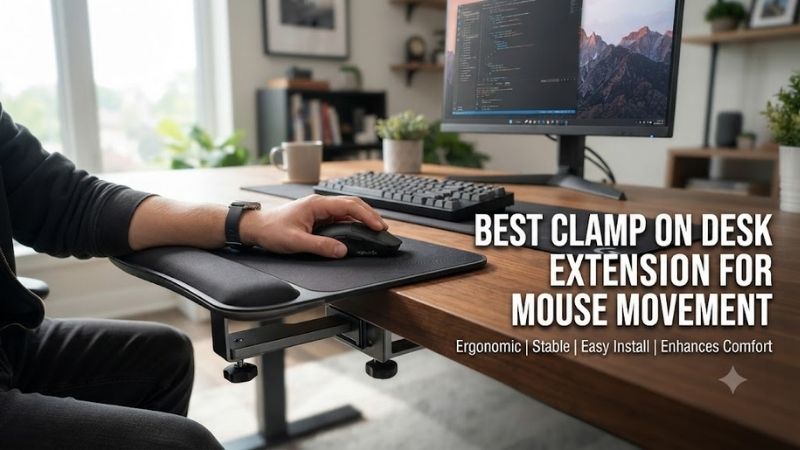
The best clamp on desk extension for mouse movement adds usable surface area without requiring an entirely new gaming desk. A stable extension can provide room for wider mouse movements, improve arm positioning, and reduce interference from keyboards or other accessories. The right choice depends on surface dimensions, clamp compatibility, and stability.
Quick Verdict
The VIVO Clamp-On Desk Extension series is our best overall choice for users who want to expand the physical working surface of an existing gaming desk.
Its flush-mounted platform design, foldable construction, and multiple widths provide a more versatile arrangement than small accessories intended only to support a wrist or elbow.
For gamers with limited space, the VIVO DESK-EXT09 is a useful compact alternative, although its narrow dimensions make it better suited to arm support or modest mouse movement than large low-sensitivity aiming sweeps.
The PEGZONE 24 × 12-inch extender is an appealing option for users who want a wider surface and additional storage.
Before purchasing any extension, measure the required mouse movement distance and the available clamping area. A rigid extension that is too small will not solve the original problem.
Quick Comparison Table
| Desk Extension | Best For | Surface Size | Important Feature |
|---|---|---|---|
| VIVO DESK-EXT24 | Best overall | 23.7 × 11.7 in | Full-width folding platform |
| VIVO DESK-EXT09 | Compact setups | 5.9 × 9.1 in | Small folding armrest |
| PEGZONE Desk Extender | Wide mouse surface | 24 × 12 in | Additional storage drawer |
| ART-GIFTREE Desk Extender | Storage and workspace | 22.8 × 12 in | Dual storage compartments |
| BONTEC Folding Desk Extender | Small desk accessories | 9.5 × 9.1 in | Compact fold-away design |
| JYLH JOYSEEKER Clamp-On Shelf | Thick desktops | 15.7 × 7.5 in | Wide clamp range |
| VIVO Clamp-On Keyboard Tray MOUNT-KB05E | Alternative mouse platform | 26.8 × 11 in | Sliding under-desk tray |
The final product is an under-desk keyboard-and-mouse tray, not a flush desktop extension. It is included as an alternative for users whose actual problem is desk depth or keyboard placement.
How We Selected the Best Clamp-On Desk Extensions
Usable Mouse Movement Area
An extension’s total dimensions do not always equal its usable mouse area.
Clamps, brackets, raised edges, surface joins, or accessories may occupy part of the platform.
For gaming, the most important dimension is often the horizontal distance available for mouse movement.
A low-sensitivity FPS player may require considerably more lateral travel than someone using a high-sensitivity mouse for ordinary desktop tasks.
Consequently, a narrow extension may be excellent for wrist support but inadequate for competitive mouse aiming.
Structural Stability
A mouse extension should remain stable while the user moves the mouse rapidly.
The load created by a mouse is small, but repeated arm contact can introduce vibration and sideways forces.
A high published weight capacity does not prove that a platform is completely rigid during fast horizontal movement.
Clamp design, bracket geometry, tabletop construction, and installation quality all influence stability.
Ergonomics and Desk Height
Increasing surface area is useful only when the new platform is positioned comfortably.
A flush extension can preserve approximately the same height as the original desk.
A sliding keyboard tray may instead position the mouse below the desktop.
Neither arrangement is universally better.
The appropriate height depends on chair position, forearm support, elbow angle, and individual comfort.
Best Clamp-On Desk Extensions for Gaming Reviewed
VIVO DESK-EXT24 Clamp-On Desk Extension — Best Overall
Best For: Gamers who need substantial additional surface area without replacing their desk.
Surface Area and Construction
The VIVO DESK-EXT24 provides a platform measuring approximately 23.7 × 11.7 inches.
This creates enough physical space for many mouse-related activities and can accommodate accessories when the mouse is not being used.
The manufacturer uses a steel bracket structure with a particleboard platform.
The extension is designed to sit flush with the existing desktop, creating a continuous working level.
This is particularly useful when the original desk lacks sufficient depth or when users want to move their keyboard farther from the front edge.
Clamp Compatibility
VIVO lists compatibility with desktops approximately 0.5 to 3.5 inches thick.
It also identifies an important restriction: the clamp is not intended for lipped or beveled desk edges.
This detail can determine whether the product is usable.
A desk may have the correct overall thickness while still lacking a flat underside suitable for the clamp.
Before ordering, examine the tabletop edge and check whether the clamp can make secure contact.
Stability and Folding Design
The platform has a manufacturer-published static weight capacity of 44 pounds.
This rating is useful for understanding the supported load, but it should not be interpreted as a measurement of vibration during gaming.
The extension folds downward approximately 90 degrees when not needed.
For multipurpose desks, that feature can help restore walking space or reduce interference with surrounding furniture.
However, the bracket mechanism still requires installation clearance beneath the desk.
Pros
-
Large usable surface
-
Flush desktop arrangement
-
Foldable construction
-
No permanent desk drilling
-
Multiple widths in the product family
-
Published clamp compatibility
Cons
-
Does not fit beveled or lipped edges
-
Requires adequate under-desk clearance
-
Wide platform may interfere with chair positioning
-
Static load capacity does not establish gaming rigidity
Buy If: You want a substantial extension for a compact gaming desk.
Skip If: Your desk edge cannot support the required clamps.
VIVO DESK-EXT09 — Best Compact Mouse and Arm Support Extension
Best For: Users who need localized mouse or forearm support.
Compact Design
The VIVO DESK-EXT09 uses a much smaller platform than the DESK-EXT24.
Its published surface dimensions are approximately 5.9 × 9.1 inches.
This makes it attractive for users who want to extend the desk edge near their mouse hand without adding a large platform.
It can also function as an armrest.
However, its small width makes it unsuitable for many low-sensitivity FPS players who need substantial side-to-side mouse travel.
Ergonomic Use
The platform is designed to sit flush with the desk and provide additional support near the user’s arm.
This may be helpful when the original desktop ends too close to the keyboard or mouse.
However, a compact extension should not force the wrist into an awkward position.
Users should evaluate whether the platform supports the forearm comfortably and whether its edge interferes with mouse movement.
Installation and Capacity
VIVO specifies compatibility with desktops between 0.5 and 3.5 inches thick and a published static capacity of 33 pounds.
The product folds down when not needed.
Its compactness is an advantage in limited spaces, but it cannot replace a large gaming mousepad or a full-width desktop extension.
Pros
-
Small footprint
-
Foldable design
-
Flush desk positioning
-
No drilling required
-
Useful as forearm support
Cons
-
Limited mouse movement area
-
Not ideal for large FPS aiming sweeps
-
Desk-edge compatibility restrictions
-
May create a narrow working zone
Buy If: You need a compact extension for arm support or limited mouse movement.
Skip If: You play low-sensitivity shooters requiring wide lateral mouse travel.
PEGZONE 24 × 12-Inch Desk Extender — Best for Maximum Added Workspace
Best For: Gamers who want substantial additional desktop surface and storage.
Extended Platform Size
The PEGZONE desk extender provides an approximately 24 × 12-inch platform.
This is roughly two square feet of additional surface area.
Compared with a narrow wrist-support extension, this format is much more suitable for relocating a mouse, keyboard, or other gaming accessories.
For users with a small original desktop, the added area can meaningfully change equipment placement.
Storage Integration
The product also includes an under-platform storage compartment.
This can be useful for storing small accessories such as spare mouse skates, USB adapters, charging cables, or other desktop items.
However, storage is not automatically beneficial for every gaming setup.
A drawer positioned beneath the extension may interfere with knee clearance, chair arms, or other desk accessories.
Users should measure the available space before treating additional storage as an advantage.
Clamp and Load Considerations
Published product information describes a clamp range of approximately 0.6 to 2.4 inches and a 55-pound static load rating.
The large platform can support ordinary desk accessories within its rated limits.
However, the condition and construction of the underlying desk remain important.
A heavy extension attached to a weak or damaged particleboard edge may not provide satisfactory stability.
Pros
-
Large working surface
-
Additional storage
-
Suitable for keyboard and mouse arrangements
-
No permanent tabletop modification
-
Published load and clamp specifications
Cons
-
Requires substantial clamping space
-
Storage drawer may reduce clearance
-
Large size may overwhelm compact desks
-
Not appropriate for irregular edges
Buy If: You want maximum practical surface expansion with additional small-item storage.
Skip If: Your desk has limited structural support or underside clearance.
ART-GIFTREE Desk Extender — Best for Workspace and Storage Organization
Best For: Users who want to combine desk expansion with accessory storage.
Platform and Storage Arrangement
The ART-GIFTREE desk extender provides an approximately 22.8 × 12-inch surface.
It also incorporates two different storage compartments, making it particularly relevant to multifunction gaming and productivity desks.
One compartment can hold smaller accessories, while the other can accommodate items that would otherwise occupy the desktop.
This arrangement may help keep mouse movement areas unobstructed.
Gaming Applications
The platform’s width makes it more suitable for normal mouse movement than compact armrest-style extensions.
It can also be used to reposition other accessories, freeing space on the original desktop.
However, gamers should consider how the storage compartments affect the available space beneath the platform.
A large drawer may interfere with a chair or knees even when the upper surface appears well positioned.
Fit and Installation
Published comparisons identify a clamp range of approximately 0.59 to 2.56 inches and a 55-pound load rating.
Buyers should confirm these figures against the specific current listing because package details can change.
A properly installed extension should not shift during ordinary mouse use.
If the clamps cannot grip a flat portion of the desk securely, the product should not be used.
Pros
-
Wide desktop extension
-
Two storage compartments
-
Useful for multipurpose workstations
-
Can help clear the original mouse area
-
No permanent desk modification
Cons
-
Drawers occupy under-desk space
-
Requires a sufficiently wide mounting area
-
More components than a basic extension
-
Compatibility depends on desk-edge geometry
Buy If: You want additional mouse space and better accessory organization.
Skip If: You prefer a completely unobstructed underside.
BONTEC Folding Desk Extender — Best Compact Fold-Away Alternative
Best For: Small gaming desks where an extension is only occasionally required.
Surface Size and Use Case
The BONTEC folding desk extender is available in a compact format around 9.5 × 9.1 inches.
This makes it more suitable for a mouse, wrist support, or small accessory than for a full keyboard-and-mouse arrangement.
Its advantage is compactness.
Users who work at a small desk may prefer an extension that can be folded away after gaming rather than leaving a permanent platform projecting into the room.
Foldability and Stability
A folding mechanism is convenient, but it introduces additional joints and connection points.
These components must be secured properly to reduce unwanted movement.
For gaming, users should confirm that the platform locks into its operating position and does not move under normal arm pressure.
A foldable accessory should not be used as a seat, lifting support, or load-bearing surface beyond its published purpose.
Limitations for Competitive Gaming
The platform’s small dimensions are its main limitation.
It may provide a convenient mouse position for high-sensitivity gaming but does not offer the horizontal area needed for extensive low-sensitivity movement.
Players should measure their normal mouse sweep before choosing this product.
Pros
-
Compact platform
-
Fold-away convenience
-
Suitable for small desks
-
No-drill installation format
-
Useful for localized mouse support
Cons
-
Limited surface area
-
Folding joints require secure installation
-
Not a replacement for a full-width gaming extension
-
Exact clamp specifications should be confirmed
Buy If: You need a compact extension that can be stored when not in use.
Skip If: You require a large, permanently available mouse area.
JYLH JOYSEEKER Clamp-On Desk Shelf — Best for Thick Desktops
Best For: Users whose desk thickness eliminates many conventional clamp-on options.
Clamp Compatibility
The JYLH JOYSEEKER clamp-on shelf is notable for its advertised accommodation of thicker desktops.
Published product comparisons describe a supported thickness range extending to approximately 3.5 inches.
That may make it suitable for users with substantial wooden desktops or thick workstation surfaces.
However, desk thickness is only one consideration.
The clamp still requires a suitable flat contact area and sufficient clearance beneath the surface.
Platform Dimensions
The approximately 15.7 × 7.5-inch surface provides moderate additional area.
It is wider than compact wrist-support platforms but shallower than larger desk extensions.
This makes it useful for small peripherals or limited mouse movement, depending on the player’s sensitivity settings.
For substantial FPS mouse movement, a wider and deeper platform is usually preferable.
Limitations
The narrower depth may restrict comfortable forearm positioning.
Users should also check whether the surface height aligns with their original desktop.
A raised shelf may work well for storage but create an uncomfortable mouse position.
Pros
-
Wide advertised clamp compatibility
-
Moderate platform width
-
Useful for thicker desktops
-
Clamp-on installation
-
Flexible accessory placement
Cons
-
Limited depth
-
May be less suitable for large mouse sweeps
-
Height alignment needs verification
-
Actual load and fit should be checked against current documentation
Buy If: Your desktop is unusually thick and conventional clamps do not fit.
Skip If: You need a large, flush gaming mouse surface.
VIVO MOUNT-KB05E Keyboard Tray — Best Alternative for Reclaiming Desktop Space
Best For: Gamers whose desk is too shallow because the keyboard occupies the main surface.
Why a Keyboard Tray Can Solve the Same Problem
Sometimes the real issue is not insufficient desk width.
Instead, the keyboard occupies so much of the available depth that the mouse and forearm have no comfortable position.
Moving the keyboard to an under-desk tray can free part of the main desktop.
The VIVO MOUNT-KB05E provides a sliding keyboard-and-mouse platform that can help address this arrangement.
Dimensions and Operation
Published specifications describe a platform approximately 26.8 × 11 inches, with a sliding mechanism that allows it to move beneath the desk.
Its principal advantage is reorganizing the existing workstation rather than adding a flush extension at desktop height.
This can be particularly useful for productivity and mixed gaming setups.
Gaming Limitations
An under-desk tray may position the mouse lower than the original desktop.
That can be ergonomically beneficial for some users but uncomfortable for others.
The tray’s movement mechanism and mounting stability also matter during rapid mouse use.
A sliding tray is not automatically equivalent to a rigid desktop extension.
Competitive players should assess whether the tray remains stable during their normal aiming movements.
Pros
-
Frees primary desktop space
-
Supports keyboard-and-mouse arrangements
-
Sliding storage design
-
Clamp-based installation
-
Useful for shallow desks
Cons
-
Different height from desktop extensions
-
Sliding mechanism may introduce movement
-
Requires suitable under-desk clearance
-
Not ideal for every competitive gaming posture
Buy If: Your primary problem is keyboard placement and limited desk depth.
Skip If: You specifically need a flush extension attached to the desktop edge.
Buying Guide: Choosing the Right Clamp-On Desk Extension
Measure Your Actual Mouse Movement
Before purchasing an extension, examine how far the mouse travels during normal gaming.
A high-sensitivity player may make relatively small wrist movements.
A low-sensitivity player may move the mouse much farther across the surface.
The required space depends on the distance needed to turn the in-game camera and the player’s physical technique.
Measure the movement area rather than relying on a generic recommendation that every gamer needs the same platform width.
Understand DPI and Effective Sensitivity
Mouse DPI determines how many counts the sensor reports per inch of physical movement.
In-game sensitivity determines how those counts translate into camera movement.
Players using lower effective sensitivity often need more physical mouse travel.
A desk extension can help provide that space, but it does not change the mouse’s sensor performance or increase aiming precision by itself.
If the player consistently runs out of mouse area, increasing usable surface width may be more appropriate than making major sensitivity changes.
Prioritize Clamp Stability
A clamp-on extension depends on the structural integrity of the original desk.
The clamp should make secure contact with an appropriate flat section of the tabletop.
Avoid mounting on damaged, uneven, or unsuitable edges.
If the desk has a thin composite surface, examine whether concentrated clamp pressure could cause damage.
Do not assume that a high published load rating guarantees compatibility with every desk material.
Choose Flush-Mount or Under-Desk Positioning
Flush-mounted platforms extend the main desktop surface at approximately the same height.
This can make it easier to move the mouse between the original desk and the extension.
Under-desk trays create a separate lower working area.
They may improve ergonomics for some seated positions but introduce a height difference and additional moving components.
Choose the arrangement that supports a comfortable wrist, forearm, and elbow position.
Check Surface Texture and Mouse Tracking
Many desk extensions use laminate, particleboard, or other finished surfaces.
Not every finish produces the same mouse-tracking experience.
For consistent movement, use a suitable gaming mousepad when needed.
A desk extension’s main purpose is to provide additional physical area and support.
It should not be assumed to replace a quality mouse surface.
Plan for Cable Clearance
Mouse cables, keyboard cables, monitor arms, and charging accessories can interfere with an extension.
Before installation, examine whether the new platform blocks existing cable routes.
For wired mice, provide enough cable slack to reach the full movement area.
For wireless mice, consider charging cable access and receiver placement.
A larger mouse surface is less useful if cables restrict movement.
Consider Chair and Leg Clearance
A front-mounted desk extension may project toward the user.
That can interfere with chair arms, standing movement, or the ability to approach the desk comfortably.
Side-mounted extensions may avoid some of these problems but introduce asymmetric working positions.
Measure the surrounding space before ordering.
Frequently Asked Questions
What is the best clamp on desk extension for mouse movement?
The VIVO DESK-EXT24 is a strong all-around choice for substantial surface expansion, while compact options are more appropriate for localized arm support.
Is a wider mouse extension better for FPS gaming?
It can be useful for low-sensitivity players who require large lateral mouse movements. However, stability and comfortable positioning remain essential.
Can a clamp-on extension damage my gaming desk?
Yes, if the clamps apply excessive pressure, the desk material is unsuitable, or the edge geometry prevents correct installation.
Are foldable desk extensions stable enough for gaming?
Some may be suitable, but the result depends on bracket construction, clamp installation, and the amount of force applied during gameplay.
Should my mouse extension be level with the desktop?
A flush surface is often convenient, but the correct position depends on the user’s seated ergonomics and equipment arrangement.
Can I use a mousepad on a desk extension?
Yes, provided it fits securely and does not interfere with clamps or folding mechanisms.
Is a keyboard tray better than a desk extension?
A keyboard tray is useful when keyboard placement consumes too much desk space. A desk extension is more appropriate when additional surface area is required.
How much desk extension space do I need?
Measure your typical mouse sweep and allow additional space for comfortable hand movement. Requirements vary significantly with sensitivity and gaming style.
Final Verdict
The best clamp on desk extension for mouse movement should provide enough usable width, stable mounting, and comfortable positioning. VIVO DESK-EXT24 is our preferred all-around option, while PEGZONE offers substantial extra surface area. Smaller platforms work for wrist support, but low-sensitivity FPS players should prioritize a wider, rigid extension.