🛒 Best Price Today on Amazon
Prime members get fast, free shipping on everything above, plus member-only deals. New members get a 30-day free trial — cancel anytime.
- Top 3 Picks
- Quick Comparison
- How We Chose
- 1. PlayStation 5 Console, 1TB – Best for the Deepest Library of Big Games
- 2. Nex Playground – Best for Active Play and Family Game Nights
- 3. Nintendo Switch (Neon Blue and Neon Red Joy-Con) – Best for Handheld and Local Multiplayer
- 4. My Arcade Atari Game Station Pro – Best for Classic Atari Nostalgia
- 5. PlayStation Portal Remote Player – Best Companion for Existing PS5 Owners
- 6. Upgrade Wireless Retro Gaming Console, 20000+ Games – Best Only for Casual Nostalgia Browsing
- 7. WYGAMING Portable 20000-in-1 Metal Box Arcade Console – Best for a DIY Arcade Cabinet Project
- 8. GameNext Retro Game Console, 620 Games – Best Simple Plug-and-Play for Two
- 9. PlayStation 5 Digital Edition – Best for Digital-Only PS5 Players
- 10. GAMENEXT AV Classic Mini Game Console, 620 Games – Best Compact Retro Box With AV Output
- How to Choose a Console in 2026
- Setup, Care and Retro Buying Checklist
- Frequently Asked Questions
- Our Recommendation by Situation
The best video game console in this guide for most people is the PlayStation 5 in its 1TB version. It has the deepest library of big-budget games in the group, a fast SSD, DualSense haptics and a disc drive that lets you buy, trade and borrow physical games. If you mostly play digitally and want a smaller footprint, the PS5 Digital Edition is the alternative, and the PlayStation Portal is a companion device rather than a console. The original Nintendo Switch is the pick for families, travelers and anyone who wants a handheld that also docks to a TV. The Nex Playground suits active play for kids and parties, and the retro consoles in the list cover nostalgia and casual couch gaming, with the My Arcade Atari Game Station Pro the most recognizable of those. The big caveat is quality control among the multi-game retro boxes: huge game counts do not guarantee good games, and these products are best treated as casual novelties. Read the notes under each pick, especially on compatibility and what you still need to buy.
Top 3 Picks
Best Overall: PlayStation 5 Console, 1TB
The 1TB PlayStation 5 offers the strongest mix of performance, game library and features. Its disc drive keeps physical games and trade-ins on the table, and the 1TB of storage leaves more room before you start deleting installs.

PlayStation®5 console – 1TB
Included for 'Best Video Game Consoles in 2026' as a representative consumer electronics in this roundup; selection reflects the product set returned for this topic.
View on Amazon
Nex Playground - The Active Play System for Kids & Families Where Indoor Physical Activity Meets Interactive Family Fun and is Great for Gaming Nights, Parties and Playdates
Included for 'Best Video Game Consoles in 2026' as a representative consumer electronics in this roundup; selection reflects the product set returned for this topic.
View on Amazon
Nintendo Switch with Neon Blue and Neon Red Joy-Con - Handheld Gaming Console
Included for 'Best Video Game Consoles in 2026' as a representative consumer electronics in this roundup; selection reflects the product set returned for this topic.
View on Amazon
My Arcade Atari Game Station Pro: Retro Video Game Console with 200+ Games, Wireless Joysticks, RGB LED Lights
Included for 'Best Video Game Consoles in 2026' as a representative consumer electronics in this roundup; selection reflects the product set returned for this topic.
View on Amazon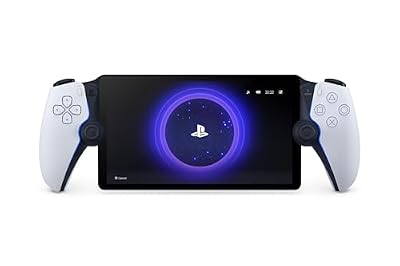
PlayStation 5 Portal Remote Player
Included for 'Best Video Game Consoles in 2026' as a representative consumer electronics in this roundup; selection reflects the product set returned for this topic.
View on Amazon
Upgrade Wireless Retro Gaming Console Pre-Installed 20000+ Video Games | 2026 Plug and Play TV Game Stick 4K HDMI Output Retro Video Game Console with Dual 2.4G Wireless Control, Nostalgic Gifts
Included for 'Best Video Game Consoles in 2026' as a representative consumer electronics in this roundup; selection reflects the product set returned for this topic.
View on Amazon
WYGAMING Portable 20000 in 1 Metal Box 3D Arcade Game Console, 22 inch Screen Retro Electronic Game Console, with Search/Hide/Save/Load/Pause Functions
Included for 'Best Video Game Consoles in 2026' because the listing lists an explicit depth/thickness, which is the attribute this article compares.
View on Amazon
GameNext Retro Game Console with 620 Built-in Games, Classic Video Game Console with 2 Wired Controllers, Plug and Play Retro Gaming System with AV Output for TV
Included for 'Best Video Game Consoles in 2026' as a representative consumer electronics in this roundup; selection reflects the product set returned for this topic.
View on Amazon
GAMENEXT Retro Game Console, AV Classic Mini Video Game Consoles Built-in with 620 Games Dual Players Mode Console with 2 Controllers Handheld Games for Kids & Adults
Included for 'Best Video Game Consoles in 2026' as a representative consumer electronics in this roundup; selection reflects the product set returned for this topic.
View on AmazonBest for Handheld and Family Play: Nintendo Switch With Neon Blue and Neon Red Joy-Con
The original Switch lets you play on a TV or take the screen with you. Detachable Joy-Con controllers make instant two-player play possible, and the library is full of family-friendly titles.
Best for Active Kids: Nex Playground
The Nex Playground uses a built-in camera to track your body, so no controller is needed. It is made for movement games, parties and rainy days, and it suits younger children better than a traditional console.
Quick Comparison
| Product | Best for | Key specs |
|---|---|---|
| PlayStation 5 Console, 1TB | Best overall, big-budget games | 1TB SSD per name, DualSense controller, disc-based play |
| Nex Playground | Active play for kids and families | Built-in camera, no controllers, up to four players, HDMI to TV |
| Nintendo Switch (Neon Blue/Red) | Handheld and family gaming | Hybrid handheld, detachable Joy-Con, TV dock play |
| My Arcade Atari Game Station Pro | Classic Atari nostalgia | 200+ games, two wireless joysticks, RGB lights |
| PlayStation Portal Remote Player | Streaming your PS5 around the home | 8-inch screen, streams from a PS5 over Wi-Fi |
| Upgrade Wireless Retro Console, 20000+ games | Huge retro library | Pre-installed games, wireless controllers; confirm details |
| WYGAMING Portable 20000-in-1 Arcade Console | Arcade-style retro box | Metal box, large game list, search, save and load functions |
| GameNext Retro Console, 620 Games | Simple plug-and-play for two | 620 built-in games, two wired controllers |
| PlayStation 5 Digital Edition | Digital-only PS5 players | 825GB SSD per listing, no disc drive, wireless controller |
| GAMENEXT AV Classic Mini Console | Compact retro for two players | 620 games, two controllers, AV connection |
How We Chose
This guide is based on research, not on product trials. For each console we read the listing name and manufacturer information, and compared them with widely reported details about the PlayStation 5 family, the Nintendo Switch, the PlayStation Portal and the Nex Playground. We rated each product on game library and availability, ease of setup, suitability for families, portability, what you need to buy in addition to the console, and how clearly the listing describes what is in the box. For the budget retro systems, we gave extra weight to connection type, controller style and clarity about how games are included, because those are the details that most often disappoint buyers. When a listing did not state an important fact, we say what to confirm before you order rather than guess.
1. PlayStation 5 Console, 1TB – Best for the Deepest Library of Big Games
As an Amazon Associate we earn from qualifying purchases at no extra cost to you.

If you want a single console that plays the largest slate of new blockbuster games, the 1TB PlayStation 5 is the easiest recommendation. The product name points to the disc-based model with 1TB of storage, and that combination matters: a disc drive lets you buy used games and lend discs to friends, while the larger drive means fewer trips to the storage menu. It suits enthusiasts, families with older kids and anyone who wants the platform with the most major releases.
Key specs
- 1TB of internal SSD storage, as stated in the listing name
- Fast SSD that shortens loading times and enables quick resume between games
- DualSense wireless controller with haptic feedback and adaptive triggers
- Ultra HD Blu-ray disc drive on the disc model; confirm the exact model on the product page
- Support for 4K gaming and high refresh rates on compatible TVs
- Large digital storefront and subscription options
Strengths
The PS5 is a performance-first console. Its SSD makes a noticeable difference to how quickly games start and how fast you can fast travel in open worlds. The DualSense controller is a standout feature, with haptics that simulate textures and triggers that push back, and many first-party titles take advantage of it. The platform offers a broad catalog, from sprawling single-player adventures to online shooters and sports games, and a large community of players. Physical games also let you resell or trade them, which can matter if you are careful about your game budget.
Storage planning is simple arithmetic. Not all of the 1TB is usable, because the system software takes a share, so assume roughly 800 GB or a little less is available for games and check Sony’s specification page for the exact figure. If large games take about 80 GB each, that is around ten installed titles. That sounds plentiful until you add a few online games with frequent updates, so many players plan to delete and reinstall as needed or add compatible extra storage later.
Things to keep in mind
You will need a TV or monitor with HDMI, and to see the best graphics you need a 4K display with HDMI 2.1 features. Online multiplayer generally requires a paid subscription, and extra controllers add up in a family setup. Make sure there is enough space for the console and clear ventilation around it. Confirm which console edition you are buying, because Sony has released several revisions with slightly different dimensions.
Pros
- Strong catalog of big-budget games
- Fast SSD and DualSense features
- Disc drive supports physical games
- Larger storage than the digital model in this list
- Works with Sony accessories like the Portal and Media Remote
Cons
- Online play usually needs a paid subscription
- Large game installs fill storage quickly
- Not portable
- Extra controllers and accessories add up
Versus the nearest alternative
The PS5 Digital Edition later in the list uses the same platform but removes the disc drive. If you buy mostly digital games, the digital version matches the features minus the drive, while the disc model keeps your options open. Against the Switch, the PS5 offers raw power and cinematic games, while the Switch offers portability and local multiplayer simplicity.
2. Nex Playground – Best for Active Play and Family Game Nights

The Nex Playground is the odd one out in this list, and that is why it deserves attention. Rather than a controller, it uses a camera and motion tracking to turn your body into the input. The listing positions it as an active play system for kids and families. It suits households with young children, parents who want games that get kids moving and anyone hosting parties where nobody wants to learn button layouts.
Key features
- Built-in wide-angle camera that tracks body movement without controllers
- Connects to a TV with HDMI, and a cable is generally included according to the maker
- Supports multiple players at once, up to four according to reported specifications
- Comes with a starter set of games, with more available through an optional subscription
- Includes a magnetic privacy cover for the camera, according to published information
- Small cube-shaped body that is easy to tuck by a TV
Strengths
The learning curve is nearly zero. A child can stand in front of the TV and start moving, which makes it a favorite for gifting and for family nights. Games are designed around dancing, sports, and silly physical challenges, and a number of them feature familiar characters. The console is also designed to avoid ads, chat features and in-app purchases in its kid-focused games, as described by the maker, which parents often appreciate.
Space is the practical constraint. Nex suggests a play area of about 6 feet by 6 feet, which is 36 square feet of clear floor. Measure your living room and move furniture if needed. Make sure there are no fragile objects within reach, and supervise young children to prevent bumping into walls or each other.
Things to keep in mind
This is not a competitor to the PS5 or Switch for traditional games. The library is focused on movement, and the full catalog is typically accessed through an optional subscription, though the console can be used without it. Camera-based tracking depends on lighting and background, so a dim room or cluttered space can reduce accuracy. Because it includes a camera, use the privacy cover when not in use and read the maker’s privacy information, particularly if children are the main users.
Pros
- No controllers needed, easy for young kids
- Encourages physical activity
- Multiplayer-friendly
- Small footprint with privacy cover
- Designed with family content in mind
Cons
- Needs clear floor space and good lighting
- Limited to motion-focused games
- Optional subscription unlocks the full library
- Camera raises privacy considerations
Versus the nearest alternative
The Switch also offers family-friendly party and fitness games, but it relies on controllers. The Nex Playground wins for very young children and group play, while the Switch wins for variety and portable use.
3. Nintendo Switch (Neon Blue and Neon Red Joy-Con) – Best for Handheld and Local Multiplayer

The original Nintendo Switch remains a versatile console because it works as both a home system and a handheld. The listing describes the standard model with Neon Blue and Neon Red Joy-Con. It suits families, commuters and students, and anyone who wants first-party Nintendo games with simple two-player play out of the box.
Key specs
- Hybrid design: play on the built-in screen or dock it to a TV
- Detachable Joy-Con controllers with motion sensing, usable together or separately
- Roughly 6.2-inch screen on the standard model
- Battery life stated by Nintendo at about 4.5 to 9 hours depending on the game, for this revised standard model
- MicroSD card slot for additional storage; the built-in storage is modest
- Includes a dock, Joy-Con grip and cables according to the usual package; confirm contents on the listing
Strengths
Few consoles make local multiplayer as easy. Each Joy-Con can act as its own controller, so two people can play as soon as the system is on. Games for family audiences are plentiful, from platformers and racing games to party collections. Handheld mode is the other major strength: you can continue a game on the sofa, in bed or on a trip without streaming from another device. The Switch is also less demanding on your TV and network, because it does not need 4K displays or fast internet to run well.
Battery planning is simple. If your game runs at the middle of Nintendo’s range, around 6 hours, a two-hour commute each way uses about 4 hours of that charge, which means you can get through a day with one top-up. Heavier 3D games may drain the battery faster, so carry a charger on longer trips.
Things to keep in mind
The hardware is older than the PS5, so graphics are less detailed, and some third-party games run at lower resolution. Internal storage is limited, so a microSD card is often needed for digital game collections. Joy-Con drift has been reported by some users over time, a common issue with the type of stick used. Online play and some features require a paid Nintendo subscription. Check that you are buying the model described in the listing and that it comes with the accessories you expect.
Pros
- Handheld and TV play in one device
- Easy local multiplayer
- Large family-friendly library
- Lighter demands on TV and network
- Portable with a roughly 6.2-inch screen
Cons
- Less powerful than the PS5
- Limited internal storage
- Joy-Con wear and drift have been reported
- Online features need a paid subscription
Versus the nearest alternative
Against the PS5, the Switch gives up graphics but offers portability and a family-friendly catalog. Against the Nex Playground, it requires controllers but covers a wider variety of game types. If your household shares one console between children and adults, the Switch tends to be the more flexible option.
4. My Arcade Atari Game Station Pro – Best for Classic Atari Nostalgia

The Atari Game Station Pro is a plug-and-play retro console built around the Atari catalog. The listing promises 200+ games, wireless joysticks and RGB LED lights. It suits adults who grew up with Atari, collectors who want a modern way to play classics, and families who enjoy simple arcade-style games with two players.
Key specs
- 200+ built-in games, including titles from Atari 2600, 5200, 7800 and arcade lines, according to the maker
- Two wireless joysticks, described as using a 2.4GHz connection
- Joysticks with built-in paddle functions for games that use them
- HDMI output to a modern TV, as reported in product information
- RGB LED lighting with several modes
- USB-C power; confirm what is included in the box
Strengths
The brand and the game selection give this console a clear identity. Instead of a random pile of unknown titles, you get recognizable classics such as Asteroids, Centipede and Missile Command, according to published game lists. The joysticks are designed to feel like the originals, with paddle functionality for games like Breakout, and wireless connection means there are no cables stretched across the living room. A save-state feature and menu make it easy to pick up where you left off, and the lighting gives it a retro-modern look on a TV stand.
Things to keep in mind
Classic games are short, hard and simple. If you want modern graphics or deep stories, this is not the console. Some well-known arcade titles may not be included, so check the game list for the games you care about. The joysticks use AA batteries in many retail descriptions, and the number required can vary, so confirm what you need and keep spares. Reviewers of similar products have mentioned that retro joysticks can feel awkward to modern players and may wear over time. For power, use a good USB source and, if possible, enable the TV’s game mode to reduce input lag.
A good way to enjoy this console is as a party piece rather than a daily driver. Pull it out for retro nights, let guests take turns with the paddle games and keep sessions short, since the games were designed for quick arcade rounds.
Pros
- Recognizable Atari library
- Wireless joysticks with paddle functions
- HDMI connection for modern TVs
- Two-player ready
- Fun retro styling with lighting
Cons
- Limited to classic, simple games
- Batteries needed for the joysticks
- Some popular titles may be missing
- Joystick feel is polarizing
Versus the nearest alternative
The other retro boxes in this list advertise far larger game counts, but they lack the same sense of curation. The Atari console is better if you want a known catalog from a known brand. The GameNext units are simpler and offer more variety in genres, but with less brand reassurance.
5. PlayStation Portal Remote Player – Best Companion for Existing PS5 Owners

The PlayStation Portal is included in a console list because it behaves like a handheld, but it needs a PS5 to function. It streams games from your console over Wi-Fi to an 8-inch screen with built-in controls. It suits people who already own a PS5, share a TV, or want to play in another room.
Key specs
- 8-inch LCD screen supporting up to 1080p at 60 frames per second, according to Sony
- Controls modeled on the DualSense, including haptics and adaptive triggers in supported games
- Streams from your PS5 over Wi-Fi; it does not store or run games itself
- 3.5mm headphone jack and support for compatible wireless audio through PlayStation Link
- Cloud streaming for certain games with a PlayStation Plus Premium subscription, as Sony has announced
Strengths
The Portal is the most convenient way to play PS5 games away from the TV. The screen is large for a handheld, the controls feel familiar and the setup is simple once your console and the Portal are on the same network. Parents and roommates can claim the TV without ending a session, and the device pairs well with the wall-mounted or hidden console placements that many people use.
Things to keep in mind
The Portal is a streaming device, not a console. Without a PS5 it has nothing to play. Performance depends on your Wi-Fi network, and a weak signal can cause lag or lower image quality. It is not a travel device in the way a handheld console is, because it requires access to the home network or a cloud-capable connection. Some features, including PS VR2 games, are not supported. Plan to charge it regularly, and keep it away from water and heat.
For best results, put the PS5 on wired Ethernet, keep the router within a reasonable distance and update both devices to the latest system software. Check Sony’s support page for recommended network speeds, because they can change.
Because Portal sessions start from the console, make sure the PS5 is set up to allow remote play and that it is either on or in rest mode before you head to another room.
Pros
- Large screen with familiar controls
- Frees up the TV for other uses
- Supports haptics and adaptive triggers in supported games
- Official Sony hardware
Cons
- Requires a PS5 and a good network
- Not a standalone console
- Latency depends on Wi-Fi quality
- Does not support everything, such as PS VR2 games
Versus the nearest alternative
The Switch is a true handheld console that runs games on its own, so it works away from home and without a second device. The Portal offers the PS5 library, but only through streaming. If you are choosing your first console, buy a console first and treat the Portal as an add-on.
6. Upgrade Wireless Retro Gaming Console, 20000+ Games – Best Only for Casual Nostalgia Browsing
This listing is for a retro gaming console that advertises 20000+ pre-installed video games and wireless play. It sits at the extreme end of the multi-game category, where the number on the box is the main selling point. It suits curious buyers who want to browse a huge pile of classic-style titles, and it is best treated as a novelty rather than a primary console.
What the listing tells us
- Wireless retro gaming console
- More than 20000 pre-installed games, as advertised
- Likely HDMI output and included controllers; confirm on the product page
- Brand and exact hardware specifications are not given in the listing name
How to read a game count
A game count in the tens of thousands usually reflects emulation of older systems and large collections of classic titles. Many of those entries are duplicates, regional variants, hacks or obscure games, and the number says little about quality. It is also common for such products to lack licensed branded titles, so do not assume specific famous games are included. If a particular title matters, search the product page and customer questions for it by name.
Here is a simple way to judge value. Suppose you find about 150 games you would genuinely enjoy in a list of 20000. That is under one percent of the collection, so the headline number overstates the practical benefit. A tidy 200-game collection with proper controllers can feel better than a vast catalog with poor navigation.
Practical and safety checks
Check how the console connects to your TV, what kind of wireless controllers are used, how they are powered and whether the console has a clear way to save progress. Look at the power adapter: use the supplied adapter or a certified replacement and avoid uncertified chargers. If the controllers use rechargeable batteries, follow the manufacturer’s charging guidance and stop using any that swell or overheat. Also check the return window, since quality in this category varies widely.
Pros
- Huge number of games to browse
- Wireless play reduces cable clutter
- Works as a casual nostalgia box
- Typically simple to set up
Cons
- Game count is not a measure of quality
- Brand and hardware details are thin
- Licensing and game selection are uncertain
- Controller quality and battery details need confirmation
Versus the nearest alternative
The WYGAMING box follows a similar philosophy with a different form factor, while the Atari console offers a smaller but more recognizable library. If you want a curated experience, the Atari unit is the safer pick. If you want to browse an enormous list, this console and its peers deliver on that promise but with caveats.
7. WYGAMING Portable 20000-in-1 Metal Box Arcade Console – Best for a DIY Arcade Cabinet Project

This product is in the arcade-box family: a metal enclosure that holds a large library of retro games and connects to a screen and controls. The listing calls it a portable 20000-in-1 3D arcade console and mentions a 22 inch screen, along with search, hide, save, load and pause functions. It suits hobbyists building a home arcade, bar-top setups and buyers who want a standalone arcade-style machine rather than a small plug-in console.
What the listing tells us
- Metal box design that houses the game system
- 20000 games advertised, including 3D titles
- A 22 inch screen is mentioned in the title; confirm whether a screen is included or the number refers to a supported display size
- Search, hide, save, load and pause features for managing the library
Why the details matter
Arcade boxes vary enormously. Some include a screen, buttons and joysticks, while others are bare boards in a case that need extra parts. The listing text does not say exactly what is in the box, so the first job is to find out. Check the photos, the contents list and the questions from other buyers. Ask yourself whether you will need an external monitor, a power supply, arcade controls or a separate stand. If you are building a cabinet, also check mounting options and the physical dimensions of the box.
The management features are useful. Search and hide make a library of that size usable, because you can remove games you will never play. Save and load let you keep your place in longer games, and pause is essential for any home use. These features are not unique to this product, but they separate a usable arcade box from a raw dump of files.
Safety and setup
A metal enclosure with an internal power supply needs ventilation, so keep it away from soft surfaces and heat sources and never block its vents. Use the supplied power cable, and do not open the case while plugged in. If a screen is included, mount it securely and keep cables tidy. If you have children, place the unit where it cannot be pulled over by cables.
Pros
- Large library with management tools
- Arcade-style design suits cabinet projects
- Save, load and pause functions
- Works as a standalone retro entertainment box
Cons
- Listing does not make the contents clear
- Screen size claim needs verification
- Game count says little about quality
- May require extra controls or a display
Versus the nearest alternative
The Upgrade Wireless Retro console is more of a living-room plug-in, while this box leans toward arcade builds. Compared with the Atari console, it offers many more games but much less curation and no brand reassurance.
8. GameNext Retro Game Console, 620 Games – Best Simple Plug-and-Play for Two

This GameNext console is a straightforward retro unit. The listing names 620 built-in games, a classic video game console design, two wired controllers and plug-and-play setup. It suits parents buying a simple first game system, secondary TVs in guest rooms and anyone who wants uncomplicated two-player fun.
What the listing tells us
- 620 built-in games
- Two wired controllers included
- Plug-and-play setup with no downloads or accounts
- Classic console styling
Strengths
Simplicity is the point. There is no account to create, no update to download and no Wi-Fi to connect. Wired controllers never need batteries or charging, which makes them popular with younger children and for shared rooms. A library of about 620 games is large enough to keep a family busy but small enough to browse, particularly when many titles are simple single-screen games.
A quick calculation shows the practical scale. If each game takes five minutes to try, going through all 620 would take over 51 hours. Most households will settle on a few dozen favorites, which is typical for this category.
Things to keep in mind
The listing does not name the output type, so check whether it connects with HDMI or with older analog AV cables. Modern TVs may not have the necessary inputs for analog cables, and an adapter might be needed. Wired controller cable length matters for living room distance. As with other retro boxes, game quality varies and licensed titles are rare, so do not buy it for specific famous games unless the product page lists them. Keep the power adapter supplied with the unit, and unplug it when not in use.
Setup is usually as simple as connecting the console to the TV, plugging in power and picking a game from the menu. It helps to check the menu layout in the product photos, since a clean list with categories is much easier to use than a scrolling wall of titles. Look for a reset button, a pause function and a way to switch games without unplugging, because those small conveniences make a big difference in daily use. If you buy for a child, supervise the first sessions and route the controller cables so nobody trips over them. Keep the box and receipt for the first few weeks in case of faulty controllers, which are a common failure point on products in this category.
Pros
- Plug-and-play with no accounts
- Two wired controllers, no batteries
- Manageable library of 620 games
- Good for kids and guest rooms
Cons
- Output type must be verified
- Game quality varies
- Wired controllers limit seating distance
- Likely lacks modern or branded titles
Versus the nearest alternative
The listing at the bottom of this guide, the GAMENEXT AV Classic Mini, shares the same game count and similar branding, which suggests a related product line. This one is the more conventional console shape with wired controllers. If you want a similar experience in a smaller body, the Mini is the alternative.
9. PlayStation 5 Digital Edition – Best for Digital-Only PS5 Players
The PlayStation 5 Digital Edition delivers the same core experience as the disc model but removes the optical drive. The listing describes a white console bundled with a wireless controller, 16GB of GDDR6 memory, an 825GB SSD and 8K output capability. It suits players who buy games from the PlayStation Store, value a slimmer body and have no use for discs.
Key specs from the listing
- 825GB SSD
- 16GB of GDDR6 RAM
- Wireless DualSense controller included
- No disc drive
- White finish; 8K output is mentioned, though few games target it
Strengths
Performance matches the disc console, since the processor, graphics and SSD speed are the same. Digital libraries are convenient: no swapping discs, and games are ready to launch from the home screen. The unit is also typically a little slimmer than its disc counterpart, which helps in tight entertainment centers. Sony has offered a separate disc drive for some digital models, so the digital edition is not a permanent dead end, though compatibility depends on the exact version.
Things to keep in mind
Storage is the main consideration. With an 825GB SSD, the usable amount is lower after system files. A common estimate for the original model is roughly two-thirds of the number printed on the box, around 650 GB, though you should check Sony’s specification page. At about 80 GB per major game, that is only around eight titles. Without a disc drive, you also cannot play physical games or buy used ones.
The listing does not say whether the console is new, so check the seller and condition. Confirm the model version, because the original and slimmer redesigns differ in size, and some accessories listed in this guide are designed for one or the other.
If you are tempted by the 8K mention, keep it in perspective. Output capability is not the same as game support, and almost all games run at 4K or lower, so very few households will benefit from 8K today. A good 4K TV, a quality HDMI cable and an up-to-date system matter far more. Also think about the future: if you later want physical games, check whether your specific console version supports Sony’s separate disc drive before relying on that option.
Pros
- Same performance as the disc console
- Includes a controller
- Clean digital-only experience
- Thinner body in many versions
Cons
- No disc drive
- Smaller storage than the 1TB model
- Model version and condition need verification
- Cannot play or trade physical games
Versus the nearest alternative
The 1TB PS5 is the natural comparison. If you ever want physical games or a bigger drive, the 1TB disc model is the better long-term base. If you are certain you will stay digital and want a lighter console, the Digital Edition is a sensible choice.
10. GAMENEXT AV Classic Mini Game Console, 620 Games – Best Compact Retro Box With AV Output

The GAMENEXT AV Classic Mini is a small retro unit with 620 built-in games, a dual-player mode and two controllers. The AV in the name indicates analog audio and video output, which affects how you connect it to a modern TV. It suits nostalgia buyers with a classic TV or a TV that has composite inputs, and families who want a compact system for a secondary room.
What the listing tells us
- 620 built-in games
- Dual-player mode with two controllers included
- AV connection, meaning analog audio and video, as suggested by the name
- Mini form factor; the listing text also mentions handheld in its title, so confirm whether a handheld mode exists
Why AV matters
Many current TVs no longer include the red, white and yellow composite inputs. If yours does not, you will need an adapter, and image quality may be softer than with HDMI. Old-style 4:3 games look fine on a small screen, but on a large modern TV they can appear blurry. Before you buy, look at the back of your TV and check which inputs it has. If you have only HDMI, consider the HDMI-based retro consoles in this list instead.
Strengths and limits
A mini console is easy to store and carry, and a collection of 620 simple games is enough for casual sessions. The dual-player mode makes it suitable for siblings. As with similar products, game quality varies and recognizable licensed titles may be limited, so treat it as a casual toy rather than a replacement for a main console. If it uses batteries or a USB power source, follow the instructions and use a quality adapter. Keep small parts away from very young children and avoid leaving batteries in the unit for long periods.
Treat it as a secondary-room system. Many families set up a small retro box in a playroom or guest bedroom with an older TV, where the AV output matches the available inputs and nobody expects cutting-edge graphics. In that role, a compact system with two controllers and a simple menu is hard to beat for convenience. If you need to use it on a modern TV, try the picture with a short game first and decide whether the softer image is acceptable before you discard the packaging.
Pros
- Compact and easy to store
- Two controllers and a dual-player mode
- Large enough library for casual play
- Good fit for older TVs with AV inputs
Cons
- Analog AV output may not suit modern TVs
- Picture quality is limited
- Game quality varies
- Listing details are inconsistent about handheld use
Versus the nearest alternative
The GameNext 620 console covers the same library count in a more traditional shape. If your TV supports HDMI only, check output options carefully, because that is the biggest difference between the retro units here. The Atari Game Station Pro is the better choice for an HDMI setup with a recognized game catalog.
How to Choose a Console in 2026
The word console now covers very different products: a high-performance living-room machine, a hybrid handheld, a camera-based family system, a streaming handheld that needs another console and a crowd of small retro boxes. Deciding which category you need matters more than comparing individual specs.
Start with who will play and where
Write down the players and the locations. A solo adult who wants the latest blockbuster games and has a good TV is the target for the PS5. A family with children of mixed ages who share a TV and sometimes travel is better served by the Switch. Parents of preschoolers who want to get kids moving indoors should look at the Nex Playground. If the main TV is often taken, a PlayStation Portal can extend a PS5 into other rooms. For nostalgia and casual two-player fun, the retro consoles are the only choices that need no accounts or downloads.
Compare the types side by side
| Type | Examples here | Strength | Trade-off |
|---|---|---|---|
| Performance home console | PlayStation 5 (1TB and Digital) | Best graphics, SSD speed, big game library | Not portable, needs a TV and often a subscription for online play |
| Hybrid handheld | Nintendo Switch | Plays on TV or on the go, easy local multiplayer | Lower power, limited internal storage |
| Camera-based active play | Nex Playground | No controllers, active family games | Needs floor space; narrow game types |
| Streaming handheld | PlayStation Portal | Large screen for PS5 games around the home | Needs a PS5 and strong Wi-Fi |
| Curated retro | My Arcade Atari Game Station Pro | Recognized classic catalog | Simple, dated games |
| Bulk retro boxes | Upgrade Wireless, WYGAMING, GameNext, GAMENEXT AV | Many games, simple setup | Quality and licensing vary; check connections |
One more filter is how long you expect to keep the system. A mainstream console such as the PlayStation 5 or the Switch keeps receiving new games for years, so it holds its usefulness as a household anchor. A camera-based or retro system tends to be a supplement: great for a specific audience, but unlikely to be the only thing you play for several years. Matching the console to the lifespan you want avoids replacing it sooner than planned.
Plan storage with arithmetic
For disc and digital consoles, usable storage is smaller than the number on the box. A rough way to plan is to take the advertised capacity, subtract the system reserve and divide by your typical game size. For the 825GB Digital Edition, a usable figure around 650 GB is a reasonable estimate for the original model. Divided by 80 GB per large game, that is about eight installed titles. For the 1TB console, a usable figure of roughly 800 GB gives about ten. Treat these as planning estimates and check Sony’s specification page for exact numbers. If you play many large online games, you will be managing storage either way, but the larger drive gives you more breathing room.
Plan for the whole setup, not just the box
Total ownership includes extra controllers, subscriptions, storage and accessories. A PS5 household often adds a second controller and a charging dock. A Switch household may add a microSD card and a case. The Nex Playground may involve an optional subscription for the full game list. Retro consoles may need batteries or an adapter. Listing what each product requires before you buy keeps the total from surprising you.
Check connections and TV compatibility
PS5 consoles need HDMI, and 4K or high refresh rate features need a compatible TV and cable. The Switch docks with HDMI. The Nex Playground uses HDMI. Several retro consoles use HDMI as well, but the GAMENEXT AV unit uses analog AV, which many modern TVs no longer support. If you are unsure, check the back of your TV before ordering.
Think about safety and age suitability
For young children, choose systems with parental controls and games rated for their age. For the camera-based Nex Playground, use the privacy cover and clear the play area. For retro consoles with batteries, use the right battery type, remove spent batteries and recycle them properly. Keep all consoles on stable, ventilated surfaces and never block vents. Use the supplied power adapters and replace damaged cables.
Common mistakes
The most common mistake is judging a retro console by its game count. The second is buying a Portal without a PS5 or without good Wi-Fi. The third is assuming a digital console is the same as a disc console for every use, when it cannot play or trade physical games. Finally, many buyers forget that a console is only part of the picture: games, subscriptions and controllers form the long-term picture.
Setup, Care and Retro Buying Checklist
Setting up a home console
Place a PlayStation 5 on a stable surface with several inches of open space around the vents, connect it to the TV with the supplied HDMI cable and choose a port on the TV that supports the features you want. Run the first-time setup, install any system updates and set up parental controls before children play. If you use a Digital Edition or fill the drive quickly, plan which games to keep installed and which to delete and reinstall later.
Setting up the Switch and the Nex Playground
The Switch needs a full charge before first use and a dock connected to the TV for big-screen play. Add a microSD card if you buy games digitally. For the Nex Playground, mount or place the camera cube so it can see the whole play area, keep the room well lit and clear the floor. Slide the privacy cover over the camera when you finish, and keep the power and HDMI cables out of the way of moving players.
A short checklist for retro boxes
- Check the output type: HDMI works with almost every modern TV, while analog AV needs matching inputs or an adapter.
- Check the controllers: wired or wireless, and which batteries they use.
- Search the questions on the product page for the specific games you care about.
- Confirm how saving works, because some units save only a few slots or none at all.
- Look at the return window and keep the packaging until you are satisfied.
- Use the supplied power adapter, and do not leave the unit powered on unattended for long periods.
Looking after your hardware
Dust is the enemy of every console. Wipe the exterior with a dry or slightly damp cloth with the unit unplugged, and clear vents with a soft brush or a gentle puff of air. Avoid stacking items on top of consoles, and keep them out of enclosed cabinets without airflow. Handhelds and streaming devices should be charged with the supplied cable, kept out of hot cars and stored in a case when traveling. If any device becomes unusually hot, smells strange or shows a swollen battery, stop using it and contact the manufacturer.
Frequently Asked Questions
Is the PS5 Digital Edition worth it over the disc version?
It is worth it if you are certain you will buy only digital games and want a slimmer console. The disc model gives you the ability to buy used and physical games, plus a larger drive in this list. If you are unsure, the disc version is the more flexible choice.
Can the PlayStation Portal replace a console?
No. The Portal streams games from your own PS5 and does not run games on its own. It adds flexibility for people who already own the console.
Is the Nintendo Switch still a good choice?
Yes, for portability, local multiplayer and family games. It has lower performance than the PS5 and limited built-in storage, so many owners add a microSD card.
How much space does the Nex Playground need?
The maker suggests roughly a 6 foot by 6 foot area, or about 36 square feet. Clear the floor of obstacles and supervise young children during active games.
Are retro consoles with thousands of games legitimate?
Many include collections of classic-style games of unclear licensing, and their quality varies. Enjoy them as casual novelties, and check the return policy before you buy.
Do I need a special cable for the retro consoles?
It depends on the model. Some use HDMI and others use analog AV connections that modern TVs may not support. Confirm the output type on the product page and check your TV’s inputs.
What should I do about controller batteries?
Use the battery type specified by the maker, avoid mixing old and new cells and remove batteries if you will not use the controller for a long time. Recycle used batteries at an appropriate collection point.
Which console is best for a child’s first system?
For young kids who like to move, the Nex Playground is a friendly start. For kids who want traditional games, the Switch offers a large family-friendly catalog with parental controls. Check age ratings and set up controls before play.
Our Recommendation by Situation
Choose the 1TB PlayStation 5 if you want the strongest all-round console, or the Digital Edition if you are committed to digital games. Pick the Nintendo Switch for portable and family play, and the Nex Playground for active kids. Add the PlayStation Portal if you already own a PS5 and want flexibility around the home. Treat the retro boxes as fun extras, starting with the Atari Game Station Pro for a curated library, and check connections and return policies for the rest.