🛒 Best Price Today on Amazon
Prime members get fast, free shipping on everything above, plus member-only deals. New members get a 30-day free trial — cancel anytime.
- Best Scuf Controller Models Compared
- 1. SCUF Omega – Best Scuf Controller for PS5
- 2. SCUF Envision Pro V2 – Best Wireless Scuf Controller for PC
- 3. SCUF Valor Pro Wireless – Best Scuf Controller for Xbox
- 4. SCUF Valor Pro Wired – Best for Wired Competitive Gaming
- 5. SCUF Envision – Best Wired Scuf Controller for PC Customization
- Scuf Controller Buying Guide
- FAQ
- Conclusion
Choosing the right Scuf controller can improve how you aim, move, and execute commands during competitive gaming. From customizable rear paddles to instant triggers and advanced thumbsticks, SCUF offers specialized options for PlayStation, Xbox, and PC. This guide compares their features, limitations, and ideal gaming uses.
Quick answer: For most people in 2026, the best scuf controller for ps5, xbox, and pc gaming 2026 is the Scuf Controller — our #1 rated choice. See the full ranked comparison, alternatives and buying advice below.
Best Scuf Controller Models Compared
SCUF controllers focus on customizable inputs, ergonomic controls, and competitive gaming features that extend beyond standard gamepads. However, different models target different platforms and playstyles. Choosing the right controller requires understanding compatibility, trigger behavior, thumbstick technology, and software options.
| Scuf Controller | Best For | Platform | Main Advantage |
|---|---|---|---|
| SCUF Omega | Competitive PS5 gaming | PS5, PC | TMR sticks and extensive programmable inputs |
| SCUF Envision Pro V2 | Advanced PC gaming | Windows PC | Wireless connection and customizable G-Keys |
| SCUF Valor Pro Wireless | Xbox and PC versatility | Xbox, Windows PC | TMR sticks and tri-mode connectivity |
| SCUF Valor Pro Wired | Competitive wired gaming | Xbox, Windows PC | Hall Effect sticks and wired connection |
| SCUF Envision | Wired PC customization | Windows PC | Programmable controls without wireless hardware |
The most suitable controller depends on whether you prioritize fast shooting inputs, precise movement, wireless convenience, or advanced button mapping. Competitive FPS players may benefit from short-travel triggers, while racing enthusiasts often require full analog input for gradual acceleration and braking.
1. SCUF Omega – Best Scuf Controller for PS5
Best For
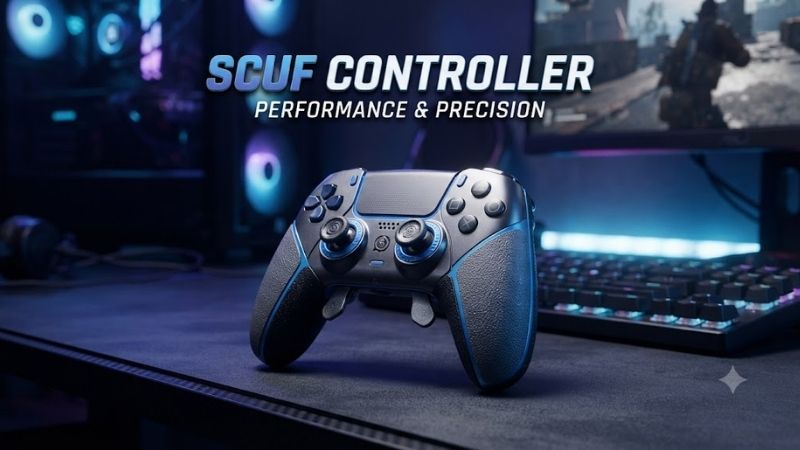
The SCUF Omega is designed for PlayStation 5 owners who want extensive input customization and competitive-focused controls. Its additional programmable buttons make it particularly attractive for players who regularly switch between movement, aiming, and combat commands in fast-paced games such as Call of Duty and Fortnite.
Key Features
-
Officially licensed for PlayStation 5
-
Four customizable rear paddles
-
Five programmable G-Keys
-
Two side action buttons
-
Endurance TMR thumbsticks
-
Adjustable instant triggers
-
Omron mechanical switches
-
Wired and wireless connectivity
-
SCUF mobile customization app
-
Up to 1,000 Hz polling on PC
The Omega uses magnetic TMR thumbsticks designed to improve long-term resistance to stick drift. Unlike traditional contact-based potentiometer sticks, magnetic sensing avoids physical contact within the sensing mechanism. However, improved sensor durability does not eliminate every possible source of mechanical wear.
What Makes It Different
The Omega stands apart from earlier PlayStation-oriented SCUF designs through its expanded programmable controls. Rear paddles support actions such as jumping and sliding, while additional side inputs and G-Keys accommodate more commands. This arrangement allows players to execute actions without constantly removing their thumbs from the analog sticks.
Its adjustable triggers are another important distinction. Players can select short, click-like activation for shooting games or restore full analog travel for situations requiring gradual input. This flexibility is useful for gamers who alternate between competitive shooters, racing titles, and other controller-supported genres.
Unlike older SCUF Reflex Pro controllers, the Omega does not include DualSense-style adaptive triggers or haptic feedback. Its design prioritizes competitive inputs rather than immersive vibration effects. Players who particularly enjoy adaptive resistance in cinematic PlayStation games should consider this limitation.
Pros and Cons
Pros
-
Extensive programmable button layout
-
TMR magnetic thumbsticks
-
Adjustable trigger behavior
-
Mechanical switch inputs
-
Dedicated customization app
-
Wired and wireless options
Cons
-
No adaptive trigger feedback
-
No vibration or haptic feedback
-
Advanced button layout requires practice
-
Additional functions may be unnecessary for casual gaming
Use Case and Who It’s For
The Omega is particularly useful in competitive shooters where movement and aiming often occur simultaneously. Players can assign jump, crouch, reload, or weapon-switch commands to additional buttons. This reduces reliance on face buttons and allows more continuous aiming during demanding combat situations.
It also suits competitive PC players who prefer a PlayStation-style controller layout. However, users should verify individual game support for advanced programmable inputs. For gamers who primarily enjoy narrative adventures and value immersive haptics, a conventional DualSense may offer a more appropriate experience.
2. SCUF Envision Pro V2 – Best Wireless Scuf Controller for PC
Best For
The SCUF Envision Pro V2 targets Windows PC players who want controller customization beyond conventional console layouts. Its programmable G-Keys, side action buttons, rear paddles, and companion software make it especially useful for gamers who regularly combine controller inputs with keyboard-style commands.
Key Features
-
Designed for Windows PC
-
Four programmable rear paddles
-
Five programmable G-Keys
-
Two side action buttons
-
Endurance Hall Effect thumbsticks
-
Adjustable dual-mode triggers
-
Omron mechanical switches
-
Corsair SLIPSTREAM wireless connectivity
-
USB-C wired connection
-
Corsair iCUE customization support
The Envision Pro V2 combines a symmetrical thumbstick layout with additional controls positioned around the controller body. Its dedicated PC design enables more extensive software customization than ordinary gamepads. Users can personalize mappings for different games, although initial configuration takes time.
What Makes It Different
The five G-Keys are a major distinction between the Envision Pro V2 and traditional console controllers. They can accommodate additional PC commands through supported software configurations. This arrangement is useful for games with numerous functions that would otherwise require keyboard input.
Corsair iCUE provides customization options for supported controls and profiles. Players can configure mappings to match different game requirements, reducing the need to relearn button positions. However, users should expect a software setup process, particularly when configuring advanced assignments.
The Hall Effect thumbsticks use magnetic sensing rather than the contact-based mechanism found in conventional potentiometer sticks. This technology helps address sensor-related wear. Nevertheless, the controller still contains mechanical components that may wear over time, so Hall Effect sensing does not guarantee permanent immunity to drift.
Pros and Cons
Pros
-
Extensive PC button customization
-
Wireless SLIPSTREAM connectivity
-
Hall Effect thumbsticks
-
Adjustable trigger travel
-
Mechanical action buttons
-
Multiple programmable control locations
Cons
-
Not designed for PlayStation or Xbox consoles
-
Advanced functions require configuration
-
Software adds setup complexity
-
More inputs than some gamers need
Use Case and Who It’s For
The Envision Pro V2 is especially practical for competitive PC players using games with complex commands. In shooters, rear paddles can handle movement actions while G-Keys support other mapped functions. This arrangement helps players maintain control without constantly switching between keyboard and gamepad.
It also benefits gamers who play several PC genres and want dedicated profiles for different control schemes. However, its expanded functionality is most valuable when users actively customize the device. Players seeking a straightforward plug-and-play experience may prefer a simpler controller.
3. SCUF Valor Pro Wireless – Best Scuf Controller for Xbox
Best For
The SCUF Valor Pro Wireless is designed for Xbox Series X|S, Xbox One, and Windows PC players who want competitive controls without remaining connected by cable. Its combination of wireless connectivity, rear paddles, adjustable triggers, and magnetic thumbsticks makes it suitable for multiplayer gaming across supported platforms.
Key Features
-
Officially licensed Xbox controller
-
Compatible with Xbox Series X|S and Xbox One
-
Windows 10 and Windows 11 support
-
Four customizable rear paddles
-
Endurance TMR thumbsticks
-
Adjustable instant triggers
-
Interchangeable thumbsticks
-
Tri-mode connectivity
-
Performance grip
-
Onboard profiles
The Valor Pro Wireless supports wired and wireless operation, providing flexibility between console and PC gaming. Its TMR thumbsticks use magnetic sensing to reduce reliance on contact-based components. The design prioritizes accurate control and customization, although individual game settings still influence aiming behavior.
What Makes It Different
The Valor Pro Wireless combines an Xbox-style asymmetrical thumbstick layout with additional programmable rear controls. Players familiar with conventional Xbox controllers can retain the general hand position while assigning frequently used actions to paddles. This reduces unnecessary thumb movement during gameplay.
Its dual-mode trigger system allows users to change between short activation and full analog travel. Short activation can feel more immediate in competitive shooters, while analog travel supports gradual acceleration in racing games. The ability to switch modes makes the controller more versatile across genres.
The controller also supports a 1,000 Hz polling mode on PC, according to SCUF. This specification refers to how frequently input information can be reported under supported conditions. It should not be interpreted as a guaranteed improvement in reaction time or an identical experience across every platform.
Pros and Cons
Pros
-
Wireless and wired connectivity
-
Official Xbox compatibility
-
TMR thumbstick technology
-
Four customizable rear paddles
-
Adjustable trigger modes
-
Xbox-style ergonomic layout
Cons
-
More expensive than basic Xbox controllers
-
Advanced customization requires familiarization
-
PC polling features do not apply equally to Xbox
-
Wireless operation requires power management
Use Case and Who It’s For
The Valor Pro Wireless is particularly useful for Xbox players who enjoy fast-paced multiplayer games but also play racing or sports titles. Rear paddles can support movement actions in shooters, while adjustable triggers preserve gradual control when needed. Wireless operation provides flexibility for living-room gaming.
PC users who prefer the familiar Xbox controller layout can also benefit from this model. Its magnetic sticks and customization features support varied gaming requirements. However, players who always remain seated close to their computer may find a wired model offers sufficient functionality.
4. SCUF Valor Pro Wired – Best for Wired Competitive Gaming
Best For
The SCUF Valor Pro Wired is designed for Xbox and PC players who prefer a direct USB connection over wireless convenience. Its competitive control layout includes rear paddles, adjustable triggers, and magnetic thumbsticks, making it an appealing option for gamers who rarely move away from their setup.
Key Features
-
Wired USB-C connectivity
-
Xbox Series X|S and Xbox One compatibility
-
Windows PC compatibility
-
Four customizable rear paddles
-
Endurance Hall Effect thumbsticks
-
Adjustable instant triggers
-
Interchangeable thumbsticks
-
Performance grip
-
Integrated audio controls
-
Supported 1,000 Hz polling mode on PC
The wired design eliminates the need to manage a wireless connection during gameplay. This makes it convenient for desk-based gaming sessions where the controller remains close to the computer or console. However, a wired connection does not automatically guarantee lower total system latency in every configuration.
What Makes It Different
The Valor Pro Wired uses Hall Effect thumbsticks, whereas the Valor Pro Wireless features TMR sensors. Both approaches use magnetic sensing, but they are different technologies and should not be treated as identical. Their practical performance also depends on firmware, calibration, and mechanical construction.
Another distinction is the absence of wireless operation. Users do not need to consider wireless pairing during ordinary play, but they must accommodate a cable. This trade-off makes the controller especially appropriate for desktop setups where cable length and routing are easy to manage.
The adjustable triggers are useful for players who switch between genres. A shorter activation mode can reduce the amount of finger movement required to register shooting commands, while full analog travel allows more gradual input. The feature offers control flexibility rather than guaranteeing faster in-game outcomes.
Pros and Cons
Pros
-
Direct USB-C connection
-
Four programmable rear paddles
-
Hall Effect thumbsticks
-
Adjustable trigger behavior
-
Xbox and Windows compatibility
-
No wireless pairing required
Cons
-
No wireless functionality
-
Cable management required
-
Less freedom of movement
-
PC-specific features may differ on Xbox
Use Case and Who It’s For
The Valor Pro Wired suits PC gamers who compete from a fixed desk and prefer a controller that remains connected throughout their sessions. Players using shooters such as Call of Duty can map essential commands to paddles, while the Xbox-style layout maintains familiar thumbstick positioning.
It is also appropriate for Xbox players who prioritize consistent wired operation and customizable controls over wireless convenience. However, users gaming from a distant sofa should measure their cable requirements carefully. A wireless controller may provide a more practical living-room experience.
5. SCUF Envision – Best Wired Scuf Controller for PC Customization
Best For
The standard SCUF Envision targets Windows PC gamers who want programmable controls without the wireless features of the Pro version. Its combination of rear paddles, G-Keys, and additional side inputs provides flexibility for players who need more commands than conventional controllers accommodate.
Key Features
-
Windows PC-focused design
-
Wired USB connection
-
Four customizable rear paddles
-
Five programmable G-Keys
-
Two side action buttons
-
Mechanical switch action buttons
-
Customizable control mappings
-
Corsair iCUE software support
-
Symmetrical thumbstick arrangement
The standard Envision retains the expanded input philosophy of the Envision family while using a wired connection. Its additional buttons support more complex command arrangements than a basic gamepad. However, the exact benefits depend on game compatibility and how effectively the user configures their mappings.
What Makes It Different
Compared with the Envision Pro V2, the standard Envision emphasizes wired control and programmable inputs without the same wireless hardware or Pro trigger system. This makes it a useful alternative for players who value additional buttons but do not require every premium feature available in the family.
Its G-Keys and side action buttons can simplify access to supported commands in PC games. Players can create layouts that place frequently used actions within reach. Nevertheless, advanced assignments may require software configuration, and users should verify that particular mappings comply with their game’s rules.
Pros and Cons
Pros
-
Multiple programmable input options
-
Wired connection
-
Dedicated PC-oriented control design
-
Rear paddles and additional G-Keys
-
Mechanical action buttons
Cons
-
No wireless operation
-
Not intended for console gaming
-
Standard triggers rather than Pro dual-mode triggers
-
Requires time to learn additional inputs
Use Case and Who It’s For
The standard Envision makes sense for players who primarily game at a Windows PC and want additional mapped controls for shooters, action games, or titles with extensive commands. Rear paddles can handle common movement functions, while G-Keys provide convenient access to additional actions.
It is less appropriate for gamers seeking cross-platform console support or wireless living-room use. Buyers should choose this controller for its wired PC customization rather than assuming it includes every Envision Pro feature. Confirming the exact model is important when comparing listings.
Scuf Controller Buying Guide
1. Check Platform Compatibility
Platform compatibility should be the first consideration when choosing a Scuf controller. The Omega targets PlayStation 5, the Valor family supports Xbox and Windows PC, and the Envision lineup is designed for Windows computers. Similar-looking controllers do not necessarily support the same systems.
PC compatibility may also involve software requirements, USB connections, wireless dongles, or game-specific controller settings. Buyers should verify their operating system and preferred games before purchasing. Console users should prioritize models explicitly approved for their hardware.
2. Understand Rear Paddles
Rear paddles allow players to activate mapped commands while keeping their thumbs on the analog sticks. This is useful when performing actions such as jumping, sliding, or reloading during combat. The advantage comes from reducing unnecessary hand movement, not automatically improving mechanical aiming accuracy.
Players should begin with two frequently used commands before assigning every available paddle. Excessive mappings can cause accidental inputs during early sessions. Consistent practice helps establish muscle memory, allowing additional controls to become useful rather than distracting.
3. Compare Trigger Technologies
Instant triggers reduce travel before activation, making them attractive for shooting games where repeated inputs are common. Adjustable dual-mode triggers offer more flexibility because users can switch between short activation and full analog movement depending on the game.
Analog triggers remain valuable in racing and simulation titles where input pressure controls acceleration or braking. Players who regularly switch genres should prioritize adjustable systems. Fixed instant triggers may be less appropriate when games require gradual trigger positioning.
4. Choose the Right Thumbsticks
Thumbstick technology affects durability and input sensing. Hall Effect and TMR systems use magnetic measurements rather than relying on traditional potentiometer contact. This design can improve resistance to sensor-related drift, although it does not prevent every mechanical issue.
Stick height and shape also influence how a controller feels. Taller thumbsticks can provide additional physical movement for fine adjustments, while shorter sticks may feel more direct. Personal grip style, sensitivity settings, and game type determine which configuration feels most comfortable.
5. Evaluate Wired Versus Wireless Connectivity
Wired controllers are practical for fixed gaming desks because they avoid wireless pairing and charging considerations. Wireless controllers provide greater freedom of movement, making them useful for couch gaming or setups where cables would be inconvenient.
Connection type alone does not determine total input latency. Controller firmware, polling behavior, game processing, and display settings also influence responsiveness. Buyers should prioritize reliable compatibility and comfortable positioning instead of assuming wireless is always slower.
6. Consider Customization Software
Customization software can extend controller functionality through button remapping, sensitivity adjustments, and profiles. The Envision lineup uses Corsair iCUE, while newer SCUF models provide other supported configuration options. Software requirements differ between product families.
Players who enjoy experimenting with control layouts may benefit from advanced settings, but others may prefer simpler onboard adjustments. Before purchasing, review which features work directly on the controller and which require a supported application or operating system.
FAQ
Is a Scuf Controller Worth Buying?
A Scuf controller can be worthwhile for players who regularly use rear paddles, customizable triggers, or advanced button mappings. These features may improve control convenience in competitive games. Casual players who rarely need extra commands may not benefit enough to justify premium hardware.
Which Scuf Controller Is Best for PS5?
The SCUF Omega is the current PlayStation 5-focused option for competitive gaming. Its TMR thumbsticks, programmable inputs, and adjustable triggers prioritize control flexibility. However, players who value DualSense adaptive triggers and haptic feedback should consider those missing features.
Which Scuf Controller Is Best for PC?
The Envision Pro V2 is well suited to PC players who want extensive programmable controls and wireless connectivity. The standard Envision offers a wired alternative. Players who prefer an Xbox-style layout can consider the Valor series instead of the symmetrical Envision design.
Do Scuf Controllers Help With FPS Games?
Rear paddles can make movement commands easier to access while aiming, and instant triggers reduce physical travel before activation. These features may support more convenient input patterns. Actual performance improvements depend on practice, game mechanics, sensitivity settings, and individual skill.
Do Scuf Controllers Get Stick Drift?
SCUF controllers can develop drift, although magnetic Hall Effect and TMR sensors are designed to resist sensor wear associated with conventional potentiometers. Mechanical damage, calibration problems, and other issues can still affect input behavior, so no controller should be considered completely drift-proof.
Can Scuf Controllers Work on Multiple Platforms?
Some models support multiple platforms, but compatibility is product-specific. Valor controllers support Xbox and Windows PC, while Envision models focus on Windows. The Omega supports PS5 and compatible PC connections. Always verify supported operating systems before buying.
Conclusion
Choosing the best Scuf controller depends on your platform, preferred games, and customization needs. The Omega targets competitive PS5 play, Envision Pro V2 delivers advanced PC controls, and Valor models support Xbox gaming. Prioritize paddle placement, trigger flexibility, thumbstick technology, and connectivity to match your playstyle.
Ready to decide? Our #1 pick for 2026 is the Scuf Controller.
Live price & availability on Amazon.