🛒 Best Price Today on Amazon
Prime members get fast, free shipping on everything above, plus member-only deals. New members get a 30-day free trial — cancel anytime.
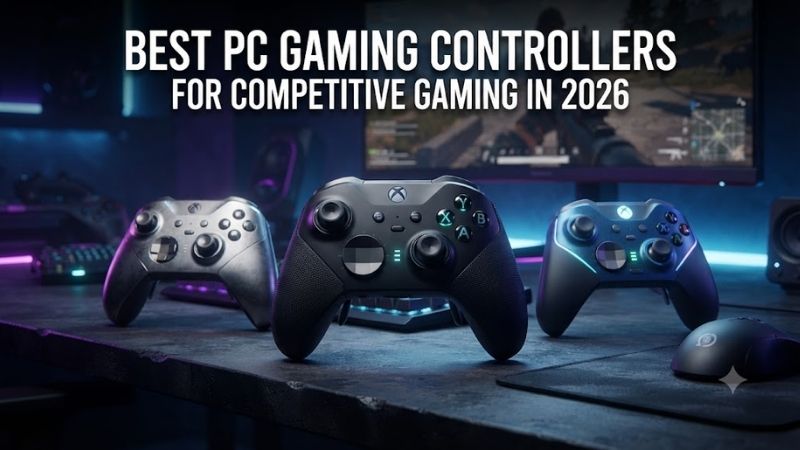
The best PC gaming controllers for competitive gaming combine low-latency input, precise sticks, short trigger travel, reliable software, and rear controls that reduce unnecessary finger movement. The right pad depends on whether you value polling rate, stick technology, wireless freedom, or deep hardware customization.
Best PC Gaming Controllers Compared
| Product | Best For | Key Advantage | Limitation |
|---|---|---|---|
| Razer Wolverine V4 Pro | Best Overall | Up to 8000Hz polling on PC | Premium price |
| GameSir G7 Pro | Best Value | TMR sticks and 1000Hz polling | Platform-specific wireless limits |
| Xbox Elite Wireless Controller Series 2 | Best Customization | Four paddles and adjustable sticks | Heavier than standard pads |
| DualSense Edge | PlayStation Layout | Replaceable stick modules | Only two rear buttons |
| 8BitDo Ultimate 2 Wireless | Budget Wireless | TMR sticks and charging dock | PC Bluetooth is not its main mode |
| Turtle Beach Stealth Ultra | Feature-Rich Pick | Rear controls, display, and dock | More complex interface |
Best Product Picks
Razer Wolverine V4 Pro
Best For: Competitive FPS, sports, and racing players who prioritize input speed.
Razer builds the Wolverine V4 Pro around PC responsiveness, with up to 8000Hz polling in wired or 2.4GHz wireless mode, contactless capacitive thumbstick sensors, four removable rear buttons, and two extra claw-grip bumpers. Its Pro HyperTriggers can switch between near-instant actuation and full analog travel.
Key Features
- Up to 8000Hz polling on PC
- Contactless capacitive thumbsticks
- Four removable rear buttons
- Two claw-grip bumpers
- Dual-mode Pro HyperTriggers
- Swappable thumbstick caps
- Wired and 2.4GHz PC connectivity
What makes it different is the number of competitive inputs available without forcing your thumbs off the sticks. Six remappable secondary buttons can handle jump, crouch, reload, ping, melee, or abilities, while the trigger system suits both shooters and racing games. The trade-off is cost and a learning curve for complex profiles.
Pros
- Extremely high PC polling rate
- Six extra remappable controls
- Flexible trigger behavior
Cons
- Expensive
- More features than casual players need
Who Should Buy It: Pick the Wolverine V4 Pro if you play competitive shooters or sports titles and already know how you want to map rear controls. It makes the most sense for players who will use high polling, trigger tuning, and extra buttons every session rather than buyers who simply want a comfortable wireless controller.
GameSir G7 Pro
Best For: Competitive players who want modern stick technology at a lower cost.
The GameSir G7 Pro combines TMR thumbsticks, Hall Effect analog triggers, clicky trigger stops, four mappable secondary buttons, and 1000Hz polling on PC through both wired and 2.4GHz modes. Two mini bumpers and two lockable rear buttons give players extra inputs without making the shell feel overloaded.
Key Features
- TMR thumbsticks
- 1000Hz polling on PC
- Hall Effect analog triggers
- Micro-switch trigger stops
- Two mini bumpers
- Two lockable rear buttons
- 2.4GHz and wired PC modes
Its value comes from offering features once limited to pricier controllers. TMR sticks avoid traditional contact-based sensing, while the trigger system can move between analog control and short digital-style actuation. Wireless behavior differs by platform, so PC buyers should verify the exact version before purchase.
Pros
- Strong feature-to-price ratio
- 1000Hz wired and wireless polling
- Four extra mappable controls
Cons
- Platform support varies by version
- Software is less established than Microsoft’s ecosystem
Who Should Buy It: The G7 Pro is a strong choice for PC players moving beyond a standard Xbox-style controller without paying flagship money. It suits shooters, action games, racers, and sports titles, especially if you want magnetic stick technology, short triggers, and extra buttons in one practical package.
Xbox Elite Wireless Controller Series 2
Best For: Players who want deep hardware customization and familiar Xbox ergonomics.
Microsoft’s Elite Wireless Controller Series 2 focuses on mechanical adjustment rather than extreme polling rates. It offers four removable paddles, adjustable-tension thumbsticks, shorter hair-trigger locks, interchangeable stick tops, a swappable D-pad, profile storage, Bluetooth, USB-C, and Xbox Wireless support on compatible systems.
Key Features
- Four removable paddles
- Adjustable-tension thumbsticks
- Three stick-tension settings
- Hair-trigger locks
- Swappable stick caps and D-pad
- Bluetooth, USB-C, and Xbox Wireless
- Up to 40 hours rated battery life
The main advantage is how naturally it fits into Windows and Xbox workflows. Players can tune stick curves, remap controls, save profiles, and physically change paddles or thumbsticks without learning a new layout. Its 345-gram listed weight makes it feel more substantial, which some users enjoy but others may notice in long sessions.
Pros
- Excellent customization
- Four removable paddles
- Mature Windows software support
Cons
- Heavier than standard controllers
- Lower raw polling focus than newer esports pads
Who Should Buy It: Choose the Elite Series 2 if you prefer Xbox ergonomics and want one controller for shooters, racers, sports games, and action titles. It is especially good for players who care about stick tension, profile switching, and paddle placement more than chasing the highest possible polling-rate specification.
DualSense Edge
Best For: PC players who prefer symmetrical sticks and PlayStation controls.
The DualSense Edge brings Sony’s premium controller layout to Windows through USB-C or Bluetooth. It includes two rear buttons, swappable stick caps, adjustable trigger stops, onboard profiles, and replaceable stick modules. Supported PC games can also use adaptive triggers and haptic feedback, sometimes requiring USB.
Key Features
- Two configurable rear buttons
- Replaceable stick modules
- Swappable stick caps
- Adjustable trigger stops
- USB-C and Bluetooth
- Onboard profiles
- Adaptive triggers in supported games
Its replaceable stick modules are the most distinctive feature. If a stick develops a problem, the module can be replaced instead of discarding the whole controller, provided compatible modules are available. The limitation is having only two rear buttons, giving competitive players fewer extra inputs than several rivals.
Pros
- Replaceable stick modules
- Familiar PlayStation layout
- Strong trigger customization
Cons
- Only two rear buttons
- Some PC features depend on connection and game support
Who Should Buy It: The DualSense Edge is best for players who already prefer PlayStation-style symmetry and want premium customization on PC. It is especially appealing for action games and titles with strong DualSense support, while players who depend on four rear paddles may find another competitive controller more flexible.
8BitDo Ultimate 2 Wireless
Best For: Budget-conscious players who still want competitive PC features.
The 8BitDo Ultimate 2 Wireless uses TMR joysticks, 1000Hz polling through wired and 2.4GHz modes, Hall Effect triggers, two rear paddles, and two extra fast bumpers. It also includes a charging dock and supports profile tuning through 8BitDo Ultimate Software V2, giving buyers a complete PC package without flagship pricing.
Key Features
- TMR joysticks
- 1000Hz wired and 2.4GHz polling
- Hall Effect triggers
- Two rear paddles
- Two fast bumpers
- Charging dock
- Ultimate Software V2
Its strongest advantage is balance. You get four extra controls, magnetic stick technology, fast PC polling, and a dock that keeps the controller ready between sessions. Bluetooth is intended mainly for other supported platforms, so Windows players should use 2.4GHz or wired mode when they want the controller’s full PC feature set.
Pros
- Strong value
- Charging dock included
- Four additional controls
Cons
- PC Bluetooth is not the main connection mode
- Fewer premium materials than flagship pads
Who Should Buy It: Choose the Ultimate 2 Wireless if you want competitive features without paying for a luxury controller. It is well suited to shooters, platformers, racers, and action games, and it makes particular sense for players who want a docked wireless setup but still care about 1000Hz polling on Windows.
Turtle Beach Stealth Ultra
Best For: Players who want a feature-rich wireless controller with onboard control.
The Turtle Beach Stealth Ultra combines four remappable rear buttons, anti-drift thumbsticks, adjustable trigger behavior, tactile microswitch controls, wireless PC connectivity, a charging dock, and an integrated command display. The screen lets users access controller settings without relying entirely on a desktop app during play.
Key Features
- Four remappable rear buttons
- Anti-drift thumbsticks
- Adjustable triggers
- Tactile microswitch controls
- Integrated command display
- Charging dock
- Wireless PC support
The display separates it from simpler competitive controllers by providing quick access to settings and status information. That helps players who frequently tune profiles. The trade-off is complexity: a screen, dock, wireless system, and many configuration options can feel busier than a performance-first design.
Pros
- Four rear controls
- Integrated display
- Charging dock included
Cons
- More complex than minimalist esports pads
- Premium pricing
Who Should Buy It: The Stealth Ultra suits players who want wireless convenience, rear controls, onboard customization, and a premium accessory package. It is a better fit for users who switch between several game genres and value features than for players who care only about maximum polling rate or the simplest possible tournament setup.
Buying Guide for Competitive PC Controllers
Polling Rate and Input Latency
Polling rate describes how frequently a controller reports input to the PC. A stable 1000Hz connection can report every millisecond under ideal conditions, while an 8000Hz mode reduces that interval further. Competitive players benefit most, but total latency also depends on the game engine, frame rate, wireless implementation, display, and system.
Higher polling is useful, but it should not outweigh ergonomics or reliable firmware. A controller that feels wrong in your hands will not become competitive simply because the specification is large. For most players, 1000Hz already offers fast reporting, while 8000Hz is aimed at enthusiasts who want to minimize every avoidable delay.
TMR, Hall Effect, and Traditional Thumbsticks
TMR and Hall Effect sticks use contactless magnetic sensing instead of the conventional contact-based potentiometers found in many older controllers. That reduces one common wear mechanism and can provide precise input, but the final aiming feel still depends on calibration, stick tension, resolution, dead zones, firmware, and response curves.
Do not choose a controller from the sensor label alone. TMR may offer high resolution and low power use, while Hall Effect designs remain proven and widely available. Competitive buyers should prioritize consistent centering, useful software calibration, comfortable stick tension, and a dead-zone range that fits the games they actually play.
Rear Buttons and Trigger Stops
Rear buttons let you jump, crouch, reload, ping, or activate abilities without lifting your thumb from the right stick. Two controls are enough for many players, while four or more make complex shooter layouts easier. Placement matters because a badly positioned paddle can cause accidental presses during tense moments.
Trigger stops solve a different problem by shortening travel. Shooters benefit because firing acts more like a quick digital command, while racing games need full analog movement for throttle and braking. A controller that can switch between both modes is more versatile than one permanently tuned for short trigger travel.
Wired vs Wireless PC Controllers
Wired controllers eliminate battery concerns and provide a simple, consistent connection for tournament-style setups. Modern 2.4GHz wireless designs can also deliver high polling rates, making them practical for competitive play when implemented well. Bluetooth remains convenient, but it is not always the fastest mode offered by a controller.
Check which connection unlocks the controller’s highest polling rate before buying. GameSir and 8BitDo support 1000Hz through selected PC modes, while Razer offers much higher PC polling on its current flagship. If your desk setup does not require wireless freedom, a USB cable remains an easy way to reduce variables.
FAQ
What is the best PC gaming controller for competitive gaming?
The Razer Wolverine V4 Pro is the strongest performance-first choice because it combines up to 8000Hz PC polling, contactless capacitive sticks, six additional remappable controls, and adjustable triggers. GameSir G7 Pro and 8BitDo Ultimate 2 Wireless are better choices when you want many competitive features at lower cost.
Is 1000Hz polling enough for competitive controller gaming?
Yes. A stable 1000Hz controller can report input once per millisecond under ideal conditions, which is already fast for competitive play. Higher polling can shorten the reporting interval further, but the practical benefit depends on frame rate, game behavior, display latency, connection stability, and your own reaction and control consistency.
Are TMR sticks better than Hall Effect sticks?
TMR and Hall Effect both use magnetic sensing and avoid the same contact-wear mechanism found in traditional potentiometers. TMR can offer high resolution and efficiency, but neither guarantees better aim by itself. Dead-zone tuning, centering, firmware, stick tension, and response curves still determine how precise a controller feels.
Do rear paddles improve competitive gaming?
Rear paddles can help because they move important actions away from the face buttons. In a shooter, you can jump, crouch, reload, or use abilities while keeping both thumbs on the sticks. The benefit is greatest for players who deliberately build muscle memory around the extra controls instead of constantly changing mappings between games.
Is wired or wireless better for competitive PC gaming?
Wired is the simplest option because it removes battery and radio variables, but modern 2.4GHz controllers can also provide fast, stable competitive performance. The better choice depends on the exact model. Use the connection mode that offers the controller’s highest supported polling rate and the most consistent behavior on your PC.
Which competitive PC controller offers the best value?
GameSir G7 Pro and 8BitDo Ultimate 2 Wireless stand out for value because they combine magnetic stick technology, 1000Hz PC polling, extra remappable controls, and adjustable trigger behavior. GameSir emphasizes competitive inputs, while 8BitDo adds a charging dock and a convenient wireless desktop setup for Windows users.
Conclusion
The best PC gaming controllers for competitive gaming depend on polling rate, stick feel, rear controls, trigger design, and layout. Razer Wolverine V4 Pro leads for PC-focused speed, while GameSir G7 Pro and 8BitDo Ultimate 2 offer stronger value. Xbox Elite, DualSense Edge, and Stealth Ultra suit buyers who prioritize customization.