🛒 Best Price Today on Amazon
Prime members get fast, free shipping on everything above, plus member-only deals. New members get a 30-day free trial — cancel anytime.
Choosing the best electric sit stand height adjustable desk means balancing stability, lifting range, weight capacity, desktop size, controls, cable management, and long-term comfort. A strong desk should move smoothly between sitting and standing positions while remaining stable enough for monitors, a gaming PC, speakers, and everyday office equipment.
Quick answer: For most people in 2026, the best electric sit stand height adjustable desk picks is the Desk — our #1 rated choice. See the full ranked comparison, alternatives and buying advice below.
Best Electric Sit Stand Height Adjustable Desks Compared
Modern electric standing desks differ more than their appearance suggests. Motor design, frame geometry, lifting range, desktop depth, controller features, weight capacity, and cable management can determine whether a desk feels stable with one laptop or remains comfortable under a heavy dual-monitor gaming setup.
| Desk | Best For | Height Range | Weight Capacity | Desktop Options | Presets |
|---|---|---|---|---|---|
| FlexiSpot E7 Pro | Best overall | 25.0–50.6 in | 440 lb static | 47.2–80 in wide | Multiple |
| Secretlab MAGNUS Pro | Gaming setups | 25.6–49.2 in | 265 lb | 59.1 or 70 in wide | 3 |
| UPLIFT V2 | Custom workstations | Varies by frame | High-capacity frame | Extensive options | Programmable |
| Vari Electric Standing Desk | Easy setup | 25–50.5 in | 200 lb | 60 x 30 in and others | Programmable |
| Branch Duo | Compact offices | 28–47.3 in | 275 lb | 36, 48, or 58 in wide | 2 |
FlexiSpot E7 Pro
Best For: Overall home office and gaming setups
The FlexiSpot E7 Pro is built around a dual-motor frame with a height range from 25.0 to 50.6 inches. FlexiSpot lists support for desktops from approximately 47.2 to 80 inches wide, giving users enough flexibility to build anything from a compact workstation to a large multi-monitor gaming desk.
FlexiSpot lists a maximum static load of 440 pounds for the E7 Pro frame. That capacity gives the desk substantial headroom for heavier configurations involving several monitors, monitor arms, a desktop PC, speakers, audio hardware, and accessories. Capacity does not eliminate wobble entirely, but a stronger frame is useful when equipment weight increases.
The wide height adjustment range is another advantage. A lower minimum height helps shorter users achieve a comfortable seated keyboard position, while the 50.6-inch upper range can accommodate many taller users when standing. This flexibility makes the E7 Pro easier to fit around individual body proportions than desks with narrower adjustment ranges.
FlexiSpot offers numerous desktop sizes and materials, including laminate, bamboo, and wood-style options. Larger tops provide more room for dual or triple monitors, while smaller tops are easier to place in bedrooms and compact offices. Buyers can therefore match the frame to their workspace instead of accepting one fixed desk dimension.
What makes the E7 Pro attractive is its combination of lifting capacity, desktop flexibility, and broad adjustment. It is suitable for productivity, gaming, streaming, creative work, and multi-monitor setups. The main consideration is that a larger frame and desktop can become heavy, so assembly and positioning may be easier with two people.
Key Features:
- Dual-motor lifting system
- 25.0–50.6-inch height range
- Up to 440-pound static load
- Supports wide desktop sizes
- Multiple desktop material choices
- Suitable for large monitor setups
- Programmable control options
Pros:
- Excellent lifting capacity
- Broad height adjustment
- Works with large desktops
- Good for heavy PC setups
- Flexible configuration options
Cons:
- Large configurations are heavy
- Final cost varies significantly with desktop choice
Use Case: Dual-monitor gaming setups, home offices, streaming stations, creative workstations, and users who want a desk that can support future equipment upgrades.
Who It’s For: Buyers who want a versatile standing desk frame with substantial load capacity and many desktop choices.
Secretlab MAGNUS Pro
Best For: Gaming and cable-heavy PC setups
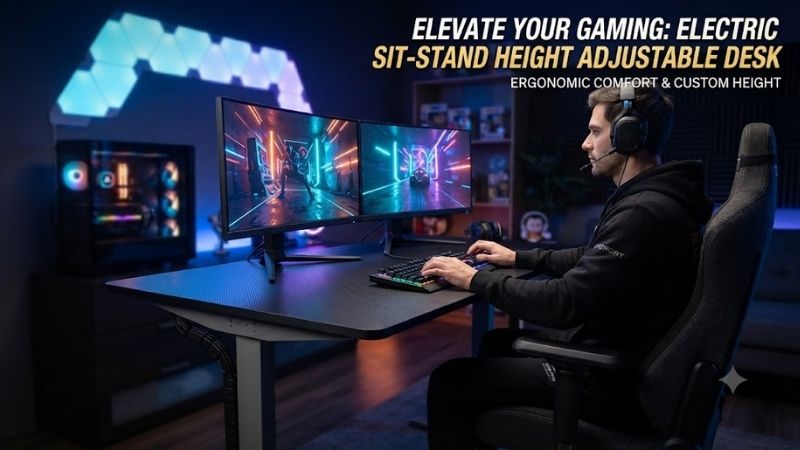
The Secretlab MAGNUS Pro is specifically designed around gaming and PC cable management. The standard version measures about 59.1 inches wide and 27.6 inches deep, while the XL version expands to approximately 70 inches wide and 31.5 inches deep, making both options suitable for substantial desktop hardware.
The desk adjusts from 25.6 to 49.2 inches and uses dual electric motors. Secretlab specifies a maximum distributed load of 265 pounds and three programmable height presets. That range provides enough flexibility for most seated and standing positions while allowing frequently used heights to be recalled without manual adjustment.
Cable management is where the MAGNUS Pro differs from typical standing desks. A rear cable tray runs across the back of the desk, while the power system is integrated through the desk leg. This approach reduces the number of cables stretching between the moving desktop and wall outlet when the desk changes height.
The metal desktop also supports Secretlab’s magnetic accessory ecosystem. Cable anchors, lighting accessories, monitor arms, and other compatible products can attach without depending entirely on adhesive or traditional mounting methods. This creates a particularly clean appearance for gaming stations with many peripherals and visible cables.
The trade-off is ecosystem dependence. Buyers who only need an adjustable work surface may not benefit enough from the integrated cable system and magnetic accessories to justify the desk. The steel-heavy construction also makes the MAGNUS Pro substantially heavier than many conventional standing desks.
Key Features:
- Dual electric motors
- 25.6–49.2-inch height range
- 265-pound distributed load rating
- Three height presets
- Integrated rear cable tray
- In-leg power routing
- Magnetic accessory support
- Standard and XL sizes
Pros:
- Excellent cable management
- Strong gaming-focused design
- Large desktop options
- Clean multi-monitor setup
- Useful integrated power routing
Cons:
- Heavy construction
- Less appealing if accessory ecosystem is unnecessary
- Higher complexity than a basic standing desk
Use Case: Gaming PCs, dual-monitor or ultrawide displays, RGB setups, streaming equipment, and desks where cable appearance matters as much as height adjustment.
Who It’s For: Gamers and PC enthusiasts who want a standing desk designed specifically around cable-heavy desktop equipment.
UPLIFT V2 Standing Desk
Best For: Highly customized workstations
The UPLIFT V2 is known for extensive configuration flexibility. Buyers can typically select different desktop sizes, materials, frame styles, control keypads, storage options, monitor accessories, power products, and cable-management equipment. That modular approach makes the desk suitable for people who want to design a workstation around specific dimensions.
Rather than forcing buyers into one standard desktop material, the V2 ecosystem includes numerous surface options ranging from common laminates to higher-end materials. This makes it easier to build a desk that matches room design, available floor space, monitor configuration, and preferred work surface.
The frame is designed for electric height adjustment and programmable control options. Depending on the selected configuration, users can save preferred sitting and standing positions rather than adjusting manually each time. This is particularly useful when several people share the same desk or when the user changes position frequently.
The large accessory ecosystem is also valuable. Monitor arms, keyboard trays, CPU holders, cable trays, drawers, power accessories, and other add-ons can turn the V2 into a highly specialized workstation. That flexibility is useful for office, gaming, creative, engineering, and multi-display environments.
The main downside is decision complexity. A basic buyer who wants one simple desk may find the large number of configuration choices unnecessary. Cost can also rise quickly when premium desktop materials and several accessories are added, so it is important to distinguish essential features from optional upgrades.
Key Features:
- Electric height adjustment
- Extensive desktop choices
- Programmable controls available
- Large accessory ecosystem
- Multiple workspace sizes
- Compatible with advanced workstation layouts
Pros:
- Highly customizable
- Excellent accessory selection
- Suitable for many workspace types
- Good long-term upgrade flexibility
Cons:
- Configuration process can feel complicated
- Premium options increase total cost quickly
Use Case: Customized home offices, creative workstations, engineering desks, mixed office-and-gaming setups, and users with unusual desktop-size requirements.
Who It’s For: Buyers who want to configure nearly every part of their sit-stand desk instead of choosing a fixed prebuilt package.
Vari Electric Standing Desk
Best For: Simple assembly and straightforward office use
The Vari Electric Standing Desk is designed around ease of setup and a conventional office-oriented appearance. The 60 x 30-inch version adjusts from approximately 25 to 50.5 inches and carries a listed weight capacity of 200 pounds, providing enough range for many seated and standing users.
A 30-inch-deep desktop provides useful viewing distance for large monitors while still leaving room for a keyboard, mouse, notebook, speakers, and office equipment. Compared with shallower compact desks, the additional depth can make monitor-arm placement easier and reduce the feeling of sitting too close to a large display.
Vari emphasizes simplified assembly and includes the tools required for installation. This is useful for buyers who want a complete desk rather than combining a separately purchased frame and tabletop. A complete package can also reduce uncertainty around desktop dimensions, mounting holes, and frame compatibility.
The desk supports programmable height adjustment, letting users save preferred sitting and standing positions. This is especially useful for people trying to build a regular sit-stand routine because switching positions becomes a single-button action instead of repeatedly searching for the correct height.
Compared with heavier enthusiast frames, the 200-pound capacity is more moderate. It is still suitable for many dual-monitor workstations and normal gaming setups, but users planning an unusually heavy desktop with several large displays, speakers, and a desktop PC may prefer a higher-capacity frame.
Key Features:
- Electric height adjustment
- 25–50.5-inch height range
- 200-pound weight capacity
- 60 x 30-inch configuration available
- Programmable controls
- Tools included for assembly
- Office-focused design
Pros:
- Straightforward setup
- Useful 30-inch depth
- Broad height range
- Clean professional appearance
- Good everyday stability
Cons:
- Lower load capacity than heavier premium frames
- Fewer enthusiast-focused features
Use Case: Home offices, remote workstations, dual-monitor setups, general PC use, and users who want a complete desk with minimal configuration decisions.
Who It’s For: Buyers who value simple installation and everyday usability more than extreme customization or gaming-specific features.
Branch Duo Standing Desk
Best For: Compact rooms and smaller workspaces
The Branch Duo is a compact electric standing desk available in 36 x 24, 48 x 24, and 58 x 27-inch configurations. Branch lists a height range from 28 to 47.3 inches and a maximum lifting capacity of 275 pounds, giving the desk respectable capacity despite its smaller footprint.
The desk uses an OLED control paddle with two programmable height presets. It also includes collision detection and standing reminders, helping users create a repeatable sit-stand routine without a large control panel. Branch lists operating noise below 50 dB and a movement speed of approximately 1.3 inches per second.
Its biggest advantage is compact sizing. A 36-inch or 48-inch desk can fit bedrooms, apartment offices, and hybrid spaces where a full 60-inch workstation would dominate the room. The 58-inch version provides more practical room for dual monitors while remaining narrower than many full-size alternatives.
The limitation is the 28-inch minimum height. Shorter users may find that relatively high compared with desks that descend closer to 25 inches or lower. Raising the chair can compensate, but a footrest may then be required to maintain comfortable lower-body support.
Key Features:
- 28–47.3-inch height range
- 275-pound lifting capacity
- Two programmable presets
- OLED control paddle
- Collision detection
- Compact desktop sizes
- Standing reminders
Pros:
- Excellent for small rooms
- Strong capacity for its size
- Simple controls
- Multiple compact widths
- Minimalist appearance
Cons:
- Minimum height may be high for shorter users
- Only two saved presets
Use Case: Bedrooms, apartments, smaller home offices, laptop workstations, and compact single-monitor or dual-monitor PC setups.
Who It’s For: Users who need electric height adjustment but cannot dedicate space to a large 60- or 72-inch standing desk.
Which Electric Standing Desk Fits Different Users?
The FlexiSpot E7 Pro is the strongest general-purpose choice for users who want high lifting capacity and broad desktop flexibility. Its frame works particularly well for heavier setups involving multiple displays, desktop speakers, a large PC, and monitor arms without forcing buyers into one specific tabletop size.
The Secretlab MAGNUS Pro makes more sense for gaming setups where cable management is a major concern. Its integrated tray, in-leg power design, metal desktop, and magnetic accessory ecosystem create a cleaner appearance than a conventional standing desk with several aftermarket cable trays and adhesive accessories.
UPLIFT V2 is the better fit for users who want to customize almost everything. Vari is easier for buyers who simply want a complete office desk with straightforward assembly. Branch Duo is the most practical choice when room dimensions matter more than maximum desktop space.
How to Choose an Electric Sit Stand Height Adjustable Desk
Check the Minimum Height
Maximum standing height receives plenty of attention, but minimum height is equally important. A desk that does not descend far enough can force shorter users to raise their chair until their feet no longer reach the floor comfortably. Compare the minimum height with your seated elbow position before buying.
Check the Maximum Height
Taller users need enough upper range to type while standing without bending forward. The desk surface should remain near standing elbow height while the shoulders stay relaxed. A monitor can be raised separately, so do not set the entire desk too high simply to improve screen position.
Consider Weight Capacity
Add the weight of monitors, arms, speakers, desktop computers, audio equipment, chargers, and other accessories. A higher capacity provides useful headroom, but do not assume load rating alone determines stability. Frame width, column design, desktop construction, and floor condition also influence movement.
Choose Enough Desktop Depth
A 30-inch-deep desk is especially useful with large monitors because it provides more viewing distance. Shallower 24-inch desks save space but can feel crowded when using a large display, speakers, keyboard, and mouse. Monitor arms can partially offset limited depth by moving displays farther backward.
Look for Memory Presets
Memory buttons make sit-stand use much easier because the desk can return to preferred positions automatically. Two presets are enough for one user’s sitting and standing heights, while three or four presets are useful when several people share the desk or when different tasks require different positions.
Plan Cable Management
Electric desks move, so cables must have enough slack to travel through the full height range without pulling connectors. A rear cable tray, under-desk power strip, and carefully routed monitor cables reduce strain. Always test cable movement before operating the desk at maximum height.
FAQ
Are Electric Standing Desks Worth It?
Yes, if you actually use the height adjustment. Their main advantage is allowing easy changes between sitting and standing rather than forcing the body into one position all day. A fixed desk may still be better if you never intend to stand while working.
Is a Dual-Motor Standing Desk Better?
Dual-motor frames can provide higher lifting capacity and more balanced movement in larger desks. However, motor count alone does not determine quality. Frame geometry, column construction, electronics, load distribution, and desktop weight also affect performance and stability.
What Height Should a Standing Desk Be?
The correct height places the keyboard around standing elbow level while keeping the shoulders relaxed and wrists relatively neutral. Because body proportions vary, adjustable desks are preferable to relying on a universal height recommendation.
Can a Standing Desk Hold a Gaming PC?
Many electric standing desks can support a gaming PC along with monitors and accessories if the total load remains within the rated capacity. Consider placing the PC on the desktop or using a compatible under-desk holder so cables move safely when the desk changes height.
Is 24 Inches Deep Enough for a Computer Desk?
A 24-inch depth can work for laptops and smaller monitors, especially when space is limited. For large displays, monitor arms, speakers, or gaming setups, a 27- to 30-inch depth usually provides more comfortable viewing distance and usable workspace.
Conclusion
The best electric sit stand height adjustable desk depends on space, equipment weight, height range, and cable needs. FlexiSpot E7 Pro offers strong overall versatility, MAGNUS Pro excels for gaming setups, UPLIFT V2 emphasizes customization, Vari keeps setup simple, and Branch Duo is ideal when compact dimensions matter most.
Ready to decide? Our #1 pick for 2026 is the Desk.
Live price & availability on Amazon.