🛒 Best Price Today on Amazon
Prime members get fast, free shipping on everything above, plus member-only deals. New members get a 30-day free trial — cancel anytime.
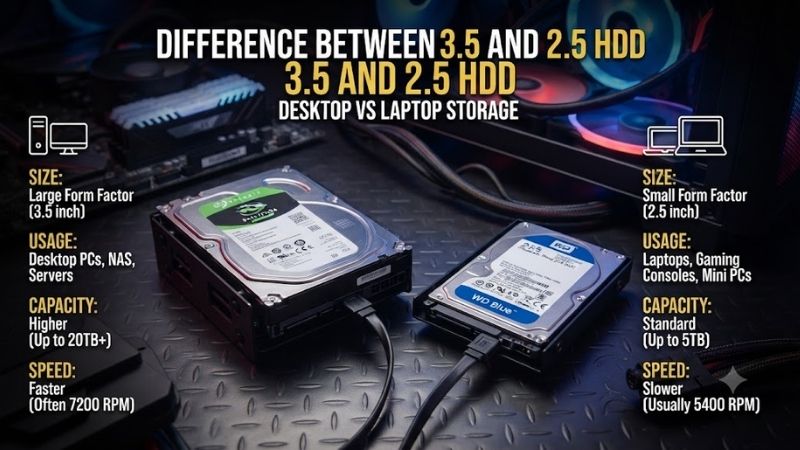
The difference between 3.5 and 2.5 HDD drives goes beyond physical size. A 3.5-inch hard drive usually offers higher capacity and better value for desktops or servers, while a 2.5-inch HDD is smaller, lighter, and better suited to compact systems. The right choice depends on storage needs, case space, power use, and portability.
3.5-Inch HDD Overview
A 3.5-inch HDD is the standard mechanical hard-drive format used in desktop PCs, NAS systems, and many home servers. Its larger enclosure provides room for more platters and higher-capacity configurations, which is why this form factor remains common when users need several terabytes of inexpensive storage for games, media, backups, or archives.
Current desktop models show how much capacity the format can provide. Seagate lists BarraCuda 3.5-inch drives with capacities reaching 24TB, while typical heights are around 20 to 26.1 mm depending on the model. That makes the format physically larger than a laptop drive but more practical for bulk storage.
Best For
- Desktop gaming PCs
- Home servers
- NAS storage
- Large media libraries
- Backups and archives
- High-capacity secondary storage
Key Features
- Larger physical chassis
- High-capacity configurations
- Standard SATA interface on consumer models
- Typically installed in 3.5-inch drive bays
- Better cost per terabyte in many capacities
- Requires more physical mounting space
What Makes It Different
The main advantage of a 3.5-inch HDD is storage density at a practical cost. Desktop and server cases have enough room for the larger chassis, so manufacturers can use the extra internal volume to offer capacities that are uncommon in 2.5-inch consumer HDDs. That matters when a gaming library or backup archive grows into multiple terabytes.
Pros
- Higher maximum capacities
- Strong value for bulk storage
- Common in desktops and NAS systems
- Good choice for backups and media
- Broad availability
Cons
- Larger and heavier
- Requires a 3.5-inch bay or adapter
- Typically uses more power
- Less suitable for portable systems
Use Case and Who It’s For
A 3.5-inch HDD is best for users building a desktop, home server, or NAS where capacity matters more than portability. It is especially useful as secondary storage beside an SSD, allowing Windows and active games to remain on fast solid-state storage while recordings, installers, older games, media, and backups stay on the larger hard drive.
2.5-Inch HDD Overview
A 2.5-inch HDD is a smaller mechanical drive commonly associated with laptops, compact PCs, external enclosures, and space-limited systems. Its reduced footprint makes installation easier where a 3.5-inch bay would be impractical, but the smaller internal volume generally limits maximum capacity compared with mainstream 3.5-inch drives.
Seagate’s current BarraCuda 2.5-inch range illustrates the size difference clearly. Models include 1TB and 2TB drives with a 7.2 mm height, while a 3TB version reaches 15 mm. These drives retain the 2.5-inch form factor but can vary significantly in thickness, which matters when fitting them into laptops or slim enclosures.
Best For
- Older laptops with SATA bays
- Compact desktops
- External portable storage
- Small-form-factor PCs
- Low-power secondary storage
- Systems with 2.5-inch mounting points
Key Features
- Smaller physical footprint
- Lower weight
- SATA interface on common consumer drives
- Lower-capacity ceiling than most 3.5-inch HDD ranges
- Available in multiple thicknesses
- Easier to fit in compact systems
What Makes It Different
The defining advantage of a 2.5-inch HDD is physical efficiency. A standard 2.5-inch drive is roughly 100 mm long and 69.85 mm wide, while thickness varies by model. That smaller footprint makes it practical for portable systems and enclosures where a full desktop hard drive would consume too much internal volume.
Pros
- Compact and lightweight
- Easier to install in small cases
- Suitable for many laptop bays
- Convenient for portable enclosures
- Usually lower power requirements
Cons
- Lower maximum capacities
- Often weaker value per terabyte
- Performance varies considerably by model
- Thickness can affect laptop compatibility
Use Case and Who It’s For
A 2.5-inch HDD is best when physical space or mobility is more important than maximum capacity. It can extend the useful life of an older laptop, add inexpensive secondary storage to a compact PC, or serve inside a portable external enclosure. For a new gaming desktop, however, an SSD is often more attractive at smaller capacities.
3.5 vs 2.5 HDD Size
The physical difference is substantial. A typical 3.5-inch drive is about 101.6 mm wide and can measure roughly 147 mm long, while many models are around 26.1 mm high. A 2.5-inch HDD is about 69.85 mm wide and 100 mm long, with common consumer models using thinner 7 mm or taller 15 mm profiles.
Those dimensions directly affect case compatibility. Desktop towers commonly provide 3.5-inch trays, while laptops and compact systems use 2.5-inch mounts. A 2.5-inch drive can often be installed in a 3.5-inch bay with an adapter, but a 3.5-inch hard drive cannot realistically fit inside hardware designed only for the smaller format.
Capacity
Capacity is one of the clearest reasons to choose a 3.5-inch HDD. Seagate currently lists desktop BarraCuda models reaching 24TB, whereas its 2.5-inch BarraCuda range includes consumer capacities up to 3TB. Product families change over time, but the larger form factor currently provides a far higher capacity ceiling.
For gamers, that difference matters when storing large libraries, recorded gameplay, disk images, media, and backups. A 2TB or 3TB laptop drive may be adequate for secondary storage, but users who need 8TB, 12TB, or more will find far more choices in the 3.5-inch market without combining several smaller drives.
Performance
Form factor alone does not determine HDD speed. Rotational speed, platter density, cache, firmware, recording technology, workload, and file pattern all influence performance. Some desktop drives outperform common laptop models, but it is incorrect to assume that every 3.5-inch HDD will be faster than every 2.5-inch drive.
For modern gaming, both HDD formats are much slower than NVMe or SATA SSDs in access latency. A hard drive can still work for archives or older games, but titles designed around rapid asset streaming benefit greatly from solid-state storage. Choose 3.5 versus 2.5 primarily for mechanical-storage needs rather than expecting SSD-like game loading.
Power Consumption
A 3.5-inch drive generally uses more power because it contains larger platters and a motor designed to spin them. Western Digital’s current 3.5-inch WD Blue specifications show read and write consumption varying by model, with some configurations drawing several watts during activity and using a 12V supply.
A 2.5-inch HDD is designed around portable hardware and typically operates without the same 12V requirement used by 3.5-inch desktop drives. This makes the smaller format easier to power through many USB external enclosures and laptop SATA connections. Lower power use can also mean less heat in tightly packed systems.
Cost Per Terabyte
For high-capacity storage, 3.5-inch HDDs generally make more economic sense because the format dominates desktop, surveillance, enterprise, and NAS storage. Buyers can choose from many capacities and workload classes. The larger market also makes it easier to scale a server or backup system without filling every available bay.
At lower capacities, a 2.5-inch mechanical drive faces stronger competition from SSDs. Once the price gap becomes small, an SSD provides far better responsiveness, silent operation, and shock resistance. A 2.5-inch HDD therefore makes the most sense when compatibility with existing hardware or low-cost capacity is the main requirement.
Gaming PC Use
For a modern gaming PC, neither HDD format should normally be the first choice for the operating system or performance-sensitive games. An NVMe SSD provides dramatically better access times and reduces loading delays. Hard drives are better used for recordings, media, backups, installers, and titles where storage performance is not important.
If a desktop gaming system needs substantial secondary storage, the 3.5-inch format is usually the better fit because cases frequently provide appropriate bays and large capacities are readily available. A 2.5-inch HDD makes more sense when the case lacks 3.5-inch mounts or when reusing a drive that is already available.
Laptop Use
A laptop that accepts a mechanical SATA drive will normally require a 2.5-inch unit, and thickness must match the available bay. Seagate’s 2.5-inch range demonstrates why this check matters: some models are 7.2 mm high, while higher-capacity versions can reach 15 mm and therefore may not fit thin notebook chassis.
Before upgrading an older laptop, verify that it actually contains a SATA bay. Many modern notebooks use only M.2 SSDs and provide no physical location for a 2.5-inch drive. Even when a bay exists, replacing the old HDD with a 2.5-inch SATA SSD often produces a much more noticeable performance improvement.
3.5 vs 2.5 HDD Comparison Table
| Feature | 3.5-Inch HDD | 2.5-Inch HDD |
|---|---|---|
| Typical Use | Desktop, NAS, server | Laptop, compact PC, portable drive |
| Physical Size | Larger | Smaller |
| Capacity Potential | Much higher | Lower |
| Power Requirement | Higher | Lower |
| Portability | Poor | Better |
| Cost per TB | Usually better at high capacities | Often higher |
| Installation | 3.5-inch bay | 2.5-inch bay |
| Gaming Role | Bulk secondary storage | Compact secondary storage |
Which HDD Should You Buy?
Choose a 3.5-inch HDD when the system has enough physical space and your priority is maximizing capacity for the money. Desktop gamers, NAS owners, and home-server builders gain the most from this format. It is particularly attractive when several terabytes are needed but SSD pricing would make the same capacity unnecessarily expensive.
Choose a 2.5-inch HDD when your hardware specifically requires the smaller format or when portability matters. Older laptops, compact PCs, and external enclosures remain sensible use cases. If the system can accept a 2.5-inch SATA SSD and only moderate capacity is needed, however, the SSD will usually provide a much faster everyday experience.
FAQ
Is a 3.5 HDD better than a 2.5 HDD?
A 3.5-inch HDD is better when you need large capacity and strong cost per terabyte in a desktop, NAS, or server. A 2.5-inch HDD is better when compact dimensions, lower power requirements, or laptop compatibility matter. Neither form factor is universally better because they solve different storage problems.
Can I use a 2.5 HDD in a desktop PC?
Yes, provided the desktop has a compatible SATA data connection, SATA power connector, and a suitable mounting location. Many modern cases include dedicated 2.5-inch trays, while older cases may require a 2.5-to-3.5-inch adapter. The drive still behaves like ordinary SATA storage once connected correctly.
Can I use a 3.5 HDD in a laptop?
Normally no. A 3.5-inch HDD is physically much larger than the drive bay found in laptops and requires power that standard laptop SATA bays are not designed to supply. An external powered enclosure can connect a 3.5-inch drive to a laptop through USB, but the drive will no longer be internally installed.
Which HDD is better for gaming storage?
For a desktop needing several terabytes of inexpensive secondary storage, a 3.5-inch HDD is generally more practical because larger capacities are available. For games that benefit from fast asset loading, however, an SSD is preferable to either HDD format. Mechanical drives are best reserved for less performance-sensitive data.
Are 2.5-inch HDDs slower than 3.5-inch HDDs?
Not automatically. Performance depends on the individual drive’s rotational speed, recording method, platter density, cache, firmware, and workload. Many laptop-oriented 2.5-inch drives prioritize power efficiency, but form factor alone is not enough to predict speed. Compare exact model specifications rather than size alone.
Conclusion
The difference between 3.5 and 2.5 HDD drives comes down mainly to capacity, physical size, power use, and intended system type. Choose 3.5-inch storage for desktops, NAS systems, and large archives, while 2.5-inch HDDs make more sense in compact or older laptop hardware. For active modern games, an SSD remains the stronger choice.