🛒 Best Price Today on Amazon
Prime members get fast, free shipping on everything above, plus member-only deals. New members get a 30-day free trial — cancel anytime.
- SSD vs HDD at a Glance
- What Is a Solid State Drive?
- What Is a Hard Disk Drive?
- SSD vs HDD Performance
- SSD vs HDD for Gaming
- Does an SSD Increase FPS?
- SSD vs HDD Loading Times
- SSD vs HDD Capacity
- SSD vs HDD Durability
- SSD vs HDD Noise
- SSD vs HDD Power Consumption
- SSD vs HDD for Laptops
- SSD vs HDD for Backups
- SSD vs HDD for Video and Media Storage
- SSD vs HDD Reliability
- SSD vs HDD Lifespan
- SSD vs HDD Cost
- SATA SSD vs NVMe SSD
- Which Drive Should Gamers Buy?
- SSD vs HDD: Which Is Better?
- FAQ
- Conclusion
A solid state drive compared to hard drive storage delivers much faster access, quieter operation, and better responsiveness, while HDDs still offer economical capacity for large libraries and backups. For gaming PCs, SSDs are usually best for Windows and active games, while HDDs remain useful for bulk storage.
SSD vs HDD at a Glance
| Feature | SSD | HDD |
|---|---|---|
| Storage Technology | NAND flash memory | Magnetic platters |
| Moving Parts | No | Yes |
| Boot and App Speed | Much faster | Slower |
| Game Loading | Faster | Slower |
| Noise | Silent | Audible |
| Vibration | Minimal | Possible |
| Power Use | Generally lower | Generally higher |
| Shock Resistance | Better | More vulnerable |
| Cost per GB | Higher | Lower |
| Large-Capacity Value | Moderate | Excellent |
| Best Use | OS, apps, active games | Archives, media, backups |
What Is a Solid State Drive?
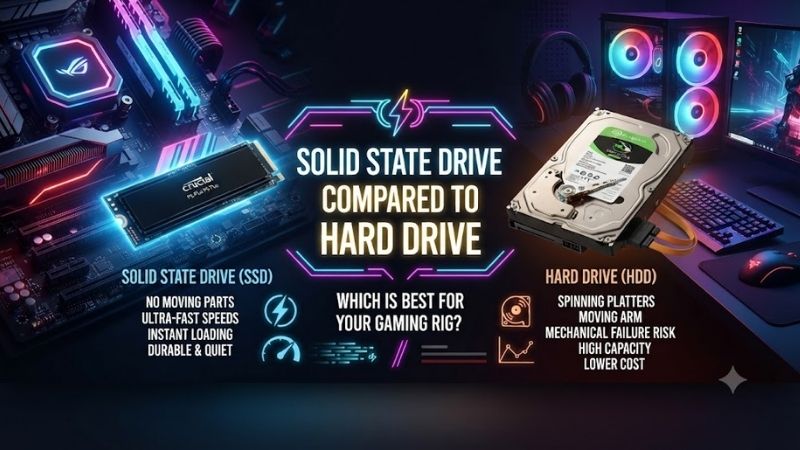
A solid state drive stores data in NAND flash memory and contains no moving platters or mechanical read heads. Because data can be accessed electronically, an SSD responds rapidly when Windows launches programs, games request files, or applications load projects. This gives modern PCs their familiar fast, responsive feel.
SSDs are available through several interfaces and form factors, including 2.5-inch SATA drives and M.2 models using SATA or NVMe communication. The interface affects potential performance, but even a basic SATA SSD typically feels dramatically faster than a hard drive during booting, application launches, updates, and normal desktop use.
What Is a Hard Disk Drive?
A hard disk drive stores information magnetically on spinning platters. A mechanical actuator moves read and write heads across those platters to locate data. This physical movement introduces seek time, making HDDs slower at opening many small files or responding to scattered data requests than solid state storage.
Hard drives remain relevant because they provide large capacities at a comparatively low cost per gigabyte. That makes them useful for video collections, backups, recorded gameplay, old projects, disk images, and games that are not currently being played. Capacity remains the strongest reason to choose HDD storage today.
SSD vs HDD Performance
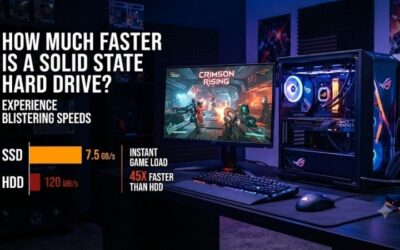
Performance is the clearest difference between an SSD and HDD. A solid state drive does not wait for a mechanical head to seek across a platter, so it can respond to random file requests much more quickly. Windows startup, game launchers, application loading, updates, and multitasking all feel noticeably more immediate.
Hard drives can still deliver reasonable sequential transfer speeds when reading or writing large continuous files. The problem appears when workloads involve thousands of small files scattered across the disk. Gaming installations, operating systems, software libraries, and modern applications frequently create exactly that kind of workload.
SSD vs HDD for Gaming
For gaming, an SSD is generally the better primary drive. Modern games continuously access textures, shaders, audio, maps, and other assets, so faster storage reduces loading screens and can improve asset streaming. An SSD does not automatically increase average frame rate, but it can make the overall experience feel much smoother.
An HDD can still store games, especially older titles or games that do not stream large amounts of data while playing. The trade-off is longer installation, patching, loading, and file-verification time. Gamers with limited SSD capacity often keep current titles on SSD while moving inactive games to a larger hard drive.
Does an SSD Increase FPS?
An SSD usually does not produce a meaningful increase in average FPS because frame rate depends primarily on the GPU, CPU, memory, and game engine. Storage has a different job. It supplies data to the system, so the biggest improvements appear during loading screens, level transitions, asset streaming, installation, and patching.
In games that stream world data continuously, slow storage can contribute to delayed textures, hitching, or objects appearing late. An SSD can reduce those storage-related interruptions, but it cannot compensate for a weak graphics card or processor. Think of SSD performance as responsiveness rather than raw rendering power.
SSD vs HDD Loading Times
Loading time strongly favors SSD technology because games frequently request many different files during startup and level transitions. A hard drive must repeatedly reposition its read head, while an SSD can access scattered data electronically. The difference becomes especially obvious in large open-world and heavily modded games.
The benefit also extends beyond games. Windows updates, antivirus scans, file indexing, software installation, browser caches, and development tools all perform many random operations. A system running entirely from a hard drive can therefore feel slow even when its CPU and memory remain perfectly adequate for the workload.
SSD vs HDD Capacity
Hard drives remain attractive when total storage capacity matters more than speed. Large media libraries, raw video recordings, backup sets, disk images, and archived projects can consume terabytes quickly. Buying the same amount of capacity exclusively as SSD storage may cost significantly more, depending on the drive class and market pricing.
SSDs have become much more affordable than they were when flash storage first entered mainstream PCs, so large solid state drives are now realistic for many gaming systems. HDDs still provide stronger value at very high capacities, which is why hybrid storage configurations remain practical for desktops and home servers.
SSD vs HDD Durability
An SSD contains no spinning platters or moving read heads, making it more resistant to physical shock while operating. This advantage is especially useful in laptops, portable computers, external drives, and systems that may be moved regularly. Mechanical hard drives are more sensitive to impact because their internal components move precisely.
SSDs are not indestructible. NAND flash cells have finite write endurance, controllers can fail, and electronics can be damaged like any other hardware. HDDs also wear mechanically over time. Neither technology should be treated as permanent storage, which is why important data still requires independent backup copies.
SSD vs HDD Noise
SSDs operate silently because there are no motors, bearings, or moving heads. In a quiet gaming or workstation PC, switching from hard drives to solid state storage can remove clicking, spinning, and low-frequency vibration. This can be noticeable when the rest of the system uses quiet fans and efficient cooling components.
A hard drive produces mechanical noise whenever its platters spin and its read heads move. Some models are quieter than others, and proper mounting can reduce vibration transferred into the case. Even so, an HDD cannot match the silence of flash storage, making SSDs preferable for acoustically optimized PC builds.
SSD vs HDD Power Consumption
SSDs generally use less power than mechanical hard drives because they do not need to keep platters rotating. Lower consumption can be useful in laptops, compact PCs, and always-on systems. It also produces less mechanical heat, although high-performance NVMe SSDs can still require adequate airflow under sustained workloads.
Hard-drive power consumption is rarely a major concern in a normal desktop with one or two drives, but it becomes more relevant in systems containing many disks. Home servers and NAS devices with several HDDs must account for startup current, continuous operation, cooling, and total energy use across the complete storage array.
SSD vs HDD for Laptops
For laptops, an SSD is usually the clear choice for the operating system and applications. Faster startup, reduced power consumption, silent operation, and better shock resistance all suit mobile hardware. Replacing an old laptop hard drive with an SSD is often one of the most noticeable upgrades possible on compatible machines.
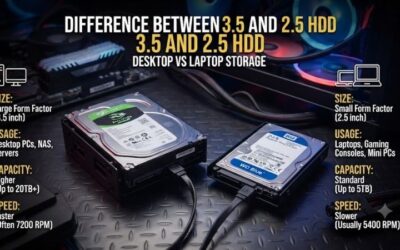
Hard drives make less sense inside modern thin laptops because of their physical size, moving components, and slower response. External HDDs still remain useful for inexpensive backups or large media collections. A user can therefore keep fast solid state storage inside the laptop while using external disks for capacity.
SSD vs HDD for Backups
Backups prioritize capacity, reliability strategy, and cost more than application responsiveness, so hard drives remain highly practical. A large external HDD can hold system images, photos, videos, projects, and game archives economically. Because backup data is not accessed constantly, slower random performance matters much less in this role.
SSDs can also be excellent backup devices, particularly when portability, silent operation, and fast restoration are important. They usually cost more per gigabyte, however. The most important backup rule is not the storage technology but maintaining more than one independent copy of irreplaceable files in separate locations.
SSD vs HDD for Video and Media Storage
Large video files are well suited to hard drives because they consume enormous capacity and are commonly read sequentially. Movies, recorded gameplay, finished video exports, raw footage archives, and music collections can therefore live comfortably on HDD storage when instant random access is not the main requirement.
Creators often combine both technologies. Current editing projects, cache files, applications, and active footage remain on fast SSDs, while completed projects and source archives move to hard drives. This setup reserves expensive high-speed capacity for files that benefit from it and cheaper capacity for long-term storage.
SSD vs HDD Reliability
Neither SSDs nor HDDs can guarantee data safety. Mechanical drives can fail because of motor, bearing, head, controller, or platter problems, while SSD failures can involve NAND wear, firmware, controllers, or electronic components. Failure behavior differs, but both technologies should be expected to fail eventually.
Drive health monitoring can provide useful warning signs, yet it cannot predict every failure. The correct response is redundancy and backups rather than trying to find a storage device that never breaks. Valuable photos, documents, business files, and creative projects should never exist on only one SSD or one HDD.
SSD vs HDD Lifespan
SSD lifespan is often described using write endurance because flash memory can tolerate a finite number of program-and-erase cycles. Consumer drives are designed around realistic desktop workloads, and many users will replace the computer before exhausting normal endurance. Heavy write workloads require more careful model selection.
Hard-drive lifespan depends on mechanical condition, workload, environment, vibration, temperature, and manufacturing variation. A drive may operate for years or fail unexpectedly much earlier. Age alone should not be used as proof that stored data is safe, particularly when an old disk contains the only copy of important files.
SSD vs HDD Cost
HDDs generally remain less expensive per gigabyte, especially at large capacities. This makes them appealing when users need many terabytes for backups, media, surveillance, project archives, or a home server. For these workloads, maximizing capacity can be more valuable than gaining very fast random-access performance.
SSDs cost more for equivalent capacity but provide a much larger improvement in everyday responsiveness. For a gaming or general-purpose PC, spending enough to place Windows, applications, and active games on SSD storage is usually worthwhile before allocating the remaining budget toward bulk hard-drive capacity.
SATA SSD vs NVMe SSD
A SATA SSD already removes the mechanical latency that makes HDDs feel slow. That means a SATA model can transform an older computer even though its maximum sequential speed is lower than modern NVMe drives. For everyday responsiveness, the jump from HDD to any competent SSD is usually more noticeable than SATA to NVMe.
NVMe SSDs use PCIe connectivity and can deliver substantially more throughput, making them attractive for modern gaming PCs, large file transfers, content creation, and demanding professional workloads. Whether the extra speed is noticeable depends on the application, because many common desktop tasks do not continuously saturate storage bandwidth.
Which Drive Should Gamers Buy?
Most gamers should use an SSD as their primary storage device. Put Windows, launchers, frequently played games, and applications on solid state storage. If the game library, recordings, or media collection becomes too large, add a hard drive for archives instead of forcing every file onto expensive high-speed storage.
A PC with only one storage device should usually choose an SSD unless maximum capacity is the overriding priority. A system with several drives can benefit from specialization: NVMe SSD for active software, additional SSD capacity for games, and large HDD storage for backups, recordings, media, and inactive files.
SSD vs HDD: Which Is Better?
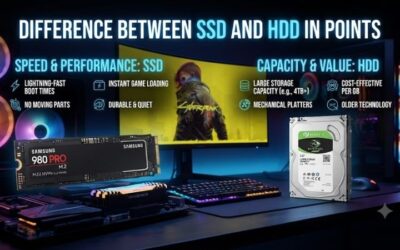
SSD is better when speed, silence, power efficiency, shock resistance, and everyday responsiveness matter. HDD is better when the primary requirement is storing a very large amount of data as cheaply as possible. Neither is universally superior because they solve different problems within a modern storage strategy.
For gaming PCs, SSD should be treated as the default active drive, while HDD is now better viewed as secondary capacity. This division uses each technology where its strengths matter most: solid state storage handles performance-sensitive workloads, and magnetic storage handles inexpensive bulk data.
FAQ
Is an SSD Better Than a Hard Drive for Gaming?
Yes. An SSD generally provides faster game loading, installation, updates, file verification, and asset access. It may also reduce storage-related stutter in games that stream data aggressively. It does not directly replace the role of the GPU or CPU, so users should not expect a major average-FPS increase.
Should I Use SSD or HDD for Windows?
Windows should normally be installed on an SSD. Operating systems constantly access many small files, launch background services, create caches, and perform updates, all workloads where SSD random-access performance provides a large advantage. Using an HDD as the Windows drive makes even capable modern hardware feel slower.
Are HDDs Still Worth Buying?
Yes. HDDs remain useful when inexpensive high-capacity storage is the priority. Backups, movies, game recordings, archives, disk images, and rarely accessed files are good examples. They make less sense as the only drive in a performance-focused PC but remain valuable as secondary storage.
Can I Use an SSD and HDD Together?
Yes, and this is often an efficient desktop configuration. Use the SSD for Windows, applications, and games you currently play, then use the HDD for bulk storage and backups. The operating system sees them as separate drives, allowing users to decide which files deserve faster storage.
Which Lasts Longer, SSD or HDD?
There is no universal answer because lifespan depends on workload, drive design, environment, usage patterns, and manufacturing variation. SSDs have write-endurance limits, while HDDs contain mechanical parts that wear. For important data, reliable backups matter far more than predicting which individual drive will last longer.
How Much SSD Storage Does a Gaming PC Need?
The right capacity depends on the number and size of games you keep installed. Modern AAA titles can consume substantial space, so gamers should estimate the combined size of Windows, applications, and their active library before buying. Extra free space also makes updates and temporary files easier to manage.
Conclusion
A solid state drive compared to hard drive storage wins for speed, gaming responsiveness, silence, and everyday use, while HDDs remain excellent for inexpensive bulk capacity. For most modern PCs, the best strategy is an SSD for Windows and active games, with a hard drive added only when large archives or backups justify it.