🛒 Best Price Today on Amazon
Prime members get fast, free shipping on everything above, plus member-only deals. New members get a 30-day free trial — cancel anytime.
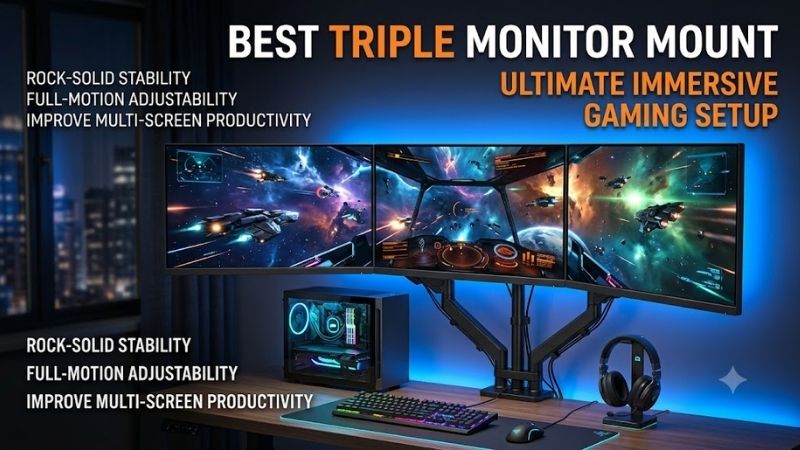
The best triple monitor mount should hold three displays securely while keeping their edges aligned and allowing comfortable viewing angles. Weight capacity, monitor size, VESA support, arm reach, desk strength, and independent adjustment matter more than appearance when building a stable gaming, trading, or productivity setup.
Quick answer: For most people in 2026, the best triple monitor mount for gaming and work setups is the Triple Monitor Mount — our #1 rated choice. See the full ranked comparison, alternatives and buying advice below.
Best Triple Monitor Mounts at a Glance
| Triple Monitor Mount | Best For | Monitor Support | Main Strength |
|---|---|---|---|
| Mount-It! MI-753XL | Overall triple-monitor setups | Up to 32-inch monitors | Strong capacity and wide layout |
| HUANUO TS3 | Flexible gaming setups | Up to 32-inch monitors | Independent arm adjustment |
| Mount-It! Heavy-Duty Triple Mount | Large and ultrawide displays | Large ultrawide configurations | Heavy-duty arms |
| VIVO STAND-V003O | 27-inch monitor setups | Three 17–27-inch displays | Pneumatic outer arms |
| VIVO STAND-V003M | Budget setups | Three smaller displays | Simple and affordable design |
1. Mount-It! MI-753XL
Best For: Most gaming and productivity triple-monitor setups
The Mount-It! MI-753XL is a practical choice for users running three conventional gaming monitors side by side. It supports displays from 17 to 32 inches and is rated for up to 19.8 pounds on each mounting position, giving it enough headroom for many mainstream 24-, 27-, and 32-inch monitors.
Its wide horizontal arm layout makes it useful for racing games, flight simulators, trading dashboards, editing timelines, and productivity work where three screens need to form one continuous viewing area. The outer arms can angle inward, allowing the side monitors to wrap slightly toward the user instead of remaining completely flat.
Each display can tilt, swivel, and rotate independently, while the complete assembly can be adjusted vertically along the center pole. That flexibility helps compensate for slight differences in monitor design and VESA position, although achieving perfectly level bezels still takes more manual adjustment than premium gas-spring systems.
Installation is flexible because both desk-clamp and grommet mounting are supported. A clamp avoids drilling and works well on sturdy conventional desks, while a grommet installation can provide a cleaner appearance and more secure mounting when the desk already includes a suitable hole.
Key Features
- Supports three monitors
- Designed for 17- to 32-inch displays
- Up to 19.8 pounds per monitor
- VESA 75 x 75 mm compatibility
- VESA 100 x 100 mm compatibility
- Adjustable tilt, swivel, and rotation
- 17.5-inch center pole
- Clamp and grommet mounting options
What Makes It Different
The MI-753XL combines support for 32-inch displays with a relatively straightforward mechanical arm design. Gamers who do not constantly reposition their screens may prefer this approach because it provides substantial adjustment without relying on three complex gas-spring arms that must each be tensioned separately.
Pros
- Supports monitors up to 32 inches
- Relatively high per-screen capacity
- Wide side-by-side layout
- Clamp and grommet installation
- Portrait and landscape positioning
- Suitable for gaming and productivity
Cons
- Not as effortless to reposition as gas-spring arms
- Requires careful alignment during setup
- Large monitors need substantial desk width
Use Case: Triple 24-inch, 27-inch, or compatible 32-inch gaming displays, trading desks, productivity workstations, and simulation setups.
Who It’s For: Users who want a stable three-screen configuration and expect the monitors to remain mostly in the same position after initial adjustment.
2. HUANUO TS3 Triple Monitor Mount
Best For: Gamers who frequently reposition their monitors
The HUANUO TS3 is designed for three displays from 13 to 32 inches, with each arm supporting up to 17.6 pounds. This makes it suitable for many mainstream gaming and office monitors while giving users more independent positioning freedom than a basic fixed crossbar-style triple monitor stand.
Independent arms are particularly useful when the three monitors are not identical. Differences in housing thickness, stand attachment points, and VESA location can otherwise make edge alignment frustrating. Adjustable arms let users move each display separately until the viewing height and inward angle feel natural from the seating position.
For gaming, the mount can create a more immersive wraparound layout by angling the side displays toward the player. That configuration works especially well for racing, simulation, strategy, and multitasking setups, although the exact achievable angle depends on monitor width and the physical reach of the mounting arms.
The TS3 also makes more sense than a fixed triple stand for a shared gaming and work desk. Screens can be repositioned for focused gaming, then adjusted again for coding, editing, browsing, or document work instead of forcing the user into one permanent three-monitor geometry throughout the day.
Key Features
- Supports three monitors
- 13- to 32-inch screen compatibility
- 17.6-pound capacity per arm
- Independent monitor positioning
- VESA-compatible mounting
- Adjustable screen angles
- Suitable for landscape configurations
- Designed for desk-mounted setups
What Makes It Different
Its main advantage is flexible positioning rather than extreme weight capacity. Users working with common 24- to 32-inch displays gain independent control over each screen, which is useful when the monitors differ slightly in size or when the layout needs to change between gaming and productivity.
Pros
- Supports monitors up to 32 inches
- Independently adjustable arms
- Suitable for mixed-use workstations
- Good for inward-curved triple layouts
- Frees substantial desktop space
Cons
- Lower capacity than heavy-duty alternatives
- Large screens require careful weight checks
- Three adjustable arms take time to balance
Use Case: Gaming, streaming, productivity, coding, multitasking, and triple-monitor systems where screens are repositioned regularly.
Who It’s For: Users who prioritize independent movement and ergonomic positioning over maximum weight capacity.
3. Mount-It! Heavy-Duty Triple Monitor Mount
Best For: Large monitors and ultrawide configurations
The Mount-It! heavy-duty triple monitor system targets a very different user from ordinary three-screen stands. Each arm is rated to handle substantially heavier displays, with support extending to large ultrawide monitors in compatible arrangements. That makes it relevant for premium simulation and professional workstations.
Its configuration supports two displays side by side with another screen positioned above or below, rather than concentrating only on a conventional three-across layout. This allows users to combine large displays without requiring an extremely wide desk, while still keeping a substantial amount of visual information directly in front.
Each arm supports up to 44 pounds, providing considerably more headroom than standard triple monitor mounts designed around lighter office screens. The gas-spring mechanism allows individual displays to be repositioned while reinforced tilt hardware helps prevent heavier panels from gradually drooping forward.
This mount is unnecessary for three lightweight 24-inch monitors, but it becomes much more relevant when working with large curved screens or heavy premium panels. Buying capacity well beyond actual display weight can also improve confidence in the setup, particularly when the monitors represent a significant hardware investment.
Key Features
- Supports three large displays
- Up to 44 pounds per arm
- Supports large and ultrawide screens
- Gas-spring arm adjustment
- Reinforced tilt mechanism
- 75 x 75 mm VESA support
- 100 x 100 mm VESA support
- Clamp and grommet mounting
- 2+1 stacked configuration support
What Makes It Different
Its defining feature is heavy-display support. Most triple arms are built around conventional monitors weighing less than 20 pounds, whereas this model provides substantially more capacity. That opens the door to mixed ultrawide layouts, large curved displays, and premium panels that ordinary triple mounts cannot safely support.
Pros
- Very high weight capacity
- Supports large monitors
- Suitable for ultrawide displays
- Gas-spring adjustment
- Strong stacked-layout potential
- Heavy-duty construction
Cons
- Excessive for small monitors
- Requires a strong desktop
- Larger mounting structure
- More complex setup than conventional mounts
Use Case: Simulation rigs, trading systems, content creation, high-end productivity workstations, and gaming setups combining several large displays.
Who It’s For: Users with unusually heavy or large monitors who need far more capacity than a mainstream triple monitor arm provides.
4. VIVO STAND-V003O
Best For: Triple 27-inch monitor configurations
The VIVO STAND-V003O is designed around three 17- to 27-inch displays and supports monitor weights from 4.4 to 19.8 pounds per position. Its outer monitors use counterbalanced mechanical arms, while the middle display attaches along the central pole, creating a useful combination of stability and adjustment.
The pneumatic outer arms provide approximately 9.8 inches of height adjustment, allowing the left and right displays to move independently. This can make final bezel alignment easier than on basic rigid-arm stands, especially when three monitors have slightly different chassis designs or VESA mounting positions.
Its arm span reaches approximately 59.5 inches, providing enough width for many conventional triple 24- or 27-inch layouts. Monitors can tilt, swivel, and rotate, so the mount can also support specialized arrangements where one secondary screen is positioned vertically for chat, code, documents, or monitoring tools.
Both clamp and grommet installations are supported, allowing the mount to work with different desk layouts. Because three screens create significant leverage against the mounting point, users should still confirm that the desktop is structurally strong enough before tightening a heavy triple-monitor assembly onto it.
Key Features
- Supports three 17- to 27-inch monitors
- 4.4- to 19.8-pound support range per monitor
- Two counterbalanced outer arms
- Fixed central monitor position
- Approximately 59.5-inch arm span
- 75 x 75 mm VESA support
- 100 x 100 mm VESA support
- Clamp and grommet installation
What Makes It Different
Instead of using three identical arms, the V003O combines two independently adjustable outer arms with a central pole-mounted display. The center remains stable while the side displays can be moved more freely, which works well for users who want a fixed primary screen with adjustable secondary monitors.
Pros
- Strong capacity for 27-inch monitors
- Adjustable outer arms
- Wide arm span
- Good screen-alignment flexibility
- Supports portrait rotation
- Two desk-mounting methods
Cons
- Center monitor has less movement
- Limited to smaller screens than 32-inch models
- Requires careful tension adjustment
Use Case: Triple 24-inch or 27-inch gaming setups, coding stations, office workstations, and users who keep the middle display fixed.
Who It’s For: Users who want adjustable side screens without paying for three fully independent premium gas-spring arms.
5. VIVO STAND-V003M
Best For: Budget triple-monitor setups
The VIVO STAND-V003M is a simpler heavy-steel triple monitor mount aimed primarily at smaller displays. It supports three screens between 13 and 24 inches, while compatible 27-inch monitors may work with more limited positioning. Each screen can weigh up to 17.6 pounds.
Its mechanical joints are less effortless than premium gas-spring arms, but they work well when monitors will remain in a fixed configuration. After positioning the displays correctly, users can tighten the joints and create a stable three-screen arrangement without paying extra for mechanisms that may rarely be adjusted.
Each VESA plate provides a small amount of independent vertical adjustment, which is important for bezel alignment. Without this feature, tiny differences between monitor mounting holes can leave one screen noticeably higher than the others even when all three arms appear to be positioned at the same height.
Integrated cable management also helps keep three power cables and three display cables from spreading across the desktop. Although it cannot hide every cable in a complex gaming system, routing wires along the arms produces a cleaner workstation and leaves more surface area available for peripherals.
Key Features
- Supports three monitors
- Designed primarily for 13- to 24-inch screens
- Up to 17.6 pounds per monitor
- 75 x 75 mm VESA support
- 100 x 100 mm VESA support
- Individual alignment adjustment
- Integrated cable management
- Clamp and grommet installation
What Makes It Different
The V003M focuses on practical triple-screen support without expensive gas-spring mechanisms. Its individual VESA-height adjustment is especially useful because screen alignment is one of the biggest frustrations with low-cost multi-monitor stands, even when all three monitors are supposedly identical.
Pros
- Straightforward steel construction
- Good choice for smaller monitors
- Individual screen alignment
- Portrait and landscape support
- Integrated cable routing
- Two mounting options
Cons
- Best suited to smaller displays
- Mechanical adjustment requires more effort
- Limited positioning with some 27-inch monitors
- Less convenient for frequent repositioning
Use Case: Budget gaming stations, three 24-inch monitors, office productivity, dashboards, and fixed multi-screen workstations.
Who It’s For: Users who mainly want to reclaim desk space and permanently align three smaller monitors without spending heavily on gas-spring arms.
How to Choose the Best Triple Monitor Mount
Check Monitor Weight Before Screen Size
Weight is more important than diagonal size when determining whether an arm can safely hold a display. Two 32-inch monitors can differ significantly in weight because of panel technology, housing design, and curvature. Check the monitor weight without its factory stand and compare it with the mount’s per-arm rating.
Confirm VESA Compatibility
Most monitor arms in this category use 75 x 75 mm or 100 x 100 mm VESA mounting patterns. Check the mounting holes on every monitor before buying. Displays without standard VESA holes may require an adapter, while deeply recessed mounting areas can also interfere with certain mounting plates or hardware.
Measure the Three Monitors Together
Three 27-inch or 32-inch displays require substantially more horizontal space than their diagonal measurements suggest. Calculate the physical width of all three panels, including their bezels, and compare that total with the mount’s arm span. Curving the side displays inward can reduce the required overall width.
Consider Independent Height Adjustment
Perfect alignment is difficult when every monitor is attached to one fixed horizontal bar. Individual vertical adjustment at each VESA plate or independent gas-spring arms can make setup much easier. This is especially important when combining monitors from different brands, since VESA holes may sit at different heights.
Choose Clamp or Grommet Installation
A C-clamp is convenient because it avoids drilling, but the desk needs a strong rear edge with enough clearance underneath. Grommet mounting passes hardware through the desktop and can provide a clean installation. Either method must spread the considerable leverage generated by three monitors safely across the desk.
Inspect the Desk Before Mounting
A powerful monitor arm cannot compensate for a weak desktop. Thin particleboard, hollow-core desks, glass surfaces, and damaged edges may not tolerate the concentrated load created by three extended monitors. Reinforcement plates can distribute pressure, but the desk itself still needs sufficient structural strength.
Think About Arm Reach
Long arms provide more positioning freedom, but they also push the monitors farther forward when folded behind the displays. If the desk sits directly against a wall, check how much rear clearance the arms require. Some triple mounts need considerable space behind the desk to achieve a curved three-screen arrangement.
Plan the Center Monitor Position
The primary gaming monitor should normally sit directly in front of your normal seated position. The side monitors can then angle inward around it. Placing the center display too high or offset from your chair can cause unnecessary neck movement, even if the overall triple-screen layout looks symmetrical from outside.
Triple Monitor Mount vs Three Single Monitor Arms
A triple mount reduces the number of desk attachment points and can create a cleaner installation. It also makes symmetrical three-screen layouts easier to conceptualize. However, all three displays share one base, so a weak desktop or movement in the center pole can affect the complete arrangement rather than only one monitor.
Three individual arms provide maximum positioning freedom because every screen has an independent mounting point. They can also handle mixed monitor sizes more easily. The trade-off is additional desk clamps, higher cost, more cable routing, and potentially more difficult alignment when attempting to create one continuous gaming display.
FAQ
Is a Triple Monitor Mount Good for Gaming?
Yes. A triple monitor mount can clear factory stands from the desktop and create a more immersive viewing arrangement. It is especially useful for racing, flight simulation, strategy games, streaming, and multitasking. However, game support for three-screen rendering varies, so the mount itself does not guarantee wider gameplay.
Can a Triple Monitor Mount Hold Three 32-Inch Screens?
Some mounts can support three 32-inch monitors, but screen size alone is not enough to confirm compatibility. Check each monitor’s weight, physical width, VESA pattern, and the arm span of the mount. Three wide 32-inch displays can exceed the positioning range even when each individual panel meets the weight limit.
Is a Gas-Spring Triple Monitor Arm Better?
Gas springs make frequent height and position changes considerably easier, especially when each screen has an independent arm. A mechanical mount can be equally useful if the screens remain fixed after installation. Gas springs mainly improve convenience and positioning flexibility rather than image quality or gaming performance.
How Much Weight Should a Triple Monitor Mount Support?
Choose a mount whose per-arm capacity comfortably exceeds the weight of each monitor without its original stand. Do not divide a total weight rating evenly unless the manufacturer explicitly specifies that approach. Triple mounts are normally rated per display because each arm and joint carries its own individual load.
Can I Mix Different Monitor Sizes?
Yes, provided every display remains within the mount’s weight, size, and VESA limits. Alignment becomes more difficult because different monitor housings and mounting-hole positions create uneven screen heights. Independent height adjustment is particularly useful when combining different models in one triple-monitor setup.
Will a Triple Monitor Mount Damage My Desk?
A properly installed mount on a strong compatible desktop should be secure, but three monitors create considerable leverage at the mounting point. Weak particleboard, thin desktops, glass, and hollow structures require extra caution. Check desk construction and consider a reinforcement plate when load concentration is a concern.
Conclusion
The best triple monitor mount should match monitor weight, width, VESA pattern, desk strength, and the amount of adjustment you need. MI-753XL suits mainstream 32-inch layouts, HUANUO TS3 favors flexible positioning, while heavy-duty Mount-It! and VIVO options cover larger displays, 27-inch setups, and tighter budgets.
Ready to decide? Our #1 pick for 2026 is the Triple Monitor Mount.
Live price & availability on Amazon.