🛒 Best Price Today on Amazon
Prime members get fast, free shipping on everything above, plus member-only deals. New members get a 30-day free trial — cancel anytime.
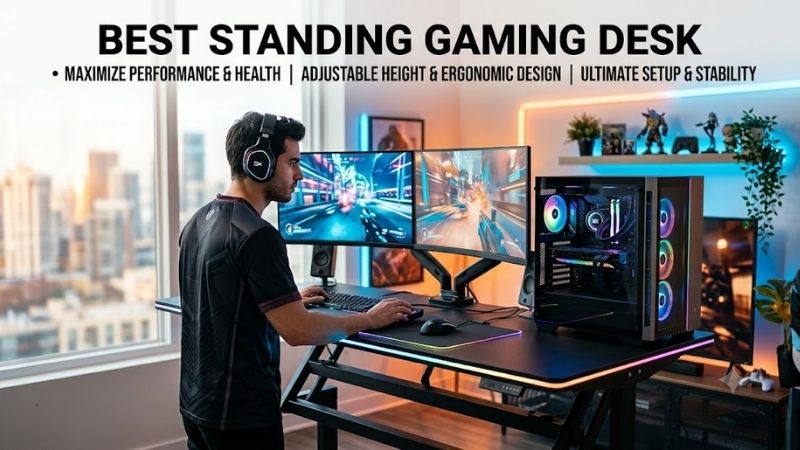
The best standing gaming desk should stay stable under monitors, speakers, peripherals, and a heavy PC while moving smoothly between seated and standing positions. This roundup focuses on desks with practical height adjustment, solid frames, useful cable management, and enough desktop space for real gaming setups.
Quick answer: For most people in 2026, the best standing gaming desk for serious pc gaming setups is the Standing Desk — our #1 rated choice. See the full ranked comparison, alternatives and buying advice below.
Quick Comparison
| Standing Desk | Best For | Height Range | Load Capacity | Desktop Size Options |
|---|---|---|---|---|
| Secretlab MAGNUS Pro | Gaming cable management | 25.6–49.2 in | 265 lb | 59.1 x 27.6 in |
| Secretlab MAGNUS Pro XL | Large battlestations | 25.6–49.2 in | 265 lb | 70 x 31.5 in |
| FlexiSpot E7 Pro | Heavy gaming setups | 25–50.6 in | 440 lb static load | 47.2–80 in tops |
| FlexiSpot E7 Plus | Multi-monitor stability | Configurable | Heavy-duty frame | Multiple top sizes |
| Corsair Platform:4 Elevate | Gaming and streaming | Electric adjustment | Varies by setup | Modular desktop |
| UPLIFT Standing Desk | Custom gaming setups | Configurable | Varies by frame | Multiple sizes |
Secretlab MAGNUS Pro
Best For: Cable-heavy gaming setups
Key Features:
- Dual electric motors
- 25.6 to 49.2-inch height range
- 265-pound distributed load capacity
- Integrated cable management tray
- Three programmable height presets
- Integrated power supply column
The Secretlab MAGNUS Pro is designed specifically around PC hardware rather than adapting an office desk for gaming. Its 59.1 x 27.6-inch desktop provides space for a monitor setup, keyboard, mouse, speakers, and accessories while keeping the footprint manageable for bedrooms, gaming rooms, and compact offices.
Its defining feature is the integrated cable system. A rear cable tray runs across the desk, while a power supply column routes electricity through the desk leg. That design reduces the number of loose cables stretching toward the floor, which is especially useful when the desk regularly moves between sitting and standing heights.
The electric frame adjusts from 25.6 to 49.2 inches and stores three custom height positions. Secretlab specifies a maximum distributed load of 265 pounds, giving the desk enough capacity for typical multi-monitor gaming configurations, mounted displays, peripherals, and accessories without requiring a separate heavy-duty industrial frame.
What Makes It Different: The metal desktop supports Secretlab’s magnetic accessories, including cable anchors and compatible desk mats. Instead of attaching adhesive clips across the surface, users can reposition accessories when monitors or peripherals move. The ecosystem is convenient, although proprietary accessories can increase the final setup cost.
Pros:
- Excellent integrated cable management
- Built specifically for gaming setups
- Three height presets
- Magnetic accessory ecosystem
- Integrated power routing
- Strong metal construction
Cons:
- Heavy desk construction
- Accessories can increase total cost
- 265-pound capacity trails heavier office-style frames
Use Case: A dual-monitor gaming PC with monitor arms, speakers, charging cables, RGB accessories, and several peripherals that need to move together when the desk changes height.
Who It’s For: Gamers who consider cable management one of the most important parts of their desk setup.
For a typical gaming battlestation, the MAGNUS Pro solves one problem better than most standard standing desks: cables moving with the desktop. Monitor, power, charging, USB, and peripheral cables can quickly become messy when desk height changes. Its integrated routing keeps those connections controlled and reduces dangling wires.
Secretlab MAGNUS Pro XL
Best For: Large multi-monitor gaming battlestations
Key Features:
- 70 x 31.5-inch desktop
- 25.6 to 49.2-inch adjustment range
- 265-pound distributed capacity
- Integrated cable tray
- Integrated power column
- Magnetic accessory support
The MAGNUS Pro XL uses the same height-adjustment and cable-management concept as the standard model but expands the work surface to 70 x 31.5 inches. Secretlab describes the XL as approximately 18 percent larger, giving multi-monitor users noticeably more width and depth for gaming hardware and desk accessories.
The extra depth matters when using larger monitors because it provides more separation between the screen and keyboard position. A deeper surface also gives users more room for monitor stands, speakers, microphone equipment, and control devices without pushing the mouse area toward the front edge of the desk during competitive games.
Like the smaller MAGNUS Pro, the XL provides a 25.6 to 49.2-inch height range and a 265-pound distributed load rating. Its larger dimensions do not increase the stated load capacity, so builders planning extremely heavy PCs, multiple displays, and substantial audio equipment should calculate their hardware weight before finalizing the setup.
What Makes It Different: The XL prioritizes usable desktop area while retaining Secretlab’s built-in cable tray and integrated power routing. That combination allows a complex gaming or streaming setup to rise as a single organized workstation instead of turning power and signal cables into separate moving points every time height changes.
Pros:
- Wide 70-inch surface
- Deeper than the standard MAGNUS Pro
- Excellent cable organization
- Suitable for multi-monitor setups
- Integrated power routing
Cons:
- Requires significantly more room
- Heavy to reposition after assembly
- Same load capacity as standard model
Use Case: Triple-screen gaming, ultrawide monitor setups, streaming stations, or combined gaming and productivity workspaces that need substantially more desktop area.
Who It’s For: Gamers with enough room for a large desk who want the MAGNUS cable-management system without the standard model’s narrower work surface.
Choosing between MAGNUS Pro and MAGNUS Pro XL mostly comes down to available room and hardware layout. The XL provides more comfortable spacing for larger screens and peripherals but demands a wider gaming area. Measure the wall, chair clearance, PC location, and nearby furniture before assuming the larger option will automatically work better.
FlexiSpot E7 Pro
Best For: Heavy gaming and productivity setups
Key Features:
- Dual-motor frame
- 25 to 50.6-inch height range
- 440-pound maximum static load
- Adjustable frame width
- Desktop support from 47.2 to 80 inches
- Multiple desktop material options
FlexiSpot’s E7 Pro approaches the category from an ergonomic workstation perspective rather than gaming-specific styling. The frame uses dual motors and adjusts from 25 to 50.6 inches. Its adjustable width supports desktops from 47.2 to 80 inches, allowing builders to create anything from a compact gaming station to a broad multi-monitor workspace.
FlexiSpot specifies a maximum static load of 440 pounds for the E7 Pro. That figure gives builders considerable headroom for monitors, heavy monitor arms, audio equipment, consoles, desktop PCs, and other hardware. Load ratings should not replace careful setup, but additional capacity is useful for gaming stations carrying substantial equipment.
The E7 Pro also supports several desktop dimensions, including 48, 55, 60, 72, and 80-inch configurations depending on the selected surface. This flexibility is valuable if a gamer wants a larger desk now or expects to change the desktop later instead of replacing the entire motorized frame and lifting system.
What Makes It Different: Instead of locking the user into one gaming-specific desktop ecosystem, the E7 Pro emphasizes frame capacity and surface choice. That makes it easier to prioritize dimensions, material, and weight requirements. The trade-off is that cable management requires more planning than Secretlab’s integrated system.
Pros:
- High stated static load capacity
- Wide height adjustment range
- Dual-motor design
- Supports many desktop sizes
- Suitable for heavy monitor setups
Cons:
- Less gaming-focused cable integration
- Accessory selection requires more planning
- Appearance depends heavily on chosen desktop
Use Case: Gaming stations carrying several monitors, large speakers, professional audio equipment, PCs, or mixed gaming and workstation hardware.
Who It’s For: Users who prioritize frame strength, desktop flexibility, and a wide adjustment range over gaming-specific accessories.
The E7 Pro makes particular sense when your desk must serve several purposes. A user can game at night, work during the day, and mount heavier equipment without depending on a proprietary gaming ecosystem. Compared with specialized gaming desks, however, getting the same polished cable-management result may require a tray, power strip, clips, and planning.
FlexiSpot E7 Plus
Best For: Multi-monitor setups requiring extra stability
Key Features:
- Four-leg standing desk design
- Electric height adjustment
- Heavy-duty construction
- Wide desktop compatibility
- Designed for larger workstation loads
The FlexiSpot E7 Plus takes a different approach from conventional two-leg standing desks by using a four-leg frame. The additional support points are intended to improve stability, which can matter when a desk carries large monitors, articulated arms, speakers, or equipment positioned far from the center of the desktop during gaming and productivity sessions.
Monitor movement becomes more noticeable when standing because the desktop is positioned higher and users interact with the keyboard or mouse at an elevated level. A rigid frame helps reduce visible screen movement when typing, adjusting peripherals, or leaning against the desk. This is especially relevant with several monitors mounted on extended arms.
The four-leg layout requires more under-desk structure than a conventional two-leg frame, so gamers should consider legroom, cable routing, PC mounting, and accessory positioning before choosing it. The advantage is a desk architecture aimed at stability rather than minimum material, portability, or a lightweight appearance in smaller gaming rooms.
What Makes It Different: Most standing gaming desks use two lifting columns, while the E7 Plus uses a four-leg structure. The design is particularly relevant to users with large surfaces and equipment spread across the desk because loads are supported across more frame contact points instead of relying on two columns.
Pros:
- Four-leg frame architecture
- Designed for heavy setups
- Strong option for monitor arms
- Useful for broad desktops
- Suitable for mixed work and gaming
Cons:
- Larger frame footprint
- More structure beneath the desktop
- Not primarily designed around gaming accessories
Use Case: A wide workstation with multiple monitors, racing or simulation accessories, speakers, production hardware, or other equipment that benefits from a more substantial support structure.
Who It’s For: Gamers who prioritize desk stability and load distribution over a minimalist frame design.
A four-leg desk is not necessary for every gaming PC, but it becomes more relevant when the setup grows beyond a single monitor and keyboard. If your monitor arms extend far from their mounting points or your desktop carries significant hardware, the extra frame structure can be more useful than RGB lighting or gaming-branded accessories.
Corsair Platform:4 Elevate
Best For: Gaming, streaming, and creator setups
Key Features:
- Electric height adjustment
- Modular accessory system
- Gaming-oriented design
- Cable organization features
- Expandable rail system
- Monitor and peripheral accessory support
Corsair’s Platform line targets users whose desk functions as part of the PC ecosystem rather than just furniture. The Platform:4 Elevate combines electric height adjustment with a modular approach to accessories, making it particularly relevant for streamers and gamers who frequently add microphones, lighting, cameras, controllers, or other equipment.
The main appeal is modularity. Instead of placing every accessory directly on the desktop, compatible mounting systems can organize equipment around the workstation. This helps preserve keyboard and mouse space while allowing streaming or gaming hardware to remain accessible, an advantage when the desk must accommodate several types of equipment.
That modular approach also gives the desk more flexibility as a gaming setup changes. A player might begin with one monitor and headset, then later add a microphone, second display, camera, lighting, or capture hardware. A configurable platform reduces the need to rebuild the entire workstation whenever the gaming or streaming setup expands.
What Makes It Different: Corsair emphasizes an expandable workstation rather than only motorized height adjustment. That makes Platform particularly interesting for users already building around a connected gaming and streaming environment, although buyers focused solely on frame capacity may prefer a more conventional ergonomic standing desk.
Pros:
- Gaming-focused modular design
- Useful for streaming accessories
- Electric height adjustment
- Expandable workstation concept
- Designed around PC peripherals
Cons:
- Modular accessories can increase cost
- More features than simple gaming setups need
- Ecosystem matters more than raw desk simplicity
Use Case: Gaming and streaming setups with microphones, cameras, control devices, monitor mounts, lighting, and accessories that would otherwise consume desktop space.
Who It’s For: PC gamers and creators who expect their workstation to evolve and want mounting flexibility around the main desktop.
The Platform concept works best when your gaming desk has become a hardware hub. Streamers often accumulate equipment that ordinary desks were never designed to organize, and simply buying a larger surface does not solve every mounting problem. A modular framework can make expansion cleaner, although minimal setups will use fewer of its advantages.
UPLIFT Standing Desk
Best For: Highly customized gaming workstations
Key Features:
- Multiple desktop choices
- Several desktop dimensions
- Electric standing frame
- Broad accessory ecosystem
- Monitor and cable-management options
UPLIFT desks are primarily ergonomic workstations, but their customization makes them relevant for gaming. Buyers can configure desktop size, material, accessories, and organization around their equipment rather than accepting a fixed gaming design. That flexibility works well for users who want the desk to look professional while supporting gaming hardware.
Customization is especially valuable when room dimensions dictate the desk rather than the other way around. A gamer working with a specific wall width, monitor arrangement, or PC position can choose a desktop configuration around those constraints. This can be more useful than buying a gaming desk with decorative features but an inconvenient fixed size.
An office-oriented standing desk may not provide integrated gaming features such as magnetic cable anchors or dedicated RGB systems. However, separate monitor arms, cable trays, controller holders, headphone hooks, and power management can create a highly personalized workstation. The trade-off is more decisions during configuration and installation.
What Makes It Different: UPLIFT focuses on extensive configuration instead of presenting one standardized gaming layout. That makes it better suited to users who already know their ideal surface size, accessories, and equipment positions, while first-time builders may find an all-in-one gaming desk easier to plan.
Pros:
- Broad customization
- Multiple desktop options
- Professional appearance
- Large accessory ecosystem
- Works for gaming and office use
Cons:
- Configuration can become complex
- Gaming features are not integrated by default
- Final cost depends heavily on options
Use Case: Combined gaming and professional workstations where desktop dimensions, material, and accessory placement need to match a specific room or equipment layout.
Who It’s For: Gamers who prefer configuring a desk around their hardware rather than choosing a predefined gaming-oriented system.
A configurable standing desk becomes more attractive when gaming is only one part of how the workstation is used. If the same space handles writing, editing, development, content creation, or business work, an understated desktop can fit more environments. Gaming-specific accessories can then be added only where they provide a practical benefit.
How to Choose the Best Standing Gaming Desk
Height Range
Height range should be your first measurement because a standing desk must work ergonomically in both positions. When seated, your elbows should rest near keyboard height without raised shoulders. When standing, the keyboard should remain comfortable while the monitor sits near eye level. A wide motor range helps accommodate different users and chairs.
Stability
Desk stability becomes increasingly important as the desktop rises. Monitor arms amplify small movements because displays extend above and away from their mounting points. Gamers using several screens should prioritize a rigid frame, correctly tightened hardware, appropriate desktop weight distribution, and enough depth to position equipment securely.
Desktop Size
A 60-inch surface works for many dual-monitor gaming setups, while wider desks provide more room for speakers, consoles, laptops, and streaming hardware. Depth is equally important because large monitors need viewing distance. Measure the actual equipment footprint instead of choosing a desk solely because its advertised width sounds generous.
Weight Capacity
Standing desk capacity should include everything that moves with the surface: monitors, arms, speakers, peripherals, desktop accessories, and any PC mounted to the desk. Leaving capacity headroom is sensible when future upgrades are likely. However, a larger advertised rating does not automatically guarantee better ergonomics or cable management.
Cable Management
Cable management matters more on a standing desk than on a fixed desk because every connection must tolerate vertical movement. Power, DisplayPort, HDMI, USB, audio, Ethernet, and charging cables need enough slack without hanging loosely. A desk-mounted power strip can reduce the number of cables that must travel between the desk and wall.
Monitor Arms
Monitor arms free desktop space and make screen positioning easier when moving between seated and standing use. Before installing one, check desktop thickness, rear-edge clearance, mounting restrictions, and the combined monitor weight. Large ultrawide displays place substantial leverage on clamps, so the desk surface and frame must support the mounting method.
PC Placement
Placing the gaming PC on the floor simplifies desktop weight but requires enough cable length for the desk’s highest position. Keeping the PC on the desktop makes cable movement easier but consumes surface area and adds load. An under-desk PC mount can work well when it is designed to move securely with the height-adjustable frame.
Controls and Presets
Memory presets are worth having if you switch between sitting and standing every day. Instead of adjusting by sight, presets return the desktop to repeatable positions for keyboard and monitor comfort. They are also useful when two people share the same desk, although each person may still need to adjust monitor height or chair position separately.
FAQ
Are Standing Desks Good for Gaming?
Standing desks work well for gaming when the frame is stable and the height range suits the player. Standing can be useful during shorter sessions or when changing posture between matches, while seated gaming remains preferable for many longer sessions. The main advantage is flexibility rather than replacing sitting completely.
What Size Standing Desk Is Best for Gaming?
A 55 to 60-inch-wide desk can handle many single or dual-monitor gaming setups, while larger 70-inch surfaces provide extra space for speakers, consoles, streaming equipment, or multiple displays. Depth also matters. Around 30 inches gives large monitors and mouse setups more breathing room than shallow desktops.
Should I Put My Gaming PC on the Standing Desk?
You can place the PC on the desktop if the desk supports its weight and enough surface area remains for your peripherals. Keeping the PC attached to the moving workstation simplifies cable management. Floor placement saves desktop space, but cables must remain long enough and safely routed at maximum standing height.
Do Standing Desks Wobble While Gaming?
All elevated desks can show some movement, but frame construction, height, monitor arms, floor condition, and assembly quality determine how noticeable it becomes. Large displays can magnify minor motion. Tightening the frame correctly and keeping heavy equipment balanced near the support structure can reduce unwanted movement.
Is a Dual-Motor Standing Desk Better for Gaming?
Dual-motor frames are common on higher-capacity standing desks and can provide smooth lifting across wider or heavier setups. Motor count alone should not determine your choice, however. Stability, frame geometry, load rating, control quality, height range, desktop dimensions, and cable management all affect everyday gaming performance.
Conclusion
The best standing gaming desk should fit your body and hardware before it fits a gaming aesthetic. MAGNUS Pro excels at cable organization, E7 Pro suits heavier flexible builds, MAGNUS Pro XL adds workspace, while E7 Plus and modular options better serve complex multi-monitor, streaming, or creator-focused gaming setups.
Ready to decide? Our #1 pick for 2026 is the Standing Desk.
Live price & availability on Amazon.